
springboot后端用websocket实现私信功能(微服务同)
·
websocket实现私信功能
一.先看成果
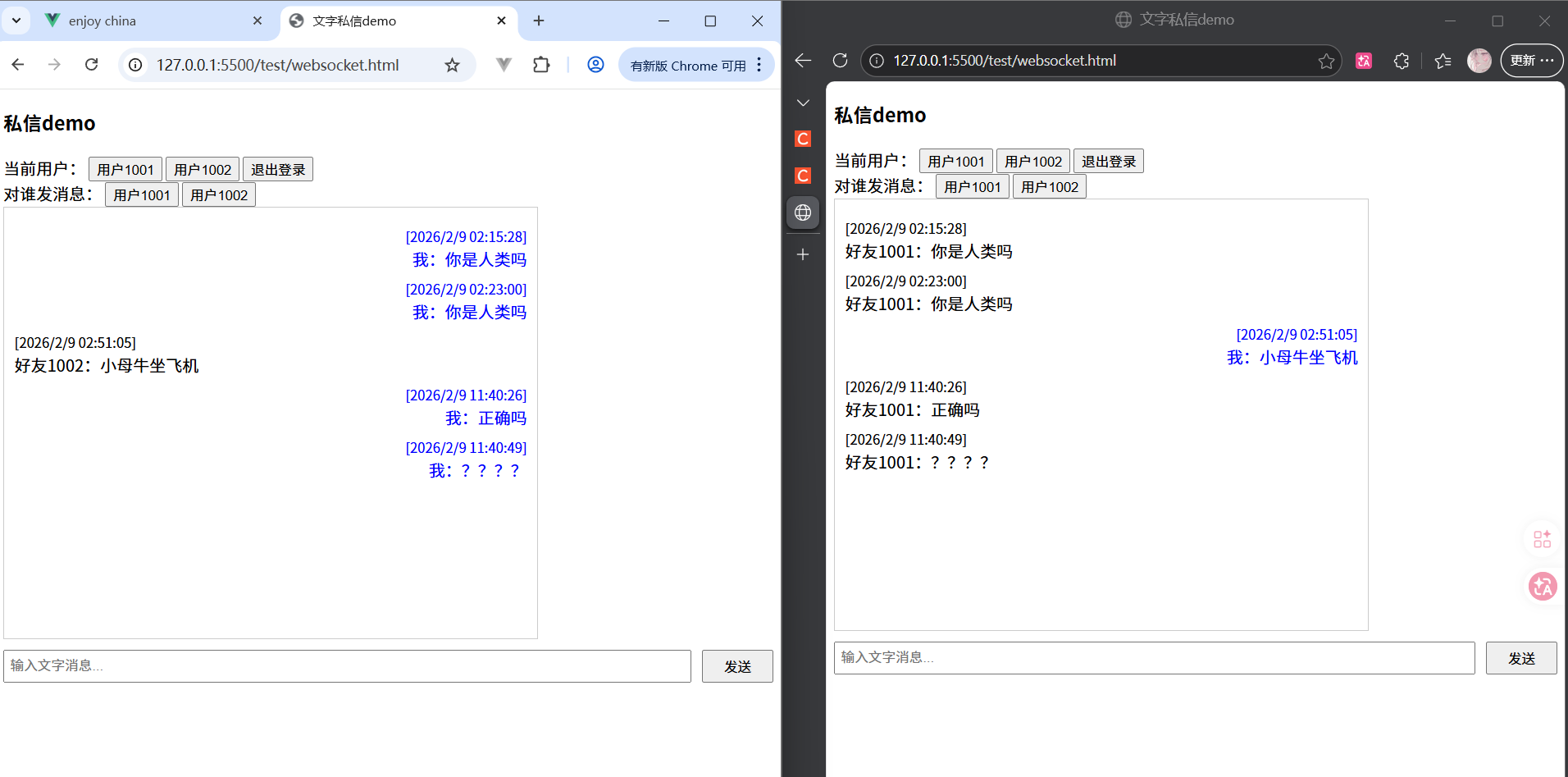
二.实现步骤与代码
Jave
1.引入核心依赖
<!-- Spring Boot WebSocket 依赖 -->
<dependency>
    <groupId>org.springframework.boot</groupId>
    <artifactId>spring-boot-starter-websocket</artifactId>
</dependency>
注意:一定要有web依赖
2.创建配置类
目的:WebSocket配置:开启WebSocket支持
/**
 * WebSocket配置:开启WebSocket支持
 */
@Configuration
public class WebSocketConfig {
    @Bean
    public ServerEndpointExporter serverEndpointExporter() {
        return new ServerEndpointExporter();
    }
}
3.定义私信消息实体(这里只发文字消息)
这里使用了mysql持久化所以库里得有私信消息表,有的可忽略
CREATE TABLE `private_message` (
	`id` BIGINT UNSIGNED NOT NULL AUTO_INCREMENT COMMENT '消息主键ID',
	`sender_id` BIGINT UNSIGNED NOT NULL COMMENT '发送方用户ID',
	`receiver_id` BIGINT UNSIGNED NOT NULL COMMENT '接收方用户ID',
	`content` VARCHAR(2000) NOT NULL COMMENT '文字消息内容(限制2000字,满足日常私信)' COLLATE 'utf8mb4_0900_ai_ci',
	`is_read` TINYINT UNSIGNED NOT NULL DEFAULT '0' COMMENT '是否已读:0-未读 1-已读',
	`send_time` DATETIME NOT NULL DEFAULT (CURRENT_TIMESTAMP) COMMENT '消息发送时间',
	`read_time` DATETIME NULL DEFAULT NULL COMMENT '消息已读时间',
	PRIMARY KEY (`id`) USING BTREE,
	INDEX `idx_sender_receiver` (`sender_id`, `receiver_id`) USING BTREE,
	INDEX `idx_receiver_read` (`receiver_id`, `is_read`) USING BTREE COMMENT '查接收方未读消息',
	INDEX `idx_send_time` (`send_time`) USING BTREE COMMENT '按时间排序聊天记录'
)
COMMENT='私信消息表(仅文字)'
COLLATE='utf8mb4_0900_ai_ci'
ENGINE=InnoDB
AUTO_INCREMENT=6
;
这是消息实体类
/**
 * 私信消息实体类
 */
@Data
@TableName("private_message")
public class PrivateMessage {
    /** 消息ID */
    @TableId(type = IdType.AUTO)
    private Long id;
    /** 发送方用户ID */
    private Long senderId;
    /** 接收方用户ID */
    private Long receiverId;
    /** 消息内容 */
    private String content;
    /** 是否已读:0-未读 1-已读 */
    private Integer isRead;
    /** 发送时间 */
    private LocalDateTime sendTime;
    /** 已读时间 */
    private LocalDateTime readTime;
}
4.私信消息处理器
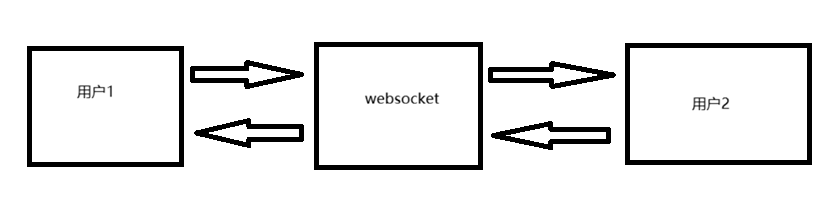
由于websocket实现私信,本质上的流程是:
如果是分布式则是:
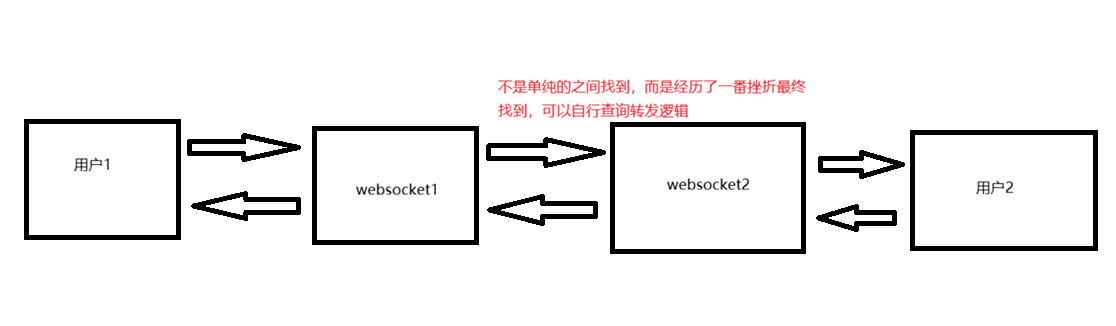
包含:
1. 用户登录(和websocket建立连接)
2. 用户发消息给wesocket
3. websocket转发
4. websocket发给用户(也就是用户2接收消息)
步骤1:先定义websocket处理器
@Slf4j
@ServerEndpoint("/user/ws/private/{userId}")
@Component
public class PrivateMsgWebSocket {
}
连接地址:/user/ws/private/{userId}
步骤2:建立连接
在处理器里添加:
		 // 存储在线用户的WebSocket连接:key=用户ID,value=会话(单机场景用这个,分布式需换Redis)
		 // 作用是单机状态下查找其他用户来给他发消息,在登录之时存入,相当于电话本。
	  private static final ConcurrentHashMap<Long, Session> ONLINE_USER_SESSIONS = new ConcurrentHashMap<>();

    // 注入Service(WebSocket中注入需注意:静态变量+setter)
    // 我添加这个是为了数据库持久化,存入私信消息实体,可根据自己需求修改
    private static PrivateMessageService privateMessageService;

    @Autowired
    public void setPrivateMessageService(PrivateMessageService privateMessageService) {
        PrivateMsgWebSocket.privateMessageService = privateMessageService;
    }

    /**
     * 连接建立时触发(用户登录后连接WebSocket)
     */
    @OnOpen
    public void onOpen(Session session, @PathParam("userId") Long userId) {
        if (userId == null || session == null) {
            return;
        }
        // 存储用户连接
        ONLINE_USER_SESSIONS.put(userId, session);
        log.info("用户{}建立WebSocket连接,当前在线人数:{}", userId, ONLINE_USER_SESSIONS.size());
    }
步骤三.用户发消息(websocket接收客户端消息)
这个过程其实分为用户发和websocket收再转发2个过程
过程1:用户发
关于用户发消息,其实本质是是建立和ws的连接之后使用ws.send()实现.
而这个send和后端的onMessage方法对应的,不难理解其实是调用接口传参(参数是内容),ws处理(也就是转发给用户2)
 // 建立新连接
            const wsUrl = `ws://localhost:8080/user/ws/private/${userId}`;
            ws = new WebSocket(wsUrl);
 /**
         * 发送文字消息
         */
        function sendMsg() {
            if (!ws || ws.readyState !== WebSocket.OPEN || !currentUserId) {
                alert("请先登录!");
                return;
            }
            const content = document.getElementById("msgInput").value.trim();
            if (!content) {
                alert("消息内容不能为空!");
                return;
            }
            // 构造消息体
            const msg = {
                receiverId: friendId,
                content: content
            };
            // 发送消息
            ws.send(JSON.stringify(msg));
            // 本地展示自己的消息(无需等服务器返回)
            const localMsg = {
                senderId: currentUserId,
                receiverId: friendId,
                content: content,
                sendTime: new Date().toLocaleString()
            };
            addMsgToChatBox(localMsg, true);
            // 清空输入框
            document.getElementById("msgInput").value = "";
        }
过程2:websocket收再转发
 /**
     * 接收客户端发送的文字消息
     */
    @OnMessage
    public void onMessage(String msgJson, @PathParam("userId") Long senderId) {
        log.info("收到用户{}的消息:{}", senderId, msgJson);
        if (!StringUtils.hasText(msgJson) || senderId == null) {
            return;
        }

        // 1. 解析前端传来的消息(JSON格式:{receiverId: 接收方ID, content: 消息内容})
        MsgRequest request = JSON.parseObject(msgJson, MsgRequest.class);
        Long receiverId = request.getReceiverId();
        String content = request.getContent();
        if (receiverId == null || !StringUtils.hasText(content)) {
            log.error("消息参数异常:receiverId={}, content={}", receiverId, content);
            return;
        }

        // 2. 存储消息到数据库
        PrivateMessage msg = new PrivateMessage();
        msg.setSenderId(senderId);
        msg.setReceiverId(receiverId);
        msg.setContent(content);
        msg.setIsRead(0); // 初始未读
        msg.setSendTime(LocalDateTime.now());
        privateMessageService.save(msg);

        // 3. 推送消息给接收方
        Session receiverSession = ONLINE_USER_SESSIONS.get(receiverId);
        if (receiverSession != null && receiverSession.isOpen()) {
            // 接收方在线,直接推送(返回完整消息对象,含ID、发送时间等)
            sendMessage(receiverSession, JSON.toJSONString(msg));
            log.info("消息已推送给用户{}", receiverId);
        } else {
            // 接收方离线,消息已存库,等上线后可主动拉取
            log.info("用户{}离线,消息已存入数据库", receiverId);
        }
    }

/**
     * 发送消息给指定会话
     */
    private void sendMessage(Session session, String message) {
        try {
            session.getBasicRemote().sendText(message);
        } catch (IOException e) {
            log.error("发送消息失败", e);
        }
    }
步骤四:用户2收到消息
  // 接收消息
            ws.onmessage = (e) => {
                const msg = JSON.parse(e.data);
                addMsgToChatBox(msg, false);//只是一些js方法加载到页面
                // 标记消息为已读(可以没有)
                fetch(`http://localhost:8080/user/private-msg/read/${msg.id}`, { method: 'POST' });
            };
总结
前端:
<!DOCTYPE html>
<html lang="zh-CN">

<head>
    <meta charset="UTF-8">
    <title>文字私信demo</title>
    <style>
        .chat-box {
            width: 500px;
            height: 400px;
            border: 1px solid #ccc;
            padding: 10px;
            overflow-y: auto;
            margin-bottom: 10px;
        }

        .msg-item {
            margin: 5px 0;
        }

        .my-msg {
            text-align: right;
            color: blue;
        }

        .friend-msg {
            text-align: left;
            color: black;
        }

        .input-area {
            display: flex;
            gap: 10px;
        }

        .input-area input {
            flex: 1;
            padding: 5px;
        }

        .input-area button {
            padding: 5px 20px;
        }
    </style>
</head>

<body>
    <h3>私信demo</h3>
    <!-- 模拟登录:选择当前用户ID -->
    <div>
        当前用户:
        <button onclick="login(1001)">用户1001</button>
        <button onclick="login(1002)">用户1002</button>
        <button onclick="logout()">退出登录</button>
    </div>
    <div>
        对谁发消息:
        <button onclick="setFriendId(1001)">用户1001</button>
        <button onclick="setFriendId(1002)">用户1002</button>
    </div>
    <!-- 聊天窗口 -->
    <div class="chat-box" id="chatBox"></div>
    <!-- 输入区域 -->
    <div class="input-area">
        <input type="text" id="msgInput" placeholder="输入文字消息...">
        <button onclick="sendMsg()">发送</button>
    </div>

    <script>
        let ws = null; // WebSocket实例
        let currentUserId = null; // 当前登录用户ID
        let friendId = 1002; // 固定聊天对象(可自行修改)

        /**
         * 设置聊天对象ID
         */
        function setFriendId(userId) {
            friendId = userId;
            loadChatHistory(); // 切换聊天对象时加载对应的历史消息
        }

        /**
         * 登录并建立WebSocket连接
         */
        function login(userId) {
            currentUserId = userId;
            console.log(ws);
            // 关闭旧连接
            if (ws) {
                alert("请先退出登录");
                return;
            }
            // 建立新连接
            const wsUrl = `ws://localhost:8080/user/ws/private/${userId}`;
            ws = new WebSocket(wsUrl);

            // 连接成功
            ws.onopen = () => {
                alert(`用户${userId}登录成功,已建立连接`);
                // 加载历史聊天记录
                loadChatHistory();
            };

            // 接收消息
            ws.onmessage = (e) => {
                const msg = JSON.parse(e.data);
                console.log(msg, "接收到的消息");
                addMsgToChatBox(msg, false);
                // 标记消息为已读
                fetch(`http://localhost:8080/user/private-msg/read/${msg.id}`, { method: 'POST' });
            };

            // 连接关闭
            ws.onclose = () => {
                alert(`用户${userId}已退出登录`);
            };

            // 连接异常
            ws.onerror = (error) => {
                console.error("WebSocket异常:", error);
            };
        }

        /**
         * 退出登录
         */
        function logout() {
            if (ws) {
                ws.close();
                ws = null;
                currentUserId = null;
                document.getElementById("chatBox").innerHTML = "";
            } else {
                alert("当前未登录");
            }
        }

        /**
         * 发送文字消息
         */
        function sendMsg() {
            if (!ws || ws.readyState !== WebSocket.OPEN || !currentUserId) {
                alert("请先登录!");
                return;
            }
            const content = document.getElementById("msgInput").value.trim();
            if (!content) {
                alert("消息内容不能为空!");
                return;
            }
            // 构造消息体
            const msg = {
                receiverId: friendId,
                content: content
            };
            // 发送消息
            ws.send(JSON.stringify(msg));
            // 本地展示自己的消息(无需等服务器返回)
            const localMsg = {
                senderId: currentUserId,
                receiverId: friendId,
                content: content,
                sendTime: new Date().toLocaleString()
            };
            addMsgToChatBox(localMsg, true);
            // 清空输入框
            document.getElementById("msgInput").value = "";
        }

        /**
         * 加载历史聊天记录
         */
        function loadChatHistory() {
            fetch(`http://localhost:8080/user/private-msg/history?userId=${currentUserId}&friendId=${friendId}`)
                .then(res => res.json())
                .then(msgs => {
                    console.log(msgs.data, "历史消息");
                    // 清空聊天框
                    document.getElementById("chatBox").innerHTML = "";
                    // 渲染历史消息
                    msgs.data.forEach(msg => {
                        if (msg.senderId == currentUserId) {
                            isMyMsg = true;
                        } else {
                            isMyMsg = false;
                        }
                        addMsgToChatBox(msg, isMyMsg)
                    });
                });
        }

        /**
         * 将消息添加到聊天框
         */
        function addMsgToChatBox(msg, isMyMsg) {
            const chatBox = document.getElementById("chatBox");
            const msgItem = document.createElement("div");
            msgItem.className = isMyMsg ? "msg-item my-msg" : "msg-item friend-msg";

            // 格式化时间(如果有sendTime)
            const time = msg.sendTime ? new Date(msg.sendTime).toLocaleString() : new Date().toLocaleString();
            // 消息内容
            const senderName = isMyMsg ? "我" : `好友${msg.senderId}`;
            msgItem.innerHTML = `<small>[${time}]</small><br>${senderName}:${msg.content}`;

            chatBox.appendChild(msgItem);
            // 滚动到底部
            chatBox.scrollTop = chatBox.scrollHeight;
        }
    </script>
</body>

</html>
后端
package com.enjoy.websocket;

import com.alibaba.fastjson2.JSON;
import com.enjoy.domain.entity.PrivateMessage;
import com.enjoy.service.PrivateMessageService;
import jakarta.websocket.*;
import jakarta.websocket.server.PathParam;
import jakarta.websocket.server.ServerEndpoint;
import lombok.Data;
import lombok.extern.slf4j.Slf4j;
import org.springframework.beans.factory.annotation.Autowired;
import org.springframework.stereotype.Component;
import org.springframework.util.StringUtils;

import java.io.IOException;
import java.time.LocalDateTime;
import java.util.concurrent.ConcurrentHashMap;

/**
 * 私信WebSocket处理器
 * 连接地址:ws://localhost:8080/user/ws/private/{userId}
 * {userId} = 当前登录用户的ID
 */
@Slf4j
@ServerEndpoint("/user/ws/private/{userId}")
@Component
public class PrivateMsgWebSocket {
    // 存储在线用户的WebSocket连接:key=用户ID,value=会话(单机场景用这个,分布式需换Redis)
    private static final ConcurrentHashMap<Long, Session> ONLINE_USER_SESSIONS = new ConcurrentHashMap<>();

    // 注入Service(WebSocket中注入需注意:静态变量+setter)
    private static PrivateMessageService privateMessageService;
    @Autowired
    public void setPrivateMessageService(PrivateMessageService privateMessageService) {
        PrivateMsgWebSocket.privateMessageService = privateMessageService;
    }

    /**
     * 连接建立时触发(用户登录后连接WebSocket)
     */
    @OnOpen
    public void onOpen(Session session, @PathParam("userId") Long userId) {
        if (userId == null || session == null) {
            return;
        }
        // 存储用户连接
        ONLINE_USER_SESSIONS.put(userId, session);
        log.info("用户{}建立WebSocket连接,当前在线人数:{}", userId, ONLINE_USER_SESSIONS.size());
    }

    /**
     * 接收客户端发送的文字消息
     */
    @OnMessage
    public void onMessage(String msgJson, @PathParam("userId") Long senderId) {
        log.info("收到用户{}的消息:{}", senderId, msgJson);
        if (!StringUtils.hasText(msgJson) || senderId == null) {
            return;
        }

        // 1. 解析前端传来的消息(JSON格式:{receiverId: 接收方ID, content: 消息内容})
        MsgRequest request = JSON.parseObject(msgJson, MsgRequest.class);
        Long receiverId = request.getReceiverId();
        String content = request.getContent();
        if (receiverId == null || !StringUtils.hasText(content)) {
            log.error("消息参数异常:receiverId={}, content={}", receiverId, content);
            return;
        }

        // 2. 存储消息到数据库
        PrivateMessage msg = new PrivateMessage();
        msg.setSenderId(senderId);
        msg.setReceiverId(receiverId);
        msg.setContent(content);
        msg.setIsRead(0); // 初始未读
        msg.setSendTime(LocalDateTime.now());
        privateMessageService.save(msg);

        // 3. 推送消息给接收方
        Session receiverSession = ONLINE_USER_SESSIONS.get(receiverId);
        if (receiverSession != null && receiverSession.isOpen()) {
            // 接收方在线,直接推送(返回完整消息对象,含ID、发送时间等)
            sendMessage(receiverSession, JSON.toJSONString(msg));
            log.info("消息已推送给用户{}", receiverId);
        } else {
            // 接收方离线,消息已存库,等上线后可主动拉取
            log.info("用户{}离线,消息已存入数据库", receiverId);
        }
    }

    /**
     * 连接关闭时触发(用户退出/断网)
     */
    @OnClose
    public void onClose(@PathParam("userId") Long userId) {
        ONLINE_USER_SESSIONS.remove(userId);
        log.info("用户{}断开WebSocket连接,当前在线人数:{}", userId, ONLINE_USER_SESSIONS.size());
    }

    /**
     * 连接异常时触发
     */
    @OnError
    public void onError(Session session, Throwable error) {
        log.error("WebSocket连接异常", error);
        // 异常时移除失效连接
        ONLINE_USER_SESSIONS.entrySet().removeIf(entry -> entry.getValue().equals(session));
    }

    /**
     * 发送消息给指定会话
     */
    private void sendMessage(Session session, String message) {
        try {
            session.getBasicRemote().sendText(message);
        } catch (IOException e) {
            log.error("发送消息失败", e);
        }
    }

    /**
     * 前端消息请求DTO(内部类)
     */
    @Data
    private static class MsgRequest {
        private Long receiverId; // 接收方用户ID
        private String content;   // 消息内容
    }
}
更多推荐

 16
16 0
0- 0


 已为社区贡献1条内容

所有评论(0)