
使用4090卡基于docker部署Index-TTS和Index-TTS-vLLM
·
文章目录
0 简介
index-tts是B站推出的强大的零样本文本转语音开源模型。index-tts-vllm则是经过推理加速优化后的衍生版本。
1 启动dokcer容器
1.1 下载镜像
docker pull nvidia/cuda:12.9.1-devel-ubuntu24.04
1.2 编写docker-compose.yml
services:
  index-tts:
    image: nvidia/cuda:12.9.1-devel-ubuntu24.04
    container_name: index-tts-4090
    runtime: nvidia
    environment:
      - NVIDIA_VISIBLE_DEVICES=all
      - HF_ENDPOINT=https://hf-mirror.com
      - DEBIAN_FRONTEND=noninteractive
      - LC_ALL=C.UTF-8
      - LANG=C.UTF-8
      - PYTHONUNBUFFERED=1
    volumes:
      - ./output:/app/output  # 挂载输出目录到宿主机
    ports:
      - "18050:18050" # 防止权限或网络问题,将端口改到1万以上
    working_dir: /app
    stdin_open: true
    tty: true
    deploy:
      resources:
        reservations:
          devices:
            - driver: nvidia
              count: 1
              capabilities: [gpu]
    command: ["tail", "-f", "/dev/null"]
1.3 启动容器
docker compose -f docker-compose.yml up -d
1.4 进入容器
docker exec -it index-tts-4090 /bin/bash
1.5 安装必需工具
apt update
apt install git wget vim -y
1.6 安装miniconda
mkdir -p ~/miniconda3
wget https://repo.anaconda.com/miniconda/Miniconda3-latest-Linux-x86_64.sh -O ~/miniconda3/miniconda.sh
bash ~/miniconda3/miniconda.sh -b -u -p ~/miniconda3
rm ~/miniconda3/miniconda.sh
2 部署index-tts
2.1 下载源码
- 下载源码
# 启动git代理加速
git clone https://github.com/index-tts/index-tts.git && cd index-tts
注意,此命令并不会真的下载examples下的wav文件,还需要手动下载
2. 下载wav文件
cd examples

wget --no-check-certificate 'https://github.com/index-tts/index-tts/raw/refs/heads/main/examples/voice_01.wav?download=' -O voice_01.wav
wget --no-check-certificate 'https://github.com/index-tts/index-tts/raw/refs/heads/main/examples/voice_02.wav?download=' -O voice_02.wav
wget --no-check-certificate 'https://github.com/index-tts/index-tts/raw/refs/heads/main/examples/voice_03.wav?download=' -O voice_03.wav
wget --no-check-certificate 'https://github.com/index-tts/index-tts/raw/refs/heads/main/examples/voice_04.wav?download=' -O voice_04.wav
wget --no-check-certificate 'https://github.com/index-tts/index-tts/raw/refs/heads/main/examples/voice_05.wav?download=' -O voice_05.wav
wget --no-check-certificate 'https://github.com/index-tts/index-tts/raw/refs/heads/main/examples/voice_06.wav?download=' -O voice_06.wav
wget --no-check-certificate 'https://github.com/index-tts/index-tts/raw/refs/heads/main/examples/voice_07.wav?download=' -O voice_07.wav
wget --no-check-certificate 'https://github.com/index-tts/index-tts/raw/refs/heads/main/examples/voice_08.wav?download=' -O voice_08.wav
wget --no-check-certificate 'https://github.com/index-tts/index-tts/raw/refs/heads/main/examples/voice_09.wav?download=' -O voice_09.wav
wget --no-check-certificate 'https://github.com/index-tts/index-tts/raw/refs/heads/main/examples/voice_10.wav?download=' -O voice_10.wav
wget --no-check-certificate 'https://github.com/index-tts/index-tts/raw/refs/heads/main/examples/voice_11.wav?download=' -O voice_11.wav
wget --no-check-certificate 'https://github.com/index-tts/index-tts/raw/refs/heads/main/examples/voice_12.wav?download=' -O voice_12.wav
wget --no-check-certificate 'https://github.com/index-tts/index-tts/raw/refs/heads/main/examples/emo_hate.wav?download=' -O emo_hate.wav
wget --no-check-certificate 'https://github.com/index-tts/index-tts/raw/refs/heads/main/examples/emo_sad.wav?download=' -O emo_sad.wav

cd ..
2.2 安装依赖
# 安装uv
source ~/miniconda3/bin/activate
pip install -U uv

# 安装依赖
uv sync --all-extras --default-index "https://mirrors.tuna.tsinghua.edu.cn/pypi/web/simple"

# 激活虚拟环境
source .venv/bin/activate
2.3 下载模型
uv tool install "modelscope"
modelscope download --model IndexTeam/IndexTTS-2 --local_dir checkpoints
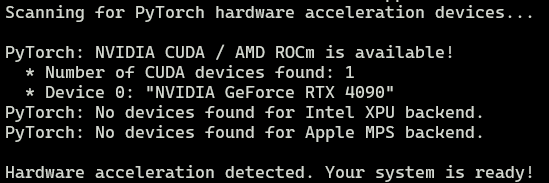
2.4 检查GPU环境是否可用
uv run tools/gpu_check.py
2.5 运行
- 在
index-tts根目录下,创建run.py脚本,第一次运行还会下载其它依赖的模型
import os
from typing import Dict

from indextts.infer_v2 import IndexTTS2
import time

tts = IndexTTS2(
    cfg_path="checkpoints/config.yaml",
    model_dir="checkpoints",
    use_fp16=False,
    use_cuda_kernel=False,
    use_deepspeed=False,
)


def run(inputs: Dict[str, str], output_dir="./output"):
    os.makedirs(output_dir, exist_ok=True)

    for name, text in inputs:
        s = time.time()
        output_path = f"{output_dir}/{name}.wav"
        tts.infer(
            spk_audio_prompt="examples/voice_03.wav",
            text=text,
            output_path=output_path,
            verbose=False,
        )
        e = time.time()
        print(f"finished: {output_path}, cost: {e - s:.2f}")


if __name__ == "__main__":
    texts = {
        "a1": "Asian countries like China, Japan, and South Korea are known for their advancements in technology.",
        "a2": "Asian cultures have a rich heritage of art, music, and dance.",
    }
    run(texts)
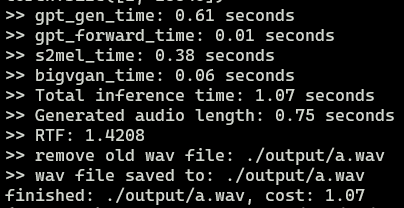
- 运行
python run.py
3 部署index-tts-vllm,并提供API服务
3.1 创建并激活虚拟环境
source ~/miniconda3/bin/activate

conda tos accept --override-channels --channel https://repo.anaconda.com/pkgs/main
conda tos accept --override-channels --channel https://repo.anaconda.com/pkgs/r

conda create -n index-tts-vllm python=3.12 -y
conda activate index-tts-vllm
3.2 下载源码
git clone https://github.com/Ksuriuri/index-tts-vllm.git
cd index-tts-vllm
3.3 安装依赖
pip install -r requirements.txt
# ModuleNotFoundError: No module named 'audiotools'
pip install git+https://github.com/descriptinc/audiotools
3.4 下载模型权重
modelscope download --model kusuriuri/IndexTTS-2-vLLM --local_dir ./checkpoints/IndexTTS-2-vLLM
3.5 加载模型并启动API服务
python api_server_v2.py \
	--model_dir ./checkpoints/IndexTTS-2-vLLM \
	--gpu_memory_utilization 0.9 \
  --port 18050

3.6 创建访问脚本
import argparse
import json
import os
import sys
import time
from dataclasses import asdict, dataclass
from typing import Dict, List, Optional
import requests
from concurrent.futures import ThreadPoolExecutor, as_completed


# Server configuration
SERVER_PORT = 18050
DEFAULT_OUTPUT_DIR = "outputs"
DEFAULT_SPK_AUDIO_PATH = "assets/jay_promptvn.wav"


@dataclass
class IndexTTS2RequestData:
    """Data class for TTS API request"""
    text: str
    spk_audio_path: str
    emo_control_method: int = 0
    emo_ref_path: Optional[str] = None
    emo_weight: float = 1.0
    emo_vec: Optional[List[float]] = None
    emo_text: Optional[str] = None
    emo_random: bool = False
    max_text_tokens_per_sentence: int = 120

    def __post_init__(self):
        if self.emo_vec is None:
            self.emo_vec = [0.0] * 8

    def to_dict(self) -> dict:
        return asdict(self)


class ProgressTracker:
    """Track and display progress information"""

    def __init__(self, total: int):
        self.total = total
        self.completed = 0
        self.start_time = time.time()
        self.lock = None

    def update(self, success: bool = True):
        """Update progress counter"""
        self.completed += 1

    def get_elapsed_time(self) -> float:
        """Get elapsed time in seconds"""
        return time.time() - self.start_time

    def get_average_time(self) -> float:
        """Get average time per audio in seconds"""
        if self.completed == 0:
            return 0.0
        return self.get_elapsed_time() / self.completed

    def format_time(self, seconds: float) -> str:
        """Format time in human readable format"""
        if seconds < 60:
            return f"{seconds:.1f}s"
        elif seconds < 3600:
            minutes = int(seconds // 60)
            secs = seconds % 60
            return f"{minutes}m {secs:.1f}s"
        else:
            hours = int(seconds // 3600)
            minutes = int((seconds % 3600) // 60)
            return f"{hours}h {minutes}m"

    def print_progress(self):
        """Print progress bar"""
        elapsed = self.get_elapsed_time()
        avg_time = self.get_average_time()

        # Calculate progress percentage
        progress = self.completed / self.total if self.total > 0 else 0
        bar_length = 40
        filled = int(bar_length * progress)
        bar = "=" * filled + "-" * (bar_length - filled)

        # Print progress bar
        print(f"\r[{bar}] {self.completed}/{self.total} | "              f"Elapsed: {self.format_time(elapsed)} | "              f"Avg: {self.format_time(avg_time)}",
              end="", flush=True)


def generate_single_audio(
    key: str,
    text: str,
    url: str,
    spk_audio_path: str,
    output_dir: str,
    progress: ProgressTracker
) -> tuple:
    """
    Generate a single audio file
    Returns:        tuple: (key, success, error_message)    """
    try:
        data = IndexTTS2RequestData(
            text=text,
            spk_audio_path=spk_audio_path
        )

        response = requests.post(url, json=data.to_dict(), timeout=30)

        if response.status_code == 200:
            # Save audio file
            output_path = os.path.join(output_dir, f"{key}.wav")
            with open(output_path, "wb") as f:
                f.write(response.content)
            progress.update(success=True)
            return (key, True, None)
        else:
            progress.update(success=False)
            return (key, False, f"HTTP {response.status_code}")

    except requests.exceptions.Timeout:
        progress.update(success=False)
        return (key, False, "Timeout")
    except Exception as e:
        progress.update(success=False)
        return (key, False, str(e))


def parse_input_data(input_value: str) -> Dict[str, str]:
    """
    Parse input from file path or JSON string

    Args:
        input_value: Either a file path or a JSON string

    Returns:
        Dictionary of {audio_name: audio_text} pairs
    """
    # Check if input is a file path
    if os.path.exists(input_value):
        print(f"Loading JSON file: {input_value}")
        with open(input_value, 'r', encoding='utf-8') as f:
            data = json.load(f)

        # Validate data format
        if not isinstance(data, dict):
            print(f"Error: JSON file must contain a dictionary, got {type(data).__name__}")
            sys.exit(1)

        return data

    # Try to parse as JSON string
    else:
        try:
            data = json.loads(input_value)

            # Validate data format
            if not isinstance(data, dict):
                print(f"Error: JSON string must be a dictionary, got {type(data).__name__}")
                sys.exit(1)

            return data

        except json.JSONDecodeError as e:
            print(f"Error: Invalid JSON string: {e}")
            print("Note: Input should be either a valid file path or a JSON string in format:")
            print('  \'{"audio_name": "audio_text", "audio_name2": "audio_text2"}\'')
            sys.exit(1)


def generate_audio_batch(
    input_data: Dict[str, str],  # Changed parameter type
    output_dir: str = DEFAULT_OUTPUT_DIR,
    spk_audio_path: str = DEFAULT_SPK_AUDIO_PATH,
    concurrency: int = 1,
    server_port: int = SERVER_PORT
) -> Dict[str, tuple]:
    """
    Generate audio files from dictionary data
    Args:        input_data: Dictionary of {audio_name: audio_text}        output_dir: Output directory for audio files        spk_audio_path: Path to speaker audio file        concurrency: Number of parallel requests (1 = sequential)        server_port: TTS server port
    Returns:        Dictionary of results: {key: (success, error_message)}    """    # Create output directory
    os.makedirs(output_dir, exist_ok=True)

    total = len(input_data)
    print(f"Total audio files to generate: {total}")
    print(f"Concurrency: {concurrency}")
    print(f"Output directory: {output_dir}")
    print(f"Speaker audio: {spk_audio_path}")
    print("-" * 60)

    # Initialize progress tracker
    progress = ProgressTracker(total)
    url = f"http://0.0.0.0:{server_port}/tts_url"
    results = {}

    if concurrency <= 1:
        # Sequential processing
        for key, text in input_data.items():
            key, success, error = generate_single_audio(
                key, text, url, spk_audio_path, output_dir, progress
            )
            results[key] = (success, error)
            progress.print_progress()
    else:
        # Concurrent processing
        with ThreadPoolExecutor(max_workers=concurrency) as executor:
            futures = {
                executor.submit(
                    generate_single_audio,
                    key, text, url, spk_audio_path, output_dir, progress
                ): key
                for key, text in input_data.items()
            }

            for future in as_completed(futures):
                key, success, error = future.result()
                results[key] = (success, error)
                progress.print_progress()

    # Print final statistics
    print("\n" + "-" * 60)
    print("Generation complete!")

    success_count = sum(1 for success, _ in results.values() if success)
    fail_count = total - success_count

    print(f"Success: {success_count}/{total}")
    print(f"Failed: {fail_count}/{total}")
    print(f"Total time: {progress.format_time(progress.get_elapsed_time())}")
    print(f"Average time per audio: {progress.format_time(progress.get_average_time())}")

    # Save failed items to file
    if fail_count > 0:
        failed_file = os.path.join(output_dir, "failed_tasks.json")
        failed_data = {
            key: {"text": input_data[key], "error": error}
            for key, (success, error) in results.items()
            if not success
        }
        with open(failed_file, 'w', encoding='utf-8') as f:
            json.dump(failed_data, f, ensure_ascii=False, indent=2)
        print(f"Failed tasks saved to: {failed_file}")

    return results


def main():
    """Main entry point"""
    parser = argparse.ArgumentParser(
        description="Batch TTS Audio Generator",
        formatter_class=argparse.RawDescriptionHelpFormatter,
        epilog="""
Examples:
  # Using JSON file
  python batch_tts.py --input sentences.json

  # Using JSON string (direct input)
  python batch_tts.py --input '{"audio1": "Hello world", "audio2": "Test text"}'

  # Concurrent generation with 5 workers
  python batch_tts.py --input sentences.json --concurrency 5

  # Custom output directory and speaker
  python batch_tts.py --input sentences.json --output my_audio --speaker assets/my_speaker.wav

  # Custom server port
  python batch_tts.py --input sentences.json --port 7000
        """    )

    parser.add_argument(
        "--input", "-i",
        required=True,
        help="Input JSON file path or JSON string in format: '{\"audio_name\": \"audio_text\"}'"
    )

    parser.add_argument(
        "--output", "-o",
        default=DEFAULT_OUTPUT_DIR,
        help=f"Output directory (default: {DEFAULT_OUTPUT_DIR})"
    )

    parser.add_argument(
        "--speaker", "-s",
        default=DEFAULT_SPK_AUDIO_PATH,
        help=f"Speaker audio path (default: {DEFAULT_SPK_AUDIO_PATH})"
    )

    parser.add_argument(
        "--concurrency", "-c",
        type=int,
        default=1,
        help="Number of concurrent requests (default: 1, sequential)"
    )

    parser.add_argument(
        "--port", "-p",
        type=int,
        default=SERVER_PORT,
        help=f"TTS server port (default: {SERVER_PORT})"
    )

    args = parser.parse_args()

    # Parse input data (from file or string)
    input_data = parse_input_data(args.input)

    # Run generation
    try:
        generate_audio_batch(
            input_data=input_data,
            output_dir=args.output,
            spk_audio_path=args.speaker,
            concurrency=args.concurrency,
            server_port=args.port
        )
    except KeyboardInterrupt:
        print("\n\nGeneration interrupted by user")
        sys.exit(1)
    except Exception as e:
        print(f"\nError: {e}")
        sys.exit(1)


if __name__ == "__main__":
    main()
3.7 生成音频
# 支持输入字符串 {"audio_name": "text"}
python run.py --input '{"hi": "hi, i am ok"}' --port 18050

# 指定json文件
# {
#        "a1": "hello world",
#        "a2": "你好啊"
#}
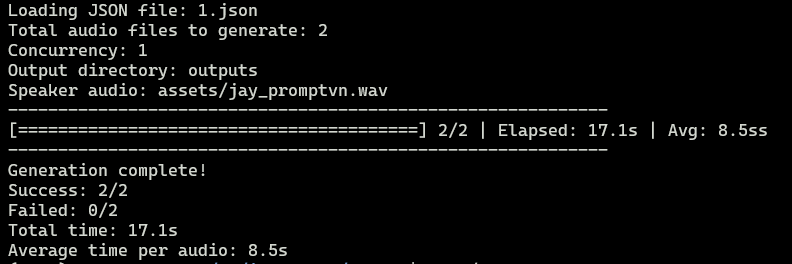
python run.py --input 1.json --port 18050
更多推荐
 3
3 0
0- 0


 已为社区贡献1条内容

所有评论(0)