
DOCKER镜像构建
熟悉镜像构建是用到的参数
| FROM | 指定base镜像 eg:FROM busybox:version |
|---|---|
| COPY | 复制文件 eg:COPY file /file 或者 COPY [“file”,”/”] |
| MAINTAINER | 指定作者信息,比如邮箱 eg:MAINTAINER user@example.com 在最新版的docker中用LABEL KEY="VALUE"代替 |
| ADD | 功能和copy相似,指定压缩文件或url eg: ADD test.tar /mnt 或者 eg:ADD http://ip/test.tar /mnt |
| ENV | 指定环境变量 eg:ENV FILENAME test |
| EXPOSE | 暴漏容器端口 eg:EXPOSE 80 |
| VOLUME | 申明数据卷,通常指数据挂载点 eg:VOLUME [“/var/www/html”] |
| WORKDIR | 切换路径 eg:WORKDIR /mnt |
| RUN | 在容器中运行的指令 eg: touch file |
| CMD | 在启动容器时自动运行动作可以被覆盖 eg:CMD echo FILENAME 会调用shell解析 eg:CMD [“/bin/sh”,”-c”,“echo FILENAME”] 不调用shell解析 |
| ENTRYPOINT | 和CMD功能和用法类似,但动作不可被覆盖 |
#建立构建目录
[root@docker-node1 ~]# mkdir docker
[root@docker-node1 ~]# cd docker/
#编写构建规则文件
[root@docker-node1 docker]# vim Dockerfile
#FROM
FROM busybox:latest
#COPY
[root@Docker-node1 docker]# echo hjw > hjw
[root@Docker-node1 docker]# cat hjw
hjw
[root@docker-node1 docker]# vim Dockerfile
FROM busybox:latest
LABEL maintainer="hhh@hjw.com"
COPY hjw /root
#构建命令
[root@Docker-node1 docker]# docker build -t hjw:v1 .
[+] Building 0.1s (7/7) FINISHED docker:default
=> [internal] load build definition from Dockerfile 0.0s
=> => transferring dockerfile: 103B 0.0s
=> [internal] load metadata for docker.io/library/busybox:latest 0.0s
=> [internal] load .dockerignore 0.0s
=> => transferring context: 2B 0.0s
=> [internal] load build context 0.0s
=> => transferring context: 34B 0.0s
=> [1/2] FROM docker.io/library/busybox:latest@sha256:b3255e7dfbcd10cb367af0d409747d511aeb66dfac98cf30e97e 0.0s
=> => resolve docker.io/library/busybox:latest@sha256:b3255e7dfbcd10cb367af0d409747d511aeb66dfac98cf30e97e 0.0s
=> [2/2] COPY hjw /root 0.0s
=> exporting to image 0.0s
=> => exporting layers 0.0s
=> => exporting manifest sha256:366122b3ac28b565963c4cf58510d486bf00ce7be11a914842844da3ca5ef743 0.0s
=> => exporting config sha256:c9f5a64a5d1369b5eebbbd05f2f9419b996214c75095d3f7a921529f97e61c6c 0.0s
=> => exporting attestation manifest sha256:bcf3134abdfa7665d19c3b98bed3b9a8e61087b719930cef7f02523d2f3713 0.0s
=> => exporting manifest list sha256:fb107d0ead2c67e56fe8659169f19a3d3c0199efffcf5bf1c6d7e8a46d303e4f 0.0s
=> => naming to docker.io/library/hjw:v1 0.0s
=> => unpacking to docker.io/library/hjw:v1
#ADD
[root@Docker-node1 docker]# touch leefile{1..3}
[root@Docker-node1 docker]# tar zcf leefile.gz leefile*
[root@Docker-node1 docker]# vim Dockerfile
FROM busybox
LABEL maintainer="hhh@hjw.com"
ADD leefile.gz /root
[root@Docker-node1 docker]# docker build -t hjw:v2 .
[root@Docker-node1 docker]# docker run --rm -it --name hjw hjw:v2
/ # ls
bin dev etc home lib lib64 proc root sys tmp usr var
/ # ls /root
hjw leefile1 leefile2 leefile3
#LABEL KEY=VALUES
LABEL creater=lee
#LABEL 用于给镜像添加键值对形式的元数据,相当于给镜像打上"标签"或"备注信息"。
#EXPOSE
EXPOSE 8080
#显示端口信息
#VOLUEM
[root@Docker-node1 docker]# vim Dockerfile
FROM busybox:latest
LABEL maintainer="hhh@hjw.com"
VOLUME /var/www/html #声明挂载点
WORKDIR /var/www/html #设置工作目录
RUN touch leefile
EXPOSE 8080
[root@Docker-node1 docker]# docker build -t hjw:v1 .
[root@Docker-node1 docker]# docker run --rm -it --name hjw hjw:v1
/var/www/html #[root@docker-node1 ~]# docker inspect test
#注如果没有WORKDIR参数可以通过[root@docker-node1 ~]# docker inspect test 查看生成的工作目录
#CMD 可以覆盖
#ENV CMD
FROM busybox:latest
LABEL maintainer="hhh@hjw.com"
EXPOSE 8080
ENV NAME lee
#CMD echo $NAME
#CMD ["/bin/echo", "$NAME"]
CMD ["/bin/sh", "-c", "/bin/echo $NAME"]
[root@Docker-node1 docker]# docker run -it --name hjw --rm hjw:v1
lee
[root@Docker-node1 docker]# docker run -it --name hjw --rm hjw:v1 echo hjw
hjw
#ENTRYPOINT 不会覆盖
[root@Docker-node1 docker]# docker run -it --name hjw --rm hjw:v1 echo hjw
lee
[root@Docker-node1 docker]# cat Dockerfile
FROM busybox:latest
LABEL maintainer="hhh@hjw.com"
EXPOSE 8080
ENV NAME lee
ENTRYPOINT echo $NAME镜像优化方案
环境配置
[root@Docker-node1 docker]# ll
总用量 74332
-rw-r--r-- 1 root root 76110336 3月 15 12:45 centos7.tar
-rw-r--r-- 1 root root 98 3月 15 12:13 Dockerfile
[root@Docker-node1 docker]# docker load -i centos7.tar
Loaded image: centos:7 #上传容器
[root@Docker-node1 docker]# docker images
i Info → U In Use
IMAGE ID DISK USAGE CONTENT SIZE EXTRA
busybox:latest b3255e7dfbcd 6.7MB 2.22MB
centos-7:repo 666bfadf8ccc 455MB 114MB U
centos:7 be65f488b776 299MB 76.1MB
nginx:1.26 41b194461e4b 279MB 75.2MB
[root@Docker-node1 docker]# cat Dockerfile
FROM centos:7
LABEL maintainer="hhh@hjw.com"
#注也可以选择 docker pull 上传
# 清理原有仓库文件并复制新配置
RUN rm -rf /etc/yum.repos.d/*
COPY centos7.repo /etc/yum.repos.d/
# 关键:清理YUM缓存并尝试生成新缓存,这一步会在构建时验证仓库是否可用
RUN yum clean all && yum makecache
镜像优化策略
-
选择最精简的基础镜像
-
减少镜像的层数
-
清理镜像构建的中间产物
镜像优化示例
方法1.缩减镜像层
[root@server1 docker]# vim Dockerfile
FROM centos-7:repo AS hjw
ADD nginx-1.26.3.tar.gz /mnt
WORKDIR /mnt/nginx-1.26.3
RUN yum install -y gcc make pcre-devel openssl-devel && sed -i 's/CFLAGS="$CFLAGS -g"/#CFLAGS="$CFLAGS -g"/g' auto/cc/gcc && ./configure --with-http_ssl_module --with-http_stub_status_module && make && make install && cd .. && rm -fr nginx-1.26.3.tar.gz && yum clean all
EXPOSE 80
VOLUME ["/usr/local/nginx/html"]
CMD ["/usr/local/nginx/sbin/nginx", "-g", "daemon off;"]
[root@server1 docker]# docker build -t web:v1 .
[root@Docker-node1 docker]# docker images web
i Info → U In Use
IMAGE ID DISK USAGE CONTENT SIZE EXTRA
web:v1 bf60b8465dbf 579MB 146MB
web:v2 690c7d0b9c26 457MB 115MB
方法2.多阶段构建
只复制编译好的 Nginx(体积小)
[root@server1 docker]# vim Dockerfile
FROM centos-7:repo AS hjw
ADD nginx-1.26.3.tar.gz /mnt
WORKDIR /mnt/nginx-1.26.3
RUN yum install -y gcc make pcre-devel openssl-devel && sed -i 's/CFLAGS="$CFLAGS -g"/#CFLAGS="$CFLAGS -g"/g' auto/cc/gcc && ./configure --with-http_ssl_module --with-http_stub_status_module && make && make install && cd .. && rm -fr nginx-1.26.3.tar.gz && yum clean all
FROM centos-7:repo
COPY --from=hjw /usr/local/nginx /usr/local/nginx
EXPOSE 80
VOLUME ["/usr/local/nginx/html"]
CMD ["/usr/local/nginx/sbin/nginx", "-g", "daemon off;"]
[root@server1 docker]# docker build -t webserver:v3 .
[root@Docker-node1 docker]# docker images web
i Info → U In Use
IMAGE ID DISK USAGE CONTENT SIZE EXTRA
web:v1 bf60b8465dbf 579MB 146MB
web:v2 690c7d0b9c26 457MB 115MB
方法3.使用最精简镜像
使用google提供的最精简镜像
下载地址:
https://github.com/GoogleContainerTools/distroless下载镜像:docker pull gcr.io/distroless/base #本地上传 [root@Docker-node1 new]# ll 总用量 21936 -rw-r--r-- 1 root root 22456832 3月 15 15:20 debian11.tar.gz [root@Docker-node1 new]# docker load -i debian11.tar.gz Loaded image: gcr.io/distroless/base-debian11:latest
利用最精简镜像构建
[root@server1 ~]# mkdir n
ew
[root@server1 ~]# cd new/
[root@server1 new]# vim Dockerfile
FROM nginx:1.26 AS base
# https://en.wikipedia.org/wiki/List_of_tz_database_time_zones
ARG TIME_ZONE
RUN mkdir -p /opt/var/cache/nginx && \
cp -a --parents /usr/lib/nginx /opt && \
cp -a --parents /usr/share/nginx /opt && \
cp -a --parents /var/log/nginx /opt && \
cp -aL --parents /var/run /opt && \
cp -a --parents /etc/nginx /opt && \
cp -a --parents /etc/passwd /opt && \
cp -a --parents /etc/group /opt && \
cp -a --parents /usr/sbin/nginx /opt && \
cp -a --parents /usr/sbin/nginx-debug /opt && \
cp -a --parents /lib/x86_64-linux-gnu/ld-* /opt && \
cp -a --parents /usr/lib/x86_64-linux-gnu/libpcre* /opt && \
cp -a --parents /lib/x86_64-linux-gnu/libz.so.* /opt && \
cp -a --parents /lib/x86_64-linux-gnu/libc* /opt && \
cp -a --parents /lib/x86_64-linux-gnu/libdl* /opt && \
cp -a --parents /lib/x86_64-linux-gnu/libpthread* /opt && \
cp -a --parents /lib/x86_64-linux-gnu/libcrypt* /opt && \
cp -a --parents /usr/lib/x86_64-linux-gnu/libssl.so.* /opt && \
cp -a --parents /usr/lib/x86_64-linux-gnu/libcrypto.so.* /opt && \
cp /usr/share/zoneinfo/${TIME_ZONE:-ROC} /opt/etc/localtime
FROM gcr.io/distroless/base-debian11:latest
COPY --from=base /opt /
EXPOSE 80 443
ENTRYPOINT ["nginx", "-g", "daemon off;"]
[root@Docker-node1 new]# docker build -t web:v3 .
[root@Docker-node1 new]# docker images web
i Info → U In Use
IMAGE ID DISK USAGE CONTENT SIZE EXTRA
web:v1 bf60b8465dbf 579MB 146MB
web:v2 690c7d0b9c26 457MB 115MB
web:v3 cf9ec4003d76 84.9MB 33.6MB 搭建简单的Registry仓库
1.下载Registry镜像
[root@docker ~]# docker pull registry
Using default tag: latest
latest: Pulling from library/registry
930bdd4d222e: Pull complete
a15309931e05: Pull complete
6263fb9c821f: Pull complete
86c1d3af3872: Pull complete
a37b1bf6a96f: Pull complete
Digest: sha256:12120425f07de11a1b899e418d4b0ea174c8d4d572d45bdb640f93bc7ca06a3d
Status: Downloaded newer image for registry:latest
docker.io/library/registry:latest
2.开启Registry
[root@docker ~]# docker run -d -p 5000:5000 --restart=always --name registry registry
bc58d3753a701ae67351fac335b06a4d7f66afa10ae60b992f647117827734c5
[root@docker ~]# docker ps
CONTAINER ID IMAGE COMMAND CREATED STATUS PORTS NAMES
bc58d3753a70 registry "/entrypoint.sh /etc…" 7 seconds ago Up 6 seconds 5000/tcp, 0.0.0.0:5000->5000/tcp, :::5000->5000/tcp registry
3.上传镜像到仓库中
#给要上传的经镜像大标签
[root@Docker-node1 docker]# docker tag web:v3 172.25.254.10:5000/web:v3
#docker在上传的过程中默认使用https,但是我们并没有建立https认证需要的认证文件所以会报错
[root@Docker-node1 docker]# docker push 172.25.254.10:5000/web:v3
The push refers to repository [172.25.254.10:5000/web]
731a414b7455: Waiting
failed to do request: Head "https://172.25.254.10:5000/v2/web/blobs/sha256:95bc8fac970128bd990b1b731d47334a16ca1f32f753444810008ca823677baa": http: server gave HTTP response to HTTPS client
[root@Docker-node1 docker]#
#配置非加密端口
[root@docker ~]# vim /etc/docker/daemon.json
{
"insecure-registries" : ["http://172.25.254.10:5000"]
}
[root@docker ~]# systemctl restart docker
#上传镜像
[root@Docker-node1 docker]# docker push 172.25.254.10:5000/web:v3
The push refers to repository [172.25.254.10:5000/web]
af5aa97ebe6c: Pushed
1a73b54f556b: Pushed
c048279a7d9f: Pushed
8451c71f8c1e: Pushed
6835249f577a: Pushed
731a414b7455: Pushed
e991f75730bf: Pushed
bbb6cacb8c82: Pushed
2a92d6ac9e4f: Pushed
2388d21e8e2b: Pushed
9ed498e122b2: Pushed
ac805962e479: Pushed
24aacbf97031: Pushed
4d049f83d9cf: Pushed
5342a2647e87: Pushed
577c8ee06f39: Pushed
v3: digest: sha256:cf9ec4003d76fc0fa65348afc15a9eab63f553f9e2bbe3698c2ccff2b2a9b47e size: 856
[root@Docker-node1 docker]#
#查看镜像上传
[root@Docker-node1 docker]# curl http://172.25.254.10:5000/v2/_catalog
{"repositories":["web"]}
为Registry提加密传输
[root@Docker-node1 docker]# openssl req -newkey rsa:4096 \
> -nodes -sha256 -keyout certs/hjw.org.key \
> -addext "subjectAltName = DNS:reg.hjw.org" \ #指定备用名称
> -x509 -days 365 -out certs/hjw.org.crt
You are about to be asked to enter information that will be incorporated
into your certificate request.
What you are about to enter is what is called a Distinguished Name or a DN.
There are quite a few fields but you can leave some blank
For some fields there will be a default value,
If you enter '.', the field will be left blank.
-----
Country Name (2 letter code) [XX]:CN
State or Province Name (full name) []:CHANGSHA
Locality Name (eg, city) [Default City]:HN
Organization Name (eg, company) [Default Company Ltd]:hjw
Organizational Unit Name (eg, section) []:docker
Common Name (eg, your name or your server's hostname) []:reg.hjw.org
Email Address []:admin@hjw.org
[root@Docker-node1 docker]# openssl x509 -in certs/hjw.org.crt -noout -text #查看证书信息
#启动registry仓库
[root@Docker-node1 docker]# docker run -d -p 443:443 --restart=always --name registry -v /opt/registry:/var/lib/registry -v /root/docker/certs:/certs -e REGISTRY_HTTP_ADDR=0.0.0.0:443 -e REGISTRY_HTTP_TLS_CERTIFICATE=/root/certs/hjw.org.crt -e REGISTRY_HTTP_TLS_KEY=/root/certs/hjw.org.key registry:latest
e6486fa4cd25ad7374bb13054d2e9a37fabb01116a39d37d0c6d5466aff8327b
测试:
[root@Docker-node1 docker]# docker tag busybox:latest reg.hjw.org/busybox:latest
[root@Docker-node1 docker]# docker push reg.hjw.org/busybox:latest
The push refers to repository [reg.hjw.org/busybox]
61dfb50712f5: Unavailable
failed to do request: Head "https://reg.hjw.org/v2/busybox/blobs/sha256:af3f0f48a24edb84e94aff6f44f5d089203453719d3b2328486d311e61db9b09": dial tcp 172.25.254.10:443: connect: connection refused
为客户端建立证书
#为客户端建立证书
[root@docker docker]# mkdir /etc/docker/certs.d/reg.hjw.org/ -p
[root@docker docker]# cp /root/docker/certs/hjw.org.crt /etc/docker/certs.d/reg.hjw.org/ca.crt
[root@docker docker]# systemctl restart docker为仓库建立登陆认证
#安装建立认证文件的工具包
[root@docker docker]# dnf install httpd-tools -y
#建立认证文件
[root@docker ~]# mkdir auth
[root@docker ~]# htpasswd -Bc auth/htpasswd hjw #-B 强制使用最安全加密方式,默认用md5加密
New password:
Re-type new password:
Adding password for user hjw
#添加认证到registry容器中
[root@Docker-node1 ~]# docker run -d -p 443:443 --restart=always --name registry -v /opt/registry:/var/lib/registry -v /root/docker/certs:/certs -e REGISTRY_HTTP_ADDR=0.0.0.0:443 -e REGISTRY_HTTP_TLS_CERTIFICATE=/certs/hjw.org.crt -e REGISTRY_HTTP_TLS_KEY=/certs/hjw.org.key -v /root/auth:/auth -e "REGISTRY_AUTH=htpasswd" -e "REGISTRY_AUTH_HTPASSWD_REALM=Registry Realm" -e REGISTRY_AUTH_HTPASSWD_PATH=/auth/htpasswd registry:latest
8526706becdec4aaf77bcd826dc821a30677a73b35681d477cd0ac66a2b23c94
[root@docker ~]# curl -k https://reg.hjw.org/v2/_catalog -u hjw:123
[root@Docker-node1 ~]# curl -k https://reg.hjw.org/v2/_catalog -u hjw:123
{"repositories":[]}
#登陆测试
[root@Docker-node1 ~]# docker login reg.hjw.org
Username: hjw
Password:
WARNING! Your credentials are stored unencrypted in '/root/.docker/config.json'.
Configure a credential helper to remove this warning. See
https://docs.docker.com/go/credential-store/
Login Succeeded
当仓库开启认证后必须登陆仓库才能进行镜像上传
#未登陆情况下上传镜像
[root@docker ~]# docker push reg.hjw.org/busybox
Using default tag: latest
The push refers to repository [reg.timinglee.org/busybox]
d51af96cf93e: Preparing
no basic auth credentials
#未登陆情况下也不能下载
[root@docker-node2 ~]# docker pull reg.hjw.org/busybox
Using default tag: latest
Error response from daemon: Head "https://reg.timinglee.org/v2/busybox/manifests/latest": no basic auth credentials客户端测试
#从node1上传证书到客户机
[root@Docker-node1 ~]# scp /etc/docker/certs.d/reg.hjw.org/ca.crt root@172.25.254.20:/etc/docker/certs.d/reg.hjw.org/
ca.crt 100% 2134 2.9MB/s 00:00
#确保客户机有/etc/docker/certs.d/reg.hjw.org/这个目录
[root@Docker-node1 ~]# systemctl restart docker
#客户机验证
[root@Docker-node2 ~]# mkdir -p /etc/docker/certs.d/reg.hjw.org/
[root@Docker-node2 ~]# ls -la /etc/docker/certs.d/reg.hjw.org/
总用量 4
drwxr-xr-x 2 root root 20 3月 15 17:38 .
drwxr-xr-x 3 root root 25 3月 15 17:35 ..
-rw-r--r-- 1 root root 2134 3月 15 17:38 ca.crt
[root@Docker-node2 ~]# systemctl restart docker
[root@Docker-node2 ~]# docker login reg.hjw.org -u hjw -p 123
WARNING! Using --password via the CLI is insecure. Use --password-stdin.
WARNING! Your credentials are stored unencrypted in '/root/.docker/config.json'.
Configure a credential helper to remove this warning. See
https://docs.docker.com/go/credential-store/
Login Succeeded
[root@Docker-node2 ~]# docker pull reg.hjw.org/busybox:latest
latest: Pulling from busybox
61dfb50712f5: Pull complete
Digest: sha256:70ce0a747f09cd7c09c2d6eaeab69d60adb0398f569296e8c0e844599388ebd6
Status: Downloaded newer image for reg.hjw.org/busybox:latest
reg.hjw.org/busybox:latest构建企业级私有仓库

下载软件包地址
https://github.com/goharbor/harbor/releases
Harbor 是由vmware公司开源的企业级 Docker Registry 项目。
它提供了以下主要功能和特点:
-
基于角色的访问控制(RBAC):可以为不同的用户和用户组分配不同的权限,增强了安全性和管理的灵活性。
-
镜像复制:支持在不同的 Harbor 实例之间复制镜像,方便在多个数据中心或环境中分发镜像。
-
图形化用户界面(UI):提供了直观的 Web 界面,便于管理镜像仓库、项目、用户等。
-
审计日志:记录了对镜像仓库的各种操作,有助于追踪和审查活动。
-
垃圾回收:可以清理不再使用的镜像,节省存储空间。
部署harbor
[root@docker ~]# tar zxf harbor-offline-installer-v2.5.4.tgz
[root@docker ~]# ls
anaconda-ks.cfg certs harbor-offline-installer-v2.5.4.tgz
auth harbor
[root@docker ~]# cd harbor/
[root@docker harbor]# cp harbor.yml.tmpl harbor.yml
[root@docker harbor]# vim harbor.yml
hostname: reg.hjw.org
certificate: /data/certs/hjw.org.crt
private_key: /data/certs/hjw.org.key
harbor_admin_password: lee
[root@docker harbor]# ./install.sh --help
Please set --with-notary #证书签名
Please set --with-trivy #安全扫描
Please set --with-chartmuseum if needs enable Chartmuseum in Harbor
[root@docker harbor]# ./install.sh --with-chartmuseum
#管理harbor的容器
[root@docker harbor]# docker compose stop
[root@docker harbor]# docker compose up -d管理仓库
1.登陆
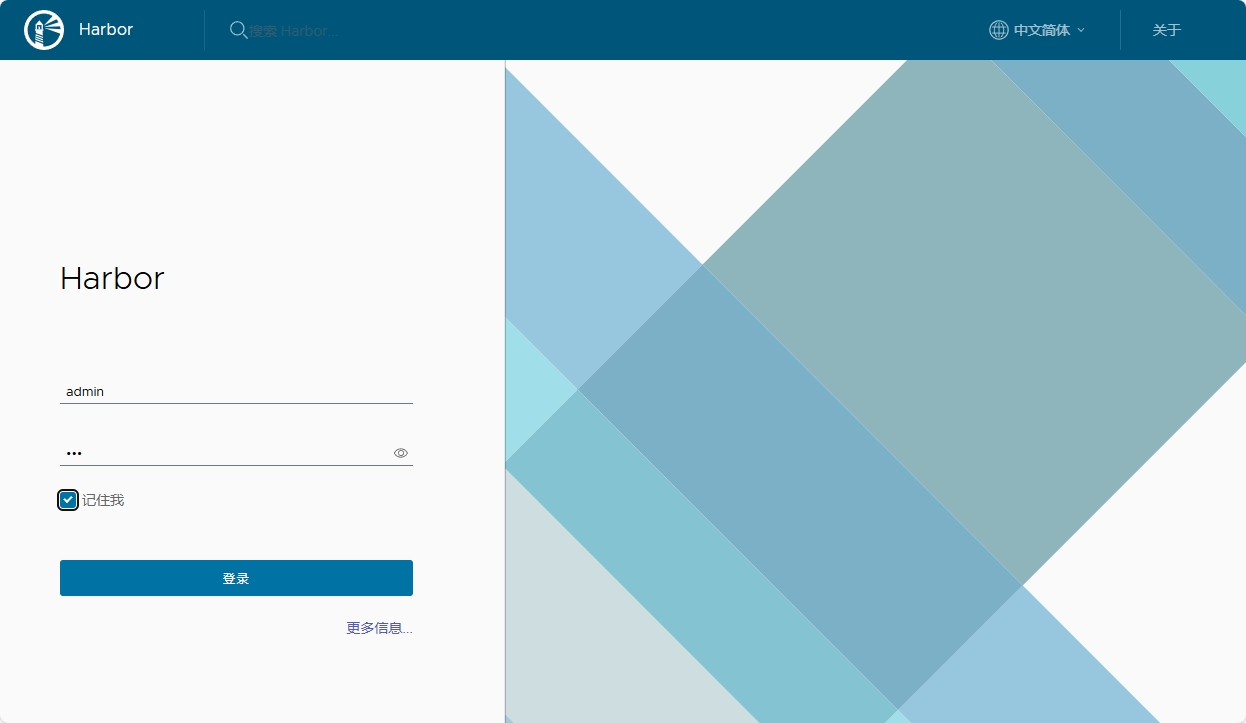
2.建立仓库项目
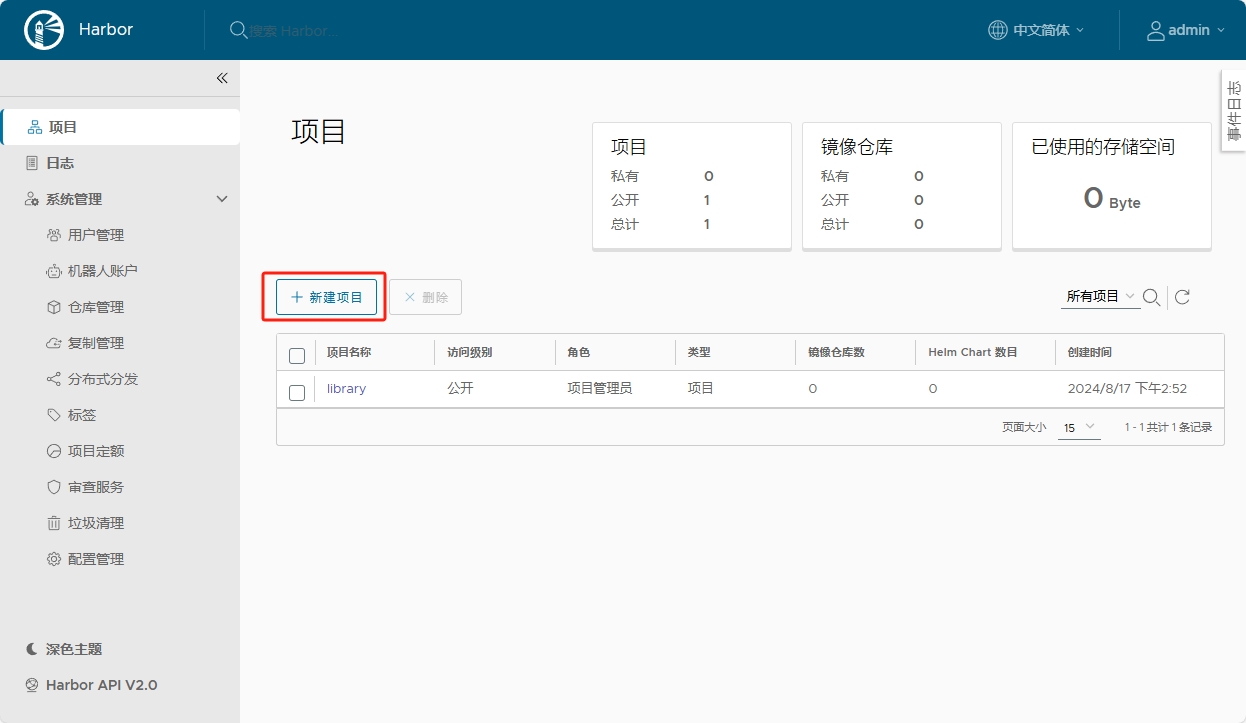
上传镜像
[root@Docker-node1 harbor]# docker login reg.hjw.org -u admin
Password:
Login Succeeded
[root@docker harbor]# docker tag busybox:latest reg.timinglee.org/timinglee/busybox:latest
[root@docker harbor]# docker push reg.timinglee.org/timinglee/busybox:latest
The push refers to repository [reg.timinglee.org/timinglee/busybox]
d51af96cf93e: Pushed
latest: digest: sha256:28e01ab32c9dbcbaae96cf0d5b472f22e231d9e603811857b295e61197e40a9b size: 527查看上传的镜像
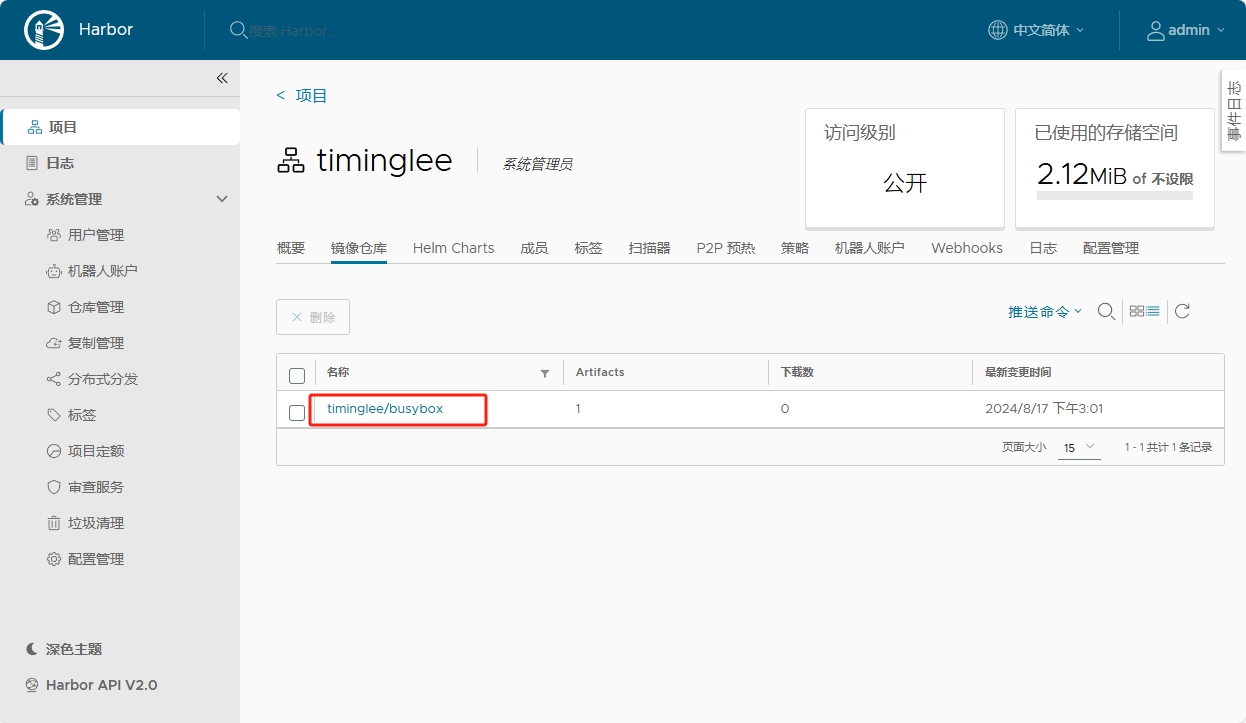
docker降级
注:由于版本问题可能会出现如下面的问题
[root@Docker-node1 harbor]# docker push reg.hjw.org/hjw/busybox:latest
The push refers to repository [reg.hjw.org/hjw/busybox]
61dfb50712f5: Unavailable
failed to authorize: failed to fetch oauth token: Post "https://reg.hjw.org/service/token": tls: failed to verify certificate: x509: certificate signed by unknown authority
这个时候就需要找一个稳定支持的版本
[root@Docker-node1 harbor]# dnf remove docker-ce docker-ce-cli containerd.io -y
[root@Docker-node1 harbor]# dnf install docker-ce-3:28.5.2-1.el9 -y
[root@Docker-node1 harbor]# docker compose stop
[root@Docker-node1 harbor]# systemctl stop docker
[root@Docker-node1 harbor]# systemctl stop docker.socket
[root@Docker-node1 harbor]# docker compose up -d
[+] up 9/9
✔ Container harbor-log Running 0.0s
✔ Container redis Running 0.0s
✔ Container registryctl Running 0.0s
✔ Container harbor-db Running 0.0s
✔ Container harbor-portal Running 0.0s
✔ Container registry Running 0.0s
✔ Container harbor-core Running 0.0s
✔ Container harbor-jobservice Running 0.0s
✔ Container nginx Running 0.0s
[root@Docker-node1 harbor]# docker login reg.hjw.org -u admin
Password:
Login Succeeded
[root@Docker-node1 harbor]# docker images
i Info → U In Use
IMAGE ID DISK USAGE CONTENT SIZE EXTRA
busybox:latest af3f0f48a24e 4.43MB 0B
goharbor/harbor-core:v2.14.0 f78eea3cde89 202MB 0B U
goharbor/harbor-db:v2.14.0 7f68b0143abb 273MB 0B U
goharbor/harbor-exporter:v2.14.0 403d93718fa2 132MB 0B
goharbor/harbor-jobservice:v2.14.0 2cd20014f558 178MB 0B U
goharbor/harbor-log:v2.14.0 e49b51ca9c1e 163MB 0B U
goharbor/harbor-portal:v2.14.0 e1055ac74dda 159MB 0B U
goharbor/harbor-registryctl:v2.14.0 9504450a9e13 165MB 0B U
goharbor/nginx-photon:v2.14.0 808a709c3f45 151MB 0B U
goharbor/prepare:v2.14.0 49c18c64627c 197MB 0B
goharbor/redis-photon:v2.14.0 15e05743b672 165MB 0B U
goharbor/registry-photon:v2.14.0 2f870818fbc8 87.3MB 0B U
goharbor/trivy-adapter-photon:v2.14.0 10a81daa59cb 393MB 0B
[root@Docker-node1 harbor]# docker tag busybox:latest reg.hjw.org/hjw/busybox:latest
[root@Docker-node1 harbor]# docker push reg.hjw.org/hjw/busybox:latest
The push refers to repository [reg.hjw.org/hjw/busybox]
495ba00f2547: Preparing
unauthorized: project hjw not found: project hjw not found
[root@Docker-node1 harbor]# docker push reg.hjw.org/hjw/busybox:latest
The push refers to repository [reg.hjw.org/hjw/busybox]
495ba00f2547: Pushed
latest: digest: sha256:91c66c844e6bba57e92e10e755e73a816d0b99edd17eb5297d9ac519ab3a8c81 size: 527
[root@Docker-node1 harbor]#
#注记得在web中创建项目更多推荐

 7
7 0
0- 0


 已为社区贡献7条内容

所有评论(0)