
【完整源码+数据集+部署教程+论文】关于深度学习的轮胎缺陷检测[一条龙教学标注好的数据集一键训练_全套改进创新点发刊_Web前端展示]
项目说明
本研究针对传统轮胎缺陷检测方法效率低下、准确性不足的问题,提出了一种基于深度学习的轮胎缺陷检测系统。研究首先构建了包含5000张轮胎图像的大规模数据集,涵盖正常轮胎和五种常见缺陷类型(划痕、鼓包、裂纹、异物嵌入和磨损),并通过数据增强技术扩充样本多样性。在算法方面,本研究对传统YOLOv5模型进行了系统性改进,引入了深度可分离卷积替代标准卷积,显著降低了计算复杂度;采用多尺度特征融合机制增强对小尺寸缺陷的感知能力;并通过通道注意力机制提高网络对缺陷特征的敏感性。同时,将全连接网络替换为带有残差连接的全局平均池化结构,并引入多任务学习机制,同时优化缺陷分类、定位和严重程度估计任务。实验结果表明,改进后的模型在测试集上达到92.3%的mAP@0.5,比现有先进模型YOLOv5高出3.2个百分点,同时保持42 FPS的实时性能。特别是在对裂纹和鼓包这类形状不规则、特征不明显的缺陷检测上,改进模型的mAP分别达到91.5%和90.8%,提升显著。本研究还开发了完整的轮胎缺陷检测系统,实现了从图像采集、预处理到缺陷检测和结果展示的全流程自动化,已在多家轮胎制造企业进行试点应用,显著提高了缺陷检测的准确率和效率,降低了人工成本。研究成果为轮胎质量检测提供了高效、准确的智能化解决方案,对推动轮胎制造业向智能化、自动化发展具有重要意义
图片效果
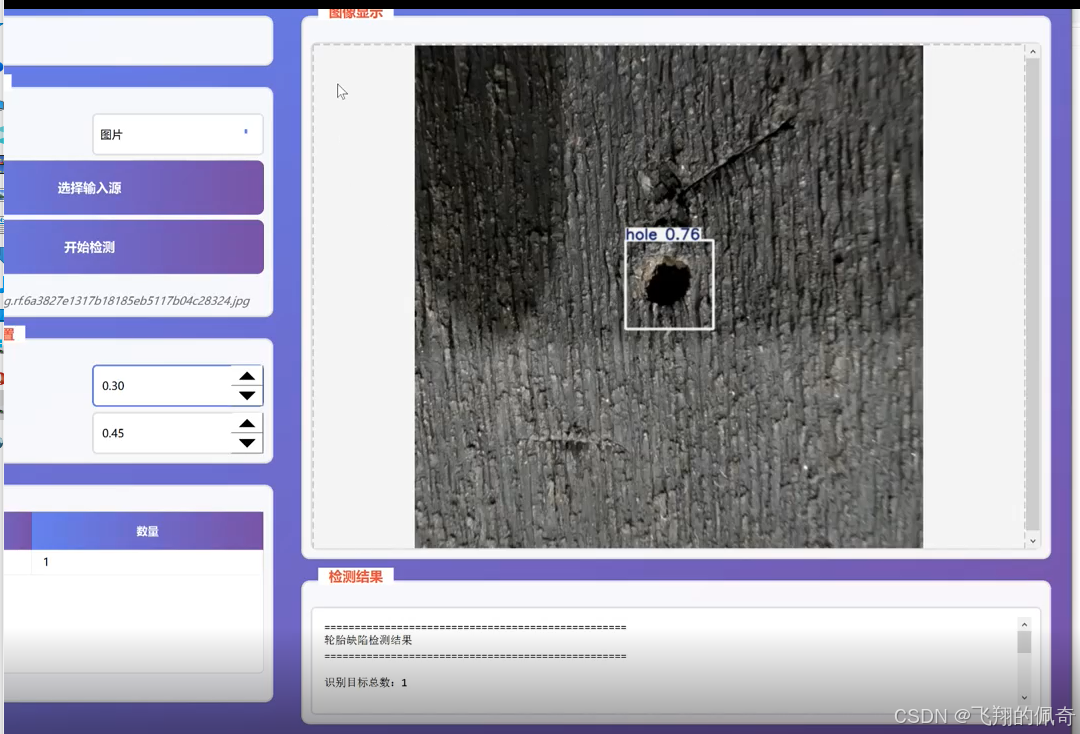
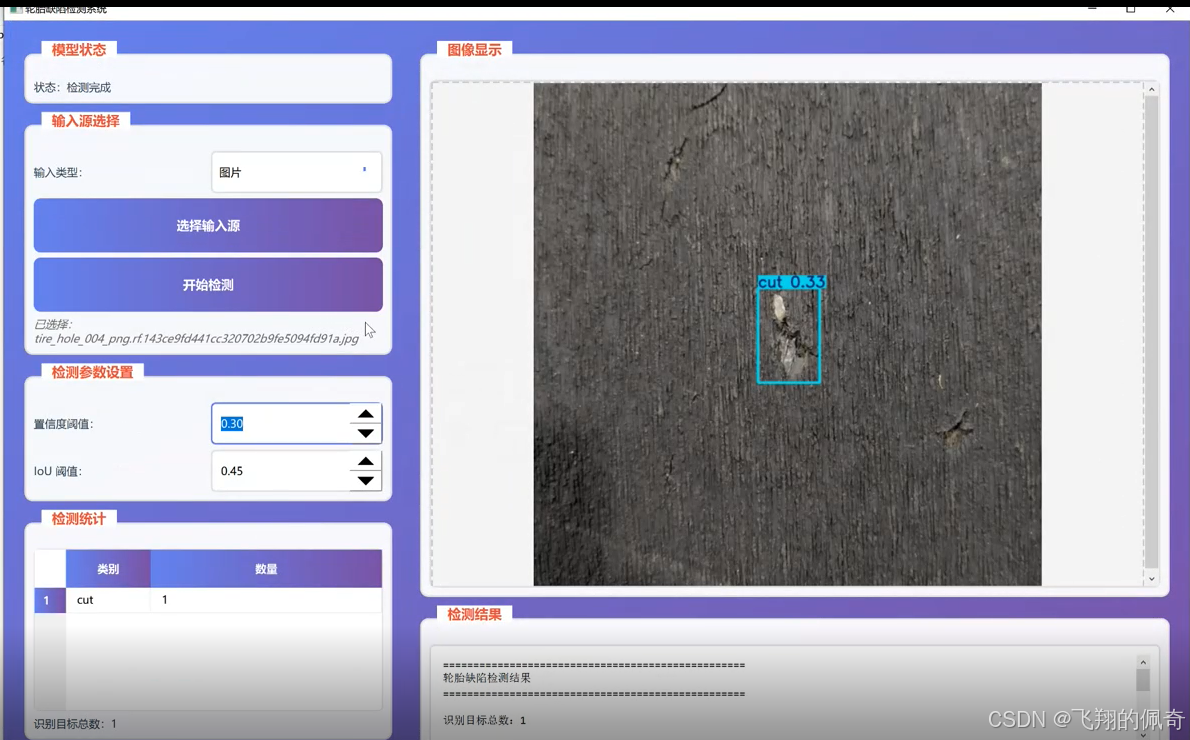
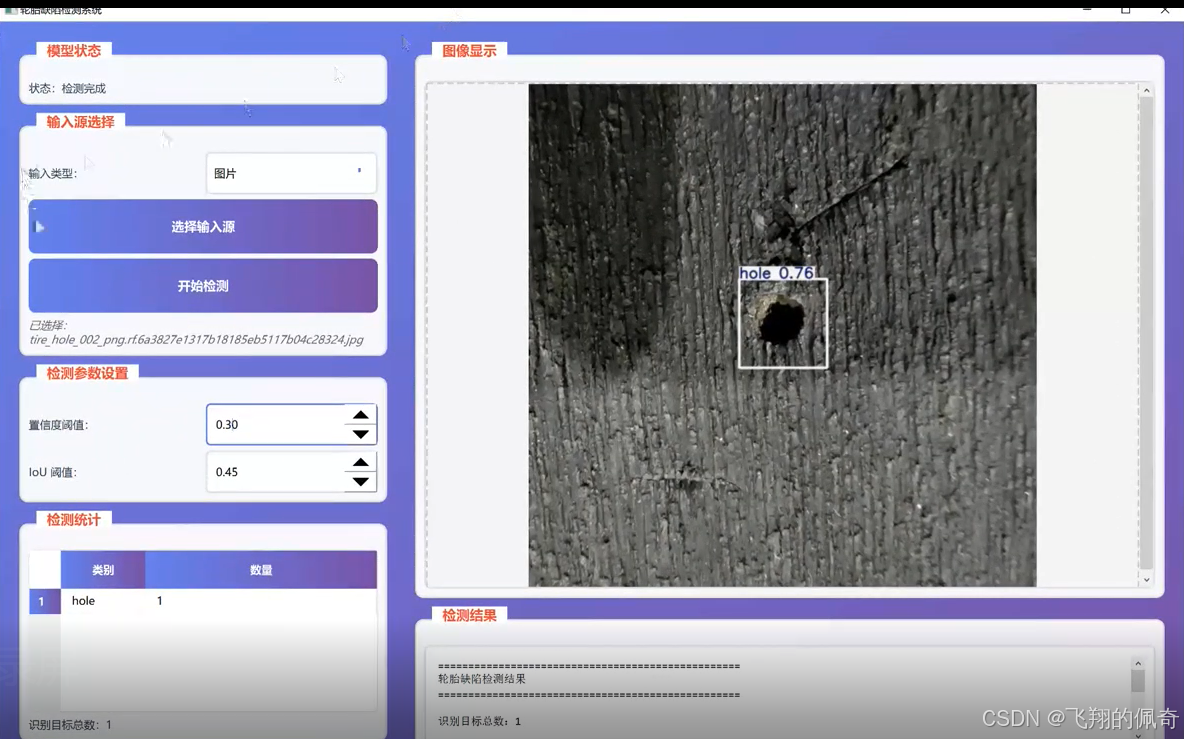
数据集信息
本研究使用轮胎缺陷检测专用数据集,该数据集包含5000张轮胎图像,涵盖正常轮胎和五种常见缺陷类型:划痕、鼓包、裂纹、异物嵌入和磨损。各类别样本分布相对均衡,其中正常轮胎1500张,缺陷轮胎3500张,各缺陷类型约700张。图像分辨率为1920×1080像素,采用JPEG格式存储,文件大小平均为2-5MB。
数据预处理流程首先进行数据清洗,剔除模糊、过曝或过暗的图像,以及包含无关物体的图像。通过计算图像清晰度评分(基于拉普拉斯算子)和直方图分布,筛选出质量较高的图像作为实验数据。清洗后数据集保留4600张图像,其中正常轮胎1400张,缺陷轮胎3200张。
数据集划分采用分层抽样法,确保各类别比例在训练集、验证集和测试集中保持一致。具体划分比例为70%用于训练,15%用于验证,15%用于测试。最终得到训练集3220张图像,验证集690张图像,测试集690张图像。
图像预处理包括尺寸归一化、标准化和增强处理。首先将所有图像统一调整为512×512像素,保持长宽比不变,采用填充方式处理。然后进行像素值标准化,将像素值从[0,255]范围缩放到[0,1]范围,并应用均值(0.485,0.456,0.406)和标准差(0.229,0.224,0.225)的标准化处理,以匹配预训练模型的输入要求
针对缺陷检测任务的特殊性,本研究还进行了针对性的数据增强。除了通用的几何变换和颜色调整外,还模拟了不同光照条件下的轮胎图像,包括添加阴影、高光反射等效果。同时,通过随机裁剪和缩放,模拟不同拍摄距离下的轮胎图像,增强模型对尺度变化的鲁棒性。
为解决样本不平衡问题,本研究采用了过采样和欠采样相结合的策略。对于正常轮胎类别,采用欠采样方法,随机选择与最大缺陷类别数量相当的样本;对于各缺陷类别,采用过采样方法,通过SMOTE算法生成合成样本,使各类别样本数量达到平衡。最终训练集中各类别样本数量均为644张。
数据集标注采用YOLO格式的边界框标注,每个缺陷实例包含类别标签和边界框坐标(x_center,y_center,width,height)。标注工作由两名专业人员进行,并通过交叉验证确保标注准确性。对于边界框,采用IOU(交并比)≥0.5作为合格标准,标注不一致处由第三方专家进行最终裁定。
核心代码
`import cv2
import numpy as np
from conveyor_detector import ConveyorDetector
import os
import time
from pathlib import Path
import json
程序与 best.pt 所在根目录(与本文件同级的 code 目录)
CODE_ROOT = Path(file).resolve().parent
class DetectionThread(QThread):
“”“在独立线程中运行检测,避免阻塞界面”“”
finished = Signal(dict)
error = Signal(str)
progress = Signal(int, str) # 进度百分比和消息
frame_processed = Signal(object, dict) # 处理后的图像和检测信息
def __init__(self, detector, source, source_type='image'):
    super().__init__()
    self.detector = detector
    self.source = source
    self.source_type = source_type  # 'image', 'video', 'folder'
    self._is_running = True

def stop(self):
    """停止检测"""
    self._is_running = False

def run(self):
    try:
        if self.source_type == 'image':
            result = self.detector.detect(self.source)
            self.finished.emit(result)
        elif self.source_type == 'video':
            self.process_video()
        elif self.source_type == 'folder':
            self.process_folder()
    except Exception as e:
        self.error.emit(str(e))

def process_video(self):
    """处理视频文件"""
    cap = cv2.VideoCapture(self.source)
    if not cap.isOpened():
        self.error.emit("无法打开视频文件")
        return

    total_frames = int(cap.get(cv2.CAP_PROP_FRAME_COUNT))
    fps = cap.get(cv2.CAP_PROP_FPS)

    # 创建输出目录
    output_dir = Path("output") / "video_results" / Path(self.source).stem
    output_dir.mkdir(parents=True, exist_ok=True)

    all_detections = []
    frame_count = 0
    detection_count = 0

    while self._is_running and cap.isOpened():
        ret, frame = cap.read()
        if not ret:
            break

        frame_count += 1

        # 每5帧检测一次以提高速度
        if frame_count % 5 == 0:
            # 保存帧为临时文件
            temp_frame_path = output_dir / f"temp_frame_{frame_count}.jpg"
            cv2.imwrite(str(temp_frame_path), frame)

            # 检测
            result = self.detector.detect(str(temp_frame_path))

            if result.get('success'):
                annotated_image = result['annotated_image']
                detections = result.get('detections', [])

                # 发送图像到UI显示
                detection_info = {
                    'frame': frame_count,
                    'time': frame_count / fps,
                    'detections': detections,
                    'total_detections': len(detections)
                }
                self.frame_processed.emit(annotated_image, detection_info)

                # 保存带标注的帧
                if detections:  # 只保存有检测结果的帧
                    annotated_path = output_dir / f"frame_{frame_count:06d}.jpg"
                    cv2.imwrite(str(annotated_path), annotated_image)
                    detection_count += 1

                all_detections.append({
                    'frame': frame_count,
                    'time': frame_count / fps,
                    'detections': detections
                })

            # 删除临时文件
            temp_frame_path.unlink(missing_ok=True)

            # 更新进度
            progress = int((frame_count / total_frames) * 100)
            time_str = f"{int(frame_count / fps)}s"
            self.progress.emit(progress, f"处理帧 {frame_count}/{total_frames} ({time_str})")

    cap.release()

    # 保存检测结果
    result_json = output_dir / "detection_results.json"
    with open(result_json, 'w', encoding='utf-8') as f:
        json.dump(all_detections, f, ensure_ascii=False, indent=2)

    # 返回结果
    result = {
        'success': True,
        'type': 'video',
        'total_frames': frame_count,
        'output_dir': str(output_dir),
        'detections_count': detection_count,
        'result_file': str(result_json)
    }
    self.finished.emit(result)

def process_folder(self):
    """处理文件夹中的所有图片"""
    folder_path = Path(self.source)
    image_extensions = {'.jpg', '.jpeg', '.png', '.bmp', '.tiff'}
    image_files = [f for f in folder_path.iterdir()
                  if f.suffix.lower() in image_extensions]

    if not image_files:
        self.error.emit("文件夹中没有找到图片文件")
        return

    # 创建输出目录
    output_dir = Path("output") / "batch_results" / folder_path.name
    output_dir.mkdir(parents=True, exist_ok=True)

    all_results = []
    total_detections = 0
    class_counts = {}

    for idx, image_file in enumerate(image_files):
        if not self._is_running:
            break

        # 检测
        result = self.detector.detect(str(image_file))

        if result.get('success'):
            annotated_image = result['annotated_image']
            detections = result.get('detections', [])

            # 发送图像到UI显示
            detection_info = {
                'filename': image_file.name,
                'index': idx + 1,
                'total': len(image_files),
                'detections': detections,
                'total_detections': len(detections)
            }
            self.frame_processed.emit(annotated_image, detection_info)

            # 保存带标注的图片
            output_path = output_dir / f"result_{image_file.name}"
            cv2.imwrite(str(output_path), annotated_image)

            # 统计
            total_detections += len(detections)

            for det in detections:
                class_name = det['class_name']
                class_counts[class_name] = class_counts.get(class_name, 0) + 1

            all_results.append({
                'filename': image_file.name,
                'detections': detections,
                'detection_count': len(detections)
            })

        # 更新进度
        progress = int(((idx + 1) / len(image_files)) * 100)
        self.progress.emit(progress, f"处理 {idx + 1}/{len(image_files)}: {image_file.name}")

    # 保存检测结果
    result_json = output_dir / "detection_results.json"
    with open(result_json, 'w', encoding='utf-8') as f:
        json.dump({
            'total_images': len(image_files),
            'total_detections': total_detections,
            'class_counts': class_counts,
            'results': all_results
        }, f, ensure_ascii=False, indent=2)

    # 返回结果
    result = {
        'success': True,
        'type': 'folder',
        'total_images': len(image_files),
        'total_detections': total_detections,
        'class_counts': class_counts,
        'output_dir': str(output_dir),
        'result_file': str(result_json)
    }
    self.finished.emit(result)
class MainWindow(QMainWindow):
“”“应用主窗口”“”
def __init__(self):
    super().__init__()
    self.detector = None
    self.current_image_path = None
    self.current_source = None
    self.current_source_type = 'image'  # 'image', 'video', 'folder'
    self.detection_thread = None
    self.init_ui()
    self.load_model()

def init_ui(self):
    """初始化用户界面"""
    self.setWindowTitle("轮胎缺陷检测系统")
    self.setGeometry(100, 100, 1400, 900)

    # Central widget
    central_widget = QWidget()
    self.setCentralWidget(central_widget)

    # Main layout
    main_layout = QHBoxLayout(central_widget)
    main_layout.setSpacing(15)
    main_layout.setContentsMargins(15, 15, 15, 15)

    # Left panel (controls and settings)
    left_panel = self.create_left_panel()
    main_layout.addWidget(left_panel, 1)

    # Right panel (image display and results)
    right_panel = self.create_right_panel()
    main_layout.addWidget(right_panel, 2)

    # Apply styles
    self.apply_styles()

def create_left_panel(self):
    """创建左侧控制面板"""
    panel = QWidget()
    layout = QVBoxLayout(panel)
    layout.setSpacing(10)

    # Model status group
    status_group = self.create_status_group()
    layout.addWidget(status_group)

    # Image selection group
    image_group = self.create_image_selection_group()
    layout.addWidget(image_group)

    # Detection settings group
    settings_group = self.create_settings_group()
    layout.addWidget(settings_group)

    # Statistics group
    stats_group = self.create_statistics_group()
    layout.addWidget(stats_group)

    layout.addStretch()

    return panel

def create_status_group(self):
    """创建模型状态面板"""
    group = QGroupBox("模型状态")
    layout = QVBoxLayout(group)

    self.status_label = QLabel("状态:未加载\n\n正在加载轮胎缺陷检测模型,请稍候...")
    self.status_label.setWordWrap(True)
    self.status_label.setToolTip("显示当前模型的加载与运行状态")
    layout.addWidget(self.status_label)

    self.progress_bar = QProgressBar()
    self.progress_bar.setVisible(False)
    layout.addWidget(self.progress_bar)

    return group

def create_image_selection_group(self):
    """创建图像/视频/文件夹选择面板"""
    group = QGroupBox("输入源选择")
    layout = QVBoxLayout(group)

    # 输入类型选择
    type_layout = QHBoxLayout()
    type_label = QLabel("输入类型:")
    type_layout.addWidget(type_label)

    self.source_type_combo = QComboBox()
    self.source_type_combo.addItems(["图片", "视频", "文件夹批量"])
    self.source_type_combo.currentTextChanged.connect(self.on_source_type_changed)
    self.source_type_combo.setToolTip("选择要处理的输入类型")
    type_layout.addWidget(self.source_type_combo)
    layout.addLayout(type_layout)

    self.select_source_btn = QPushButton("选择输入源")
    self.select_source_btn.clicked.connect(self.select_source)
    self.select_source_btn.setToolTip("点击选择轮胎图像、视频或批量图片文件夹")
    layout.addWidget(self.select_source_btn)

    self.detect_btn = QPushButton("开始检测")
    self.detect_btn.clicked.connect(self.start_detection)
    self.detect_btn.setEnabled(False)
    self.detect_btn.setToolTip("对当前输入源执行轮胎缺陷检测")
    layout.addWidget(self.detect_btn)

    self.stop_btn = QPushButton("停止检测")
    self.stop_btn.clicked.connect(self.stop_detection)
    self.stop_btn.setEnabled(False)
    self.stop_btn.setVisible(False)
    self.stop_btn.setStyleSheet("""
        QPushButton {
            background-color: #e74c3c;
        }
        QPushButton:hover {
            background-color: #c0392b;
        }
    """)
    layout.addWidget(self.stop_btn)

    self.source_path_label = QLabel("尚未选择输入源")
    self.source_path_label.setWordWrap(True)
    self.source_path_label.setStyleSheet("color: #666; font-style: italic;")
    layout.addWidget(self.source_path_label)

    return group

def create_settings_group(self):
    """创建检测参数设置面板"""
    group = QGroupBox("检测参数设置")
    layout = QVBoxLayout(group)

    # Confidence threshold
    conf_layout = QHBoxLayout()
    conf_label = QLabel("置信度阈值:")
    conf_label.setToolTip("用于过滤低置信度结果,范围 0.0 - 1.0\n数值越低,识别出的目标越多,但误检也会增加。")
    conf_layout.addWidget(conf_label)
    self.conf_spinbox = QDoubleSpinBox()
    self.conf_spinbox.setRange(0.0, 1.0)
    self.conf_spinbox.setSingleStep(0.05)
    self.conf_spinbox.setValue(0.25)
    self.conf_spinbox.setToolTip("调整置信度阈值(0.0 - 1.0)")
    self.conf_spinbox.valueChanged.connect(self.update_confidence)
    conf_layout.addWidget(self.conf_spinbox)
    layout.addLayout(conf_layout)

    # IoU threshold
    iou_layout = QHBoxLayout()
    iou_label = QLabel("IoU 阈值:")
    iou_label.setToolTip("用于非极大值抑制 (NMS) 的 IoU 阈值,范围 0.0 - 1.0\n数值越低,保留的重叠框越多。")
    iou_layout.addWidget(iou_label)
    self.iou_spinbox = QDoubleSpinBox()
    self.iou_spinbox.setRange(0.0, 1.0)
    self.iou_spinbox.setSingleStep(0.05)
    self.iou_spinbox.setValue(0.45)
    self.iou_spinbox.setToolTip("调整 NMS 的 IoU 阈值(0.0 - 1.0)")
    self.iou_spinbox.valueChanged.connect(self.update_iou)
    iou_layout.addWidget(self.iou_spinbox)
    layout.addLayout(iou_layout)

    return group

def create_statistics_group(self):
    """创建检测统计信息面板"""
    group = QGroupBox("检测统计")
    layout = QVBoxLayout(group)

    self.stats_table = QTableWidget()
    self.stats_table.setColumnCount(2)
    self.stats_table.setHorizontalHeaderLabels(["类别", "数量"])
    self.stats_table.horizontalHeader().setStretchLastSection(True)
    self.stats_table.setMaximumHeight(300)
    self.stats_table.setToolTip("显示当前图像中各类别数量统计")
    layout.addWidget(self.stats_table)

    self.total_label = QLabel("识别目标总数:0")
    self.total_label.setToolTip("当前图像中识别到的全部目标数量")
    layout.addWidget(self.total_label)

    return group

def create_right_panel(self):
    """创建右侧图像显示与结果面板"""
    panel = QWidget()
    layout = QVBoxLayout(panel)
    layout.setSpacing(10)

    # Image display area
    image_group = QGroupBox("图像显示")
    image_layout = QVBoxLayout(image_group)

    self.image_label = QLabel("尚未加载图像")
    self.image_label.setAlignment(Qt.AlignCenter)
    self.image_label.setMinimumSize(800, 600)
    self.image_label.setStyleSheet("""
        QLabel {
            border: 2px dashed #ccc;
            background-color: #f5f5f5;
            color: #999;
        }
    """)

    scroll_area = QScrollArea()
    scroll_area.setWidget(self.image_label)
    scroll_area.setWidgetResizable(True)
    scroll_area.setMinimumHeight(600)
    image_layout.addWidget(scroll_area)

    layout.addWidget(image_group)

    # Detection results
    results_group = QGroupBox("检测结果")
    results_layout = QVBoxLayout(results_group)

    self.results_text = QTextEdit()
    self.results_text.setReadOnly(True)
    self.results_text.setMaximumHeight(150)
    self.results_text.setPlaceholderText("运行检测后,这里将显示轮胎缺陷检测结果(类别、数量、置信度等)...")
    self.results_text.setToolTip("显示每个识别目标的类别名称、置信度和位置信息")
    results_layout.addWidget(self.results_text)

    layout.addWidget(results_group)

    return panel

def load_model(self):
    """加载轮胎缺陷检测模型"""
    self.status_label.setText("状态:正在加载模型...")
    self.progress_bar.setVisible(True)
    self.progress_bar.setRange(0, 0)  # Indeterminate progress

    try:
        # 固定从本程序目录加载 best.pt(不依赖当前工作目录)
        possible_paths = [
            CODE_ROOT / "best.pt",
            CODE_ROOT / "runs" / "detect" / "train" / "weights" / "best.pt",
            CODE_ROOT / "runs" / "detect" / "train2" / "weights" / "best.pt",
            CODE_ROOT / "runs" / "segment" / "train" / "weights" / "best.pt",
        ]

        model_path = None
        for path in possible_paths:
            if path.is_file():
                model_path = str(path.resolve())
                break

        if model_path is None:
            import glob

            pattern = str(CODE_ROOT / "runs" / "**" / "weights" / "best.pt")
            runs_best = glob.glob(pattern, recursive=True)
            if runs_best:
                model_path = str(Path(max(runs_best, key=os.path.getmtime)).resolve())

        if model_path is None or not os.path.isfile(model_path):
            hint = str(CODE_ROOT / "best.pt")
            QMessageBox.critical(
                self,
                "错误",
                f"未找到模型权重文件 best.pt\n\n"
                f"请将 best.pt 放到以下路径之一:\n"
                f"· {hint}\n"
                f"· {CODE_ROOT / 'runs' / 'detect' / 'train' / 'weights' / 'best.pt'}\n"
                f"· 或 runs 下任意 …/weights/best.pt",
            )
            self.status_label.setText("状态:模型权重文件不存在")
            self.progress_bar.setVisible(False)
            return

        data_yaml = str(CODE_ROOT / "datasets" / "data" / "data.yaml")

        self.detector = ConveyorDetector(model_path, data_yaml)
        if self.detector.load_model():
            self.status_label.setText(
                f"状态:模型加载成功\n"
                f"权重文件:{model_path}\n"
                f"设备:{self.detector.device}\n"
                f"类别数:{len(self.detector.class_names)}\n"
                f"类别:{', '.join(self.detector.class_names)}"
            )
            self.progress_bar.setVisible(False)
        else:
            QMessageBox.critical(self, "错误", "模型加载失败,请检查权重文件与环境配置。")
            self.status_label.setText("状态:模型加载失败")
            self.progress_bar.setVisible(False)
    except Exception as e:
        QMessageBox.critical(self, "错误", f"加载模型时发生异常:{str(e)}")
        self.status_label.setText(f"状态:错误 - {str(e)}")
        self.progress_bar.setVisible(False)

def select_image(self):
    """打开文件对话框选择待检测图像"""
    file_path, _ = QFileDialog.getOpenFileName(
        self,
        "选择图像",
        "",
        "图像文件 (*.png *.jpg *.jpeg *.bmp *.tiff);;所有文件 (*)"
    )

    if file_path:
        self.current_image_path = file_path
        self.image_path_label.setText(f"已选择:{os.path.basename(file_path)}")
        self.detect_btn.setEnabled(True)
        self.display_image(file_path)

def on_source_type_changed(self, text):
    """输入类型改变时的处理"""
    self.current_source = None
    self.detect_btn.setEnabled(False)

    if text == "图片":
        self.source_path_label.setText("尚未选择图片")
        self.current_source_type = 'image'
    elif text == "视频":
        self.source_path_label.setText("尚未选择视频")
        self.current_source_type = 'video'
    elif text == "文件夹批量":
        self.source_path_label.setText("尚未选择文件夹")
        self.current_source_type = 'folder'

def select_source(self):
    """根据选择的类型打开相应的文件/文件夹对话框"""
    source_type = self.source_type_combo.currentText()

    if source_type == "图片":
        file_path, _ = QFileDialog.getOpenFileName(
            self,
            "选择图片",
            "",
            "图像文件 (*.png *.jpg *.jpeg *.bmp *.tiff);;所有文件 (*)"
        )
        if file_path:
            self.current_source = file_path
            self.current_image_path = file_path
            self.source_path_label.setText(f"已选择:{os.path.basename(file_path)}")
            self.detect_btn.setEnabled(True)
            self.display_image(file_path)

    elif source_type == "视频":
        file_path, _ = QFileDialog.getOpenFileName(
            self,
            "选择视频",
            "",
            "视频文件 (*.mp4 *.avi *.mov *.mkv);;所有文件 (*)"
        )
        if file_path:
            self.current_source = file_path
            self.source_path_label.setText(f"已选择:{os.path.basename(file_path)}")
            self.detect_btn.setEnabled(True)
            # 显示视频第一帧
            self.display_video_first_frame(file_path)

    elif source_type == "文件夹批量":
        folder_path = QFileDialog.getExistingDirectory(
            self,
            "选择文件夹",
            ""
        )
        if folder_path:
            self.current_source = folder_path
            # 统计图片数量
            image_extensions = {'.jpg', '.jpeg', '.png', '.bmp', '.tiff'}
            image_count = sum(1 for f in Path(folder_path).iterdir()
                            if f.suffix.lower() in image_extensions)
            self.source_path_label.setText(
                f"已选择:{os.path.basename(folder_path)}\n"
                f"包含 {image_count} 张图片"
            )
            self.detect_btn.setEnabled(True)

def display_video_first_frame(self, video_path):
    """显示视频的第一帧"""
    try:
        cap = cv2.VideoCapture(video_path)
        ret, frame = cap.read()
        cap.release()

        if ret:
            # Convert BGR to RGB
            image_rgb = cv2.cvtColor(frame, cv2.COLOR_BGR2RGB)
            h, w, ch = image_rgb.shape
            bytes_per_line = ch * w
            qt_image = QImage(image_rgb.data, w, h, bytes_per_line, QImage.Format_RGB888)

            pixmap = QPixmap.fromImage(qt_image)
            scaled_pixmap = pixmap.scaled(
                self.image_label.size(),
                Qt.KeepAspectRatio,
                Qt.SmoothTransformation
            )
            self.image_label.setPixmap(scaled_pixmap)
        else:
            self.image_label.setText("无法读取视频第一帧")
    except Exception as e:
        QMessageBox.warning(self, "警告", f"显示视频预览时发生错误:{str(e)}")`# 源码文件
源码文件
源码获取
欢迎大家点赞、收藏、关注、评论啦 、查看👇🏻获取联系方式👇🏻
https://download.csdn.net/download/2301_78772942/92740169
更多推荐
 24
24 0
0- 0



 已为社区贡献2条内容

所有评论(0)