
Terraform实战10:RDS + Secrets Manager——数据库与密钥管理
·
Terraform实战10:RDS + Secrets Manager——数据库与密钥管理
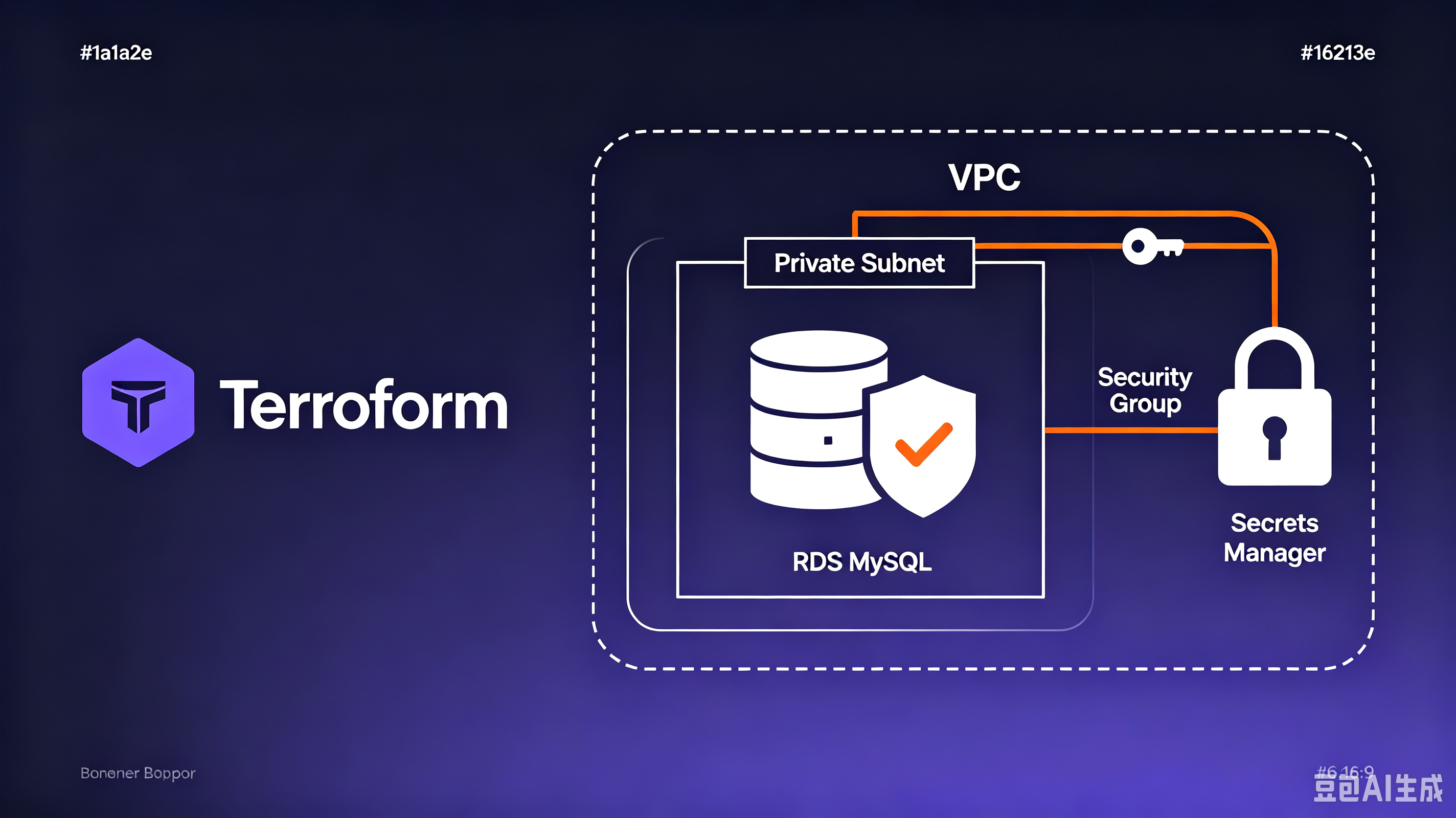
本篇目标
用Terraform创建RDS MySQL数据库,配合Secrets Manager安全管理数据库密码。理解数据库子网组、安全访问控制和密钥管理最佳实践。
学完本篇你将掌握:
- RDS数据库的创建和配置
- 数据库子网组(DB Subnet Group)
- Secrets Manager存储和管理密码
- random_password生成安全密码
- 数据库安全组设计(只允许应用层访问)
前置条件
- 已完成前九篇练习
- 理解VPC公私网和安全组
为什么需要Secrets Manager
之前的练习中密码可以写在变量里,但生产环境这样做很危险:
| 方式 | 问题 |
|---|---|
| 密码写在代码里 | 推到Git后所有人都能看到 |
| 密码写在tfvars里 | tfvars可能被提交,或本地泄露 |
| 密码写在环境变量里 | 不方便管理和轮转 |
| Secrets Manager | 加密存储、API获取、支持自动轮转、有审计日志 |
架构图
┌─────────────────────────────────────────────────────────┐
│                 VPC (10.0.0.0/16)                        │
│                                                         │
│  ┌───────────────┐  ┌───────────────┐  ┌───────────┐  │
│  │ 公有子网(2个)  │  │ 私有子网(2个)  │  │DB子网(2个)│  │
│  │ 10.0.1-2.0/24│  │ 10.0.10-11/24│  │10.0.20-21 │  │
│  └───────────────┘  └───────────────┘  └─────┬─────┘  │
│                                               │         │
│                                        ┌──────┴──────┐  │
│                                        │  RDS MySQL  │  │
│                                        │  db.t3.micro│  │
│                                        │  port:3306  │  │
│                                        └─────────────┘  │
│                                               ↑         │
│                                          安全组:        │
│                                     只允许VPC内部3306    │
└─────────────────────────────────────────────────────────┘

        ┌─────────────────────┐
        │  Secrets Manager    │
        │  存储DB用户名/密码   │  ← 应用通过API获取密码
        └─────────────────────┘
目录结构
10-rds-secrets/
├── main.tf          # VPC + RDS + Secrets Manager + 安全组
├── variables.tf     # 变量(DB规格、库名、用户名)
└── outputs.tf       # 输出(端点地址、Secret名称)
完整代码
main.tf
terraform {
  required_providers {
    aws = {
      source  = "hashicorp/aws"
      version = "~> 5.0"
    }
    random = {
      source  = "hashicorp/random"
      version = "~> 3.0"
    }
  }
  required_version = ">= 1.0"
}

provider "aws" {
  region = var.region
}

locals {
  name_prefix = "${var.project_name}-${var.environment}"

  common_tags = {
    Project     = var.project_name
    Environment = var.environment
    ManagedBy   = "terraform"
  }
}

# VPC(注意:多了database_subnets)
module "vpc" {
  source  = "terraform-aws-modules/vpc/aws"
  version = "5.16.0"

  name = "${local.name_prefix}-vpc"
  cidr = "10.0.0.0/16"

  azs              = ["${var.region}a", "${var.region}b"]
  public_subnets   = ["10.0.1.0/24", "10.0.2.0/24"]
  private_subnets  = ["10.0.10.0/24", "10.0.11.0/24"]
  database_subnets = ["10.0.20.0/24", "10.0.21.0/24"]  # 【新增】数据库专用子网

  # 社区模块自动创建数据库子网组
  create_database_subnet_group = true
  database_subnet_group_name   = "${local.name_prefix}-db-subnet-group"

  enable_nat_gateway   = false
  enable_dns_hostnames = true
  enable_dns_support   = true

  tags = local.common_tags
}

# 【新资源】随机密码(不把密码写在代码里)
resource "random_password" "db_password" {
  length           = 16
  special          = true
  override_special = "!#$%&*()-_=+[]{}<>:?"
}

# 【新资源】Secrets Manager - 密钥存储
resource "aws_secretsmanager_secret" "db_credentials" {
  name                    = "${local.name_prefix}-db-credentials"
  description             = "RDS database credentials"
  recovery_window_in_days = 0    # 练习用(生产用7-30天)

  tags = local.common_tags
}

# Secret的值(JSON格式)
resource "aws_secretsmanager_secret_version" "db_credentials" {
  secret_id = aws_secretsmanager_secret.db_credentials.id

  secret_string = jsonencode({
    username = var.db_username
    password = random_password.db_password.result
    dbname   = var.db_name
    host     = aws_db_instance.mysql.endpoint
    port     = 3306
    engine   = "mysql"
  })
}

# 安全组 - 只允许VPC内部访问3306
resource "aws_security_group" "rds" {
  name   = "${local.name_prefix}-rds-sg"
  vpc_id = module.vpc.vpc_id

  ingress {
    description = "MySQL from VPC"
    from_port   = 3306
    to_port     = 3306
    protocol    = "tcp"
    cidr_blocks = [module.vpc.vpc_cidr_block]
  }

  egress {
    from_port   = 0
    to_port     = 0
    protocol    = "-1"
    cidr_blocks = ["0.0.0.0/0"]
  }

  tags = merge(local.common_tags, {
    Name = "${local.name_prefix}-rds-sg"
  })
}

# 【新资源】RDS MySQL
resource "aws_db_instance" "mysql" {
  identifier = "${local.name_prefix}-mysql"

  # 引擎
  engine         = "mysql"
  engine_version = "8.0"
  instance_class = var.db_instance_class

  # 存储
  allocated_storage     = 20
  max_allocated_storage = 50
  storage_type          = "gp3"
  storage_encrypted     = true

  # 数据库
  db_name  = var.db_name
  username = var.db_username
  password = random_password.db_password.result

  # 网络
  db_subnet_group_name   = module.vpc.database_subnet_group_name
  vpc_security_group_ids = [aws_security_group.rds.id]
  publicly_accessible    = false    # 不允许公网访问

  # 备份
  backup_retention_period = 1
  skip_final_snapshot     = true

  # 高可用(练习关闭)
  multi_az            = false
  deletion_protection = false

  tags = merge(local.common_tags, {
    Name = "${local.name_prefix}-mysql"
  })
}
variables.tf
variable "region" {
  default = "us-east-1"
}

variable "project_name" {
  default = "tf-practice"
}

variable "environment" {
  default = "dev"
}

variable "db_instance_class" {
  description = "RDS实例规格"
  default     = "db.t3.micro"
}

variable "db_name" {
  description = "数据库名称"
  default     = "myapp"
}

variable "db_username" {
  description = "数据库管理员用户名"
  default     = "admin"
}
outputs.tf
output "rds_endpoint" {
  description = "RDS连接地址"
  value       = aws_db_instance.mysql.endpoint
}

output "rds_port" {
  value = aws_db_instance.mysql.port
}

output "rds_database_name" {
  value = aws_db_instance.mysql.db_name
}

output "secret_name" {
  description = "Secrets Manager中的密钥名称"
  value       = aws_secretsmanager_secret.db_credentials.name
}

output "secret_arn" {
  description = "Secret ARN"
  value       = aws_secretsmanager_secret.db_credentials.arn
}

# 不输出密码明文!通过API获取
output "how_to_get_password" {
  value = "aws secretsmanager get-secret-value --secret-id ${aws_secretsmanager_secret.db_credentials.name} --query SecretString --output text"
}
新增资源说明
RDS关键字段
| 字段 | 含义 | 示例值 |
|---|---|---|
identifier | RDS实例标识(控制台显示的名称) | “tf-practice-dev-mysql” |
engine / engine_version | 数据库引擎和版本 | “mysql” / “8.0” |
instance_class | 实例规格 | “db.t3.micro” |
allocated_storage | 初始存储(GB) | 20 |
max_allocated_storage | 存储自动扩展上限(GB) | 50 |
storage_type | 存储类型 | “gp3”(性价比最高) |
storage_encrypted | 是否加密存储 | true |
db_subnet_group_name | 数据库子网组 | 跨2个AZ |
publicly_accessible | 是否允许公网访问 | false(必须) |
multi_az | 是否多AZ高可用 | 生产true,练习false |
backup_retention_period | 备份保留天数 | 生产7-30,练习1 |
skip_final_snapshot | 删除时是否跳过最终快照 | 生产false,练习true |
deletion_protection | 防止误删 | 生产true,练习false |
Secrets Manager关键字段
| 字段 | 含义 |
|---|---|
name | 密钥名称(全局唯一) |
recovery_window_in_days | 删除后保留天数(0=立即删,生产用7-30) |
secret_string | 密钥值(通常是JSON格式) |
random_password
resource "random_password" "db_password" {
  length           = 16            # 密码长度
  special          = true          # 包含特殊字符
  override_special = "!#$%&*()..."  # 指定允许的特殊字符
}
# 引用:random_password.db_password.result
database_subnets(VPC模块新参数)
module "vpc" {
  # ...
  database_subnets = ["10.0.20.0/24", "10.0.21.0/24"]    # 数据库专用子网
  create_database_subnet_group = true                      # 自动创建子网组
  database_subnet_group_name   = "xxx-db-subnet-group"     # 子网组名称
}
RDS要求至少2个AZ的子网才能创建子网组。社区VPC模块支持直接传database_subnets参数自动处理。
操作步骤与实际输出
Apply(RDS创建约6-7分钟)
terraform apply -auto-approve
module.vpc.aws_db_subnet_group.database[0]: Creation complete after 3s
aws_security_group.rds: Creation complete after 7s
aws_db_instance.mysql: Still creating... [6m0s elapsed]
aws_db_instance.mysql: Creation complete after 6m30s

Apply complete! Resources: 27 added, 0 changed, 0 destroyed.

Outputs:
rds_endpoint      = "tf-practice-dev-mysql.cqnyouc4a558.us-east-1.rds.amazonaws.com:3306"
rds_database_name = "myapp"
secret_name       = "tf-practice-dev-db-credentials"
how_to_get_password = "aws secretsmanager get-secret-value --secret-id tf-practice-dev-db-credentials --query SecretString --output text"
获取密码(通过API而非明文输出)
aws secretsmanager get-secret-value \
  --secret-id tf-practice-dev-db-credentials \
  --query SecretString --output text
返回JSON:
{
  "username": "admin",
  "password": "随机生成的16位密码",
  "dbname": "myapp",
  "host": "tf-practice-dev-mysql.xxx.rds.amazonaws.com:3306",
  "port": 3306,
  "engine": "mysql"
}
控制台验证
RDS实例详情:
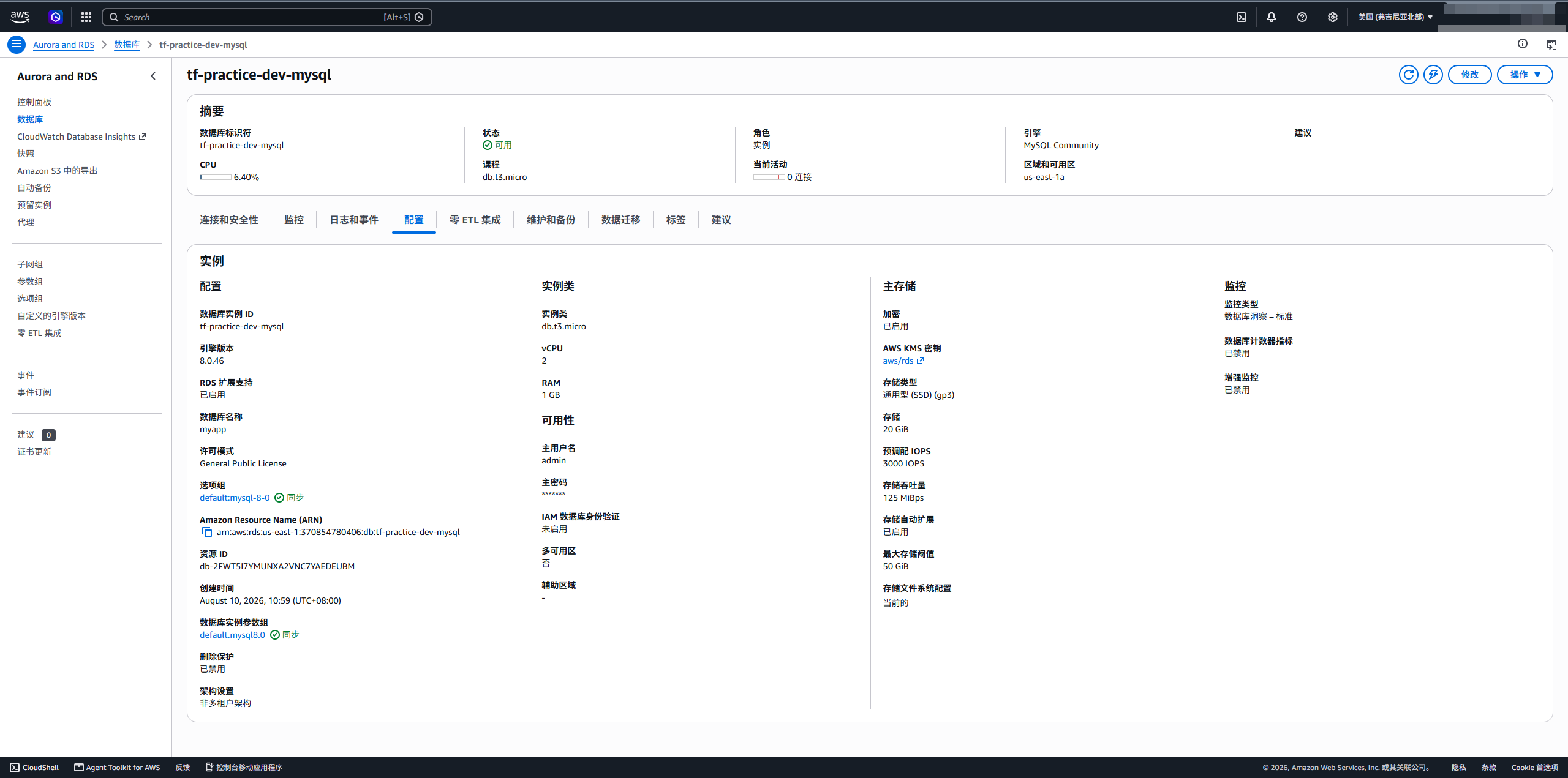
- 引擎:MySQL 8.0
- 规格:db.t3.micro
- 状态:Available
连接与安全:
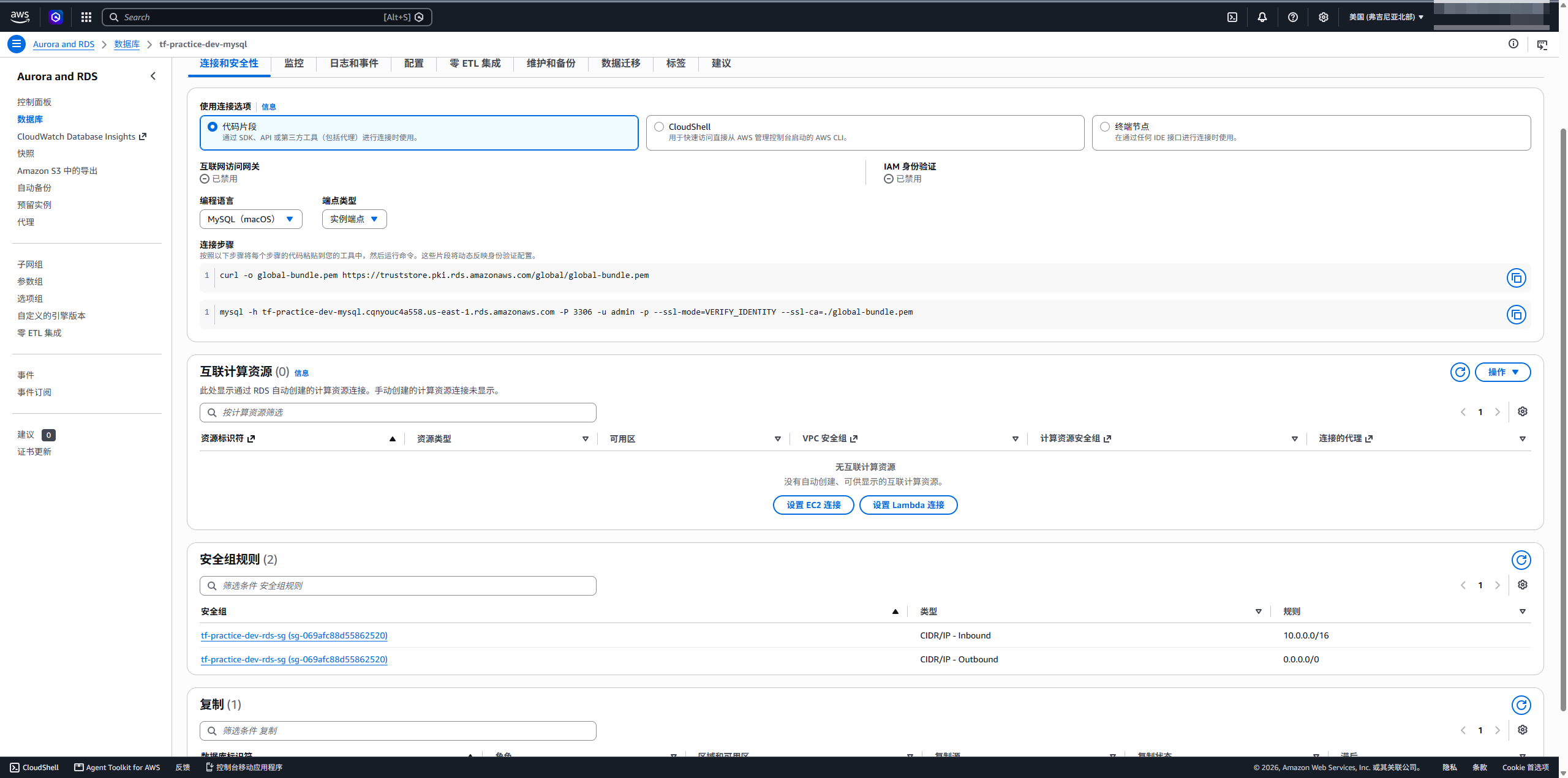
- 公网访问:No
- VPC和子网组
Secrets Manager:
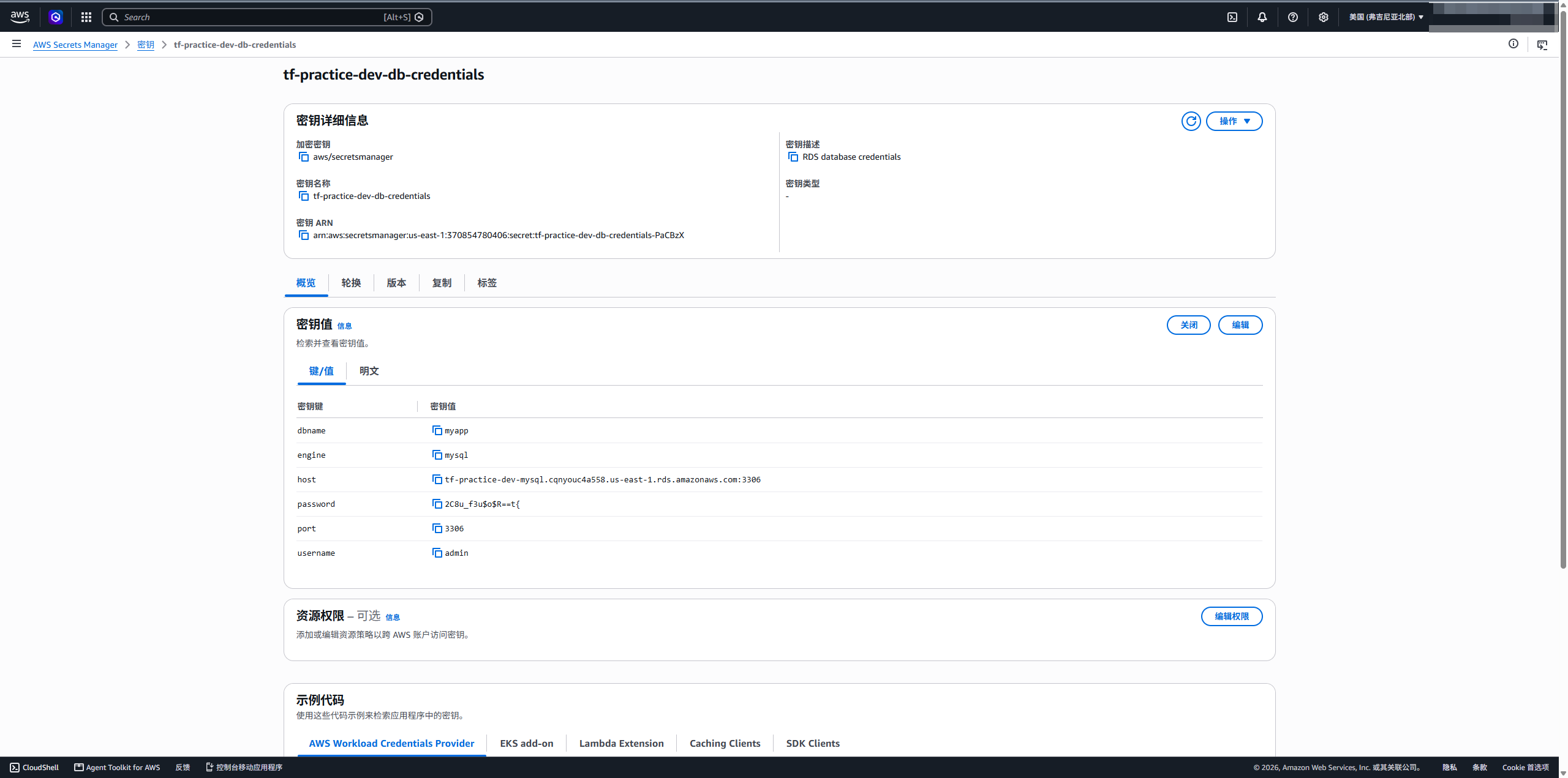
- 密钥已创建
数据库子网组:
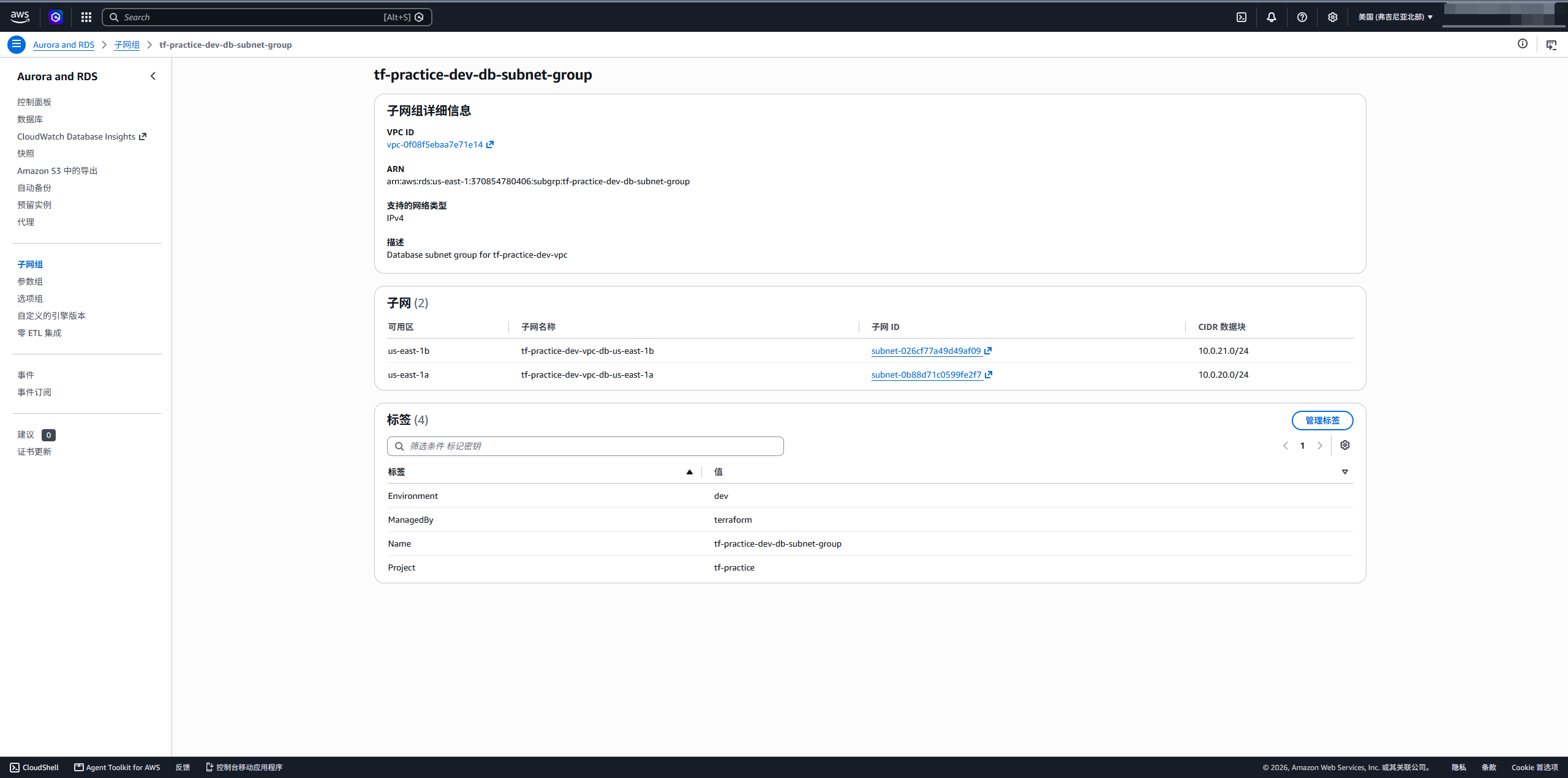
- 跨2个AZ
Destroy
terraform destroy -auto-approve
# Destroy complete! Resources: 27 destroyed.
安全最佳实践
| 实践 | 本篇演示 | 生产环境建议 |
|---|---|---|
| 密码不写在代码里 | ✅ random_password生成 | ✅ |
| 密码存在Secrets Manager | ✅ | ✅ + 开启自动轮转 |
| RDS不可公网访问 | ✅ publicly_accessible=false | ✅ |
| 安全组限制来源 | ✅ 只允许VPC内部 | 进一步限制到应用安全组 |
| 存储加密 | ✅ storage_encrypted=true | ✅ + 用自定义KMS key |
| 多AZ高可用 | ❌ 省钱关闭 | ✅ multi_az=true |
| 删除保护 | ❌ 练习关闭 | ✅ deletion_protection=true |
| 备份保留 | 1天 | 7-30天 |
延伸思考:面试常见问题
| 面试问题 | 答案要点 |
|---|---|
| RDS密码怎么管理? | random_password生成 + Secrets Manager存储,不在代码中明文 |
| 为什么RDS要放私有子网? | 不暴露公网,只允许VPC内部应用访问 |
| DB Subnet Group是什么? | 告诉RDS可以在哪些子网创建实例,至少跨2个AZ |
| multi_az有什么用? | 主从自动切换,主实例挂了自动failover到备用AZ |
| 应用怎么获取数据库密码? | 通过Secrets Manager API获取,不写死在配置文件里 |
| gp3和gp2的区别? | gp3性价比更高,基准性能更好,可独立调整IOPS |
费用说明
| 资源 | 费用 |
|---|---|
| RDS db.t3.micro | ~$0.017/小时 |
| Secrets Manager | ~$0.40/月(按比例) |
| VPC / 子网 / 安全组 | 免费 |
| 总计 | ~$0.02/小时 |
本次练习(约15分钟):约$0.01
小结
本篇核心收获:
- RDS放私有子网 +
publicly_accessible=false是安全标配 - random_password 生成密码 + Secrets Manager 存储 = 安全的密码管理
- DB Subnet Group 需要至少2个AZ的子网(VPC模块可自动创建)
- 不输出密码明文,通过Secrets Manager API获取
- 生产环境要开multi_az、deletion_protection、更长的备份保留
下一篇预告
Terraform实战11:完整三层架构(VPC + ALB + EKS + RDS)
下一篇将串联前面所有知识,构建一个完整的生产级架构:
- VPC网络层
- ALB负载均衡层
- EKS计算层
- RDS数据层
- 所有组件通过模块组合
参考链接
更多推荐

 11
11 0
0- 0


 已为社区贡献15条内容

所有评论(0)