
【免费】基于YOLO26的车辆车牌识别系统(深度学习+LPRNet+CCPD+PyQt6) 人工智能 机器视觉 计算机视觉 锋哥原创出品,必属精品
·
大家好,我是Java1234_小锋老师,分享一套锋哥原创的基于YOLO26的车辆车牌识别系统(深度学习+LPRNet+CCPD+PyQt6) 人工智能 机器视觉 计算机视觉。
项目介绍
随着机动车保有量持续增长,停车场管理、卡口稽查和道路监控等场景对车牌自动识别提出了更高要求。传统依赖人工判读或浅层特征的方法在复杂光照、倾斜拍摄和新能源绿牌并存的条件下稳定性不足。本文设计并实现了一套基于YOLO26、LPRNet与CCPD的车辆车牌识别桌面系统,在CPU环境下完成从车牌定位到字符识别的完整流程。
系统采用两阶段技术路线:首先使用在CCPD中文车牌数据上训练的YOLO26-Pose模型检测车牌区域并回归四个角点,再通过透视变换将倾斜车牌拉正;对双层车牌执行上下区域拆分与横向拼接;随后将矫正图像缩放为94×24像素,送入LPRNet进行端到端字符识别,并以CTC贪心解码得到车牌号码。颜色判定与号牌类型推断作为后处理,用于区分普通蓝牌、新能源绿牌和黄牌。
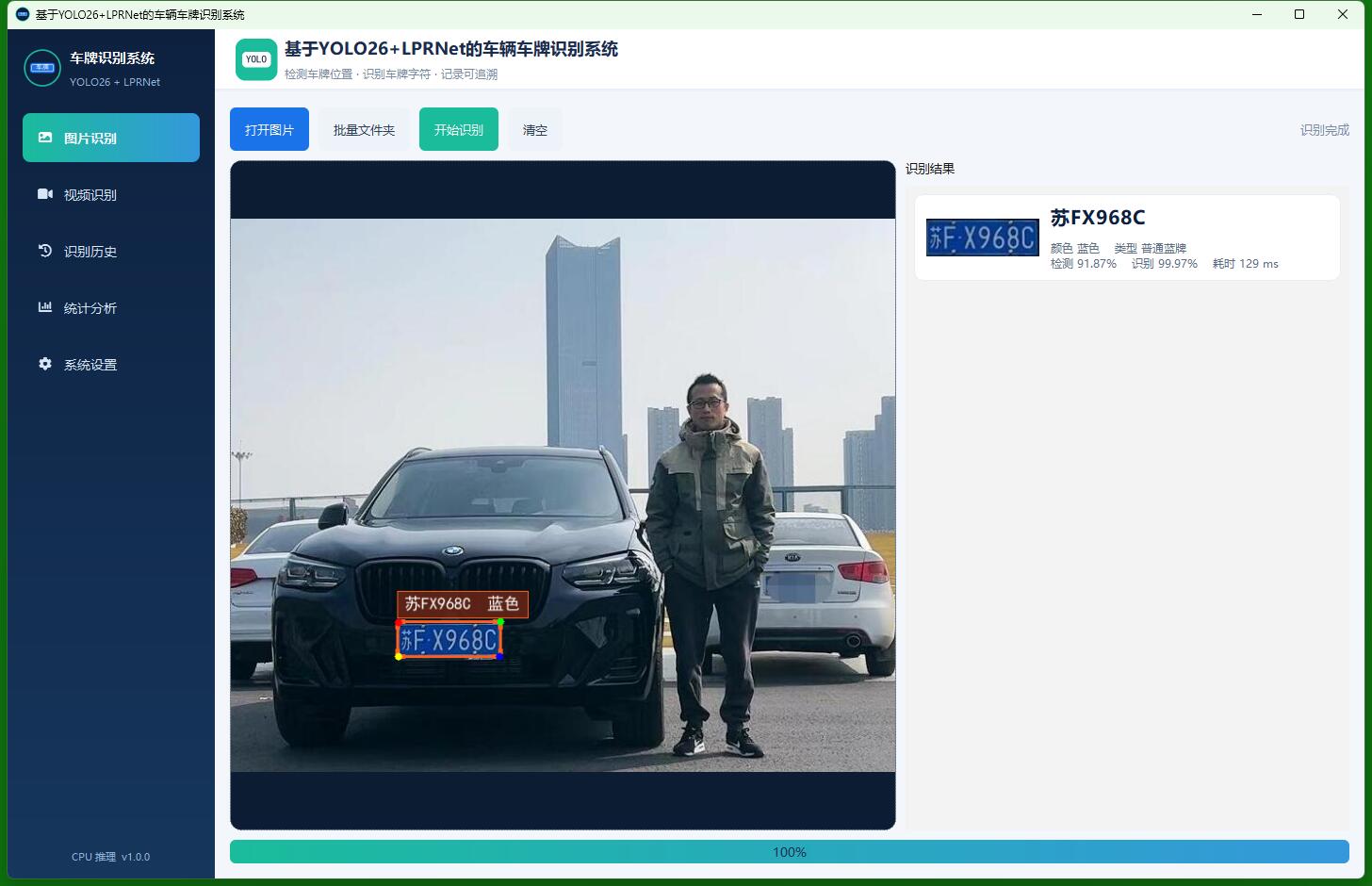
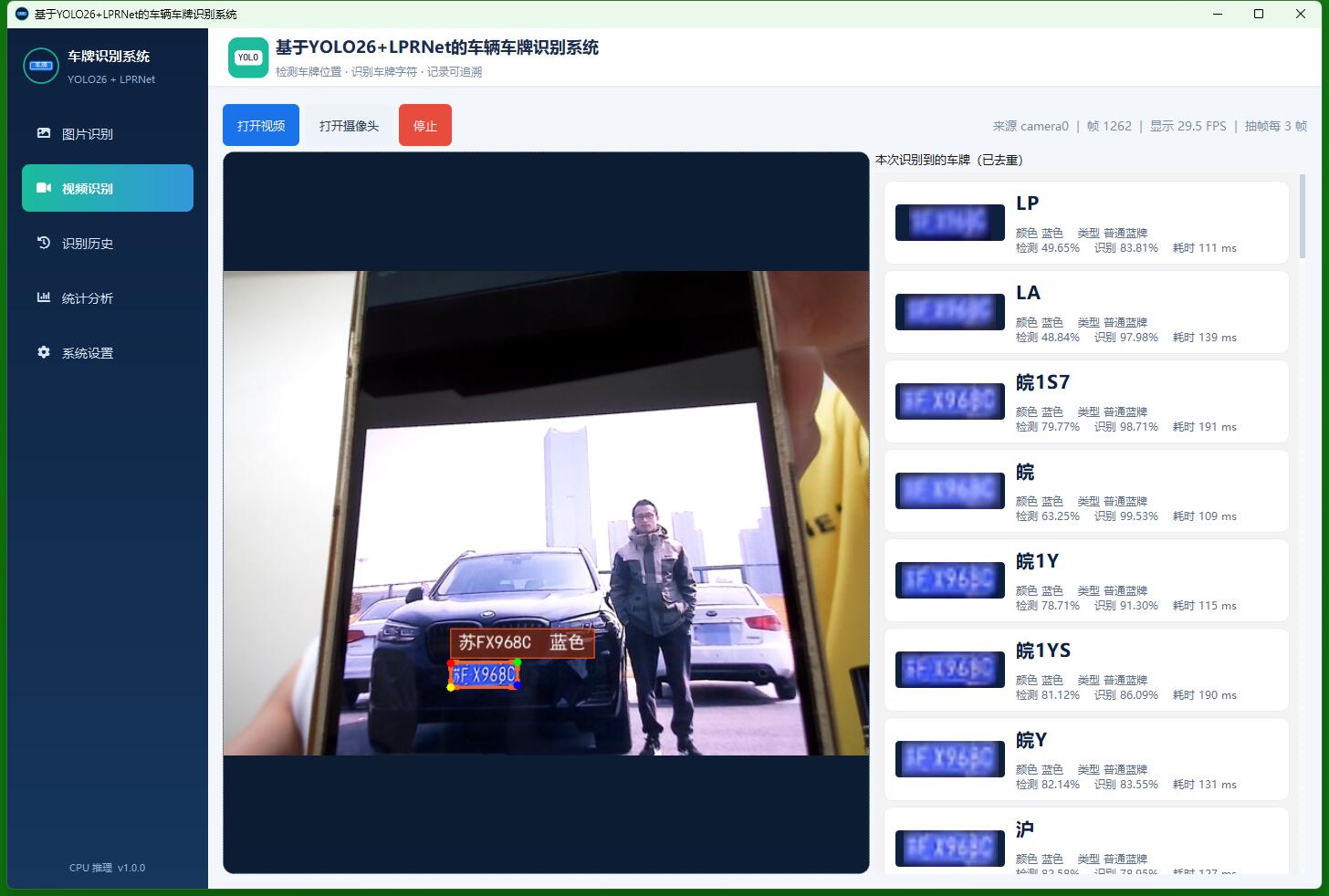
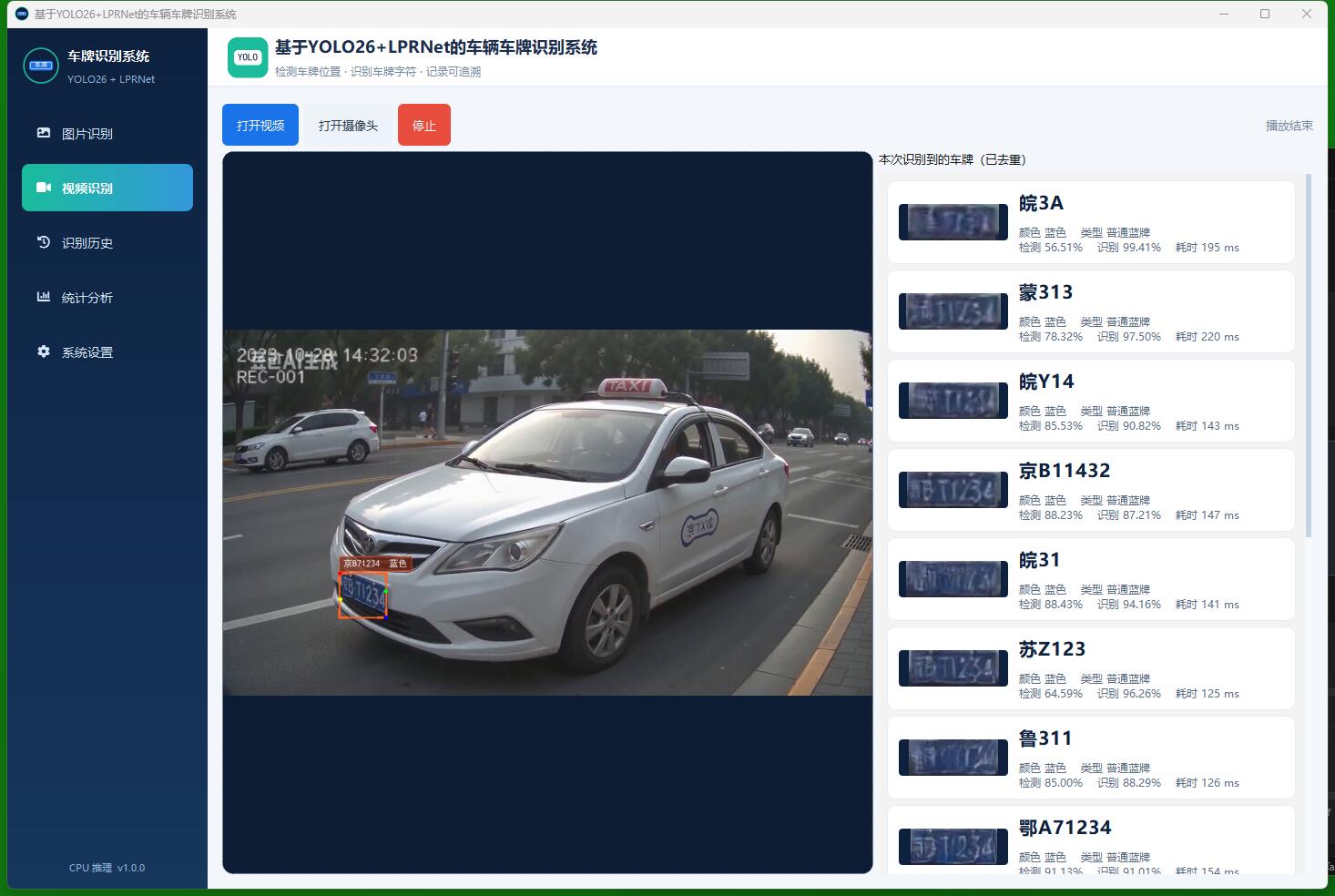
软件层面以Python 3.11为开发语言,使用PyQt6构建侧边导航式图形界面,覆盖图片识别、视频与摄像头识别、识别历史、统计分析与系统设置五类功能。识别任务放入工作线程,避免界面卡顿。数据层采用MySQL 8,库名为db_plate_recognition,包含识别记录、模型信息和系统参数三张表,原图、车牌小图和标注图统一保存到本地目录。测试表明,系统能够完成蓝牌、绿牌、黄牌的检测与识别,并支持批量图片与抽帧视频处理,满足本科毕业设计的功能完整性与可演示性要求。
源码下载
链接: https://pan.baidu.com/s/1Rjp2PTRWZnIplgYjF9mB1w?pwd=1234
提取码: 1234
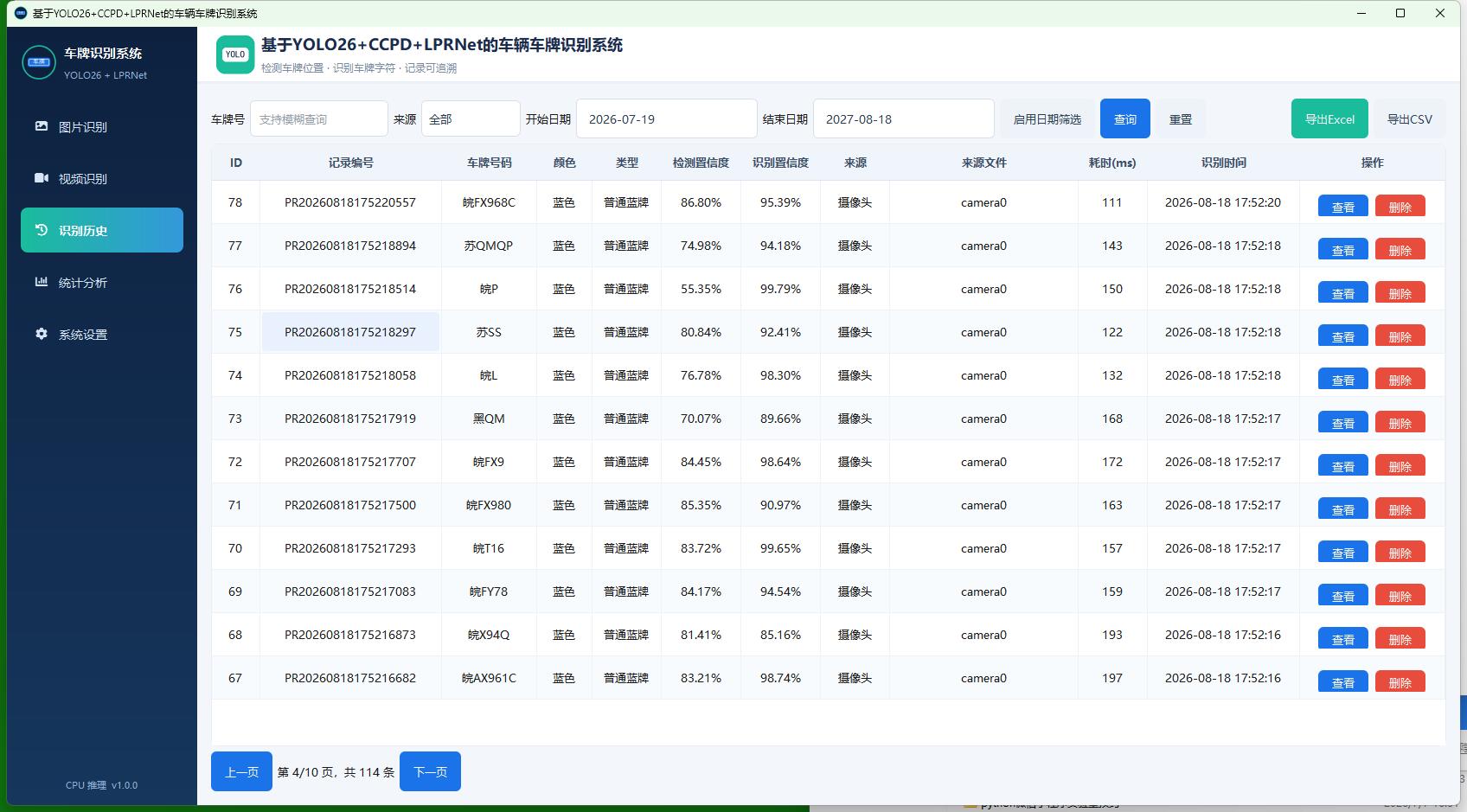
系统展示
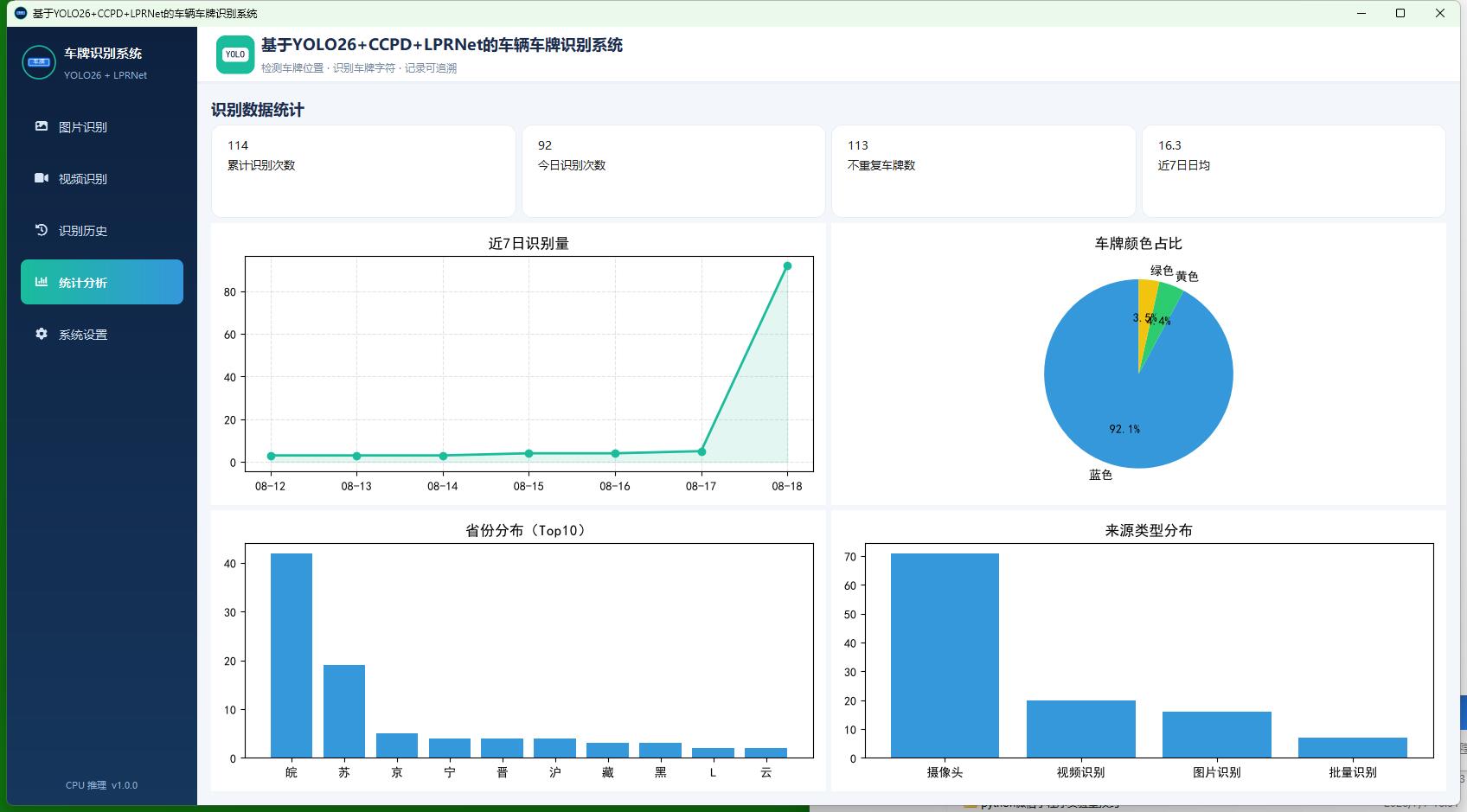
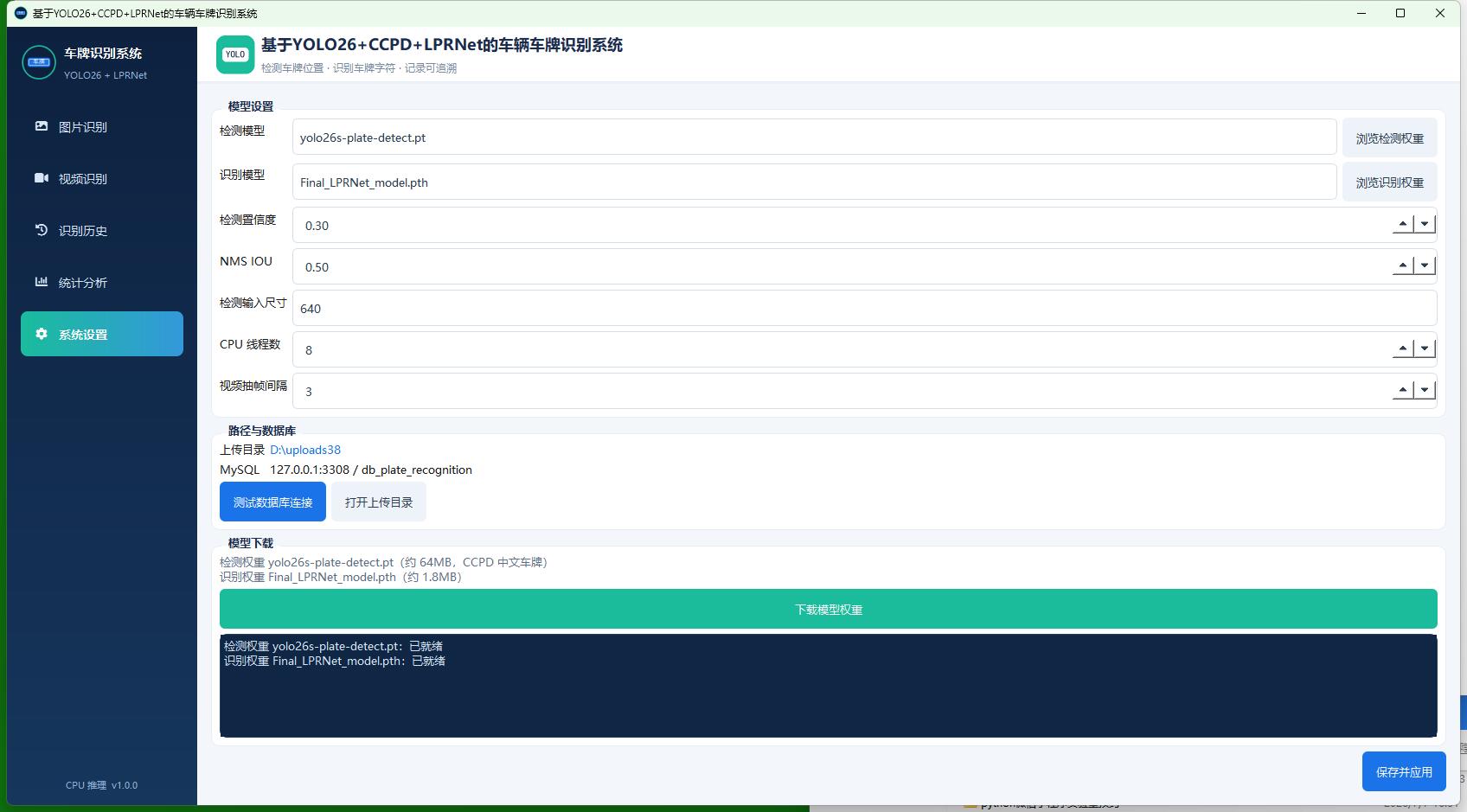
核心代码
# -*- coding: utf-8 -*-
"""
YOLO26-Pose 车牌检测器。

加载 `yolo26s-plate-detect.pt`(或用户指定的其它 YOLO 权重),
在 CPU 上推理,输出检测框、置信度、类别(单层/双层)以及四个角点。
若加载的是普通 detect 模型(无关键点),则仅返回检测框。
"""

from pathlib import Path
from typing import List, Optional

import numpy as np

from config.settings import Settings
from utils.logger import logger


class PlateDetector:
    """车牌检测器,封装 Ultralytics YOLO 的加载与推理。"""

    def __init__(
        self,
        weights_path: Optional[str] = None,
        conf: float = None,
        iou: float = None,
        imgsz: int = None,
        device: str = None,
    ):
        """
        初始化检测器(延迟加载权重,避免导入阶段就报错)。

        :param weights_path: 权重文件路径
        :param conf: 置信度阈值
        :param iou: NMS IOU 阈值
        :param imgsz: 检测输入尺寸
        :param device: 推理设备,本系统固定 cpu
        """
        self.weights_path = str(weights_path or Settings.DETECT_MODEL_PATH)
        self.conf = Settings.DETECT_CONF if conf is None else conf
        self.iou = Settings.DETECT_IOU if iou is None else iou
        self.imgsz = Settings.DETECT_IMGSZ if imgsz is None else imgsz
        self.device = device or Settings.DEVICE
        self.model = None
        self.ready = False
        self.error_msg = ""

    def load(self) -> bool:
        """
        加载 YOLO 权重到 CPU。

        :return: 是否加载成功
        """
        path = Path(self.weights_path)
        if not path.exists():
            self.error_msg = f"检测权重不存在:{path},请先在系统设置页下载模型"
            logger.warning(self.error_msg)
            self.ready = False
            return False
        try:
            from ultralytics import YOLO

            self.model = YOLO(str(path))
            self.ready = True
            self.error_msg = ""
            logger.info("检测模型加载成功:%s", path)
            return True
        except Exception as exc:
            self.error_msg = f"检测模型加载失败:{exc}"
            logger.exception(self.error_msg)
            self.ready = False
            return False

    def reload(self, weights_path: str) -> bool:
        """
        切换并重新加载检测权重。

        :param weights_path: 新的权重路径
        :return: 是否加载成功
        """
        self.weights_path = str(weights_path)
        self.model = None
        return self.load()

    def detect(self, image: np.ndarray) -> List[dict]:
        """
        对单张图像执行车牌检测。

        :param image: BGR 图像
        :return: 检测结果列表,每项包含 rect/conf/cls/landmarks
        """
        if image is None:
            return []
        if not self.ready or self.model is None:
            if not self.load():
                return []
        try:
            results = self.model.predict(
                source=image,
                conf=self.conf,
                iou=self.iou,
                imgsz=self.imgsz,
                device=self.device,
                verbose=False,
            )
        except Exception as exc:
            logger.exception("YOLO 推理失败:%s", exc)
            return []

        detections = []
        for result in results:
            boxes = getattr(result, "boxes", None)
            if boxes is None or len(boxes) == 0:
                continue
            keypoints = getattr(result, "keypoints", None)
            kpts_xy = None
            if keypoints is not None and getattr(keypoints, "xy", None) is not None:
                kpts_xy = keypoints.xy
            num = len(boxes)
            for idx in range(num):
                xyxy = boxes.xyxy[idx].cpu().numpy().tolist()
                conf = float(boxes.conf[idx])
                cls_id = int(boxes.cls[idx]) if boxes.cls is not None else 0
                landmarks = []
                if kpts_xy is not None and idx < len(kpts_xy):
                    landmarks = kpts_xy[idx].cpu().numpy().tolist()
                detections.append(
                    {
                        "rect": [int(v) for v in xyxy],
                        "conf": conf,
                        "cls": cls_id,
                        "landmarks": landmarks,
                    }
                )
        return detections
# -*- coding: utf-8 -*-
"""
识别历史页面。

提供按车牌号、来源类型、日期区间筛选的分页表格,支持查看原图、删除和导出。
表格列宽按内容分配:记录编号、识别时间给固定宽度,来源文件列随窗口拉伸。
"""

import csv
from math import ceil

from PyQt6.QtCore import QDate, Qt
from PyQt6.QtGui import QPixmap
from PyQt6.QtWidgets import (
    QComboBox,
    QDateEdit,
    QDialog,
    QFileDialog,
    QHBoxLayout,
    QHeaderView,
    QLabel,
    QLineEdit,
    QMessageBox,
    QPushButton,
    QTableWidget,
    QTableWidgetItem,
    QVBoxLayout,
    QWidget,
)

from config.settings import Settings
from db.dao import PlateRecordDao
from ui.widgets.image_viewer import ImageViewer
from utils.image_utils import bgr_to_qimage, imread_unicode
from utils.plate_utils import source_type_text


class HistoryPage(QWidget):
    """识别历史查询页。"""

    def __init__(self, parent=None):
        """初始化历史页。"""
        super().__init__(parent)
        self.page = 1
        self.page_size = Settings.PAGE_SIZE
        self.total = 0
        self._build_ui()

    def _build_ui(self):
        """构建筛选栏与表格。"""
        root = QVBoxLayout(self)
        root.setContentsMargins(16, 16, 16, 16)

        filt = QHBoxLayout()
        filt.addWidget(QLabel("车牌号"))
        self.edt_plate = QLineEdit()
        self.edt_plate.setPlaceholderText("支持模糊查询")
        self.edt_plate.setFixedWidth(160)
        filt.addWidget(self.edt_plate)
        filt.addWidget(QLabel("来源"))
        self.cmb_source = QComboBox()
        self.cmb_source.addItem("全部", "")
        self.cmb_source.addItem("图片识别", "image")
        self.cmb_source.addItem("批量识别", "batch")
        self.cmb_source.addItem("视频识别", "video")
        self.cmb_source.addItem("摄像头", "camera")
        filt.addWidget(self.cmb_source)
        filt.addWidget(QLabel("开始日期"))
        self.dt_start = self._make_date_edit(QDate.currentDate().addDays(-30))
        filt.addWidget(self.dt_start)
        filt.addWidget(QLabel("结束日期"))
        self.dt_end = self._make_date_edit(QDate.currentDate())
        # 默认不限制日期,需点击「启用日期筛选」后才生效
        filt.addWidget(self.dt_end)
        self.chk_date = QPushButton("启用日期筛选")
        self.chk_date.setCheckable(True)
        self.chk_date.setStyleSheet("background:#eef3f9;color:#2c3e50;")
        filt.addWidget(self.chk_date)
        self.btn_query = QPushButton("查询")
        self.btn_reset = QPushButton("重置")
        self.btn_reset.setStyleSheet("background:#eef3f9;color:#2c3e50;")
        self.btn_export_xlsx = QPushButton("导出Excel")
        self.btn_export_xlsx.setStyleSheet("background:#1abc9c;")
        self.btn_export_csv = QPushButton("导出CSV")
        self.btn_export_csv.setStyleSheet("background:#eef3f9;color:#2c3e50;")
        filt.addWidget(self.btn_query)
        filt.addWidget(self.btn_reset)
        filt.addStretch()
        filt.addWidget(self.btn_export_xlsx)
        filt.addWidget(self.btn_export_csv)
        root.addLayout(filt)

        headers = [
            "ID", "记录编号", "车牌号码", "颜色", "类型", "检测置信度", "识别置信度",
            "来源", "来源文件", "耗时(ms)", "识别时间", "操作",
        ]
        self.table = QTableWidget(0, len(headers))
        self.table.setHorizontalHeaderLabels(headers)
        self.table.verticalHeader().setVisible(False)
        self.table.setAlternatingRowColors(True)
        self.table.setSelectionBehavior(self.table.SelectionBehavior.SelectRows)
        self.table.setEditTriggers(self.table.EditTrigger.NoEditTriggers)
        self.table.setWordWrap(False)
        # 行高加高,保证「查看 / 删除」按钮完整显示
        vheader = self.table.verticalHeader()
        vheader.setDefaultSectionSize(50)
        vheader.setMinimumSectionSize(50)
        vheader.setSectionResizeMode(QHeaderView.ResizeMode.Fixed)
        self._apply_column_widths()
        root.addWidget(self.table, 1)

        page_bar = QHBoxLayout()
        self.btn_prev = QPushButton("上一页")
        self.btn_next = QPushButton("下一页")
        self.lbl_page = QLabel("第 1 页")
        page_bar.addWidget(self.btn_prev)
        page_bar.addWidget(self.lbl_page)
        page_bar.addWidget(self.btn_next)
        page_bar.addStretch()
        root.addLayout(page_bar)

        self.btn_query.clicked.connect(self.reload)
        self.btn_reset.clicked.connect(self._reset)
        self.btn_prev.clicked.connect(self._prev)
        self.btn_next.clicked.connect(self._next)
        self.btn_export_xlsx.clicked.connect(lambda: self._export("xlsx"))
        self.btn_export_csv.clicked.connect(lambda: self._export("csv"))

    def _make_date_edit(self, date: QDate) -> QDateEdit:
        """
        创建带日历弹窗的日期选择框。

        :param date: 初始日期
        :return: 配置完成的日期控件
        """
        editor = QDateEdit()
        editor.setCalendarPopup(True)
        editor.setDisplayFormat("yyyy-MM-dd")
        editor.setDate(date)
        # 预留右侧日历图标空间,避免日期文字把箭头挤没
        editor.setFixedWidth(168)
        editor.setMinimumHeight(34)
        return editor

    def _apply_column_widths(self):
        """设置表格列宽:编号和时间给够宽度,来源文件占剩余空间。"""
        header = self.table.horizontalHeader()
        header.setMinimumSectionSize(56)
        header.setSectionResizeMode(QHeaderView.ResizeMode.Interactive)
        header.setStretchLastSection(False)
        # 来源文件列随窗口拉伸,其余列固定以免文字被省略号截断
        header.setSectionResizeMode(8, QHeaderView.ResizeMode.Stretch)
        header.setSectionResizeMode(11, QHeaderView.ResizeMode.Fixed)
        widths = {
            0: 56,    # ID
            1: 210,   # 记录编号 PR20260818172517001
            2: 110,   # 车牌号码
            3: 64,    # 颜色
            4: 80,    # 类型
            5: 92,    # 检测置信度
            6: 92,    # 识别置信度
            7: 80,    # 来源
            9: 80,    # 耗时(ms)
            10: 176,  # 识别时间 2026-08-18 17:25:17
            11: 168,  # 操作
        }
        for col, width in widths.items():
            self.table.setColumnWidth(col, width)

    def showEvent(self, event):
        """每次进入页面自动刷新。"""
        super().showEvent(event)
        self.reload()

    def _filters(self):
        """读取当前筛选条件。"""
        start = self.dt_start.date().toString("yyyy-MM-dd") if self.chk_date.isChecked() else ""
        end = self.dt_end.date().toString("yyyy-MM-dd") if self.chk_date.isChecked() else ""
        return {
            "plate_no": self.edt_plate.text().strip(),
            "source_type": self.cmb_source.currentData() or "",
            "start_date": start,
            "end_date": end,
        }

    def reload(self):
        """按条件重新查询当前页。"""
        try:
            rows, total = PlateRecordDao.page_query(
                page=self.page, page_size=self.page_size, **self._filters()
            )
        except Exception as exc:
            QMessageBox.warning(self, "查询失败", str(exc))
            return
        self.total = total
        pages = max(1, ceil(total / self.page_size)) if total else 1
        if self.page > pages:
            self.page = pages
        self.lbl_page.setText(f"第 {self.page}/{pages} 页,共 {total} 条")
        self.table.setRowCount(0)
        for row in rows:
            r = self.table.rowCount()
            self.table.insertRow(r)
            values = [
                str(row.get("id", "")),
                row.get("record_no", ""),
                row.get("plate_no", ""),
                row.get("plate_color", ""),
                row.get("plate_type", ""),
                f"{float(row.get('detect_conf') or 0):.2%}",
                f"{float(row.get('rec_conf') or 0):.2%}",
                source_type_text(row.get("source_type", "")),
                row.get("source_name", ""),
                str(row.get("cost_ms", "")),
                row.get("create_time", ""),
            ]
            for c, val in enumerate(values):
                item = QTableWidgetItem(val)
                item.setTextAlignment(Qt.AlignmentFlag.AlignCenter)
                item.setToolTip(val)
                self.table.setItem(r, c, item)
            self.table.setRowHeight(r, 50)
            op = QWidget()
            lay = QHBoxLayout(op)
            lay.setContentsMargins(8, 8, 8, 8)
            lay.setSpacing(8)
            lay.setAlignment(Qt.AlignmentFlag.AlignCenter)
            btn_view = QPushButton("查看")
            btn_view.setFixedSize(58, 28)
            btn_view.setStyleSheet("background:#1a73e8;padding:0px 8px;min-height:28px;max-height:28px;")
            btn_del = QPushButton("删除")
            btn_del.setFixedSize(58, 28)
            btn_del.setStyleSheet("background:#e74c3c;padding:0px 8px;min-height:28px;max-height:28px;")
            rid = int(row.get("id"))
            btn_view.clicked.connect(lambda _, i=rid: self._view(i))
            btn_del.clicked.connect(lambda _, i=rid: self._delete(i))
            lay.addWidget(btn_view)
            lay.addWidget(btn_del)
            self.table.setCellWidget(r, len(values), op)
        self._apply_column_widths()

    def _reset(self):
        """重置筛选条件。"""
        self.edt_plate.clear()
        self.cmb_source.setCurrentIndex(0)
        self.chk_date.setChecked(False)
        self.page = 1
        self.reload()

    def _prev(self):
        """上一页。"""
        if self.page > 1:
            self.page -= 1
            self.reload()

    def _next(self):
        """下一页。"""
        pages = max(1, ceil(self.total / self.page_size)) if self.total else 1
        if self.page < pages:
            self.page += 1
            self.reload()

    def _view(self, record_id: int):
        """弹出对话框查看原图与车牌小图。"""
        row = PlateRecordDao.get_by_id(record_id)
        if not row:
            return
        dlg = QDialog(self)
        dlg.setWindowTitle(f"识别详情 - {row.get('plate_no')}")
        dlg.resize(900, 560)
        lay = QVBoxLayout(dlg)
        info = QLabel(
            f"编号 {row.get('record_no')}    号码 {row.get('plate_no')}    "
            f"颜色 {row.get('plate_color')}    类型 {row.get('plate_type')}    "
            f"时间 {row.get('create_time')}"
        )
        lay.addWidget(info)
        imgs = QHBoxLayout()
        left = ImageViewer("无标注图")
        left.show_path(row.get("annotated_path") or row.get("original_path") or "")
        imgs.addWidget(left, 3)
        plate_box = QVBoxLayout()
        plate_box.addWidget(QLabel("车牌小图"))
        thumb = QLabel()
        thumb.setFixedSize(280, 90)
        thumb.setAlignment(Qt.AlignmentFlag.AlignCenter)
        thumb.setStyleSheet("background:#0d213f;border-radius:6px;color:#fff;")
        plate_img = imread_unicode(row.get("plate_path") or "")
        if plate_img is not None:
            qimg = bgr_to_qimage(plate_img)
            thumb.setPixmap(
                QPixmap.fromImage(qimg).scaled(
                    thumb.size(),
                    Qt.AspectRatioMode.KeepAspectRatio,
                    Qt.TransformationMode.SmoothTransformation,
                )
            )
        else:
            thumb.setText("暂无小图")
        plate_box.addWidget(thumb)
        plate_box.addStretch()
        imgs.addLayout(plate_box, 1)
        lay.addLayout(imgs, 1)
        dlg.exec()

    def _delete(self, record_id: int):
        """删除一条记录。"""
        if QMessageBox.question(self, "确认", "确定删除该识别记录?") != QMessageBox.StandardButton.Yes:
            return
        PlateRecordDao.delete_by_id(record_id)
        self.reload()

    def _export(self, kind: str):
        """
        导出当前筛选条件下的全部记录。

        :param kind: xlsx 或 csv
        """
        try:
            rows = PlateRecordDao.list_export(**self._filters())
        except Exception as exc:
            QMessageBox.warning(self, "导出失败", str(exc))
            return
        if not rows:
            QMessageBox.information(self, "提示", "没有可导出的数据")
            return
        suffix = "xlsx" if kind == "xlsx" else "csv"
        path, _ = QFileDialog.getSaveFileName(
            self, "保存文件", f"识别记录.{suffix}", f"*.{suffix}"
        )
        if not path:
            return
        headers = [
            "ID", "记录编号", "车牌号码", "颜色", "类型", "检测置信度", "识别置信度",
            "来源", "来源文件", "原图路径", "车牌图路径", "耗时ms", "识别时间",
        ]
        keys = [
            "id", "record_no", "plate_no", "plate_color", "plate_type",
            "detect_conf", "rec_conf", "source_type", "source_name",
            "original_path", "plate_path", "cost_ms", "create_time",
        ]
        try:
            if kind == "csv":
                with open(path, "w", newline="", encoding="utf-8-sig") as fp:
                    writer = csv.writer(fp)
                    writer.writerow(headers)
                    for row in rows:
                        writer.writerow([row.get(k, "") for k in keys])
            else:
                from openpyxl import Workbook

                wb = Workbook()
                ws = wb.active
                ws.title = "识别记录"
                ws.append(headers)
                for row in rows:
                    values = []
                    for k in keys:
                        val = row.get(k, "")
                        if k == "source_type":
                            val = source_type_text(val)
                        values.append(val)
                    ws.append(values)
                wb.save(path)
            QMessageBox.information(self, "成功", f"已导出 {len(rows)} 条到\n{path}")
        except Exception as exc:
            QMessageBox.warning(self, "导出失败", str(exc))
更多推荐


 43
43 0
0- 0


 已为社区贡献35条内容

所有评论(0)