
hgdb4.5.8.8版本下pgagent扩展使用的注意事项
环境
系统平台:Linux x86-64 Red Hat Enterprise Linux 7
版本:4.5.8
文档用途
本文主要用于介绍瀚高数据库安全版4.5.8.8下pgagent使用注意事项。
详细信息
一、pgagent的安装
1、在使用瀚高数据库时,如有使用pgagent的需求,需瀚高开发提供相应安装包,直接使用pgagent源码编译安装可能存在兼容性问题;
2、使用原生pg数据库编译pgagent,请参考support文档:054248704
3、本文中,数据库安装包集成了pgagent,当安装完数据库并关闭三权后,使用sysdba用户在highgo库完成pgagent的创建,相关命令如下:
psql highgo sysdba
create extension pgagent;
4、在完成pgagent的扩展创建后,还需要启动pgagent进程,建议提前配置pgpass文件,防止密码明文泄露,参考命令如下:
nohup pgagent  hostaddr=127.0.0.1 dbname=highgo user=sysdba  port=5866 password=Hello@123  -l 1 -s /tmp/pgagent.log &

-l :日志级别,ERROR=0, WARNING=1, DEBUG=2, default 0表示不开启,在测试阶段可以调整为2,方便定位问题
-l <logging verbosity (ERROR=0, WARNING=1, DEBUG=2, default 0)>
5、启动pgagent后,如要关闭pgagent,可通过kill-9 +进程id的方式关闭pgagent进程,此方法不会引起数据库的崩溃重启。
二、 pgagent任务的创建
总体步骤分为三步:创建pgagent任务–创建步骤(编辑要定时运行的sql或批次)–创建计划(做定时任务)
1、创建pgagent任务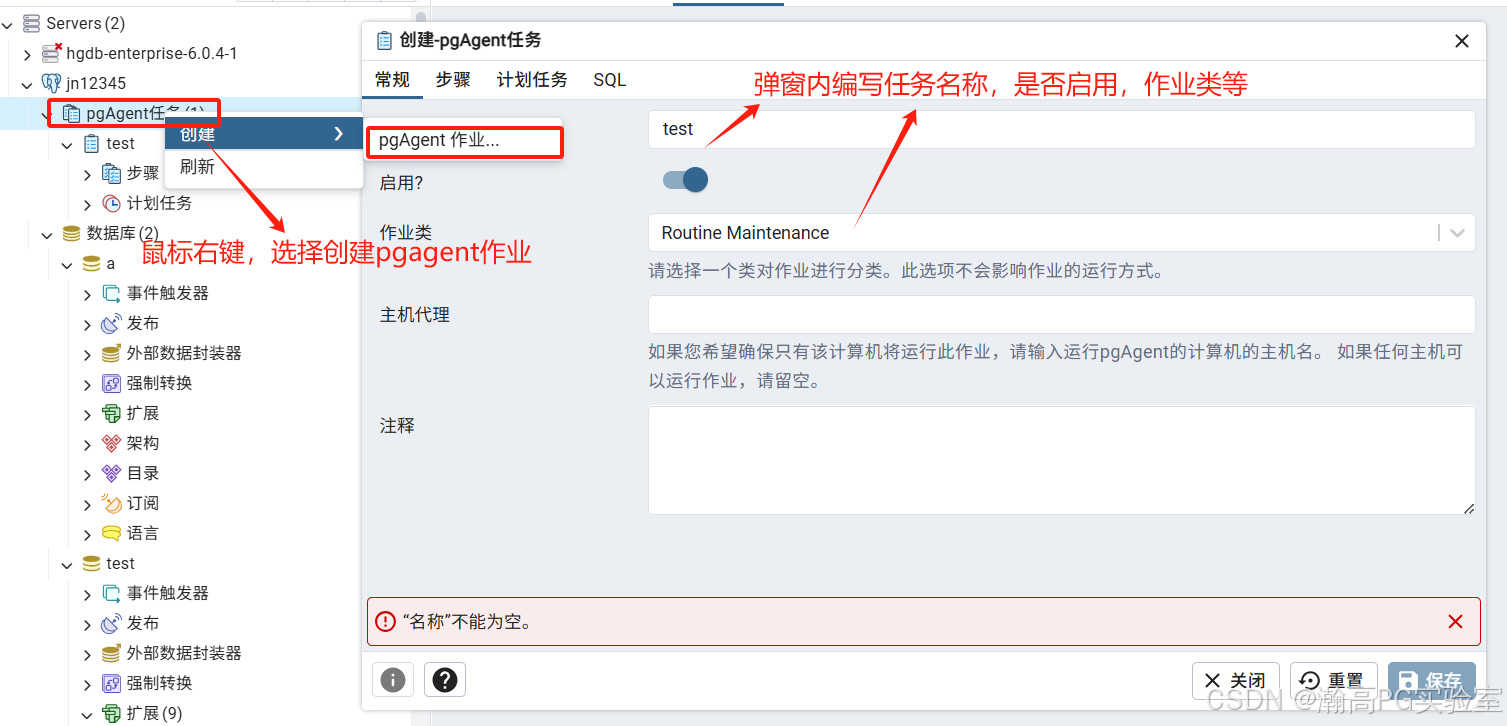
2、创建步骤
编辑常规及sql项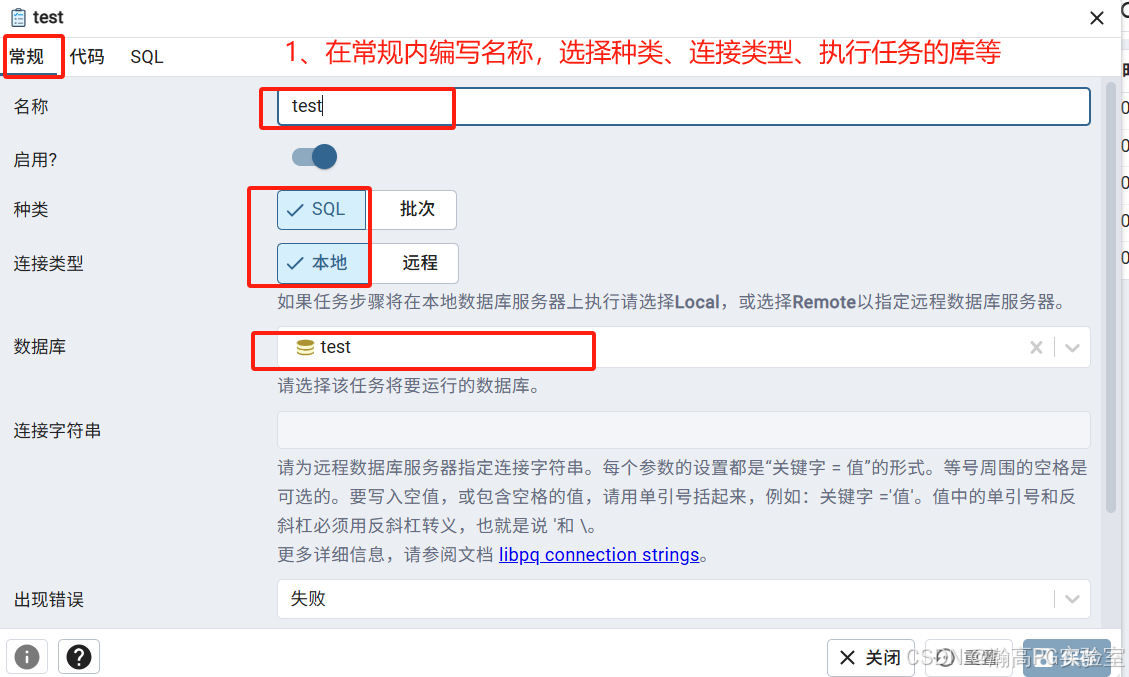

3、创建计划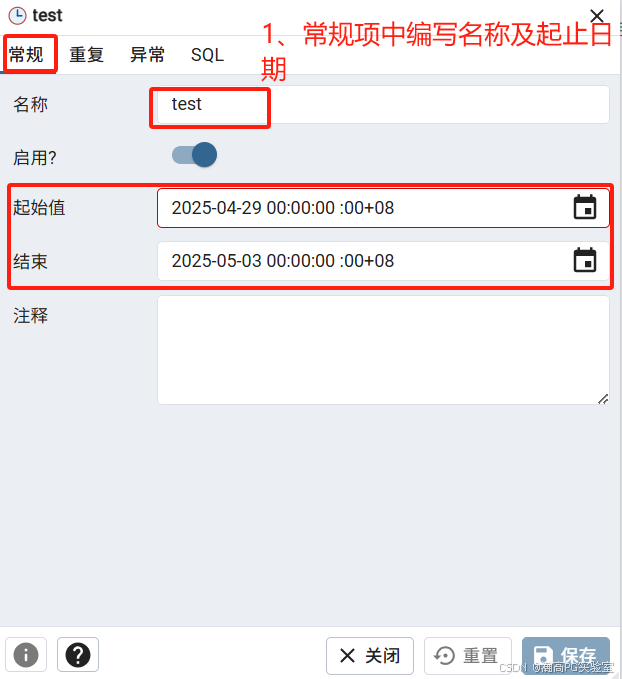
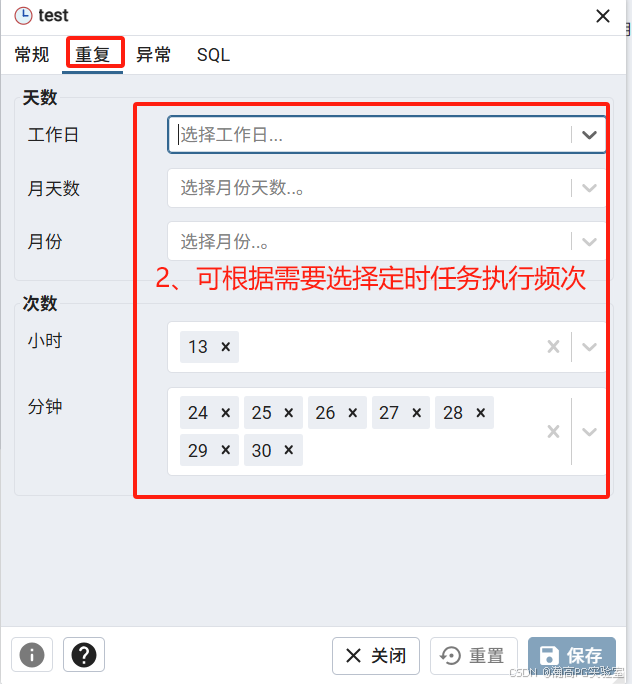
最后点击保存完成pgagent任务的编辑。
三、结果验证
可以通过数据库运行日志、查询数据库结果、pgagent运行日志等方式确认是否生效。
1、数据库运行日志:
2025-04-29 13:30:02.317 CST [7430] LOG:  statement: SELECT J.jobid   FROM pgagent.pga_job J  WHERE jobenabled    AND jobagentid IS NULL    AND jobnextrun <= now()    AND (jobhostagent = '' OR jobhostagent = 'mode2') ORDER BY jobnextrun
2025-04-29 13:30:02.325 CST [16246] LOG:  statement: UPDATE pgagent.pga_job SET jobagentid=7430, joblastrun=now()  WHERE jobagentid IS NULL AND jobid=38
2025-04-29 13:30:02.329 CST [16246] LOG:  statement: SELECT nextval('pgagent.pga_joblog_jlgid_seq') AS id
2025-04-29 13:30:02.329 CST [16246] LOG:  statement: INSERT INTO pgagent.pga_joblog(jlgid, jlgjobid, jlgstatus) VALUES (16, 38, 'r')
2025-04-29 13:30:02.331 CST [16246] LOG:  statement: SELECT *   FROM pgagent.pga_jobstep  WHERE jstenabled    AND jstjobid=38 ORDER BY jstname, jstid
2025-04-29 13:30:02.331 CST [16246] LOG:  statement: SELECT nextval('pgagent.pga_jobsteplog_jslid_seq') AS id
2025-04-29 13:30:02.332 CST [16246] LOG:  statement: INSERT INTO pgagent.pga_jobsteplog(jslid, jsljlgid, jsljstid, jslstatus) SELECT 16, 16, 38, 'r'  FROM pgagent.pga_jobstep WHERE jstid=38
2025-04-29 13:30:02.344 CST [16247] LOG:  sta** insert into test.test values(1);**ues(1);
2025-04-29 13:30:02.345 CST [16247] LOG:  statement: RESET ALL
2、数据库结果
test=> select * from test.test ;
 id
----
  1
  1
  1
  1
  1
(5 rows)
3、pgagent日志
Tue Apr 29 13:30:02 2025 DEBUG: Checking for jobs to run
Tue Apr 29 13:30:02 2025 DEBUG: Creating job thread for job 38
Tue Apr 29 13:30:02 2025 DEBUG: Destroying job thread for job 38
Tue Apr 29 13:30:02 2025 DEBUG: Destroying job thread for job 38
Tue Apr 29 13:30:02 2025 DEBUG: Destroying job thread for job 38
Tue Apr 29 13:30:02 2025 DEBUG: Creating DB connection: user=sysdba password=Hello@123  hostaddr=127.0.0.1 port=5866 dbname=highgo
Tue Apr 29 13:30:02 2025 DEBUG: Sleeping...
Tue Apr 29 13:30:02 2025 DEBUG: Parsing connection information...
Tue Apr 29 13:30:02 2025 DEBUG: Allocating new connection for the database with connection string: user=sysdba password=***** dbname=highgo hostaddr=127.0.0.1 port=5866...
Tue Apr 29 13:30:02 2025 DEBUG: Starting job: 38
Tue Apr 29 13:30:02 2025 DEBUG: Creating DB connection: user=sysdba password=Hello@123  hostaddr=127.0.0.1 port=5866 dbname=test
Tue Apr 29 13:30:02 2025 DEBUG: Parsing connection information...
Tue Apr 29 13:30:02 2025 DEBUG: Allocating new connection for the database with connection string: user=sysdba password=***** dbname=test hostaddr=127.0.0.1 port=5866...
Tue Apr 29 13:30:02 2025 DEBUG: Executing SQL step 38(part of job 38)
Tue Apr 29 13:30:02 2025 DEBUG: Parsing connection information...
Tue Apr 29 13:30:02 2025 DEBUG: Returning the connection to the connection pool: 'user=sysdba password=***** dbname=test hostaddr=127.0.0.1 port=5866'...
Tue Apr 29 13:30:02 2025 DEBUG: Parsing connection information...
Tue Apr 29 13:30:02 2025 DEBUG: Returning the connection to the connection pool: 'user=sysdba password=***** dbname=highgo hostaddr=127.0.0.1 port=5866'...
Tue Apr 29 13:30:02 2025 DEBUG: Completed job: 38
Tue Apr 29 13:30:02 2025 DEBUG: Destroying job thread for job 38
四、注意事项
1、只能使用sysdba用户创建pgagent扩展;
2、仅在highgo库创建扩展即可,无需再目标库创建;
3、需要注意数据库对象的权限问题,在关闭三权的请款下将相关权限赋予sysdba用户,否则无法成功执行;
4、可通过任务节点查看定时任务的执行情况。
jlgstatus: 作业状态 r=running, s=successfully finished, f=failed, i=no steps to execute, d=aborted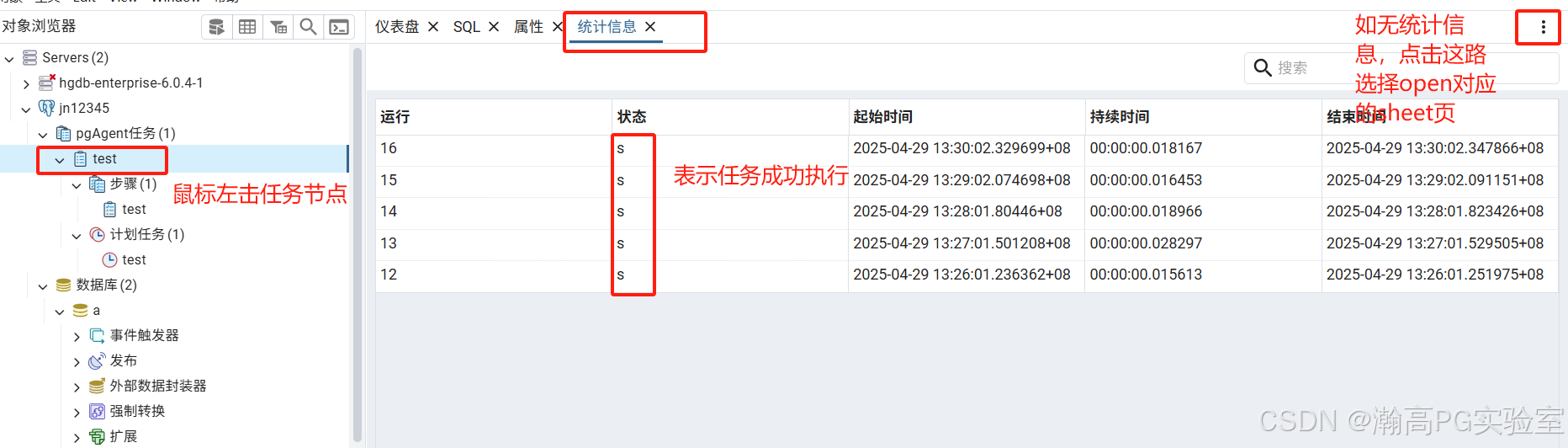
更多推荐


 7
7 0
0- 0


 已为社区贡献3条内容

所有评论(0)