
思科网络自动化-Python基础与Netmiko实操讲解
知识精讲
本课程为思科数据中心自动化Python入门课程,从Python基础语法到Netmiko库实战,讲解网络自动化开发核心知识点,并配套动手实验演示操作流程,最终完成自动化配置思科设备的实战项目。
课程大纲与实验安排
-
课程整体目标:教授Python在网络自动化中的应用,从基础语法到第三方库实战,配套两个综合实验
-
实验1:使用Python生成路由器配置,练习变量、文件、条件、循环的使用
-
实验2:使用Netmiko与思科IOS XE设备通信,获取信息并修改设备配置
-
补充(根据课堂图片):Netmiko可同时连接多台设备批量下发配置,架构图如下:中心节点NETMIKO分别向R1/R2/R3/R4四台路由器下发不同配置
-
-
讲师介绍:Gilberto Pereira,思科内容开发人员,拥有20年思科认证讲师与咨询顾问经验,专注数据中心自动化领域
Python基础数据类型
-
数据类型分类:分为原始类型与非原始类型两类
-
原始类型:存储单个值,包含
整型(int)、浮点型(float)、字符串(string)、布尔型(bool) -
非原始类型:由原始类型组合而成,包含
列表(list)、元组(tuple)、字典(dictionary)、集合(set)
-
-
🚩重点:非原始类型支持嵌套特性,一个非原始类型可以包含其他非原始类型作为元素
-
嵌套示例(根据课堂图片):
-
嵌套列表:
访问路径:`[0][0] → CATALYST → [1][1] → ISR → [2][0] → ISR`[[], ["NEXUS"], ["ASA", "CATALYST"]]-
嵌套字典:
访问路径:`csr1kv1["os"] → "ios-xe"`;`mgmt_if[0]["name"] → "Gi0/1"`{ "csr1kv1": {}, "mgmt_if": [{}], "upgraded": True } -
Python控制流语法
-
条件语句:使用
if/elif/else实现多分支条件判断,通过比较运算符得到布尔结果执行对应分支-
if:开启条件判断,条件为真执行对应代码块后退出 -
elif:当前面条件为假时,检测新的条件 -
else:所有条件都为假时,执行默认代码块
-
-
循环语法:Python包含
for循环和while循环两类(根据课堂图片):循环类型
执行逻辑
代码示例
for循环迭代遍历容器内的每个元素,遍历结束自动退出
```python
遍历设备列表
devices = ["ASA", "Nexus"] for device in devices: print(device)
输出: ASA, Nexus
| `while`循环 | 只要条件保持为真就反复执行代码,条件为假时退出 | ```python
# 生成接口编号
interface_id = 1
while interface_id <=4:
    print(f'Ethernet1/{interface_id}')
    interface_id += 1
# 输出: Ethernet1/1 ~ Ethernet1/3
``` |
* **函数概念**:函数是可复用、模块化的代码块,可以是Python内置函数,也可以自定义,或者从其他脚本导入,提升代码一致性与开发效率

---

**Python基础实验:交互式解释器练习**
* **实验路径**:进入实验目录`$HOME/labs/lab02/task01`,启动Python解释器
* **字符串操作练习**:
```python
hostname = "csr1kv"
ios_version = "15.8"
hostname_upper = hostname.upper() # 转换为全大写
print("Hostname: {} and IOS Version:{}".format(hostname_upper,ios_version))
# 输出: Hostname: CSR1KV and IOS Version:15.8
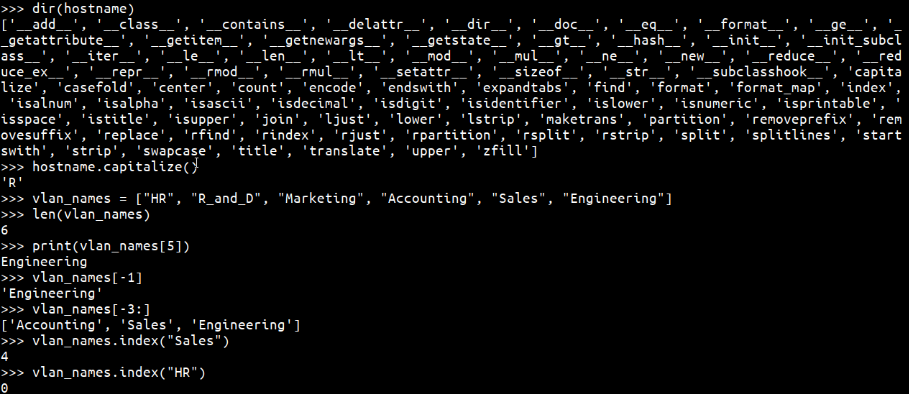
dir(hostname) # 查看字符串对象的所有可用方法
hostname.capitalize() # 首字母大写,输出: 'Csr1kv'
-
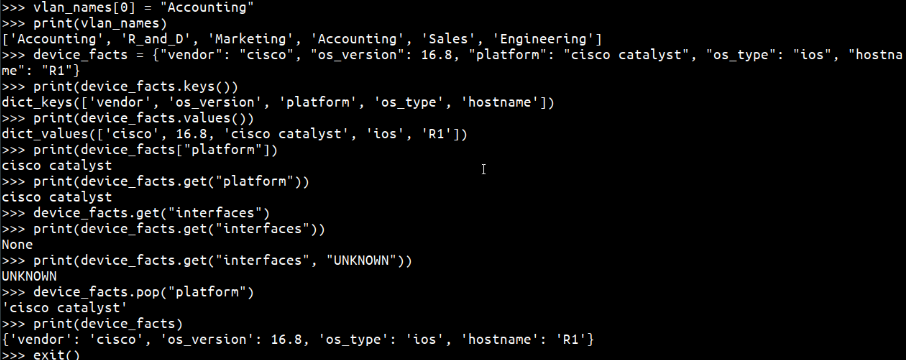
列表操作练习:
vlan_names = ["HR", "R_and_D", "Marketing", "Accounting", "Sales", "Engineering"]-
🚩重点:Python列表编号从0开始:
len(vlan_names)返回长度6,print(vlan_names[5])输出最后一个元素Engineering,而非位置5的Sales -
负索引用法:
vlan_names[-1]返回最后一个元素Engineering,vlan_names[-3:]返回列表最后三个元素:["Accounting", "Sales", "Engineering"] -
查找索引:
vlan_names.index("Sales")返回4,vlan_names.index("HR")返回0 -
修改元素:
vlan_names[0] = "Accounting可以直接覆盖列表指定位置的元素
-
-
字典操作练习: 创建字典存储设备信息:
device_facts = { "vendor": "Cisco", "os_type": "ios", "version": ios_version, "platform": "csr1kv", "hostname": "csr1kv1" }-
获取值:两种写法等价:
print(device_facts["platform"])与print(device_facts.get("platform"))都返回csr1kv -
🚩重点:
get()方法支持默认值,访问不存在的键时不会抛出异常:device_facts.get("interfaces", "unknown")会返回unknown,而直接用方括号访问不存在的键会报错 -
删除键值对:调用
pop()方法:device_facts.pop("platform")会移除platform键及其对应的值
-
嵌套数据结构探索实验
-
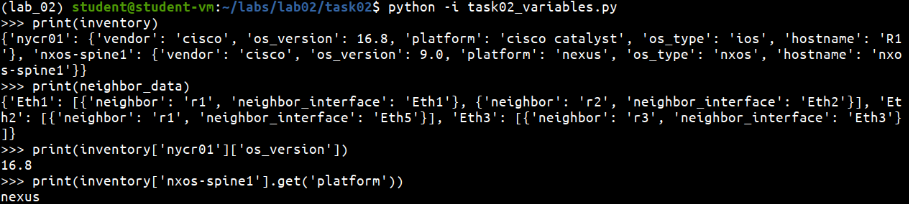
进入
$HOME/labs/lab02/task02,加载预定义变量文件task02_variables.py -
练习嵌套访问:从嵌套字典中提取指定信息:
-
获取
NYCR01的OS版本:inventory["NYCR01"]["os_version"] -
获取
NSOX-Spine1的平台:inventory["NSOX-Spine1"]["platform"]
-
-
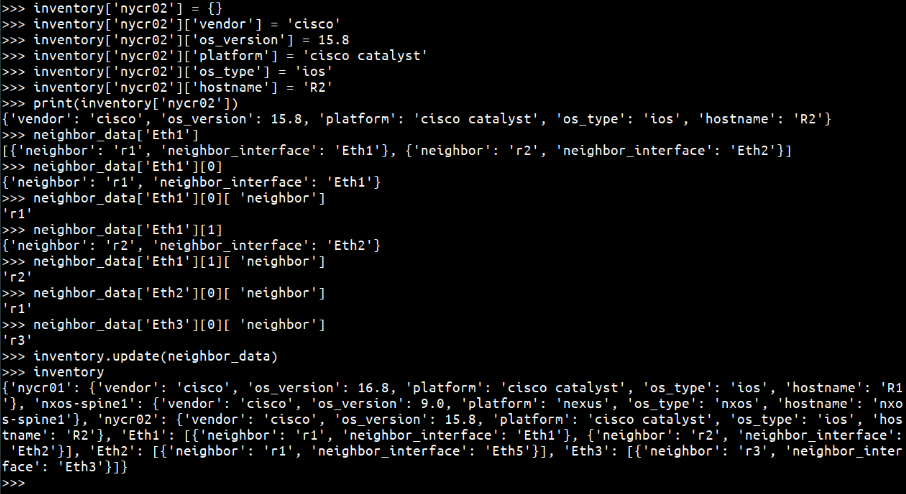
新增嵌套数据:添加
NYCR02到 inventory 字典,注意区分字符串和整型:OS version为整型,不需要加引号 -
使用JSON格式化输出:导入
json模块,调用json.dumps(inventory, indent=4)可以格式化输出嵌套字典,提升可读性
循环语法实验:循环调试练习
-
进入
$HOME/labs/lab02/task03 -
while循环排错:原脚本错误:
while 5 < len(vlan_ids)条件初始就为假,因此无输出;修正为while 5 > len(vlan_ids)后,循环会向空列表依次添加100,200,300,400,500五个VLAN ID,运行后输出正确结果 -
嵌套循环遍历嵌套字典:遍历
cisco_lifecycle_data中所有厂商的停售设备,输出设备型号与停售日期:
# 遍历外层字典的OS类型与对应数据
for os, data in cisco_lifecycle_data.items():
    # 遍历当前OS下的所有停售设备
    for item in data["list_of_eol_devices"]:
        # 输出型号与停售日期
        print("{} has reached EOL on {}".format(item['model'], item['eol_date']))
运行后会依次输出所有停售设备的信息,符合预期。
条件语句实验:自动化生成设备配置
-
进入
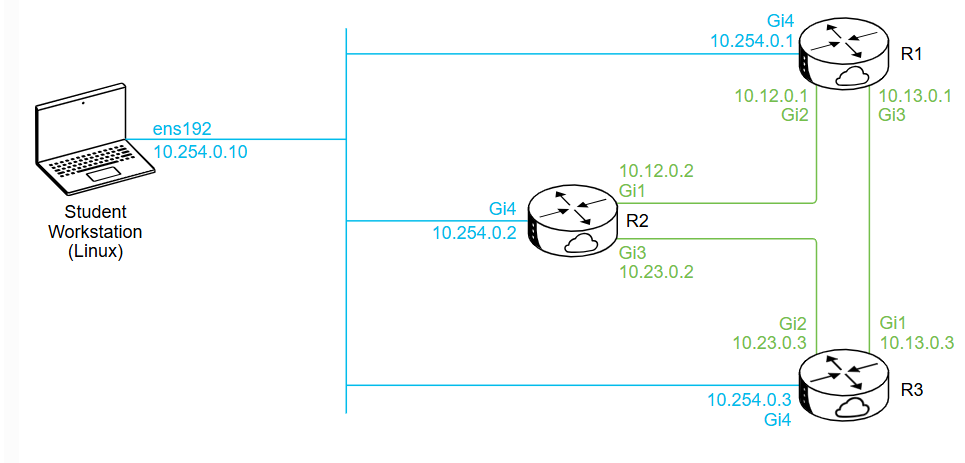
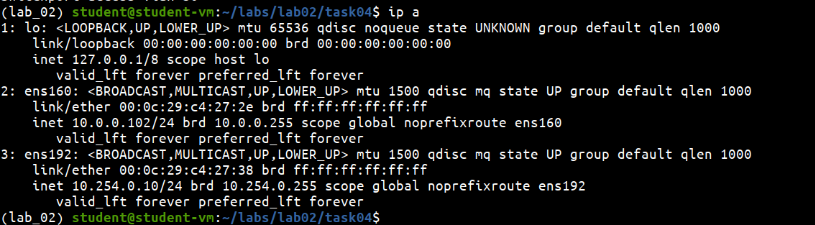
$HOME/labs/lab02/task04,打开task04_config_generator.py -
编程最佳实践:不需要一开始就覆盖所有场景,可以先预留
!INTERFACE STATE UNKNOWN注释(思科IOS中!表示注释,等价于Python的#),后续迭代补充逻辑 -
实验任务:取消分隔线打印的注释,修改接口状态与模式的条件分支,最终生成符合要求的可直接导入设备的配置,实验完成。
Python模块、包与库基础
-
核心概念
-
模块:单个后缀为
.py的文件,包含可复用的代码、变量、函数或类 -
包:存储模块的目录,一个包包含多个模块
-
库:预编写的模块/包的集合,方便开发者直接调用,简化开发;Python自带的称为标准库,也可以从GitHub、PyPI获取第三方开源库,企业也可以开发私有内部库
-
-
🚩重点:
Python Path是Python搜索模块包的路径列表,可以修改登录脚本更新Python Path,在代码中可以通过sys.path查看所有搜索路径 -
三种import导入写法:
-
导入整个模块:
import netmiko,调用时需要写netmiko.ConnectHandler -
从模块导入指定对象:
from netmiko import ConnectHandler,可以直接调用ConnectHandler,不需要加模块前缀 -
导入对象并设置别名:
from netmiko import ConnectHandler as ch,用短别名简化长名称的调用
-
-
Python包管理pip常用命令:
命令
功能
pip install 包名安装最新版本的包及其依赖
pip install --upgrade 包名将已安装的包升级到最新版本
pip install -r requirements.txt批量安装requirements文件中指定版本的所有依赖
pip freeze输出当前已安装的所有包及其版本,可以重定向到文件作为requirements备份
-
从Git源码安装:如果PyPI没有最新版本,可以先通过
git clone将GitHub源码下载到本地,再本地安装。
Netmiko网络自动化库介绍
-
Netmiko的作用:基于Paramiko开发的多厂商SSH库,简化Python通过SSH连接网络设备的过程,支持超过20个厂商的设备(包括思科),可以批量对多台设备下发命令和配置,实现自动化运维。
-
常用Netmiko方法:
方法
功能
必要参数
ConnectHandler()初始化设备连接,创建设备对象
需要传入设备IP、用户名、密码、设备类型
is_alive()判断连接是否存活,返回布尔值
True/False无
establish_connection()连接断开后重新发起连接
无
disconnect()主动断开当前会话
无
send_command()发送一条查询命令(如
show version),返回输出参数为命令字符串
send_config_from_file()从本地配置文件读取配置并下发到设备
参数为配置文件的完整路径
send_config_set()发送一组配置命令,参数为命令字符串组成的列表
按顺序下发列表中的命令
log_session()将会话日志保存到文件,方便调试
参数为日志文件路径
Netmiko实验:连接设备下发配置
-
实验1:验证Netmiko安装与基础连接
-
进入实验目录
$HOME/labs/lab03/task01,执行pip freeze | grep netmiko查看已安装版本,如果需要升级执行sudo pip install --upgrade netmiko==2.4.1 -
进入
$HOME/labs/lab03/task02,打开脚本修改设备连接信息:填入主机IP、用户名、密码、设备类型,保存后运行 -
基础操作验证:调用
is_alive()验证连接,断开后重新调用establish_connection()重连,发送show version获取设备版本,修改接口描述,最后保存会话日志并断开连接。
-
-
实验2:批量下发配置
-
单设备配置:实验任务,填写单设备连接信息,运行脚本下发配置,验证执行成功
-
多设备批量配置:脚本会遍历设备库存中的三台设备,分别下发对应配置;排错:如果提示配置文件缺失,需要在
config/目录下为每台设备创建独立的配置文件,修改配置文件中的SNMP位置信息后,运行脚本即可批量完成配置 -
动态配置生成:实验任务,取消代码注释、补全变量与逻辑、添加输出提示,最终实现自动为多台设备添加Loopback接口,运行后输出清晰的执行过程,实验完成。
-
💡 核心概念
-
原始数据类型:存储单个值,包含整型、浮点型、字符串、布尔型
-
非原始数据类型:由原始类型组合而成,支持嵌套,包含列表、元组、字典、集合
-
for循环:遍历容器内所有元素,遍历结束自动退出
-
while循环:条件为真时持续执行,条件为假时退出
-
模块:单个
.py文件,包含可复用代码 -
包:模块的集合,存储在同名目录下
-
库:预编写的模块/包集合,简化开发
-
Netmiko:Python多厂商SSH连接库,专门用于网络设备自动化,简化SSH连接与配置下发流程
✨ 课堂金句
-
"A mistake that a lot of folks make is they try to build a perfect config that's going to handle every possible scenario, all at once. Instead we can leave ourselves a little placeholder, we can come back to it later."
-
"It's kind of like throwing the parachute out of the plane and then going and catching it on your way down."
📝 待办事项
-
作业任务:完成lab02的三个任务(基础变量、循环、条件),补全配置生成器代码;完成lab03的两个任务(基础连接、批量配置),验证配置下发
-
下次预习:提前了解Git基础操作,为从GitHub下载源码做准备
-
复习重点:牢记Python索引从0开始的规则;练习嵌套数据结构的访问;掌握Netmiko常用方法的使用场景;掌握pip常用命令的功能
🎯实验总结
🔍 课程核心目标
-
使用Python生成路由器配置
-
掌握变量、文件、条件语句和循环等基础语法
-
通过Netmiko实现与Cisco IOS XE设备的SSH通信
📊 非基本数据类型
-
嵌套列表(Nested List):列表中包含列表,用于层级化数据存储
示例:[[["CATALYST", "ISR", "ISR"]], ["NEXUS"], ["ASA", "CATALYST"]]-
访问方式:通过索引链(如
list[0][0][1]获取"ISR")
-
-
嵌套字典(Nested Dictionary):字典中包含字典或列表,用于描述复杂对象
示例:{ "csr1kv1": {"os": "ios-xe"}, "mgmt_if": [{"name": "Gi0/1"}], "upgraded": True }
🔄 Python循环结构
|
循环类型 |
特点 |
网络设备配置场景示例 |
|---|---|---|
|
For循环 |
遍历序列(列表、字符串等) |
批量处理设备列表: |
|
While循环 |
基于条件重复执行 |
生成连续VLAN ID: |
📝 实践案例:网络设备配置自动化
-
字符串操作:设备名称格式化
hostname = "csr1kv" print("Hostname: {}".format(hostname.upper())) # 输出 "Hostname: CSR1KV" -
列表索引与切片:VLAN名称管理
vlan_names = ["HR", "R_and_D", "Marketing", "Accounting", "Sales", "Engineering"] print(vlan_names[5]) # 正向索引:输出 "Engineering" print(vlan_names[-1]) # 负向索引:输出 "Engineering" -
嵌套数据处理:设备生命周期管理
# 遍历嵌套字典提取EOL设备信息 for os, data in cisco_lifecycle_data.items(): for item in data["list_of_eol_devices"]: print("{} has reached EOL on {}".format(item['model'], item['eol_date'])) -
条件语句配置生成:接口状态控制
 for interface in config["interface_data"]:
     print("interface {}".format(interface["if_name"]))
     if interface["state"] == "shutdown":
         print("shutdown")
     elif interface["state"] == "up":
         print("no shutdown")
🧩 关键工具与环境
-
Netmiko:跨厂商网络设备SSH连接库,支持Cisco IOS、Nexus等设备
-
实验环境:Linux终端(Python 3.6.8),实验路径
$HOME/labs/lab02/taskXX



>>> import json
>>> print(json.dumps(inventory, indent=4))
{
    "nycr01": {
        "vendor": "cisco",
        "os_version": 16.8,
        "platform": "cisco catalyst",
        "os_type": "ios",
        "hostname": "R1"
    },
    "nxos-spine1": {
        "vendor": "cisco",
        "os_version": 9.0,
        "platform": "nexus",
        "os_type": "nxos",
        "hostname": "nxos-spine1"
    },
    "nycr02": {
        "vendor": "cisco",
        "os_version": 15.8,
        "platform": "cisco catalyst",
        "os_type": "ios",
        "hostname": "R2"
    },
    "Eth1": [
        {
            "neighbor": "r1",
            "neighbor_interface": "Eth1"
        },
        {
            "neighbor": "r2",
            "neighbor_interface": "Eth2"
        }
    ],
    "Eth2": [
        {
            "neighbor": "r1",
            "neighbor_interface": "Eth5"
        }
    ],
    "Eth3": [
        {
            "neighbor": "r3",
            "neighbor_interface": "Eth3"
        }
    ]
}
>>>
>>> exit()
(lab_02) student@student-vm:~/labs/lab02/task02$
(lab_02) student@student-vm:~/labs/lab02/task02$ cd $HOME/labs/lab02/task03
(lab_02) student@student-vm:~/labs/lab02/task03$ ls -al
total 28
drwxrwxr-x 2 student student 4096 Aug 22  2024 .
drwxrwxr-x 8 student student 4096 Mar 11  2024 ..
-rw-rw-r-- 1 student student  425 Nov 16  2019 task03_for_and_while_loop.py
-rw-rw-r-- 1 student student  847 Nov 16  2019 task03_for_loop_nested_dictionary.py
-rw-rw-r-- 1 student student  946 Nov 16  2019 task03_nested_for_loop.py
-rw-rw-r-- 1 student student  181 Aug 22  2024 task03_while_loop_device_list.py
-rw-rw-r-- 1 student student  150 Nov 16  2019 task03_while_loop_vlan_ids.py
(lab_02) student@student-vm:~/labs/lab02/task03$ cat task03_while_loop_device_list.py
device_list = ["R-1", "R-2", "R-3"]

#Iterate over the list and print all the items using while-loop
num = 0
while num < len(device_list):
    print(device_list[num])
    num += 1

(lab_02) student@student-vm:~/labs/lab02/task03$ python task03_while_loop_device_list.py
R-1
R-2
R-3
(lab_02) student@student-vm:~/labs/lab02/task03$ python task03_while_loop_vlan_ids.py
[]
(lab_02) student@student-vm:~/labs/lab02/task03$ cat task03_while_loop_vlan_ids.py
vlan_ids = []

#Adds 5 vlans to the list with while-loop
vlan = 100

while 5 < len(vlan_ids):
  vlan_ids.append(vlan)
  vlan += 100

print(vlan_ids)

(lab_02) student@student-vm:~/labs/lab02/task03$ python task03_while_loop_vlan_ids.py
[100, 200, 300, 400, 500]
(lab_02) student@student-vm:~/labs/lab02/task03$ cat task03_for_and_while_loop.py
device_ips = [["10.254.0.1","not connected"], ["10.254.0.2","not connected"], ["10.254.0.3", "not connected"]]

print(device_ips)

for ip in device_ips:
    print("\nAttempting to establish connection with {}".format(ip[0]))
    attempt_count = 0
    while attempt_count < 5:
        print("Establishing connection...")
        attempt_count += 1
    print("Connection Established!")
    ip[1]="connected"

print(device_ips)
(lab_02) student@student-vm:~/labs/lab02/task03$ python task03_for_and_while_loop.py
[['10.254.0.1', 'not connected'], ['10.254.0.2', 'not connected'], ['10.254.0.3', 'not connected']]

Attempting to establish connection with 10.254.0.1
Establishing connection...
Establishing connection...
Establishing connection...
Establishing connection...
Establishing connection...
Connection Established!

Attempting to establish connection with 10.254.0.2
Establishing connection...
Establishing connection...
Establishing connection...
Establishing connection...
Establishing connection...
Connection Established!

Attempting to establish connection with 10.254.0.3
Establishing connection...
Establishing connection...
Establishing connection...
Establishing connection...
Establishing connection...
Connection Established!
[['10.254.0.1', 'connected'], ['10.254.0.2', 'connected'], ['10.254.0.3', 'connected']]
(lab_02) student@student-vm:~/labs/lab02/task03$
(lab_02) student@student-vm:~/labs/lab02/task03$ cat task03_for_loop_nested_dictionary.py
cisco_lifecycle_data = {
    "cisco-ios": {
        "latest_release": "15.8(3)M",
        "list_of_supported_devices": ["Catalyst 2960", "Catalyst 4500"],
        "list_of_eol_devices": [
            {"model": "Catalyst 2940", "eol_date": "11/6/2015"},
            {"model": "Catalyst 3560", "eol_date": "11/14/2013"},
        ],
    },
    "cisco-nxos": {
        "latest_release": "7.0(3)I7(6)",
        "list_of_supported_devices": ["Nexus 9508", "Nexus 7000"],
        "list_of_eol_devices": [
            {"model": "Nexus 5500", "eol_date": "05/5/2018"},
            {"model": "Nexus 3500", "eol_date": "12/21/2018"},
        ],
    },
}


# Iterate over the dictionary with the for-loop and print all latest releases

for os, data in cisco_lifecycle_data.items():
    print("Latest release for {} is: {}".format(os, data["latest_release"]))
(lab_02) student@student-vm:~/labs/lab02/task03$
(lab_02) student@student-vm:~/labs/lab02/task03$ python task03_for_loop_nested_dictionary.py
Latest release for cisco-ios is: 15.8(3)M
Latest release for cisco-nxos is: 7.0(3)I7(6)
(lab_02) student@student-vm:~/labs/lab02/task03$
(lab_02) student@student-vm:~/labs/lab02/task03$ cat task03_nested_for_loop.py
cisco_lifecycle_data = {
  "cisco-ios": {
    "latest_release": "15.8(3)M",
    "list_of_supported_devices": [
      "Catalyst 2960",
      "Catalyst 4500"
    ],
    "list_of_eol_devices": [{
      "model": "Catalyst 2940",
      "eol_date": "11/6/2015"
      },
      {
      "model": "Catalyst 3560",
      "eol_date": "11/14/2013"
      }
    ]
  },
  "cisco-nxos": {
    "latest_release": "7.0(3)I7(6)",
    "list_of_supported_devices": [
      "Nexus 9508",
      "Nexus 7000"
    ],
    "list_of_eol_devices": [{
      "model": "Nexus 5500",
      "eol_date": "05/5/2018"
      },
      {
      "model": "Nexus 3500",
      "eol_date": "12/21/2018"
      }
    ]
  }
}

#Iterate over the dictionary and print all models that reached the end-of-life
#and respective dates

for os, data in cisco_lifecycle_data.items():
  for item in data["list_of_eol_devices"]:
    print("{} has reached EOL on {}".format(item['model'], item['eol_date']))
(lab_02) student@student-vm:~/labs/lab02/task03$
(lab_02) student@student-vm:~/labs/lab02/task03$ python task03_nested_for_loop.py
Catalyst 2940 has reached EOL on 11/6/2015
Catalyst 3560 has reached EOL on 11/14/2013
Nexus 5500 has reached EOL on 05/5/2018
Nexus 3500 has reached EOL on 12/21/2018
(lab_02) student@student-vm:~/labs/lab02/task03$
(lab_02) student@student-vm:~/labs/lab02/task03$ cd $HOME/labs/lab02/task04
(lab_02) student@student-vm:~/labs/lab02/task04$ ls -al
total 12
drwxrwxr-x 2 student student 4096 Aug 22  2024 .
drwxrwxr-x 8 student student 4096 Mar 11  2024 ..
-rw-rw-r-- 1 student student 3209 Aug 22  2024 task04_config_generator.py
(lab_02) student@student-vm:~/labs/lab02/task04$ more task04_config_generator.py
config_data = {
    "R1": {
        "banner": "This Device is being monitored 24/7.",
        "mgmt_ip": "10.254.0.1",
        "interface_data": [
            {
                "if_name": "GigabitEthernet1",
                "state": "shutdown",
                "mode": "access",
                "config": "10",
            },
            {
                "if_name": "GigabitEthernet2",
                "state": "up",
                "mode": "routing",
                "config": "10.12.0.1",
            },
            {
                "if_name": "GigabitEthernet3",
                "state": "up",
                "mode": "routing",
                "config": "10.13.0.1",
            },
        ],
    },
    "R2": {
        "banner": "This Device is being monitored 24/7.",
        "mgmt_ip": "10.254.0.2",
        "interface_data": [
            {
                "if_name": "GigabitEthernet1",
                "state": "up",
                "mode": "routing",
                "config": "10.12.0.2",
            },
            {
                "if_name": "GigabitEthernet2",
                "state": "shutdown",
                "mode": "access",
                "config": "20",
            },
            {
                "if_name": "GigabitEthernet3",
                "state": "up",
                "mode": "routing",
                "config": "10.23.0.2",
            },
        ],
    },
    "R3": {
        "banner": "This Device is being monitored 24/7.",
        "mgmt_ip": "10.254.0.3",
        "interface_data": [
            {
                "if_name": "GigabitEthernet1",
                "state": "up",
                "mode": "routing",
                "config": "10.13.0.3",
            },
            {
                "if_name": "GigabitEthernet2",
                "state": "up",
                "mode": "routing",
                "config": "10.23.0.3",
            },
            {
                "if_name": "GigabitEthernet3",
                "state": "shutdown",
                "mode": "access",
                "config": "30",
            },
        ],
    },
}


for device, config in config_data.items():
    # print("Generating configuration for {}".format(device))
    # print("#" * 22 + device + "#" * 22)
    print("banner + {} +".format(config["banner"]))
    print("interface GigabitEthernet4")
    print("ip address {} 255.255.255.0".format(config["mgmt_ip"]))
    for interface in config["interface_data"]:
        print("!")
        print("interface {}".format(interface["if_name"]))
        if interface["state"] == "shutdown":
            print("shutdown")
        elif interface["state"] == "up":
            print("no shutdown")
        # else:
        #    print("!INTERFACE STATE UNKNOWN")
        if interface["mode"] == "access":
            print("switctport mode access")
            print("switchport access vlan {}".format(interface["config"]))
        elif interface["mode"] == "routing":
            print("ip address {} 255.255.255.0".format(interface["config"]))
        # elif interface["mode"] == "trunk":
        #    print("switchport mode trunk")
        #    print("switchport trunk native vlan {}".format(interface["config"]))
    # print("#" * 50)
(lab_02) student@student-vm:~/labs/lab02/task04$
(lab_02) student@student-vm:~/labs/lab02/task04$ python task04_config_generator.py
banner + This Device is being monitored 24/7. +
interface GigabitEthernet4
ip address 10.254.0.1 255.255.255.0
!
interface GigabitEthernet1
shutdown
switctport mode access
switchport access vlan 10
!
interface GigabitEthernet2
no shutdown
ip address 10.12.0.1 255.255.255.0
!
interface GigabitEthernet3
no shutdown
ip address 10.13.0.1 255.255.255.0
banner + This Device is being monitored 24/7. +
interface GigabitEthernet4
ip address 10.254.0.2 255.255.255.0
!
interface GigabitEthernet1
no shutdown
ip address 10.12.0.2 255.255.255.0
!
interface GigabitEthernet2
shutdown
switctport mode access
switchport access vlan 20
!
interface GigabitEthernet3
no shutdown
ip address 10.23.0.2 255.255.255.0
banner + This Device is being monitored 24/7. +
interface GigabitEthernet4
ip address 10.254.0.3 255.255.255.0
!
interface GigabitEthernet1
no shutdown
ip address 10.13.0.3 255.255.255.0
!
interface GigabitEthernet2
no shutdown
ip address 10.23.0.3 255.255.255.0
!
interface GigabitEthernet3
shutdown
switctport mode access
switchport access vlan 30
(lab_02) student@student-vm:~/labs/lab02/task04$
(lab_02) student@student-vm:~/labs/lab02/task04$ cat task04_config_generator.py
config_data = {
    "R1": {
        "banner": "This Device is being monitored 24/7.",
        "mgmt_ip": "10.254.0.1",
        "interface_data": [
            {
                "if_name": "GigabitEthernet1",
                "state": "shutdown",
                "mode": "access",
                "config": "10",
            },
            {
                "if_name": "GigabitEthernet2",
                "state": "up",
                "mode": "routing",
                "config": "10.12.0.1",
            },
            {
                "if_name": "GigabitEthernet3",
                "state": "up",
                "mode": "routing",
                "config": "10.13.0.1",
            },
        ],
    },
    "R2": {
        "banner": "This Device is being monitored 24/7.",
        "mgmt_ip": "10.254.0.2",
        "interface_data": [
            {
                "if_name": "GigabitEthernet1",
                "state": "up",
                "mode": "routing",
                "config": "10.12.0.2",
            },
            {
                "if_name": "GigabitEthernet2",
                "state": "shutdown",
                "mode": "access",
                "config": "20",
            },
            {
                "if_name": "GigabitEthernet3",
                "state": "up",
                "mode": "routing",
                "config": "10.23.0.2",
            },
        ],
    },
    "R3": {
        "banner": "This Device is being monitored 24/7.",
        "mgmt_ip": "10.254.0.3",
        "interface_data": [
            {
                "if_name": "GigabitEthernet1",
                "state": "up",
                "mode": "routing",
                "config": "10.13.0.3",
            },
            {
                "if_name": "GigabitEthernet2",
                "state": "up",
                "mode": "routing",
                "config": "10.23.0.3",
            },
            {
                "if_name": "GigabitEthernet3",
                "state": "shutdown",
                "mode": "access",
                "config": "30",
            },
        ],
    },
}

for device, config in config_data.items():
    # print("Generating configuration for {}".format(device))
    # print("#" * 22 + device + "#" * 22)
    print("banner + {} +".format(config["banner"]))
    print("interface GigabitEthernet4")
    print("ip address {} 255.255.255.0".format(config["mgmt_ip"]))
    for interface in config["interface_data"]:
        print("!")
        print("interface {}".format(interface["if_name"]))
        if interface["state"] == "shutdown":
            print("shutdown")
        elif interface["state"] == "up":
            print("no shutdown")
        # else:
        #    print("!INTERFACE STATE UNKNOWN")
        if interface["mode"] == "access":
            print("switctport mode access")
            print("switchport access vlan {}".format(interface["config"]))
        elif interface["mode"] == "routing":
            print("ip address {} 255.255.255.0".format(interface["config"]))
        # elif interface["mode"] == "trunk":
        #    print("switchport mode trunk")
        #    print("switchport trunk native vlan {}".format(interface["config"]))
    # print("#" * 50)
(lab_02) student@student-vm:~/labs/lab02/task04$
(lab_02) student@student-vm:~/labs/lab02/task04$ python task04_config_generator.py
banner + This Device is being monitored 24/7. +
interface GigabitEthernet4
ip address 10.254.0.1 255.255.255.0
!
interface GigabitEthernet1
shutdown
switctport mode access
switchport access vlan 10
!
interface GigabitEthernet2
no shutdown
ip address 10.12.0.1 255.255.255.0
!
interface GigabitEthernet3
no shutdown
ip address 10.13.0.1 255.255.255.0
banner + This Device is being monitored 24/7. +
interface GigabitEthernet4
ip address 10.254.0.2 255.255.255.0
!
interface GigabitEthernet1
no shutdown
ip address 10.12.0.2 255.255.255.0
!
interface GigabitEthernet2
shutdown
switctport mode access
switchport access vlan 20
!
interface GigabitEthernet3
no shutdown
ip address 10.23.0.2 255.255.255.0
banner + This Device is being monitored 24/7. +
interface GigabitEthernet4
ip address 10.254.0.3 255.255.255.0
!
interface GigabitEthernet1
no shutdown
ip address 10.13.0.3 255.255.255.0
!
interface GigabitEthernet2
no shutdown
ip address 10.23.0.3 255.255.255.0
!
interface GigabitEthernet3
shutdown
switctport mode access
switchport access vlan 30
(lab_02) student@student-vm:~/labs/lab02/task04$
更多推荐

 18
18 0
0- 0


 已为社区贡献1条内容

所有评论(0)