
第三章 Tool Calling — 让 Agent 拥有“手“
·
第3章:Tool Calling — 让 Agent 拥有"手"
📌 本章目标
- 理解 Function Calling 的底层原理(模型不是真的执行函数!)
- 掌握工具 Schema 的定义方法
- 写出完整的 Tool Calling 循环
- 实现一个能查天气、算数学题的 Agent
- 所有代码均已打包,可直接运行。需要的同学请私信我,可免费提供学习。
3.1 Function Calling 到底是怎么回事?
这是新手最容易搞混的地方,请先记住一个关键认知:
⚠️ LLM 不会执行任何函数! 它只是输出一段 JSON,说"我想调用这个函数,参数是这些"。
真正执行函数的是你的代码。 执行完之后,你再把结果告诉 LLM。
整个流程是这样的:
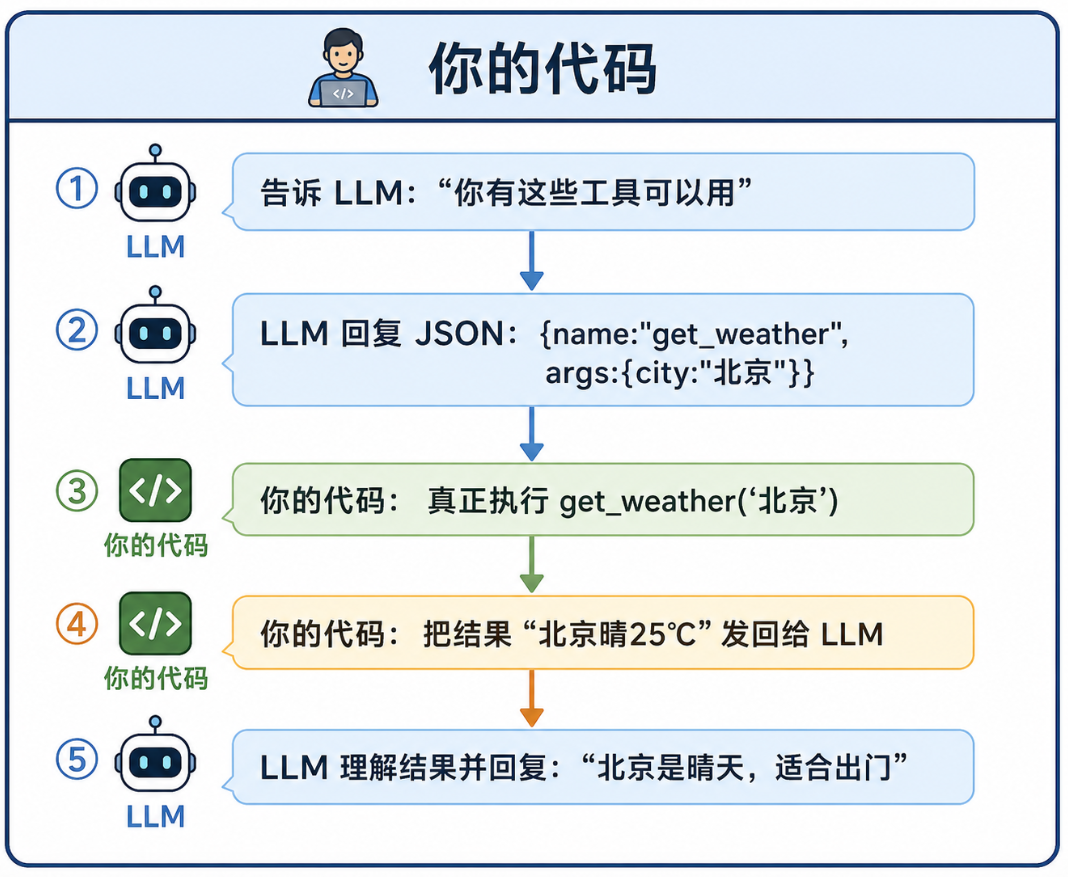
用图说话:
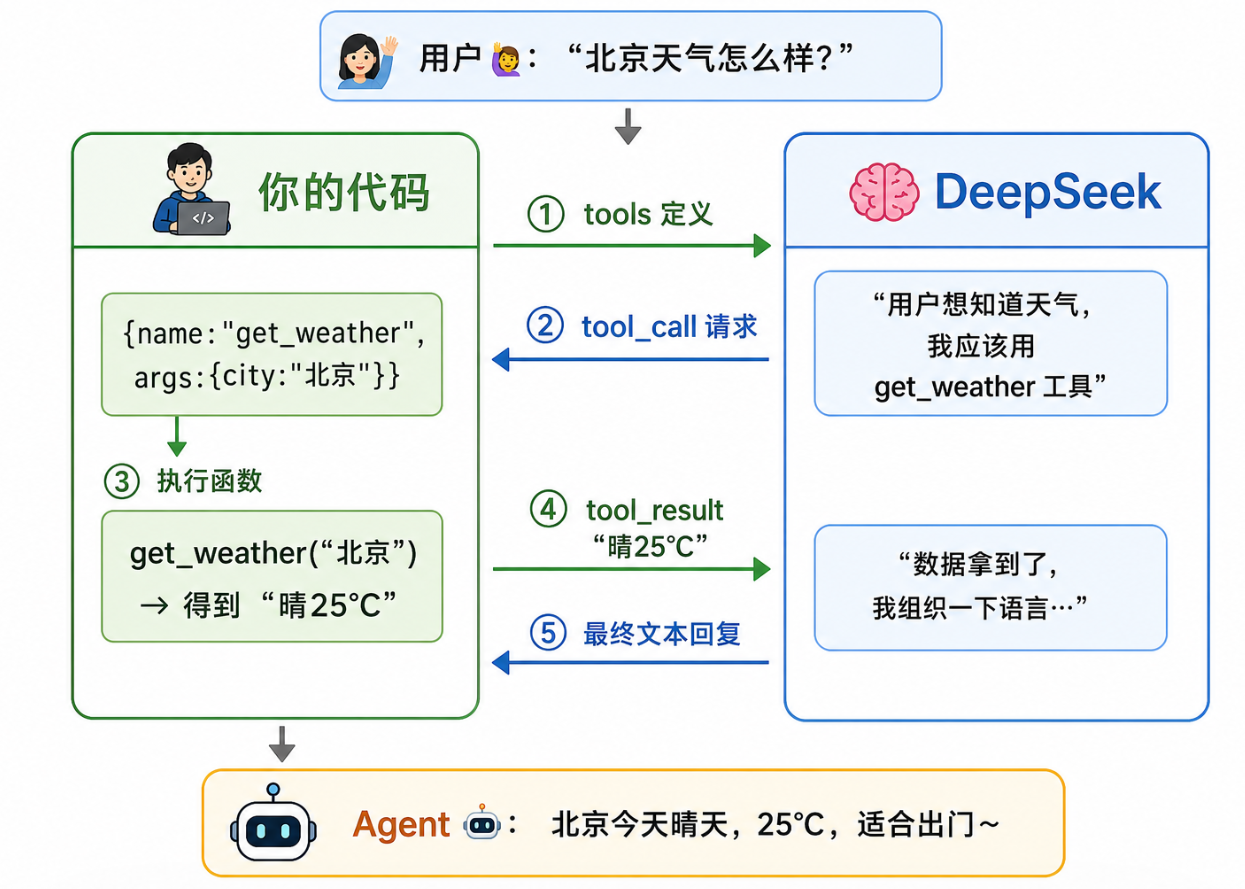
3.2 定义工具:用 JSON Schema 描述函数
工具的定义是一段 JSON Schema,它告诉 LLM:“我有一个函数,名字叫 xxx,功能是 xxx,需要这些参数”。
基本结构
# 一个完整的工具定义
tool_definition = {
    "type": "function",              # 固定值
    "function": {
        "name": "get_weather",       # 函数名(LLM 会输出这个名字)
        "description": "查询指定城市的实时天气,返回温度、天气状况等信息",
        "parameters": {              # 参数定义(JSON Schema 格式)
            "type": "object",
            "properties": {
                "city": {
                    "type": "string",
                    "description": "城市名称,例如:北京、上海、深圳"
                },
                "unit": {
                    "type": "string",
                    "enum": ["celsius", "fahrenheit"],
                    "description": "温度单位,默认celsius(摄氏度)"
                }
            },
            "required": ["city"]     # 必填参数
        }
    }
}
实战:定义多个工具
"""
定义 Agent 可用的工具集
"""

# ── 工具1:天气查询 ──
def get_weather(city: str, unit: str = "celsius") -> str:
    """查询指定城市的天气(模拟数据)"""
    weather_db = {
        "北京":    {"temp": 25, "condition": "晴", "humidity": 40},
        "上海":    {"temp": 28, "condition": "多云", "humidity": 65},
        "深圳":    {"temp": 30, "condition": "阵雨", "humidity": 80},
        "杭州":    {"temp": 22, "condition": "小雨", "humidity": 75},
        "成都":    {"temp": 26, "condition": "阴", "humidity": 55},
        "哈尔滨":  {"temp": -5, "condition": "大雪", "humidity": 90},
    }

    data = weather_db.get(city)
    if not data:
        return f"未找到{city}的天气数据"

    if unit == "fahrenheit":
        data["temp"] = data["temp"] * 9/5 + 32

    return f"{city}:{data['condition']},温度{data['temp']}°{'F' if unit == 'fahrenheit' else 'C'},湿度{data['humidity']}%"


# ── 工具2:计算器 ──
def calculator(expression: str) -> str:
    """安全的表达式计算器"""
    try:
        # 限制只允许数字和基本运算符
        allowed = set("0123456789+-*/.() ")
        if not all(c in allowed for c in expression):
            return "错误:表达式包含不允许的字符"
        result = eval(expression)
        return f"{expression} = {result}"
    except Exception as e:
        return f"计算出错:{str(e)}"


# ── 工具3:获取当前时间 ──
from datetime import datetime

def get_current_time() -> str:
    """获取当前日期和时间"""
    now = datetime.now()
    return f"现在是 {now.year}年{now.month}月{now.day}日,{now.hour}:{now.minute:02d}"


# ── 所有工具的 JSON Schema ──
TOOLS = [
    {
        "type": "function",
        "function": {
            "name": "get_weather",
            "description": "查询指定城市的天气,返回温度、天气状况、湿度",
            "parameters": {
                "type": "object",
                "properties": {
                    "city": {
                        "type": "string",
                        "description": "城市名称,如:北京、上海、深圳"
                    },
                    "unit": {
                        "type": "string",
                        "enum": ["celsius", "fahrenheit"],
                        "description": "温度单位,默认celsius"
                    }
                },
                "required": ["city"]
            }
        }
    },
    {
        "type": "function",
        "function": {
            "name": "calculator",
            "description": "执行数学计算,支持加减乘除和括号",
            "parameters": {
                "type": "object",
                "properties": {
                    "expression": {
                        "type": "string",
                        "description": "数学表达式,如:'(1+2)*3'"
                    }
                },
                "required": ["expression"]
            }
        }
    },
    {
        "type": "function",
        "function": {
            "name": "get_current_time",
            "description": "获取当前日期和时间",
            "parameters": {
                "type": "object",
                "properties": {},
                "required": []
            }
        }
    }
]

# ── 工具注册表(函数名 → 实际函数) ──
TOOL_FUNCTIONS = {
    "get_weather": get_weather,
    "calculator": calculator,
    "get_current_time": get_current_time,
}
3.3 完整 Tool Calling 循环
这是本章的核心代码——一个通用的 Agent 循环。
"""
完整的 Tool Calling Agent 循环 —— 可直接运行
使用前请先: pip install openai python-dotenv
并在 .env 文件中设置: DEEPSEEK_API_KEY=sk-你的密钥
"""
import json
import os
from datetime import datetime
from openai import OpenAI
from dotenv import load_dotenv

load_dotenv()

# ============================================
# 第1部分:DeepSeek 客户端配置
# ============================================
client = OpenAI(
    api_key=os.getenv("DEEPSEEK_API_KEY"),
    base_url="https://api.deepseek.com/v1"
)

# ============================================
# 第2部分:工具定义
# ============================================
def get_weather(city: str, unit: str = "celsius") -> str:
    """查询指定城市的天气(模拟数据)"""
    weather_db = {
        "北京":    {"temp": 25, "condition": "晴", "humidity": 40},
        "上海":    {"temp": 28, "condition": "多云", "humidity": 65},
        "深圳":    {"temp": 30, "condition": "阵雨", "humidity": 80},
        "杭州":    {"temp": 22, "condition": "小雨", "humidity": 75},
        "成都":    {"temp": 26, "condition": "阴", "humidity": 55},
        "哈尔滨":  {"temp": -5, "condition": "大雪", "humidity": 90},
    }
    data = weather_db.get(city)
    if not data:
        return f"未找到{city}的天气数据"
    if unit == "fahrenheit":
        data = {**data, "temp": data["temp"] * 9/5 + 32}
    return f"{city}:{data['condition']},温度{data['temp']}°{'F' if unit == 'fahrenheit' else 'C'},湿度{data['humidity']}%"

def calculator(expression: str) -> str:
    """安全的表达式计算器"""
    try:
        allowed = set("0123456789+-*/.() ")
        if not all(c in allowed for c in expression):
            return "错误:表达式包含不允许的字符"
        result = eval(expression)
        return f"{expression} = {result}"
    except Exception as e:
        return f"计算出错:{str(e)}"

def get_current_time() -> str:
    """获取当前日期和时间"""
    now = datetime.now()
    return f"现在是 {now.year}年{now.month}月{now.day}日,{now.hour}:{now.minute:02d}"

# 工具的 JSON Schema(告诉 LLM 每个工具怎么用)
TOOLS = [
    {
        "type": "function",
        "function": {
            "name": "get_weather",
            "description": "查询指定城市的天气,返回温度、天气状况、湿度",
            "parameters": {
                "type": "object",
                "properties": {
                    "city": {"type": "string", "description": "城市名称,如:北京、上海、深圳"},
                    "unit": {"type": "string", "enum": ["celsius", "fahrenheit"], "description": "温度单位,默认celsius"}
                },
                "required": ["city"]
            }
        }
    },
    {
        "type": "function",
        "function": {
            "name": "calculator",
            "description": "执行数学计算,支持加减乘除和括号",
            "parameters": {
                "type": "object",
                "properties": {
                    "expression": {"type": "string", "description": "数学表达式,如:'(1+2)*3'"}
                },
                "required": ["expression"]
            }
        }
    },
    {
        "type": "function",
        "function": {
            "name": "get_current_time",
            "description": "获取当前日期和时间",
            "parameters": {"type": "object", "properties": {}, "required": []}
        }
    }
]

# 工具名 → 实际函数的映射
TOOL_FUNCTIONS = {
    "get_weather": get_weather,
    "calculator": calculator,
    "get_current_time": get_current_time,
}

# ============================================
# 第3部分:Agent 主循环
# ============================================
def agent_loop(user_input: str, max_steps: int = 8) -> str:
    """
    Agent 主循环

    工作流程:
    1. 把用户输入发给 LLM
    2. 如果 LLM 回复文本 → 任务完成,返回
    3. 如果 LLM 要求调工具 → 执行工具 → 把结果发回去 → 回到步骤2
    4. 超过 max_steps 步还没完成 → 强制结束
    """

    # 初始化消息列表
    messages = [{"role": "user", "content": user_input}]

    # 记录工具调用过程(给用户看的)
    steps_log = []

    for step in range(max_steps):
        # ── 调用 LLM ──
        response = client.chat.completions.create(
            model="deepseek-chat",
            messages=messages,
            tools=TOOLS,
        )

        msg = response.choices[0].message

        # ── 情况1:LLM 要调用工具 ──
        if msg.tool_calls:
            for tool_call in msg.tool_calls:
                func_name = tool_call.function.name
                func_args = json.loads(tool_call.function.arguments)

                # 打印日志
                log = f"🔧 调用: {func_name}({json.dumps(func_args, ensure_ascii=False)})"
                steps_log.append(log)
                print(log)

                # 真正执行函数
                func = TOOL_FUNCTIONS.get(func_name)
                if func:
                    result = func(**func_args)
                else:
                    result = f"错误:未知的工具 {func_name}"

                # 打印结果
                log = f"👀 结果: {result}"
                steps_log.append(log)
                print(log)

                # 把 LLM 的工具调用请求加入消息
                messages.append(msg)
                # 把工具执行结果加入消息
                messages.append({
                    "role": "tool",
                    "tool_call_id": tool_call.id,
                    "content": result,
                })

        # ── 情况2:LLM 直接文本回复(任务完成) ──
        else:
            print(f"✅ 完成(共 {step + 1} 步)")
            return msg.content

    # 超过最大步数,让 LLM 基于已有信息总结
    print(f"⚠️ 达到最大步数 {max_steps},强制总结...")
    messages.append({
        "role": "user",
        "content": "请根据以上工具返回的信息,给出你的最终回答。"
    })
    response = client.chat.completions.create(
        model="deepseek-chat",
        messages=messages,
    )
    return response.choices[0].message.content


# ============================================
# 测试:运行几个例子
# ============================================
if __name__ == "__main__":
    # 测试1:单个工具
    print("\n" + "=" * 60)
    print("测试1:查天气")
    print("=" * 60)
    result = agent_loop("北京今天天气怎么样?")
    print(f"\n📝 最终回答:{result}")

    # 测试2:需要多个工具协作
    print("\n" + "=" * 60)
    print("测试2:多工具协作")
    print("=" * 60)
    result = agent_loop(
        "帮我算一下 (25 + 30) * 2 等于多少,"
        "然后告诉我现在几点了"
    )
    print(f"\n📝 最终回答:{result}")

    # 测试3:需要推理的任务
    print("\n" + "=" * 60)
    print("测试3:推理 + 多工具")
    print("=" * 60)
    result = agent_loop(
        "帮我比较一下北京和深圳的天气。"
        "如果我今天想出门跑步,你推荐哪个城市?为什么?"
    )
    print(f"\n📝 最终回答:{result}")
3.4 深入理解:LLM 怎么知道该调用哪个工具?
当你把 tools 参数传入 API 时,DeepSeek 会:
- 读取每个工具的
name和description,理解它们的用途 - 根据用户的问题,判断是否需要工具
- 如果需要,输出一个 tool_call,包含函数名和参数
写好 tool description 的技巧
# ❌ 不好的描述(太模糊)
"description": "搜索东西"

# ✅ 好的描述(明确、具体)
"description": "在互联网上搜索实时信息。当用户询问新闻、天气、股票等需要最新数据的问题时使用此工具"

# ❌ 不好的参数描述
"city": {"type": "string", "description": "城市"}

# ✅ 好的参数描述(带例子)
"city": {
    "type": "string",
    "description": "城市名称,使用中文全称。例如:'北京'而不是'beijing','上海'而不是'sh'"
}
💡 核心原则:把 LLM 当成一个新来的实习生。你的工具描述越清晰具体,它就越不会"误解"。
3.5 错误处理:当工具出问题时
真实世界中,API 调用可能失败、网络可能超时。Agent 需要能处理这些情况。
def get_weather_robust(city: str, unit: str = "celsius") -> str:
    """
    带错误处理的天气查询
    """
    import time
    import random

    try:
        # 模拟 10% 的概率失败
        if random.random() < 0.1:
            raise Exception("网络超时")

        weather_db = {
            "北京": {"temp": 25, "condition": "晴", "humidity": 40},
            "上海": {"temp": 28, "condition": "多云", "humidity": 65},
        }

        data = weather_db.get(city)
        if not data:
            return f"❌ 未找到城市「{city}」的天气数据。可用的城市有:{', '.join(weather_db.keys())}"

        return f"{city}:{data['condition']},{data['temp']}°C,湿度{data['humidity']}%"

    except Exception as e:
        # 返回明确的错误信息,LLM 看到后会决定重试或告知用户
        return f"❌ 查询天气失败:{str(e)}。建议稍后重试或换个城市试试。"
💡 关键技巧:工具返回错误时,不要只返回 “Error”,而要返回结构化的错误描述。LLM 看到错误信息后,能自主决定是重试、换个参数,还是如实告诉用户。
📝 本章小结
Agent 循环的本质:
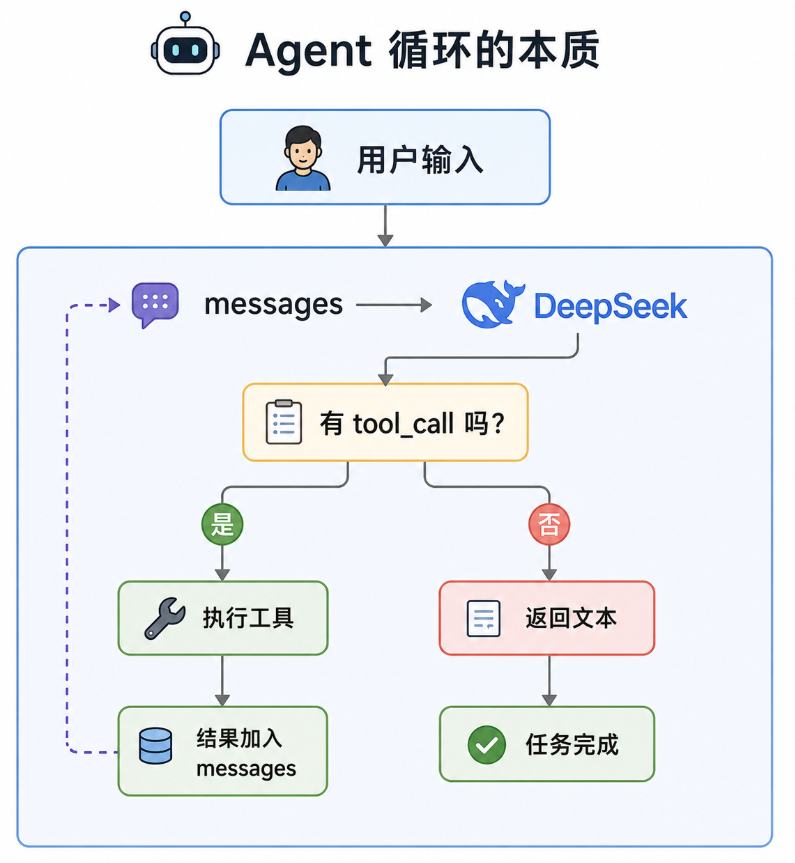
| 关键点 | 说明 |
|---|---|
| LLM 不执行函数 | 它只是输出 JSON,说"我想调用这个函数" |
| 你的代码执行函数 | 拿到 JSON → 执行真正的 Python 函数 → 返回结果 |
| Tool Description 很重要 | 写得好,LLM 才能正确选择工具 |
| 错误处理要结构化 | 让 LLM 看到错误后能自主决定下一步 |
✏️ 练习题
-
基础题:给工具集增加一个
send_email(to, subject, body)工具(不需要真发邮件,返回"已发送"即可),然后让 Agent 查完天气后"发邮件"给某人。 -
进阶题:修改
agent_loop函数,加上一个"确认"机制——当 Agent 想执行危险操作(比如"删除文件")时,先打印出来让用户确认再执行。 -
挑战题:工具返回错误时,Agent 能不能自己换一种方式重试?比如查询"北京"天气失败,Agent 能不能换个写法"北京市"再试?
下一章预告:第4章:Memory — 让 Agent 拥有"记忆" —— 没有记忆的 Agent 就像一个永远失忆的朋友,我们来给它装上"大脑"!
更多推荐
 15
15 0
0- 0


 已为社区贡献3条内容

所有评论(0)