
中级前端进阶方向 延伸扩展一)javascript 私有状态/工厂函数/回调中保持局部状态/防抖与节流/IIFE 捕获
《中级前端进阶方向 第一步)JavaScript 微任务 / 宏任务机制》
《中级前端进阶方向 第二步)深入事件循环(Event Loop)》
《中级前端进阶方向 第三步)深入javascript原型链,附学习代码》
《中级前端进阶方向 第四步)深入javascript 闭包、this 、作用域提升,附学习案例源码》
1. 模块模式(私有状态)——IIFE / Revealing Module(经典写法)
// 经典 IIFE 模块:私有变量在闭包内,外部只能通过暴露的 API 访问
const CounterModule = (function () {
  // 私有状态(外部无法直接访问)
  let count = 0;
  // 私有方法
  function log() { console.log('count =>', count); }

  // 对外暴露的 API(revealing pattern)
  return {
    increment() {
      count += 1;
      log();
    },
    decrement() {
      count -= 1;
      log();
    },
    getCount() {
      return count; // 只读访问
    }
  };
})();

// 使用
CounterModule.increment(); // count => 1
console.log(CounterModule.getCount()); // 1
// 不能直接访问 count(undefined)
console.log(CounterModule.count); // undefined
变体:传参注入依赖(避免全局)
const AjaxModule = (function (fetchFn) {
  let token = null;
  return {
    setToken(t) { token = t; },
    async get(url) {
      return fetchFn(url, { headers: { Authorization: token }});
    }
  };
})(window.fetch.bind(window)); // 把依赖注入模块
2. ES6 模块(文件级) —— 私有状态天然实现
// file: store.js
let state = { count: 0 }; // module scope 私有
export function increment(){ state.count++; }
export function getState(){ return { ...state }; } // 返回副本以避免外部修改

// file: main.js
// import { increment, getState } from './store.js'
在 ES6 模块中,模块内部的变量就是私有(文件边界),只有被
export的才是公共的。
3. 工厂函数(Factory Function)——创建具有私有状态的对象
// 简单工厂函数:每个实例都有自己的私有变量
function createCounter(initial = 0) {
  let count = initial; // 私有
  return {
    increment() { count++; return count; },
    decrement() { count--; return count; },
    get() { return count; }
  };
}

const a = createCounter(1);
const b = createCounter(10);
console.log(a.increment(), a.get()); // 2,2
console.log(b.get()); // 10
工厂函数的内存问题与优化(方法共享)
工厂函数每次返回的对象方法都会重新创建,若需要大量实例且方法相同,可以把方法放外部并用 Object.create 共享原型,但仍需私有状态:可用 WeakMap 存私有数据。
// 使用 WeakMap 存储私有数据以实现方法共享
const _private = new WeakMap();
const proto = {
  increment() {
    const p = _private.get(this);
    p.count++;
    return p.count;
  },
  get() {
    return _private.get(this).count;
  }
};

function createCounterShared(initial = 0) {
  const obj = Object.create(proto);
  _private.set(obj, { count: initial });
  return obj;
}

const c1 = createCounterShared(5);
console.log(c1.increment(), c1.get()); // 6,6
4. 回调中保持局部状态(保持计数 / 重试次数 / 上下文)
// 场景:为某个按钮创建事件处理器,内部保持点击次数状态
function bindButtonWithLocalState(btn) {
  let clicks = 0; // 闭包私有
  function handler(e) {
    clicks++;
    console.log('clicked times:', clicks, 'this:', this);
  }
  btn.addEventListener('click', handler);
  // 返回移除函数,避免内存泄漏
  return () => btn.removeEventListener('click', handler);
}

// 假设有 <button id="btn">
const remover = bindButtonWithLocalState(document.getElementById('btn'));
// later...
// remover(); // 卸载处理器并释放闭包对 DOM 的隐式引用(有助防止泄漏)
回调中保持重试计数(例如网络请求)
function fetchWithRetries(url, maxRetries = 3) {
  let attempts = 0;
  return new Promise((resolve, reject) => {
    function attempt() {
      attempts++;
      fetch(url).then(res => {
        if (!res.ok && attempts <= maxRetries) {
          attempt();
        } else if (!res.ok) {
          reject(new Error('Failed after ' + attempts));
        } else {
          resolve(res);
        }
      }).catch(err => {
        if (attempts <= maxRetries) attempt(); else reject(err);
      });
    }
    attempt();
  });
}
5. 防抖(debounce)实现与变体 —— 代码 + 说明
基本防抖(只在停止触发后执行)
function debounce(fn, wait = 200) {
  let timer = null;
  return function (...args) {
    const ctx = this;
    clearTimeout(timer);
    timer = setTimeout(() => {
      fn.apply(ctx, args);
    }, wait);
  };
}

// 使用:输入框实时搜索时防抖
const input = document.querySelector('#search');
input.addEventListener('input', debounce(function (e) {
  console.log('search for', e.target.value);
}, 300));
支持立即触发(leading)与 cancel / flush
function debounceWithOptions(fn, wait = 200, options = { leading: false, trailing: true }) {
  let timer = null;
  let lastArgs, lastThis;
  let result;
  const { leading, trailing } = options;

  function invoke() {
    result = fn.apply(lastThis, lastArgs);
    lastArgs = lastThis = null;
  }

  const debounced = function (...args) {
    lastArgs = args;
    lastThis = this;
    const callNow = leading && !timer;
    clearTimeout(timer);
    timer = setTimeout(() => {
      timer = null;
      if (trailing && lastArgs) invoke();
    }, wait);
    if (callNow) invoke();
    return result;
  };

  debounced.cancel = function () {
    clearTimeout(timer);
    timer = null;
    lastArgs = lastThis = null;
  };

  debounced.flush = function () {
    if (timer) {
      clearTimeout(timer);
      timer = null;
      if (lastArgs) invoke();
    }
  };

  return debounced;
}

// usage
const fn = debounceWithOptions((v) => console.log('do:', v), 300, { leading: true, trailing: true });
fn('a'); // immediate since leading true
fn('b'); // will schedule trailing
setTimeout(() => fn.flush(), 100); // force flush
rAF 防抖(适合渲染/滚动)
function rafDebounce(fn) {
  let id = null;
  return function (...args) {
    const ctx = this;
    if (id) cancelAnimationFrame(id);
    id = requestAnimationFrame(() => {
      id = null;
      fn.apply(ctx, args);
    });
  };
}
防抖注意事项
-
若需要最后一次调用结果(例如提交最后的输入),确保
trailing为 true 或使用flush()。 -
防抖会保留
lastArgs/lastThis,因此可能会延长闭包中的数据生命周期(注意内存)。 -
对 promise-returning
fn,可以在invoke中返回并保留 Promise 以便debounced返回值为 Promise(可选扩展)。
6. 节流(throttle)实现与变体 —— 代码 + 说明
时间戳法(leading 即刻触发)
function throttleTimestamp(fn, wait = 200) {
  let previous = 0;
  return function (...args) {
    const now = Date.now();
    const ctx = this;
    if (now - previous >= wait) {
      previous = now;
      fn.apply(ctx, args);
    }
  };
}
定时器法(trailing 执行)
function throttleTimer(fn, wait = 200) {
  let timer = null;
  let lastArgs, lastThis;
  return function (...args) {
    lastArgs = args;
    lastThis = this;
    if (!timer) {
      timer = setTimeout(() => {
        timer = null;
        fn.apply(lastThis, lastArgs);
      }, wait);
    }
  };
}
lodash 风格(leading/trailing 可选)——综合版
function throttle(fn, wait = 200, options = { leading: true, trailing: true }) {
  let timer = null;
  let previous = 0;
  let lastArgs, lastThis;

  const later = () => {
    previous = options.leading === false ? 0 : Date.now();
    timer = null;
    if (lastArgs) {
      fn.apply(lastThis, lastArgs);
      lastArgs = lastThis = null;
    }
  };

  return function (...args) {
    const now = Date.now();
    if (!previous && options.leading === false) previous = now;
    const remaining = wait - (now - previous);
    lastArgs = args;
    lastThis = this;

    if (remaining <= 0 || remaining > wait) {
      if (timer) {
        clearTimeout(timer);
        timer = null;
      }
      previous = now;
      fn.apply(lastThis, lastArgs);
      lastArgs = lastThis = null;
    } else if (!timer && options.trailing !== false) {
      timer = setTimeout(later, remaining);
    }
  };
}
节流注意事项
-
timestamp法更适合需要最小延迟的场景(即时响应),timer法适合保证间隔内至少执行一次(最后结尾)。 -
leading/trailing组合常用:leading 控制是否立即触发,trailing 控制是否在间隔结束时再次触发。 -
对于需要保持
this与参数的情况,请用apply并保留lastArgs/lastThis。
7. IIFE 捕获(立即执行函数表达式)——循环捕获经典问题与解决
问题:var 循环中的闭包捕获
for (var i = 0; i < 3; i++) {
  setTimeout(function () {
    console.log('var i =>', i); // 3 3 3(预期 0 1 2)
  }, 0);
}
解决方法一:使用 IIFE 捕获每次的 i
for (var i = 0; i < 3; i++) {
  (function (j) {
    setTimeout(function () {
      console.log('i with IIFE =>', j); // 0 1 2
    }, 0);
  })(i);
}
解决方法二:使用 let(块级作用域)
for (let i = 0; i < 3; i++) {
  setTimeout(function () {
    console.log('let i =>', i); // 0 1 2
  }, 0);
}
IIFE 的常见用法
// 1) 创建私有块,避免污染全局
(function () {
  const secret = 'x';
  console.log('IIFE', secret);
})();

// 2) 注入依赖以利于压缩和测试
(function (window, document) {
  // use window, document as local vars -> 压缩时能缩短名称
})(window, document);

// 3) 立即初始化单例
const singleton = (function () {
  const state = {};
  return {
    set(k,v){ state[k]=v; },
    get(k){ return state[k]; }
  };
})();
8. 内存泄漏注意(闭包持有 DOM 的风险)
function attach() {
  const big = document.getElementById('big'); // large DOM subtree
  function onClick() { console.log(big); }
  window.addEventListener('click', onClick);
  // 如果页面上卸载 big,但没有移除 listener,big 会因为闭包而被保留
  return () => window.removeEventListener('click', onClick);
}
const remove = attach();
// later when unmounting:
remove(); // 释放闭包对 big 的引用,允许回收
建议:绑定事件时返回移除函数;在组件卸载时调用;避免闭包持有大型外部资源。
9. 小结(实践建议)
-
模块私有状态:IIFE / ES6 模块 / WeakMap / 私有字段(
#)都可实现,优先使用模块或私有字段(更语义化)。 -
工厂函数:简单、直观;若要节省内存可用
WeakMap + prototype共享方法。 -
回调局部状态:用闭包保存状态(计数、重试、节流状态等),并提供取消 API 以避免泄漏。
-
防抖/节流:理解
leading/trailing行为,提供cancel/flush接口;留意this与参数传递。 -
IIFE:在没有
let的旧环境或需要立即作用域隔离时非常有用;也常用于参数注入与单例初始化。 -
内存安全:给长期闭包(事件监听、长定时器)提供卸载/取消逻辑,避免保留对大对象或 DOM 的引用。
10. 源文件案例代码:
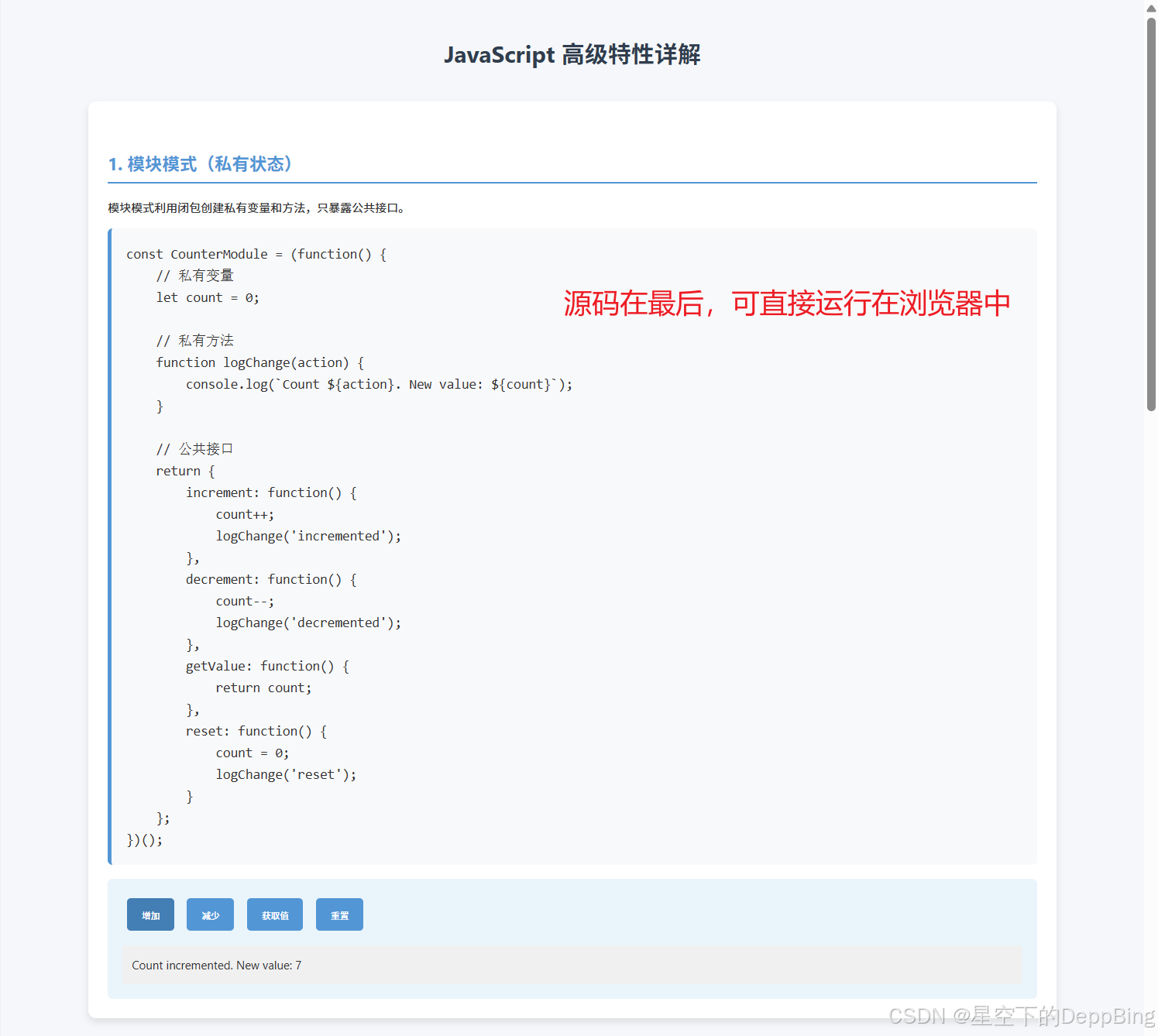
1. 模块模式(私有状态)
-
使用IIFE创建了一个计数器模块
-
内部状态
count是私有的,只能通过公共方法访问 -
演示了如何封装私有变量和提供公共接口
2. 工厂函数
-
createUser函数返回一个新用户对象 -
每个对象都有自己的私有状态(创建时间)
-
展示了如何创建具有封装状态的对象而不使用类
3. 回调中保持局部状态
-
setupCounter函数返回一个闭包 -
返回的函数保持对
count变量的访问 -
演示了如何在异步回调中保持状态
4. 防抖和节流
-
实现了防抖和节流函数
-
防抖:输入框输入时延迟处理,避免频繁触发
-
节流:按钮点击时限制执行频率
5. IIFE捕获
-
展示了经典的IIFE在循环中捕获变量值的问题
-
使用IIFE为每个迭代创建新的作用域,保存正确的值
<!DOCTYPE html>
<html lang="zh-CN">
<head>
    <meta charset="UTF-8">
    <meta name="viewport" content="width=device-width, initial-scale=1.0">
    <title>JavaScript 高级特性详解</title>
    <style>
        body {
            font-family: 'Segoe UI', Tahoma, Geneva, Verdana, sans-serif;
            line-height: 1.6;
            color: #333;
            max-width: 1000px;
            margin: 0 auto;
            padding: 20px;
            background-color: #f5f7fa;
        }
        h1 {
            color: #2c3e50;
            text-align: center;
            margin-bottom: 30px;
        }
        h2 {
            color: #3498db;
            border-bottom: 2px solid #3498db;
            padding-bottom: 5px;
            margin-top: 30px;
        }
        .section {
            background-color: white;
            border-radius: 8px;
            padding: 20px;
            margin-bottom: 30px;
            box-shadow: 0 4px 8px rgba(0, 0, 0, 0.1);
        }
        pre {
            background-color: #f8f9fa;
            padding: 15px;
            border-radius: 5px;
            overflow-x: auto;
            border-left: 4px solid #3498db;
        }
        code {
            font-family: 'Consolas', 'Monaco', monospace;
            font-size: 14px;
        }
        .example {
            margin-top: 15px;
            padding: 15px;
            background-color: #e8f4fc;
            border-radius: 5px;
        }
        button {
            background-color: #3498db;
            color: white;
            border: none;
            padding: 10px 15px;
            border-radius: 4px;
            cursor: pointer;
            margin: 5px;
            transition: background-color 0.3s;
        }
        button:hover {
            background-color: #2980b9;
        }
        .output {
            margin-top: 10px;
            padding: 10px;
            background-color: #f0f0f0;
            border-radius: 4px;
            min-height: 20px;
        }
    </style>
</head>
<body>
    <h1>JavaScript 高级特性详解</h1>

    <div class="section">
        <h2>1. 模块模式(私有状态)</h2>
        <p>模块模式利用闭包创建私有变量和方法,只暴露公共接口。</p>
        <pre><code>const CounterModule = (function() {
    // 私有变量
    let count = 0;

    // 私有方法
    function logChange(action) {
        console.log(`Count ${action}. New value: ${count}`);
    }

    // 公共接口
    return {
        increment: function() {
            count++;
            logChange('incremented');
        },
        decrement: function() {
            count--;
            logChange('decremented');
        },
        getValue: function() {
            return count;
        },
        reset: function() {
            count = 0;
            logChange('reset');
        }
    };
})();</code></pre>

        <div class="example">
            <button onclick="counterIncrement()">增加</button>
            <button onclick="counterDecrement()">减少</button>
            <button onclick="counterGetValue()">获取值</button>
            <button onclick="counterReset()">重置</button>
            <div class="output" id="counter-output"></div>
        </div>
    </div>

    <div class="section">
        <h2>2. 工厂函数</h2>
        <p>工厂函数是返回新对象的函数,用于创建相似对象而不使用new关键字。</p>
        <pre><code>function createUser(name, age, email) {
    // 私有变量
    const createdAt = new Date();

    // 公共接口
    return {
        getName: () => name,
        getAge: () => age,
        getEmail: () => email,
        getCreatedAt: () => createdAt,
        setName: (newName) => {
            if (newName && newName.length > 0) {
                name = newName;
                return true;
            }
            return false;
        },
        getInfo: () => `${name} (${age}), ${email}`
    };
}</code></pre>

        <div class="example">
            <button onclick="createUserExample()">创建用户示例</button>
            <div class="output" id="user-output"></div>
        </div>
    </div>

    <div class="section">
        <h2>3. 回调中保持局部状态</h2>
        <p>使用闭包在回调函数中保持对局部变量的访问。</p>
        <pre><code>function setupCounter() {
    let count = 0;
    const outputElement = document.getElementById('callback-output');

    return function() {
        count++;
        outputElement.textContent = `按钮被点击了 ${count} 次`;

        // 模拟异步操作
        setTimeout(() => {
            outputElement.textContent += ` | 异步更新: ${count}`;
        }, 500);
    };
}</code></pre>

        <div class="example">
            <button id="callback-button">点击我</button>
            <div class="output" id="callback-output"></div>
        </div>
    </div>

    <div class="section">
        <h2>4. 防抖和节流</h2>
        <p>防抖和节流是控制函数执行频率的技术。</p>

        <h3>防抖 (Debounce)</h3>
        <pre><code>function debounce(func, delay) {
    let timeoutId;
    return function(...args) {
        clearTimeout(timeoutId);
        timeoutId = setTimeout(() => func.apply(this, args), delay);
    };
}</code></pre>

        <h3>节流 (Throttle)</h3>
        <pre><code>function throttle(func, limit) {
    let inThrottle;
    return function(...args) {
        if (!inThrottle) {
            func.apply(this, args);
            inThrottle = true;
            setTimeout(() => inThrottle = false, limit);
        }
    };
}</code></pre>

        <div class="example">
            <h3>防抖示例</h3>
            <input type="text" id="debounce-input" placeholder="输入内容(防抖500ms)">
            <div class="output" id="debounce-output"></div>

            <h3>节流示例</h3>
            <button id="throttle-button">频繁点击我(节流1000ms)</button>
            <div class="output" id="throttle-output"></div>
        </div>
    </div>

    <div class="section">
        <h2>5. IIFE捕获</h2>
        <p>立即调用函数表达式(IIFE)可以捕获变量在特定时刻的状态。</p>
        <pre><code>// 经典问题:循环中的闭包
for (var i = 0; i < 5; i++) {
    (function(j) {
        setTimeout(function() {
            console.log('IIFE捕获的值:', j);
        }, j * 500);
    })(i);
}</code></pre>

        <div class="example">
            <button onclick="runIIFEExample()">运行IIFE示例</button>
            <div class="output" id="iife-output"></div>
        </div>
    </div>

    <script>
        // 1. 模块模式示例
        const CounterModule = (function() {
            let count = 0;

            function logChange(action) {
                console.log(`Count ${action}. New value: ${count}`);
                document.getElementById('counter-output').textContent =
                    `Count ${action}. New value: ${count}`;
            }

            return {
                increment: function() {
                    count++;
                    logChange('incremented');
                },
                decrement: function() {
                    count--;
                    logChange('decremented');
                },
                getValue: function() {
                    return count;
                },
                reset: function() {
                    count = 0;
                    logChange('reset');
                }
            };
        })();

        function counterIncrement() { CounterModule.increment(); }
        function counterDecrement() { CounterModule.decrement(); }
        function counterGetValue() {
            document.getElementById('counter-output').textContent =
                `当前值: ${CounterModule.getValue()}`;
        }
        function counterReset() { CounterModule.reset(); }

        // 2. 工厂函数示例
        function createUser(name, age, email) {
            const createdAt = new Date();

            return {
                getName: () => name,
                getAge: () => age,
                getEmail: () => email,
                getCreatedAt: () => createdAt,
                setName: (newName) => {
                    if (newName && newName.length > 0) {
                        name = newName;
                        return true;
                    }
                    return false;
                },
                getInfo: () => `${name} (${age}), ${email}`
            };
        }

        function createUserExample() {
            const user = createUser('张三', 28, 'zhangsan@example.com');
            let output = `初始信息: ${user.getInfo()}<br>`;

            user.setName('李四');
            output += `修改后: ${user.getInfo()}<br>`;
            output += `创建时间: ${user.getCreatedAt().toLocaleString()}`;

            document.getElementById('user-output').innerHTML = output;
        }

        // 3. 回调中保持局部状态
        const counterCallback = setupCounter();
        document.getElementById('callback-button').addEventListener('click', counterCallback);

        function setupCounter() {
            let count = 0;
            const outputElement = document.getElementById('callback-output');

            return function() {
                count++;
                outputElement.textContent = `按钮被点击了 ${count} 次`;

                setTimeout(() => {
                    outputElement.textContent += ` | 异步更新: ${count}`;
                }, 500);
            };
        }

        // 4. 防抖和节流
        // 防抖实现
        function debounce(func, delay) {
            let timeoutId;
            return function(...args) {
                clearTimeout(timeoutId);
                timeoutId = setTimeout(() => func.apply(this, args), delay);
            };
        }

        // 节流实现
        function throttle(func, limit) {
            let inThrottle;
            return function(...args) {
                if (!inThrottle) {
                    func.apply(this, args);
                    inThrottle = true;
                    setTimeout(() => inThrottle = false, limit);
                }
            };
        }

        // 防抖示例
        const debounceInput = document.getElementById('debounce-input');
        const debounceOutput = document.getElementById('debounce-output');

        const updateDebounceOutput = debounce(function(e) {
            debounceOutput.textContent = `防抖结果: ${e.target.value}`;
        }, 500);

        debounceInput.addEventListener('input', updateDebounceOutput);

        // 节流示例
        const throttleButton = document.getElementById('throttle-button');
        const throttleOutput = document.getElementById('throttle-output');
        let throttleCount = 0;

        const updateThrottleOutput = throttle(function() {
            throttleCount++;
            throttleOutput.textContent = `节流点击次数: ${throttleCount}`;
        }, 1000);

        throttleButton.addEventListener('click', updateThrottleOutput);

        // 5. IIFE捕获示例
        function runIIFEExample() {
            const outputElement = document.getElementById('iife-output');
            outputElement.innerHTML = '';

            for (var i = 0; i < 5; i++) {
                (function(j) {
                    setTimeout(function() {
                        outputElement.innerHTML += `IIFE捕获的值: ${j}<br>`;
                    }, j * 500);
                })(i);
            }
        }
    </script>
</body>
</html>
更多推荐
 17
17 0
0- 0


 已为社区贡献13条内容

所有评论(0)