
springboot vue sse消息推送,封装系统公共消息推送前后端方法
概述
1、封装springboot全局的消息推送接口;
注:
	1)由于原生HTML5 EventSource 不支持添加header,所以要把连接创建接口加入身份验证白名单,并在接口内添加自己校验token
	2)后台需定时心跳,保证链接的存活
2、封装前端公共的消息推动存储方法:保证整个系统只有1个消息链接
组件可根据传递指定的业务类型,展示制定的消息
3、注意sse连接建立接口,需要单独指定nginx配置,防止nginx默认配置导致的推送链接中断
4、分布式系统,该后台接口改动介绍
测试效果
如下图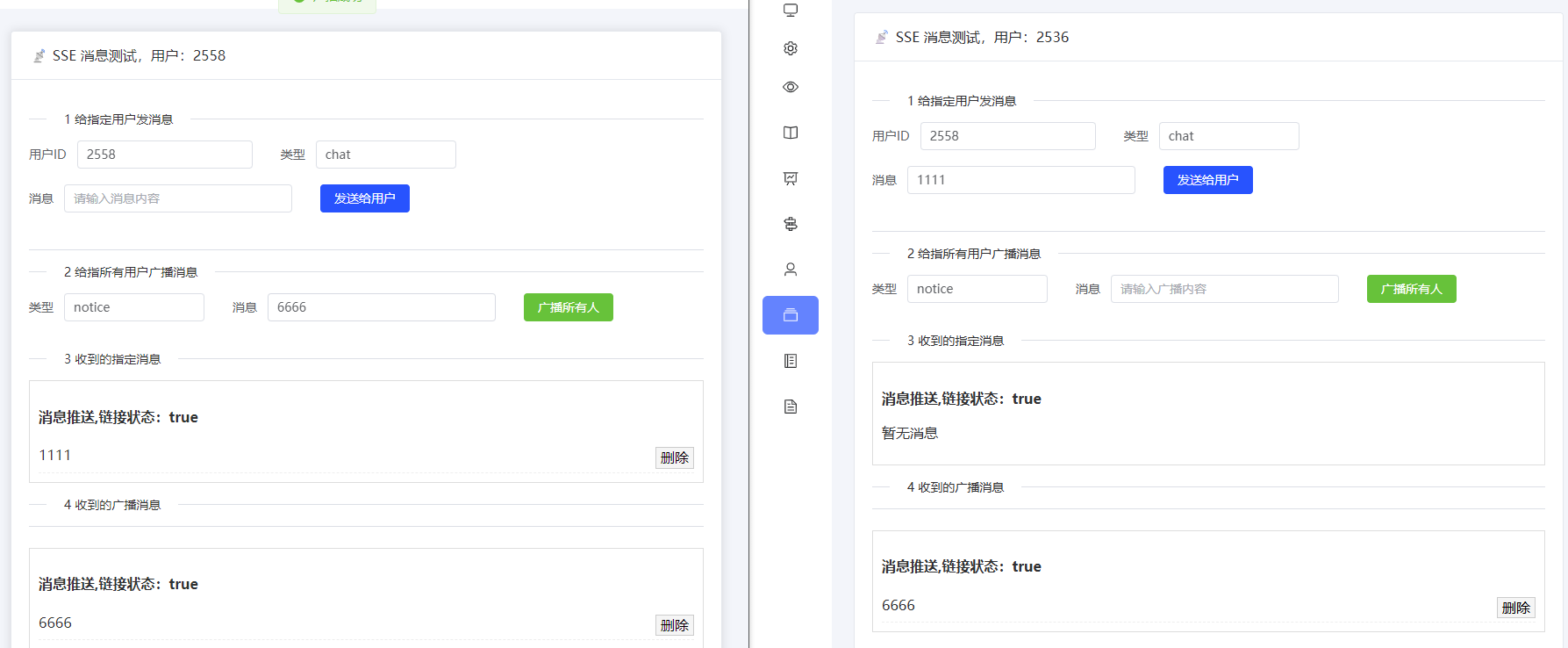
1 后端接口的实现
controller有3个方法
1、sse链接建立
2、给已连接的指定用户推送消息(用户在线才能收到,不在线消息丢下:可根据您的业务再做具体代码编写)
3、给所有已建立的用户广播消息
注:本文章采用:有心跳(心跳30s,一般30~60s)→30min过期 ;前端重连是基于tcp链接断开检测,当网络断开后 15~60 秒左右触发 onerror;所以可能会出现消息推送失败,实际推送一般:首次链接建立,会把未读的消息汇总推送给前端;
也可采用:无心跳 →用 0L 永久连接,服务器资源受控,客户端也能保持连接
1.1 推送服务Service
SseService 接口
package com.server.common.notice.service;

import org.springframework.web.servlet.mvc.method.annotation.SseEmitter;

public interface SseService {

    /**
     * 建立连接
     *
     * @param clientId 连接id,这里是用户id
     * @return see 服务器事件响应
     */
    SseEmitter connect(String clientId);

    /**
     * 给指定 连接,发送消息
     *
     * @param clientId 连接id
     * @param type     消息类型
     * @param data     数据
     */
    void sendMessage(String clientId, String type, Object data);

    /**
     * 广播某事件消息
     *
     * @param type 类型
     * @param data 数据
     */
    void broadcast(String eventName, String type, Object data);

    /**
     * 广播消息
     *
     * @param type 类型
     * @param data 数据
     */
    void broadcastMessage(String type, Object data);
}
SseService 接口实现:SseServiceImpl
注意:链接建立逻辑不要做改动,若直接根据clientId 移除和关闭,可能造成竞态删除”错误对象
package com.server.common.notice.service.impl;

import cn.hutool.core.date.LocalDateTimeUtil;
import cn.hutool.core.util.IdUtil;
import cn.hutool.core.util.ObjectUtil;
import com.server.common.notice.enums.SseEventTypeEnum;
import com.server.common.notice.service.SseService;
import jakarta.annotation.Resource;
import org.springframework.context.annotation.Lazy;
import org.springframework.stereotype.Service;
import org.springframework.web.servlet.mvc.method.annotation.SseEmitter;

import java.time.LocalDateTime;
import java.util.Map;
import java.util.concurrent.ConcurrentHashMap;

@Service
public class SseServiceImpl implements SseService {

    private final Map<String, SseEmitter> clients = new ConcurrentHashMap<>();

    @Override
    public SseEmitter connect(String clientId) {
        // 1) 删除旧连接,但仅在它还在 Map 中时
        SseEmitter old = clients.get(clientId);
        if (ObjectUtil.isNotNull(old)) {
            if (clients.remove(clientId, old)) {
                try {
                    old.complete();
                } catch (Exception ignore) {
                }
            }
        }

        // 2) 建立新连接(可设置永不超时0L,这里是 30 min + 心跳)
        SseEmitter emitter = new SseEmitter(30 * 60 * 1000L);
        clients.put(clientId, emitter);

        // 3) 回调里做“条件删除”:仅当 Map 中的值就是当前这个 emitter 时才删除
        Runnable cleanup = () -> clients.remove(clientId, emitter);
        emitter.onCompletion(cleanup);

        // 连接超时:不打印日志,不抛异常,不让全局异常处理器介入
        emitter.onTimeout(() -> {
            cleanup.run();
            try {
                emitter.complete();
            } catch (Exception ignore) {
            }
        });

        // 异常相同:注意:不要 rethrow,不要 completeWithError
        emitter.onError(ex -> {
            cleanup.run();
            try {
                emitter.complete();
            } catch (Exception ignore) {
            }
        });

        // 4) 初始事件
        onConnectInit(clientId, emitter);
        return emitter;
    }

    /**
     * SSE 连接建立后的初始化操作
     * 可以在这里扩展发送更多信息给客户端
     */
    protected void onConnectInit(String clientId, SseEmitter emitter) {
        try {
            // 1 连接确认,发送类型
            emitter.send(SseEmitter.event().name("INIT").data("connected"));

        } catch (Exception e) {
            // 只删除当前 emitter
            clients.remove(clientId, emitter);
            try {
                emitter.complete();
            } catch (Exception ignore) {
            }
        }
    }

    @Override
    public void sendMessage(String clientId, String type, Object data) {
        sendMessage(clientId, "MESSAGE", type, data, LocalDateTimeUtil.now());
    }

    /**
     * 给指定 连接,发送消息
     *
     * @param clientId  连接id
     * @param eventName 事件名称
     * @param type      消息类型
     * @param data      数据
     */
    private void sendMessage(String clientId, String eventName, String type, Object data, LocalDateTime localDateTime) {
        SseEmitter emitter = clients.get(clientId);
        if (emitter == null) {
            return;
        }
        try {
            emitter.send(SseEmitter.event()
                    .name(eventName)
                    .data(Map.of(
                            "id", IdUtil.fastSimpleUUID(),
                            "type", type,
                            "ts", LocalDateTimeUtil.formatNormal(localDateTime),
                            "data", data
                    )));
        } catch (Exception e) {
            clients.remove(clientId, emitter);
            try {
                emitter.complete();
            } catch (Exception ignore) {
            }
        }
    }

    /**
     * 广播
     *
     * @param eventName 事件名称
     * @param type      消息体的类型
     * @param data      消息体的data
     */
    @Override
    public void broadcast(String eventName, String type, Object data) {
        LocalDateTime localDateTime = LocalDateTimeUtil.now();
        for (Map.Entry<String, SseEmitter> entry : clients.entrySet()) {
            sendMessage(entry.getKey(), eventName, type, data, localDateTime);
        }
    }

    /**
     * 广播消息
     *
     * @param type 消息体的类型
     * @param data 消息体的data
     */
    @Override
    public void broadcastMessage(String type, Object data) {
        broadcast(SseEventTypeEnum.Message.getCode(), type, data);
    }
}
依赖枚举 SseEventTypeEnum
package com.server.common.notice.enums;

import lombok.Getter;

import java.util.Map;

/**
 * 试题类型
 */
@Getter
public enum SseEventTypeEnum {

    Message("MESSAGE", "消息"),

    Heartbeat("HEARTBEAT", "心跳");

    private final String code;

    @Getter
    private final String message;

    SseEventTypeEnum(String code, String message) {
        this.code = code;
        this.message = message;
    }
}
1.2 推送服务Controller
package com.server.common.notice.controller;

import cn.hutool.core.util.ObjectUtil;
import com.server.common.notice.service.SseService;
import jakarta.annotation.Resource;
import lombok.extern.slf4j.Slf4j;
import org.springframework.http.HttpStatus;
import org.springframework.http.ResponseEntity;
import org.springframework.web.bind.annotation.*;
import org.springframework.web.servlet.mvc.method.annotation.SseEmitter;

import java.time.Instant;

@Slf4j
@RestController
@RequestMapping("/common/stream")
public class SseController {

    @Resource
    private SseService sseService;

    /**
     * 建立 SSE 连接
     *
     * @param clientId 连接id
     * @return sse 事件
     */
    @GetMapping("/connect/{clientId}")
    public ResponseEntity<SseEmitter> connect(@PathVariable String clientId, @RequestParam String token) {
        ...解析token,并验证
        if (验证不过) {
            log.warn("SSE connect token 无效或过期, clientId={}", clientId);
            // 返回 401,但不抛异常
            return ResponseEntity.status(HttpStatus.UNAUTHORIZED).build();
        }

        // token 校验通过,返回正常连接
        SseEmitter emitter = sseService.connect(clientId);
        return ResponseEntity.ok(emitter);
    }

    /**
     * 给指定用户推送(仅测试用)
     *
     * @param clientId 连接id
     * @param type     类型
     * @param data     数据
     */
    @PostMapping("/push/{clientId}")
    public void  push(@PathVariable String clientId,
                              @RequestParam String type,
                              @RequestBody Object data) {
        sseService.sendMessage(clientId, type, data);
    }

    /**
     * 广播推送(仅测试用)
     *
     * @param type 类型
     * @param data 数据
     */
    @PostMapping("/broadcast")
    public void broadcast(@RequestParam String type,
                                   @RequestBody Object data) {
        sseService.broadcastMessage(type, data);
    }
}
1.3 定时心跳,保证链接不中断
package com.server.common.notice.schedule;

import com.server.common.notice.enums.SseEventTypeEnum;
import com.server.common.notice.service.SseService;
import jakarta.annotation.Resource;
import org.springframework.scheduling.annotation.Scheduled;
import org.springframework.stereotype.Component;

@Component
public class SseHeartbeatTask {

    @Resource
    private SseService sseService;

    /**
     * 每30秒执行一次,给sse链接事件,发送一次广播
     */
    @Scheduled(fixedRate = 30000)
    public void sendHeartbeat() {
        sseService.broadcast(SseEventTypeEnum.Heartbeat.getCode(), "ping", "");
    }
}
前端会30s 打印一次,可根基实际情况调整广播和前端的打印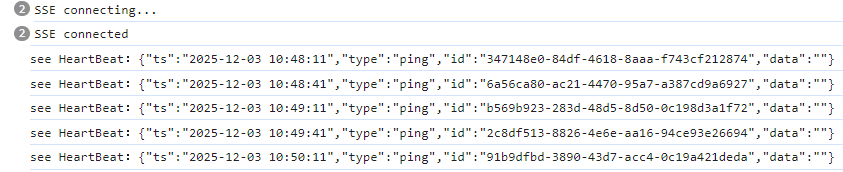
1.4 异常拦截添加忽略
忽略:SSE 客户端断开异常,尽量写在类的前面:ControllerAdvice 异常是自上而下匹配
package com.server.exception;

import lombok.extern.slf4j.Slf4j;
import org.springframework.web.bind.annotation.ControllerAdvice;
import org.springframework.web.bind.annotation.ExceptionHandler;
import org.springframework.web.bind.annotation.ResponseBody;

@Slf4j
@ControllerAdvice("com")
public class GlobalExceptionHandler {

    /**
     * SSE 客户端断开类异常
     */
    @ExceptionHandler({
            org.springframework.web.context.request.async.AsyncRequestNotUsableException.class,
            org.springframework.http.converter.HttpMessageNotWritableException.class  // flush 期间可能出现
    })
    @ResponseBody
    public Object sseExceptionHandler(Exception e) {
        log.debug("客户端连接已断开(正常现象):{}", e.getClass().getSimpleName());
        return null; // 不要返回错误,不要影响主流程
    }
}
2 前端公共组件封装
核心:
1、使用公共变量存储前端唯一的:eventSource ,不重复建立连接
2、pinia 类定义了前端唯一的sse事件监听器,且存储所有消息
3、封装消息展示组件固定化流程,防止链接重复创建
包含:sseStore.js、PushMessage.vue
2.1 sseStore.js
注:其中链接地址的前缀需要你根据实际业务调整:例如:import.meta.env.VITE_BASE_API
属性 messages:存储的消息列表:格式:[{id:唯一标识,type:消息类型,data:消息内容,ts:消息时间}]
属性 connected:是够链接建立成功
方法:
1)initSse 初始化链接,传递用户id 和 获取用户token的方法
2)removeMessage:存储中删除指定消息
import {defineStore} from 'pinia';
import {ref} from 'vue';

let eventSource = null; // 全局唯一 SSE 连接
let reconnectTimer = null; // 定时重连器
let initSseTimer = null; // 防抖定时器

export const useSseStore = defineStore('sse', () => {
    const messages = ref([]);
    const connected = ref(false);
    const clientInfo = ref({clientId: null, getTokenFun: null});

    const MAX_MESSAGES = 500;        // 最大缓存消息数量
    const RECONNECT_INTERVAL = 30000; // 固定重连间隔 30 秒

    // ---------------- 初始化 SSE ----------------
    function initSse(clientId, getTokenFun) {
        clientInfo.value = {clientId, getTokenFun};

        // 防抖:连续调用只执行最后一次
        if (initSseTimer) clearTimeout(initSseTimer);
        initSseTimer = setTimeout(() => {

            // 已经连接且 OPEN,直接返回
            if (eventSource && eventSource.readyState === EventSource.OPEN) return;

            console.log('SSE connecting...');
            eventSource = new EventSource(`${import.meta.env.VITE_BASE_API}/common/stream/connect/${clientId}?token=${getTokenFun()}`);

            eventSource.addEventListener('INIT', () => {
                connected.value = true;
                console.log('SSE connected');

                // 清空定时连接器
                if (reconnectTimer) {
                    clearInterval(reconnectTimer);
                    reconnectTimer = null;
                }
            });

            eventSource.addEventListener('MESSAGE', event => {
                const msg = JSON.parse(event.data);
                messages.value.unshift(msg);
                // 限制缓存
                if (messages.value.length > MAX_MESSAGES) {
                    messages.value.pop();
                }
            });

            eventSource.addEventListener('HEARTBEAT', event => {
                // 收到后台心跳
                console.log(`see HeartBeat:${event.data}`)
            });

            eventSource.onerror = () => {
                console.warn("SSE error");

                // 小延迟,避免误判
                setTimeout(() => {
                    // 未断开(仍然存在且不是 CLOSED) → return,不重连
                    if (eventSource && eventSource.readyState !== EventSource.CLOSED) {
                        console.log("SSE alive → ignore error");
                        return;
                    }

                    console.log("SSE closed → reconnect");
                    connected.value = false;

                    eventSource?.close();
                    eventSource = null;

                    startAutoReconnect();
                }, 500); // 延迟 0.5 秒即可
            };
        }, 300); // 防抖延迟 300ms
    }

    // ---------------- 自动重连 ----------------
    function startAutoReconnect() {
        // 如果正在重连(timer 存在),就不重复启动
        if (reconnectTimer) return;

        console.warn("Start auto reconnect...");
        reconnectTimer = setInterval(() => {
            if (connected.value) {
                clearInterval(reconnectTimer);
                reconnectTimer = null;
                return;
            }

            console.log('Trying to reconnect SSE...');
            if (clientInfo.value.clientId && clientInfo.value.getTokenFun) {
                initSse(clientInfo.value.clientId, clientInfo.value.getTokenFun);
            }
        }, RECONNECT_INTERVAL);
    }

    // ---------------- 切换 clientId/getTokenFun ----------------
    function switchClient(clientId, getTokenFun) {
        if (eventSource) {
            eventSource.close();
            eventSource = null;
        }
        connected.value = false;

        initSse(clientId, getTokenFun);
    }

    // ---------------- 删除消息 ----------------
    function removeMessage(id) {
        messages.value = messages.value.filter(msg => msg.id !== id);
    }

    // ---------------- 页面关闭清理 ----------------
    function cleanup() {
        if (eventSource) {
            eventSource.close();
            eventSource = null;
        }
        if (reconnectTimer) {
            clearInterval(reconnectTimer);
            reconnectTimer = null;
        }
    }

    return {messages, connected, initSse, switchClient, removeMessage, cleanup};
});
上面的实现已经可以用于生产环境;但是对于大规模应用,需优化2点性能损耗:
1)token 失效一直重连;2)同时发生多个错误造成,重复 close / reconnect
下面是 指数延迟重试 和 和重试半小时版本,你可对比理解2者的区别
import {defineStore} from 'pinia';
import {ref} from 'vue';

/** ================= 全局唯一连接相关 ================= */
let eventSource = null; // 全局唯一 SSE 连接
let initSseTimer = null; // 防抖定时器
let isHandlingDisconnect = false; // 是否正在处理断开/重连,防止重复 close / reconnect

// 重连控制
let reconnectTimer = null;
let retryCount = 0;
let firstReconnectTime = null;

export const useSseStore = defineStore('sse', () => {

    /** ================= 响应式状态 ================= */
    const messages = ref([]);
    const connected = ref(false);
    const clientInfo = ref({clientId: null, getTokenFun: null});

    /** ================= 常量配置 ================= */
    const MAX_MESSAGES = 500;        // 最大缓存消息数量
    // 指数退避
    const BASE_RECONNECT_DELAY = 5_000;      // 初始 5s
    const MAX_RECONNECT_DELAY = 5 * 60_000; // 最大 5 分钟
    const MAX_RECONNECT_TIME = 30 * 60_000;// 最多重连 30 分钟

    /** ================= 初始化 SSE ================= */
    function initSse(clientId, getTokenFun) {
        clientInfo.value = {clientId, getTokenFun};

        // 防抖,避免频繁初始化
        if (initSseTimer) clearTimeout(initSseTimer);
        initSseTimer = setTimeout(() => {
            // 已连接则直接返回
            if (eventSource?.readyState === EventSource.OPEN) {
                return;
            }

            const token = getTokenFun?.();
            if (!token) {
                console.warn('SSE token missing, abort connect');
                return;
            }

            console.log('SSE connecting...');
            isHandlingDisconnect = false;

            eventSource = new EventSource(`${import.meta.env.VITE_BASE_API}/common/stream/connect/${clientId}?token=${token}`);

            /** ===== 原生 onopen(兜底) ===== */
            eventSource.onopen = () => {
                connected.value = true;
                console.log('SSE opened');

                resetReconnectState();
            };

            /** ===== 业务 INIT 事件(推荐后端发) ===== */
            eventSource.addEventListener('INIT', () => {
                connected.value = true;
                console.log('SSE INIT success');

                resetReconnectState();
            });

            /** ===== 业务消息 ===== */
            eventSource.addEventListener('MESSAGE', event => {
                try {
                    const msg = JSON.parse(event.data);
                    messages.value.unshift(msg);

                    if (messages.value.length > MAX_MESSAGES) {
                        messages.value.pop();
                    }
                } catch (e) {
                    console.error('SSE message parse error', e);
                }
            });

            /** ===== 心跳 ===== */
            eventSource.addEventListener('HEARTBEAT', event => {
                console.log(`see HeartBeat:${event.data}`)
            });

            /** ===== 错误处理 ===== */
            eventSource.onerror = () => {
                if (isHandlingDisconnect) return;

                console.warn('SSE error detected');
                // 延迟判断,防止误触发
                setTimeout(() => {
                    if (eventSource?.readyState !== EventSource.CLOSED) {
                        return;
                    }

                    isHandlingDisconnect = true;
                    connected.value = false;

                    eventSource?.close();
                    eventSource = null;

                    startAutoReconnect();
                    isHandlingDisconnect = false;
                }, 500); // 延迟 0.5 秒即可
            };
        }, 300); // 防抖延迟 300ms
    }

    /** ================= 自动重连 ================= */
    function startAutoReconnect() {
        // 如果正在重连(timer 存在),就不重复启动
        if (reconnectTimer) return;

        const {clientId, getTokenFun} = clientInfo.value;
        const token = getTokenFun?.();

        // token 不存在,直接停止
        if (!clientId || !token) {
            console.warn('SSE reconnect aborted (invalid token/client)');
            cleanup();
            return;
        }

        // 第一次进入重连
        const now = Date.now();
        if (!firstReconnectTime) {
            firstReconnectTime = now;
        }

        // 超过最大重连时长
        if (now - firstReconnectTime > MAX_RECONNECT_TIME) {
            console.error('SSE reconnect timeout, stop retry');
            cleanup();
            return;
        }

        // 计算重连延时时间
        const delay = Math.min(BASE_RECONNECT_DELAY * Math.pow(2, retryCount), MAX_RECONNECT_DELAY);
        console.warn(`SSE reconnect in ${Math.round(delay / 1000)}s (retry ${retryCount})`);

        // 启用延迟重试
        retryCount++;
        reconnectTimer = setTimeout(() => {
            reconnectTimer = null;

            initSse(clientId, getTokenFun);
        }, delay);
    }

    /** ================= 状态重置 ================= */
    function resetReconnectState() {
        retryCount = 0;
        firstReconnectTime = null;

        if (reconnectTimer) {
            clearTimeout(reconnectTimer);
            reconnectTimer = null;
        }
    }

    /** ================= 切换客户端 ================= */
    function switchClient(clientId, getTokenFun) {
        // 先清理所有状态
        cleanup();
        // 再重新尝试重连
        initSse(clientId, getTokenFun);
    }

    /** ================= 删除消息 ================= */
    function removeMessage(id) {
        messages.value = messages.value.filter(msg => msg.id !== id);
    }

    /** ================= 彻底清理 ================= */
    function cleanup() {
        isHandlingDisconnect = true;

        if (eventSource) {
            eventSource.close();
            eventSource = null;
        }
        if (reconnectTimer) {
            clearTimeout(reconnectTimer);
            reconnectTimer = null;
        }
        if (initSseTimer) {
            clearTimeout(initSseTimer);
            initSseTimer = null;
        }

        connected.value = false;
        retryCount = 0;
        firstReconnectTime = null;
        isHandlingDisconnect = false;
    }

    return {messages, connected, initSse, switchClient, removeMessage, cleanup};
});
2.2 PushMessage.vue
注:onMounted的参数需要你根据实际业务传递,ui展示也需要您根据业务调整
<template>
  <div class="push-messages" :style="{ width: width }">
    <!-- 头部 -->
    <div class="card-header">
      <span class="title">{{ title }}</span>
      <el-tag :type="sseStore.connected ? 'success' : 'danger'">
        {{ sseStore.connected ? '已连接' : '未连接' }}
      </el-tag>
    </div>

    <!-- 消息列表 -->
    <el-scrollbar class="message-list" :height="messageHeight">

      <!-- 有消息 -->
      <template v-if="filteredMessages.length">
        <div v-for="(msg,index) in filteredMessages"
             :key="msg.id"
             class="message-item">
          <!-- 左侧消息 -->
          <div class="message-text">{{ msg.data }}</div>

          <!-- 右侧 时间 + 删除 -->
          <div class="right-box">
            <span class="message-time">{{ msg.ts }}</span>
            <el-button size="small" type="danger" icon="Delete" :disabled="index === 0" @click="remove(msg.id)"/>
          </div>
        </div>
      </template>

      <!-- 空消息 -->
      <el-empty v-else description="暂无消息" class="empty-message"/>
    </el-scrollbar>
  </div>
</template>

<script setup>
import {computed, onMounted, watch} from 'vue';
import {useSseStore} from '@/pinia/sseStore.js';

const emit = defineEmits(['init', 'change']);

const props = defineProps({
  moduleType: {type: String, required: true},
  title: {type: String, default: '消息推送'},
  maxCache: {type: Number, default: 50},
  width: {type: String, default: '100%'},   // 新增宽度
  messageHeight: {type: String, default: '90px'} // 新增高度
});

const sseStore = useSseStore();

const filteredMessages = computed(() =>
    sseStore.messages
        .filter(msg => msg.type === props.moduleType)
        .slice(0, props.maxCache)  // 取最前面的 maxCache 条
);

watch(() => filteredMessages.value, (newVal) => {
  emit('change', newVal[0] ?? null);
});

function remove(id) {
  sseStore.removeMessage(id);
}

onMounted(() => {
 // todo 这里需要根据你的实际情况:传递用户id 和 获取token的方法
  sseStore.initSse(用户id, 获取用户token的方法);
  emit('init', filteredMessages.value[0] ?? null);
});
</script>

<style lang="scss" scoped>
.push-messages {
  border: 1px solid #ebeef5;
  border-radius: 6px;
  font-size: 13px;
  padding: 6px;
  background: #fff;

  /* 头部 */
  .card-header {
    display: flex;
    justify-content: space-between;
    align-items: center;
    padding: 6px 8px 8px;
    font-weight: 600;
    font-size: 14px;
    border-bottom: 1px solid #ebeef5;

    .title {
      color: #333;
    }
  }

  /* 消息列表区域 */
  .message-list {
    margin-top: 6px;
    display: flex;
    flex-direction: column;
    gap: 8px;
    padding-right: 4px;

    /* 单条消息 */
    .message-item {
      background: #f8fafc;
      border: 1px solid #e6e8eb;
      border-radius: 4px;
      padding: 8px 10px;
      display: flex;
      align-items: center;
      font-size: 13px;

      /* 左侧内容自动扩展 */
      .message-text {
        flex: 1;
        overflow: hidden;
        white-space: nowrap;
        text-overflow: ellipsis;
        color: #333;
        padding-right: 10px;
      }

      /* 右侧区域:固定宽度 */
      .right-box {
        width: 120px; /* 控制文本和按钮整体宽度 */
        display: flex;
        justify-content: flex-end;
        align-items: center;
        gap: 8px;

        .message-time {
          color: #999;
          font-size: 12px;
          white-space: nowrap;
        }

        .el-button {
          padding: 3px 6px;
        }
      }
    }
  }

  /* 空消息专用展示 */
  .empty-message {
    margin: 16px auto;
    font-size: 12px;
    color: #aaa;
  }
}
</style>
3 前端组件测试
包含:1 sseApi.js 本质就是网路请求公共提取
2 SseMessageTest.vue,测试页面
3.1 sseApi.js
这里引用的utils/request会自动添加header 头
import request from '@/utils/request'

export default {
    // 给用发送消息
    sendToUser(clientId, type, data) {
        return request({
            url: `/common/stream/push/${clientId}?type=${type}`,
            method: 'post',
            data: data,
            headers: {
                'Content-Type': 'application/json',  // 根据需求设置
            }
        })
    },
    //
    broadcast(type, data) {
        return request({
            url: `/common/stream/broadcast?type=${type}`,
            method: 'post',
            data: data,
            headers: {
                'Content-Type': 'application/json',  // 根据需求设置
            }
        })
    },
}
3.1 SseMessageTest.vue
下列:common.getUserIdByToken() 为我这获取当前登陆用户id的前端方法,请根据实际业务进行替换
<template>
  <el-card class="sse-message-test" shadow="hover">
    <template #header>
      <span>📡 SSE 消息测试,用户:{{ common.getUserIdByToken() }}</span>
    </template>
    <el-divider content-position="left">1 给指定用户发消息</el-divider>
    <!-- 给指定用户发消息 -->
    <el-form :inline="true" :model="formSingle" class="form-block">
      <el-form-item label="用户ID">
        <el-input v-model="formSingle.clientId" placeholder="请输入用户ID" style="width: 200px"/>
      </el-form-item>
      <el-form-item label="类型">
        <el-input v-model="formSingle.type" placeholder="如 chat/order" style="width: 160px"/>
      </el-form-item>
      <el-form-item label="消息">
        <el-input v-model="formSingle.data" placeholder="请输入消息内容" style="width: 260px"/>
      </el-form-item>
      <el-form-item>
        <el-button type="primary" @click="sendToUser">发送给用户</el-button>
      </el-form-item>
    </el-form>
    <el-divider/>

    <el-divider content-position="left">2 给指所有用户广播消息</el-divider>
    <!-- 广播消息 -->
    <el-form :inline="true" :model="formBroadcast" class="form-block">
      <el-form-item label="类型">
        <el-input v-model="formBroadcast.type" placeholder="如 notice/chat" style="width: 160px"/>
      </el-form-item>
      <el-form-item label="消息">
        <el-input v-model="formBroadcast.data" placeholder="请输入广播内容" style="width: 260px"/>
      </el-form-item>
      <el-form-item>
        <el-button type="success" @click="broadcast">广播所有人</el-button>
      </el-form-item>
    </el-form>
    <el-divider content-position="left">3 收到的指定消息</el-divider>
    <push-message module-type="chat"/>
    <el-divider content-position="left">4 收到的广播消息</el-divider>
    <el-divider content="广播信息"/>
    <push-message module-type="notice"/>
  </el-card>
</template>

<script setup>
import {reactive} from 'vue'
import {ElMessage} from 'element-plus'
import sseApi from '@/api/sys/sseApi.js'
import common from "@/utils/common.js";

import PushMessage from "@/components/message/PushMessage.vue";

// 单用户消息
const formSingle = reactive({
  clientId: common.getUserIdByToken(),
  type: 'chat',
  data: ''
})

// 广播消息
const formBroadcast = reactive({
  type: 'notice',
  data: ''
})

// 给指定用户发消息
async function sendToUser() {
  if (!formSingle.clientId || !formSingle.data) {
    return ElMessage.warning('请填写用户ID和消息内容')
  }
  try {
    await sseApi.sendToUser(formSingle.clientId, formSingle.type, formSingle.data)
    ElMessage.success(`已向 ${formSingle.clientId} 发送消息`)
  } catch (e) {
    ElMessage.error('发送失败')
  }
}

// 广播所有人
async function broadcast() {
  if (!formBroadcast.data) {
    return ElMessage.warning('请输入广播内容')
  }
  try {
    await sseApi.broadcast(formBroadcast.type, formBroadcast.data)
    ElMessage.success('广播成功')
  } catch (e) {
    console.log('广播失败', e)
    ElMessage.error('广播失败:')
  }
}
</script>

<style scoped>
.sse-message-test {
  margin: 20px;
}

.form-block {
  margin-bottom: 15px;
}
</style>
3 nginx部署改动
单独添加
       # SSE 专用
        location /api/common/stream/connect/ {
			proxy_set_header Host $http_host;
            proxy_set_header X-Real-IP $remote_addr;
            proxy_set_header X-Forwarded-For $proxy_add_x_forwarded_for;
			# SSE 专用配置
            proxy_http_version 1.1;        # SSE 必须 HTTP/1.1
            proxy_set_header Connection ''; # 保持长连接
            chunked_transfer_encoding off; # 保证消息实时
			# 本机上运行的后端接口
			proxy_pass http://127.0.0.1:8080/common/stream/connect/;
        }
完整的配置nginx的配置,这边nginx安装是启用了压缩
详见:https://blog.csdn.net/qq_26408545/article/details/133685624?spm=1001.2014.3001.5502
# Nginx 进程数,一般设置为和 CPU 核数一样,可设置 auto
worker_processes  auto;

#error_log  logs/error.log; # Nginx 的错误日志存放目录
#error_log  logs/error.log  notice;
#error_log  logs/error.log  info;

#pid        logs/nginx.pid; # Nginx 服务启动时的 pid 存放位置

events {
	# 根据操作系统自动选择:建议指定事件驱动模型,避免 Nginx 误判环境
	use epoll;
	# 每个进程允许最大并发数
	# 小规模的服务器:512或1024,中等规模的服务器:2048或4096,大规模的服务器:8192或更高
	# 考虑到内存占用和CPU的利用率,一般建议不要将worker_connections设置得过高
    worker_connections  2048;
	# 默认:off,高并发下建议开,让 worker 每次尽量多 accept 新连接
	multi_accept on;
	# 默认:on,避免多个 worker 同时抢占 accept,减少惊群现象
	accept_mutex on;
}

http {
    include       mime.types;# 文件扩展名与类型映射表
    default_type  application/octet-stream;# 默认文件类型

	# 设置日志模式
    #log_format  main  '$remote_addr - $remote_user [$time_local] "$request" '
    #                  '$status $body_bytes_sent "$http_referer" '
    #                  '"$http_user_agent" "$http_x_forwarded_for"';

    #access_log  logs/access.log  main; # Nginx访问日志存放位置

    sendfile        on;# 开启高效传输模式
    #tcp_nopush     on;# 减少网络报文段的数量
    keepalive_timeout  65;# 保持连接的时间,也叫超时时间,单位秒

    gzip on;#表示开启压缩功能

	gzip_static on;#静态文件压缩开启

	# 设置压缩的最低文件大小(默认值是 20 字节)
    gzip_min_length 5k;# 设置为 1KB 或更大,避免对小文件压缩

    # 设置使用的压缩算法(一般是 gzip)
    gzip_comp_level 7;# 范围是 1-9,数字越大压缩率越高,但占用 CPU 更多

    # 开启对特定文件类型的压缩(不建议压缩紧凑格式:图片)
	gzip_types text/plain text/css application/javascript application/json application/xml text/xml application/xml+rss text/javascript application/font-woff2 application/font-woff application/font-otf;

    # 不压缩的 MIME 类型
    gzip_disable "msie6";# 禁止压缩 IE6 浏览器

    # 压缩缓存控制
    gzip_vary on;# 设置响应头 `Vary: Accept-Encoding`

    # 压缩后文件传输
    gzip_buffers 16 8k;# 设定缓冲区大小

	#认证后台
	server {
		listen       80; # 88 ssl 本服务监听的端口号
		server_name  localhost; # 主机名称

		client_max_body_size 600m;
		client_body_buffer_size 128k;
		proxy_connect_timeout 600;
		proxy_read_timeout 600;
		proxy_send_timeout 600;
		proxy_buffer_size 64k;
		proxy_buffers   4 32k;
		proxy_busy_buffers_size 64k;
		proxy_temp_file_write_size 64k;

		# 首页 index.html — 禁止缓存,强烈推荐
        location = /index.html {
            root /opt/sm-crypto/process-center-web/dist;
            add_header Cache-Control "no-cache, no-store, must-revalidate";
            add_header Pragma "no-cache";
            add_header Expires "0";
            try_files $uri =404;
        }

		# 静态资源 /assets/,缓存7天,不带immutable,允许刷新更新
        location /assets/ {
            root /opt/sm-crypto/process-center-web/dist;
            expires 7d;
            add_header Cache-Control "public";
        }

		location / {
			# root 规定了通过监听的端口号访问的文件目录
			root  /opt/sm-crypto/process-center-web/dist;
			# 配置资源重新跳转,防止刷新后页面丢失
			try_files $uri $uri/  /index.html;
			# index 规定了该目录下指定哪个文件
			index  index.html index.htm;
		}

 		# SSE 专用
        location /api/common/stream/connect/ {
			proxy_set_header Host $http_host;
            proxy_set_header X-Real-IP $remote_addr;
            proxy_set_header X-Forwarded-For $proxy_add_x_forwarded_for;
			#
            proxy_http_version 1.1;        # SSE 必须 HTTP/1.1
            proxy_set_header Connection ''; # 保持长连接
            chunked_transfer_encoding off; # 保证消息实时
			# 本机上运行的后端接口
			proxy_pass http://127.0.0.1:8080/common/stream/connect/;
        }

		# 配置后端接口的跨域代理
		# 对于路径为 "api 的接口,帮助他跳转到指定的地址
		location /api/ {
		proxy_set_header Host $http_host;
			proxy_set_header X-Real-IP $remote_addr;
			proxy_set_header REMOTE-HOST $remote_addr;
			proxy_set_header X-Forwarded-For $proxy_add_x_forwarded_for;
			# 本机上运行的后端接口
			proxy_pass http://127.0.0.1:8080/;
		}

		location /status{
			stub_status on;
		}
	}

}
4 分布式系统,该后台接口改动介绍
实现有多重可问AI,下面只是实现方案之一
基于 消息队列(推荐)
- 核心思路
- 每台应用实例只维护自己的 SSE 连接
- 推送消息通过 消息中间件(Redis Pub/Sub、Kafka、RabbitMQ 等)广播到所有节点
- 每台节点收到消息后,将其推送给本节点内存里的 SSE 客户端
- 流程示意
客户端(EventSource)
      |
      v
   节点 A --------> Redis Pub/Sub ---------> 节点 B
      |                                   |
      v                                   v
   SseEmitter                           SseEmitter
- 优点
- 高可用,自动扩展节点
- 节点之间解耦
- 消息顺序可控(Kafka 支持顺序)
- 实现举例(Redis Pub/Sub)
// 发布消息
redisTemplate.convertAndSend("sse:channel", msg);

// 订阅消息
@EventListener
public void onMessage(Message msg) {
    sseService.broadcast(msg.getType(), msg.getData());
}
更多推荐
 9
9 0
0- 0


 已为社区贡献4条内容

所有评论(0)