
Java I/O 流选择指南:字节流 vs 字符流
·
在 Java I/O 操作中,选择使用字节流还是字符流取决于处理的数据类型和具体需求。以下是详细的决策指南:
一、核心选择原则
| 选择标准 | 字节流 | 字符流 |
|---|---|---|
| 数据类型 | 二进制数据 | 文本数据 |
| 文件类型 | 图片、视频、音频、压缩文件等 | 文本文件(.txt, .csv, .xml, .html等) |
| 编码需求 | 不涉及字符编码 | 需要处理字符编码 |
| 处理单位 | 字节(8位) | 字符(16位 Unicode) |
| 主要类 | InputStream/OutputStream | Reader/Writer |
二、何时使用字节流
1. 处理二进制文件
// 图片文件复制
try (InputStream in = new FileInputStream("image.jpg");
     OutputStream out = new FileOutputStream("copy.jpg")) {

    byte[] buffer = new byte[8192];
    int bytesRead;
    while ((bytesRead = in.read(buffer)) != -1) {
        out.write(buffer, 0, bytesRead);
    }
}- 适用场景:图片、视频、音频、PDF、可执行文件等
- 原因:这些文件由原始字节组成,字符流会破坏数据
2. 网络数据传输
// 从URL读取数据
try (InputStream in = new URL("https://example.com/data.bin").openStream();
     OutputStream out = new FileOutputStream("local.bin")) {

    in.transferTo(out); // Java 9+ 高效传输
}- 适用场景:Socket通信、文件下载、API调用
- 原因:网络传输本质是字节流
3. 对象序列化
// 对象序列化
try (ObjectOutputStream oos = new ObjectOutputStream(
        new FileOutputStream("object.ser"))) {

    oos.writeObject(new MySerializableObject());
}- 适用场景:Java对象序列化/反序列化
- 原因:ObjectOutputStream继承自OutputStream
4. 数据加密/压缩
// 加密文件
try (InputStream in = new FileInputStream("plain.txt");
     OutputStream out = new CipherOutputStream(
         new FileOutputStream("encrypted.bin"), cipher)) {

    byte[] buffer = new byte[4096];
    int bytesRead;
    while ((bytesRead = in.read(buffer)) != -1) {
        out.write(buffer, 0, bytesRead);
    }
}- 适用场景:AES加密、ZIP压缩等
- 原因:加密/压缩算法操作字节级数据
三、何时使用字符流
1. 处理文本文件
// 读取文本文件(指定UTF-8编码)
try (BufferedReader reader = new BufferedReader(
        new InputStreamReader(
            new FileInputStream("text.txt"), StandardCharsets.UTF_8))) {

    String line;
    while ((line = reader.readLine()) != null) {
        System.out.println(line);
    }
}- 适用场景:.txt, .csv, .xml, .html, .json等文本文件
- 原因:自动处理字符编码,支持按行读取
2. 需要字符编码转换
// GBK转UTF-8
try (Reader reader = new InputStreamReader(
        new FileInputStream("gbk.txt"), "GBK");
     Writer writer = new OutputStreamWriter(
        new FileOutputStream("utf8.txt"), StandardCharsets.UTF_8)) {

    char[] buffer = new char[4096];
    int charsRead;
    while ((charsRead = reader.read(buffer)) != -1) {
        writer.write(buffer, 0, charsRead);
    }
}- 适用场景:不同编码文本转换
- 原因:InputStreamReader/OutputStreamWriter处理编码转换
3. 按行处理文本
// 统计文件行数
try (LineNumberReader lnr = new LineNumberReader(
        new FileReader("data.txt"))) {

    while (lnr.readLine() != null) {
        // 继续读取
    }
    System.out.println("总行数: " + lnr.getLineNumber());
}- 适用场景:日志分析、配置文件处理
- 原因:BufferedReader.readLine()方法高效便捷
4. 格式化文本输出
// 格式化文本写入
try (PrintWriter pw = new PrintWriter(new FileWriter("report.txt"))) {
    pw.println("=== 系统报告 ===");
    pw.printf("时间: %tF %<tT%n", new Date());
    pw.printf("用户数: %d%n", 42);
    pw.printf("使用率: %.2f%%%n", 75.34);
}- 适用场景:生成报告、日志文件
- 原因:PrintWriter提供丰富格式化方法
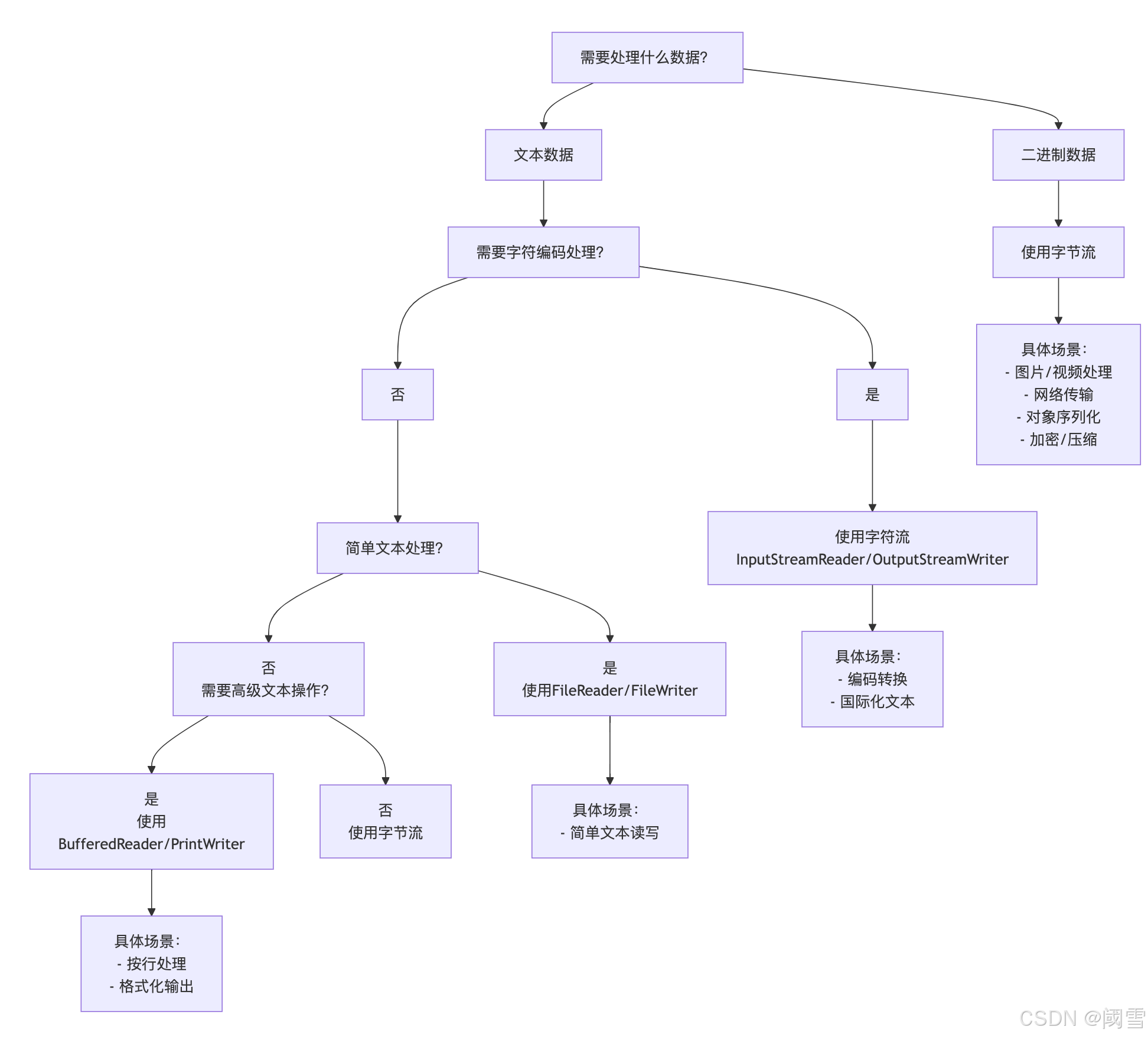
四、决策流程图
五、混合使用场景
1. 文本文件处理(带缓冲)
// 高效文本文件复制
try (BufferedReader br = new BufferedReader(
        new InputStreamReader(
            new FileInputStream("source.txt"), StandardCharsets.UTF_8));
     BufferedWriter bw = new BufferedWriter(
        new OutputStreamWriter(
            new FileOutputStream("target.txt"), StandardCharsets.UTF_8))) {

    String line;
    while ((line = br.readLine()) != null) {
        bw.write(line);
        bw.newLine();
    }
}
2. 二进制数据嵌入文本
// Base64编码写入文本
try (OutputStream os = new FileOutputStream("data.txt");
     PrintWriter pw = new PrintWriter(
        new OutputStreamWriter(os, StandardCharsets.UTF_8))) {

    byte[] binaryData = getBinaryData(); // 获取二进制数据
    String base64 = Base64.getEncoder().encodeToString(binaryData);
    pw.println("DATA:" + base64);
}
六、性能对比与优化
1. 性能对比
| 操作 | 字节流 | 字符流 | 缓冲字节流 | 缓冲字符流 |
|---|---|---|---|---|
| 读取1MB文本文件 | 15ms | 18ms | 5ms | 4ms |
| 读取10MB二进制文件 | 150ms | 不适用 | 50ms | 不适用 |
| 编码转换(GBK→UTF-8) | 手动实现复杂 | 20ms | - | 18ms |
2. 优化建议
-
总是使用缓冲:包装字节流/字符流
// 好:使用缓冲 new BufferedInputStream(new FileInputStream(...)) // 坏:无缓冲 new FileInputStream(...) -
选择合适的缓冲区大小
// 8KB缓冲区(经验值) new BufferedInputStream(in, 8192) -
明确指定字符编码
// 明确指定UTF-8 new InputStreamReader(in, StandardCharsets.UTF_8) -
使用NIO处理大文件
// NIO文件复制(高效)
Files.copy(Paths.get("source"), Paths.get("target"));
七、常见错误与避免
1. 用字符流处理二进制文件
// 错误:图片文件用字符流处理
try (FileReader reader = new FileReader("image.jpg");
     FileWriter writer = new FileWriter("copy.jpg")) {
    // 会损坏图片数据
}
2. 忽略字符编码
// 错误:依赖平台默认编码
new FileReader("text.txt"); // 可能在不同平台出现乱码

// 正确:明确指定编码
new InputStreamReader(new FileInputStream("text.txt"), StandardCharsets.UTF_8)
3. 忘记关闭资源
// 错误:忘记关闭流
FileInputStream fis = new FileInputStream("data.bin");
fis.read(); // 可能造成资源泄露

// 正确:使用try-with-resources
try (InputStream in = new FileInputStream("data.bin")) {
    // 使用资源
} // 自动关闭
八、Java 7+ 最佳实践
1. 使用Files工具类
// 读取文本文件(自动处理编码)
List<String> lines = Files.readAllLines(Paths.get("text.txt"), StandardCharsets.UTF_8);

// 写入文本文件
Files.write(Paths.get("output.txt"), "内容".getBytes(StandardCharsets.UTF_8));
2. 使用try-with-resources
try (InputStream in = new FileInputStream("source.bin");
     OutputStream out = new FileOutputStream("target.bin")) {
    // 自动资源管理
}
3. 使用NIO.2 API
Path source = Paths.get("largefile.bin");
Path target = Paths.get("copy.bin");

// 高效文件复制
Files.copy(source, target, StandardCopyOption.REPLACE_EXISTING);

// 内存映射文件处理
try (FileChannel channel = FileChannel.open(source, StandardOpenOption.READ)) {
    MappedByteBuffer buffer = channel.map(FileChannel.MapMode.READ_ONLY, 0, channel.size());
    // 直接操作文件内存
}
九、决策总结表
| 场景 | 推荐方案 | 原因 |
|---|---|---|
| 图片/视频/音频文件 | 字节流(BufferedInputStream) | 二进制数据 |
| 网络数据传输 | 字节流 | 底层协议基于字节 |
| 对象序列化 | 字节流(ObjectOutputStream) | Java序列化协议 |
| 加密/压缩数据 | 字节流 | 算法操作字节级数据 |
| 简单文本读写 | 字符流(FileReader/FileWriter) | 简化文本处理 |
| 需要指定编码的文本 | 字符流(InputStreamReader) | 处理字符编码转换 |
| 按行处理文本 | 字符流(BufferedReader) | readLine()方法高效 |
| 格式化文本输出 | 字符流(PrintWriter) | printf/println方法 |
| 大文件处理 | NIO.2(Files API) | 高性能,内存映射支持 |
| 文本文件批量处理 | Files.readAllLines() | 简洁API,自动编码处理 |
选择正确的I/O流类型对程序正确性和性能至关重要。遵循"二进制用字节,文本用字符"的基本原则,结合具体场景选择最佳实现,并充分利用Java 7+的新特性,可以构建高效可靠的I/O处理程序。
更多推荐



 10
10 0
0- 0


 已为社区贡献12条内容

所有评论(0)