
javascript/js之粘贴文本时,自动检测并换行网址代码
·
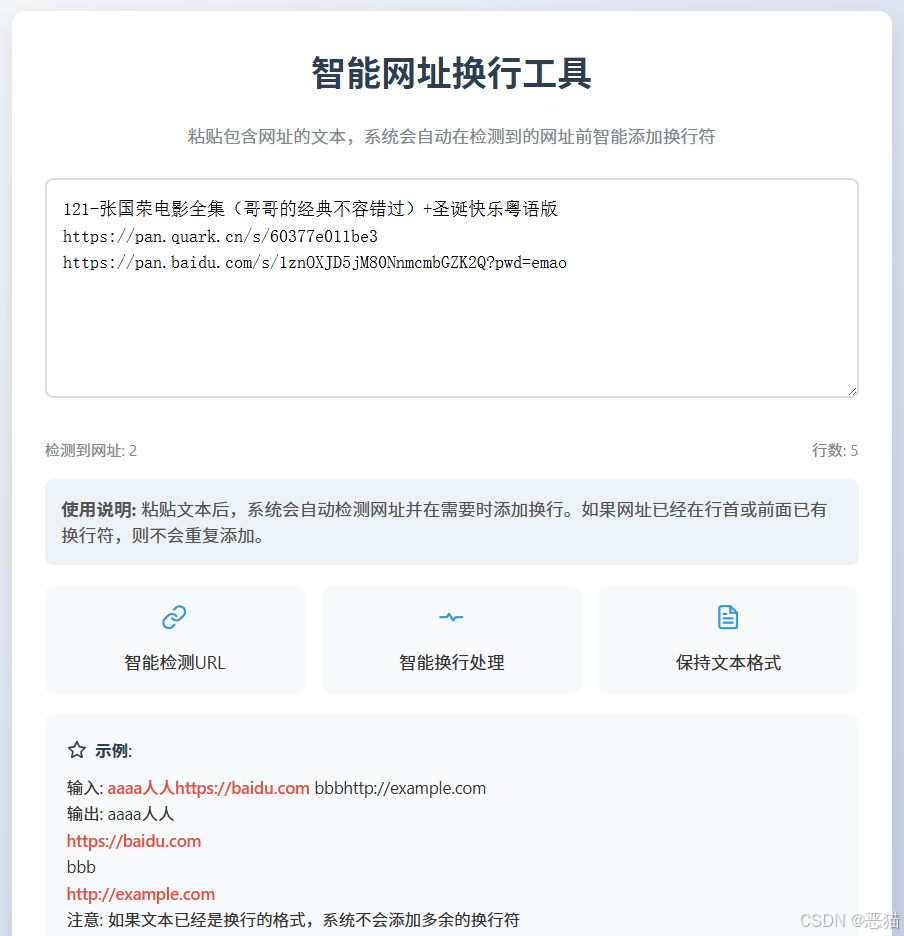
实现思路
-
使用正则表达式检测URL
-
检查每个URL前的位置,如果不是行首或已有换行符,才添加换行
-
保持原有文本格式,避免不必要的换行
完整代码实现
<!DOCTYPE html>
<html lang="zh-CN">
<head>
    <meta charset="UTF-8">
    <meta name="viewport" content="width=device-width, initial-scale=1.0">
    <title>智能网址换行工具</title>
    <style>
        * {
            box-sizing: border-box;
            margin: 0;
            padding: 0;
        }
        body {
            font-family: 'Segoe UI', Tahoma, Geneva, Verdana, sans-serif;
            line-height: 1.6;
            color: #333;
            background: linear-gradient(135deg, #f5f7fa 0%, #c3cfe2 100%);
            padding: 20px;
            min-height: 100vh;
            display: flex;
            flex-direction: column;
            align-items: center;
        }
        .container {
            width: 100%;
            max-width: 800px;
            background: white;
            border-radius: 12px;
            box-shadow: 0 10px 30px rgba(0, 0, 0, 0.1);
            padding: 30px;
            margin-top: 30px;
        }
        h1 {
            text-align: center;
            color: #2c3e50;
            margin-bottom: 20px;
            font-weight: 600;
        }
        .description {
            text-align: center;
            color: #7f8c8d;
            margin-bottom: 25px;
        }
        textarea {
            width: 100%;
            min-height: 200px;
            padding: 15px;
            border: 2px solid #ddd;
            border-radius: 8px;
            font-size: 16px;
            transition: border-color 0.3s;
            resize: vertical;
            margin-bottom: 20px;
            line-height: 1.5;
        }
        textarea:focus {
            border-color: #3498db;
            outline: none;
            box-shadow: 0 0 0 3px rgba(52, 152, 219, 0.2);
        }
        .example {
            background-color: #f8f9fa;
            padding: 20px;
            border-radius: 8px;
            margin-top: 20px;
            font-size: 15px;
        }
        .example-title {
            font-weight: 600;
            margin-bottom: 10px;
            color: #2c3e50;
            display: flex;
            align-items: center;
        }
        .example-title svg {
            margin-right: 8px;
        }
        .url-highlight {
            color: #e74c3c;
            font-weight: 500;
        }
        .instructions {
            margin: 15px 0;
            line-height: 1.5;
            color: #555;
            padding: 15px;
            background-color: #edf2f7;
            border-radius: 8px;
        }
        .footer {
            margin-top: 30px;
            text-align: center;
            font-size: 14px;
            color: #7f8c8d;
        }
        .counter {
            display: flex;
            justify-content: space-between;
            margin-top: 10px;
            color: #7f8c8d;
            font-size: 14px;
        }
        .features {
            display: flex;
            flex-wrap: wrap;
            gap: 15px;
            margin-top: 20px;
        }
        .feature {
            flex: 1;
            min-width: 200px;
            background: #f8f9fa;
            padding: 15px;
            border-radius: 8px;
            text-align: center;
        }
        .feature svg {
            margin-bottom: 10px;
        }
    </style>
</head>
<body>
    <div class="container">
        <h1>智能网址换行工具</h1>

        <p class="description">粘贴包含网址的文本,系统会自动在检测到的网址前智能添加换行符</p>

        <textarea id="productSupply" rows="6" placeholder="在此粘贴或输入商品发货信息..."></textarea>

        <div class="counter">
            <span id="urlCount">检测到网址: 0</span>
            <span id="lineCount">行数: 1</span>
        </div>

        <div class="instructions">
            <p><strong>使用说明:</strong> 粘贴文本后,系统会自动检测网址并在需要时添加换行。如果网址已经在行首或前面已有换行符,则不会重复添加。</p>
        </div>

        <div class="features">
            <div class="feature">
                <svg xmlns="http://www.w3.org/2000/svg" width="24" height="24" viewBox="0 0 24 24" fill="none" stroke="#3498db" stroke-width="2" stroke-linecap="round" stroke-linejoin="round">
                    <path d="M10 13a5 5 0 0 0 7.54.54l3-3a5 5 0 0 0-7.07-7.07l-1.72 1.71"></path>
                    <path d="M14 11a5 5 0 0 0-7.54-.54l-3 3a5 5 0 0 0 7.07 7.07l1.71-1.71"></path>
                </svg>
                <p>智能检测URL</p>
            </div>
            <div class="feature">
                <svg xmlns="http://www.w3.org/2000/svg" width="24" height="24" viewBox="0 0 24 24" fill="none" stroke="#3498db" stroke-width="2" stroke-linecap="round" stroke-linejoin="round">
                    <polyline points="22 12 16 12 14 15 10 9 8 12 2 12"></polyline>
                </svg>
                <p>智能换行处理</p>
            </div>
            <div class="feature">
                <svg xmlns="http://www.w3.org/2000/svg" width="24" height="24" viewBox="0 0 24 24" fill="none" stroke="#3498db" stroke-width="2" stroke-linecap="round" stroke-linejoin="round">
                    <path d="M14 2H6a2 2 0 0 0-2 2v16a2 2 0 0 0 2 2h12a2 2 0 0 0 2-2V8z"></path>
                    <polyline points="14 2 14 8 20 8"></polyline>
                    <line x1="16" y1="13" x2="8" y2="13"></line>
                    <line x1="16" y1="17" x2="8" y2="17"></line>
                    <polyline points="10 9 9 9 8 9"></polyline>
                </svg>
                <p>保持文本格式</p>
            </div>
        </div>

        <div class="example">
            <div class="example-title">
                <svg xmlns="http://www.w3.org/2000/svg" width="18" height="18" viewBox="0 0 24 24" fill="none" stroke="#2c3e50" stroke-width="2" stroke-linecap="round" stroke-linejoin="round">
                    <polygon points="12 2 15.09 8.26 22 9.27 17 14.14 18.18 21.02 12 17.77 5.82 21.02 7 14.14 2 9.27 8.91 8.26 12 2"></polygon>
                </svg>
                <span>示例:</span>
            </div>
            <p>输入: <span class="url-highlight">aaaa人人https://baidu.com</span> bbbhttp://example.com</p>
            <p>输出: aaaa人人<br><span class="url-highlight">https://baidu.com</span><br> bbb<br><span class="url-highlight">http://example.com</span></p>
            <p>注意: 如果文本已经是换行的格式,系统不会添加多余的换行符</p>
        </div>
    </div>

    <div class="footer">
        <p>© 2023 智能网址换行工具 | 粘贴文本后,系统会自动检测网址并智能添加换行</p>
    </div>

    <script>
        document.getElementById('productSupply').addEventListener('input', function() {
            processText(this);
            updateCounters(this.value);
        });

        document.getElementById('productSupply').addEventListener('paste', function(e) {
            // 允许默认粘贴行为先发生
            setTimeout(() => {
                processText(this);
                updateCounters(this.value);
            }, 0);
        });

        function processText(textarea) {
            const text = textarea.value;

            // 使用正则表达式匹配URL
            const urlRegex = /(https?:\/\/[^\s]+)/g;

            // 创建一个新文本,避免重复处理
            let newText = text;

            // 查找所有URL
            let match;
            while ((match = urlRegex.exec(text)) !== null) {
                const url = match[0];
                const index = match.index;

                // 检查URL前面是否已经是行首或换行符
                if (index > 0) {
                    const prevChar = text[index - 1];
                    if (prevChar !== '\n' && !(index === 1 && prevChar === '')) {
                        // 只在前面不是换行符且不是行首时添加换行
                        newText = newText.replace(url, '\n' + url);
                    }
                }
            }

            // 更新文本框内容
            if (newText !== text) {
                const startPos = textarea.selectionStart;
                const endPos = textarea.selectionEnd;

                textarea.value = newText;

                // 恢复光标位置
                textarea.selectionStart = startPos;
                textarea.selectionEnd = endPos;
            }
        }

        function updateCounters(text) {
            // 计算网址数量
            const urlRegex = /https?:\/\/[^\s]+/g;
            const urlMatches = text.match(urlRegex);
            const urlCount = urlMatches ? urlMatches.length : 0;

            // 计算行数
            const lineCount = text.split('\n').length;

            // 更新计数器
            document.getElementById('urlCount').textContent = `检测到网址: ${urlCount}`;
            document.getElementById('lineCount').textContent = `行数: ${lineCount}`;
        }
    </script>
</body>
</html>
核心功能代码说明
最核心的文本处理函数如下:
function processText(textarea) {
    const text = textarea.value;

    // 使用正则表达式匹配URL
    const urlRegex = /(https?:\/\/[^\s]+)/g;

    // 创建一个新文本,避免重复处理
    let newText = text;

    // 查找所有URL
    let match;
    while ((match = urlRegex.exec(text)) !== null) {
        const url = match[0];
        const index = match.index;

        // 检查URL前面是否已经是行首或换行符
        if (index > 0) {
            const prevChar = text[index - 1];
            if (prevChar !== '\n' && !(index === 1 && prevChar === '')) {
                // 只在前面不是换行符且不是行首时添加换行
                newText = newText.replace(url, '\n' + url);
            }
        }
    }

    // 更新文本框内容
    if (newText !== text) {
        const startPos = textarea.selectionStart;
        const endPos = textarea.selectionEnd;

        textarea.value = newText;

        // 恢复光标位置
        textarea.selectionStart = startPos;
        textarea.selectionEnd = endPos;
    }
}
这个实现:
-
检测所有URL
-
检查每个URL前面的字符
-
只在URL前面不是换行符且不是行首时才添加换行
-
保持光标位置不变,避免用户体验中断
-
添加了计数器显示检测到的网址数量和行数
这个解决方案能够智能处理各种文本格式,避免不必要的重复换行。

更多资源下载:https://wangpanmao.com
更多推荐


 4
4 0
0- 0


 已为社区贡献1条内容

所有评论(0)