
[vue]创建表格并实现筛选和增删改查功能
·
<template>
  <div>
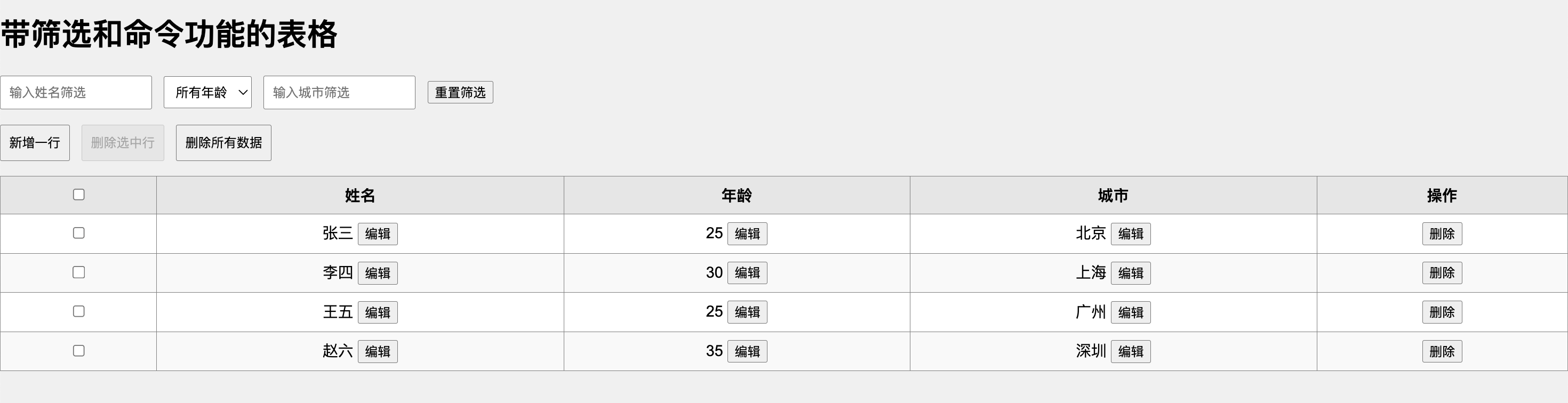
    <h1>带筛选和命令功能的表格</h1>

    <!-- 筛选器部分 -->
    <div class="filters">
      <input v-model="filters.name" placeholder="输入姓名筛选" />
      <select v-model="filters.age">
        <option value="">所有年龄</option>
        <option v-for="age in uniqueAges" :key="age" :value="age">{{ age }}</option>
      </select>
      <input v-model="filters.city" placeholder="输入城市筛选" />
      <button @click="resetFilters">重置筛选</button>
    </div>

    <!-- 全局命令部分 -->
    <div class="commands">
      <button @click="addRow">新增一行</button>
      <button @click="deleteSelectedRows" :disabled="!selectedRows.length">删除选中行</button>
      <button @click="deleteAllRows" :disabled="!data.length">删除所有数据</button>
    </div>

    <!-- 表格部分 -->
    <table border="1">
      <thead>
        <tr>
          <th>
            <input type="checkbox" @change="toggleSelectAll" :checked="isAllSelected" />
          </th>
          <th @click="sortBy('name')">姓名</th>
          <th @click="sortBy('age')">年龄</th>
          <th @click="sortBy('city')">城市</th>
          <th>操作</th>
        </tr>
      </thead>
      <tbody>
        <tr v-for="(item, index) in sortedFilteredData" :key="index">
          <!-- 多选列 -->
          <td>
            <input
              type="checkbox"
              :value="index"
              v-model="selectedRows"
            />
          </td>

          <!-- 姓名 -->
          <td>
            <div v-if="isEditing(index, 'name')">
              <input v-model="editCache.name" />
              <button @click="saveEdit(index, 'name')">保存</button>
              <button @click="cancelEdit()">取消</button>
            </div>
            <div v-else>
              {{ item.name }}
              <button @click="startEdit(index, 'name', item.name)">编辑</button>
            </div>
          </td>

          <!-- 年龄 -->
          <td>
            <div v-if="isEditing(index, 'age')">
              <input type="number" v-model="editCache.age" />
              <button @click="saveEdit(index, 'age')">保存</button>
              <button @click="cancelEdit()">取消</button>
            </div>
            <div v-else>
              {{ item.age }}
              <button @click="startEdit(index, 'age', item.age)">编辑</button>
            </div>
          </td>

          <!-- 城市 -->
          <td>
            <div v-if="isEditing(index, 'city')">
              <input v-model="editCache.city" />
              <button @click="saveEdit(index, 'city')">保存</button>
              <button @click="cancelEdit()">取消</button>
            </div>
            <div v-else>
              {{ item.city }}
              <button @click="startEdit(index, 'city', item.city)">编辑</button>
            </div>
          </td>

          <!-- 删除 -->
          <td>
            <button @click="deleteRow(index)">删除</button>
          </td>
        </tr>
      </tbody>
    </table>
  </div>
</template>

<script>
export default {
  data() {
    return {
      // 表格数据
      data: [
        { name: "张三", age: 25, city: "北京" },
        { name: "李四", age: 30, city: "上海" },
        { name: "王五", age: 25, city: "广州" },
        { name: "赵六", age: 35, city: "深圳" },
      ],
      // 筛选条件
      filters: {
        name: "", // 按姓名筛选
        age: "", // 按年龄筛选
        city: "", // 按城市筛选
      },
      // 排序条件
      sortKey: "", // 按哪一列排序
      sortOrder: 1, // 排序顺序:1 升序,-1 降序

      // 编辑状态
      editing: {
        index: null, // 当前编辑的行索引
        field: null, // 当前编辑的列名
      },
      // 编辑缓存
      editCache: {
        name: "",
        age: "",
        city: "",
      },
      // 多选行
      selectedRows: [],
    };
  },
  computed: {
    // 获取唯一的年龄列表
    uniqueAges() {
      return [...new Set(this.data.map((item) => item.age))];
    },
    // 过滤后的数据
    filteredData() {
      return this.data.filter((item) => {
        const matchesName = item.name.includes(this.filters.name);
        const matchesAge = !this.filters.age || item.age === Number(this.filters.age);
        const matchesCity = item.city.includes(this.filters.city);
        return matchesName && matchesAge && matchesCity;
      });
    },
    // 排序后的数据
    sortedFilteredData() {
      return [...this.filteredData].sort((a, b) => {
        if (!this.sortKey) return 0;
        let valueA = a[this.sortKey];
        let valueB = b[this.sortKey];
        if (typeof valueA === "string") valueA = valueA.localeCompare(valueB);
        return (valueA > valueB ? 1 : -1) * this.sortOrder;
      });
    },
    // 是否全选
    isAllSelected() {
      return this.selectedRows.length === this.data.length && this.data.length > 0;
    },
  },
  methods: {
    resetFilters() {
      this.filters = { name: "", age: "", city: "" };
    },
    sortBy(key) {
      if (this.sortKey === key) {
        this.sortOrder *= -1; // 切换升序或降序
      } else {
        this.sortKey = key;
        this.sortOrder = 1; // 默认升序
      }
    },
    startEdit(index, field, value) {
      this.editing = { index, field };
      this.editCache[field] = value;
    },
    isEditing(index, field) {
      return this.editing.index === index && this.editing.field === field;
    },
    saveEdit(index, field) {
      this.data[index][field] = this.editCache[field];
      this.cancelEdit();
    },
    cancelEdit() {
      this.editing = { index: null, field: null };
      this.editCache = { name: "", age: "", city: "" };
    },
    deleteRow(index) {
      this.data.splice(index, 1);
    },
    deleteSelectedRows() {
      this.data = this.data.filter((_, index) => !this.selectedRows.includes(index));
      this.selectedRows = [];
    },
    deleteAllRows() {
      this.data = [];
    },
    addRow() {
      this.data.push({ name: "", age: null, city: "" });
    },
    toggleSelectAll(event) {
      if (event.target.checked) {
        this.selectedRows = this.data.map((_, index) => index);
      } else {
        this.selectedRows = [];
      }
    },
  },
};
</script>

<style>
/* 修改页面背景色 */
body {
  background-color: #f0f0f0; /* 浅灰色背景 */
  margin: 0;
  font-family: Arial, sans-serif;
}

/* 筛选器和命令样式 */
.filters,
.commands {
  margin-bottom: 1rem;
}
.filters input,
.filters select,
.commands button {
  margin-right: 0.5rem;
  padding: 0.5rem;
}

/* 表格样式 */
table {
  width: 100%;
  border-collapse: collapse;
  background: white; /* 表格背景色 */
}
th {
  cursor: pointer;
  background: #e6e6e6; /* 表头浅灰背景 */
  padding: 0.5rem;
}
th:hover {
  background: #d4d4d4; /* 表头悬停颜色 */
}
td {
  padding: 0.5rem;
  text-align: center;
}
tr:nth-child(even) {
  background: #f9f9f9; /* 偶数行浅背景 */
}
</style>
更多推荐
 2
2 0
0- 0


 已为社区贡献2条内容

所有评论(0)