
Java集合框架(Java Collections Framework)是一套用于表示和操作集合的标准化架构,提供了用于存储、检索和操作数据的通用接口和实现。
1. Java集合框架概述
Java集合框架(Java Collections Framework)是一套用于表示和操作集合的标准化架构,提供了用于存储、检索和操作数据的通用接口和实现。它解决了数组固定长度的限制,提供了更灵活的数据结构操作方式。
1.1 集合框架的核心优势
-
减少编程工作量:提供通用数据结构和算法
-
提高性能:优化实现的数据结构和算法
-
提高互操作性:统一的标准接口
-
降低学习成本:一致的API设计
-
提高软件质量:经过充分测试的可靠代码
1.2 集合框架层次结构
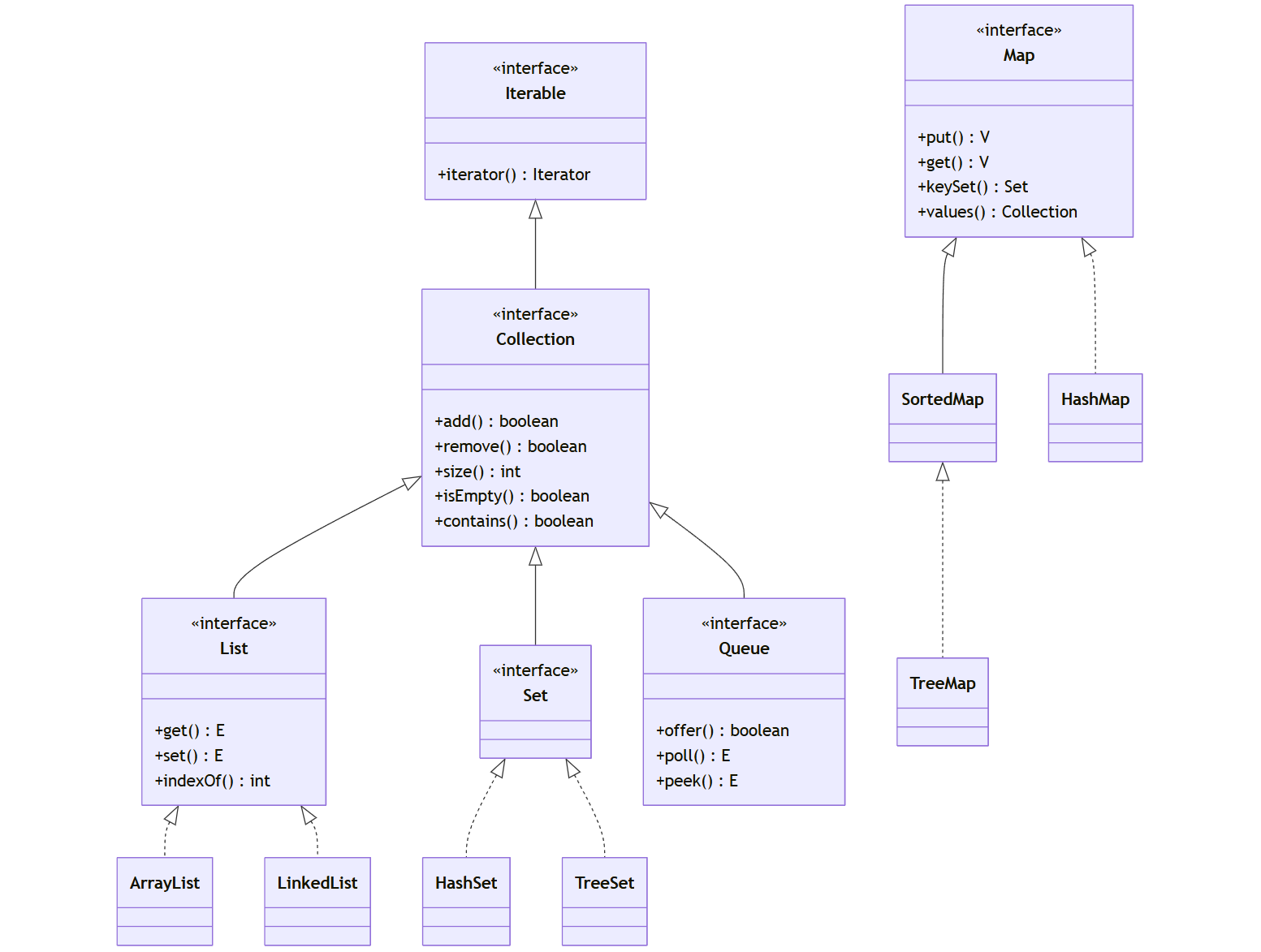
classDiagram
    class Iterable {
        <<interface>>
        +iterator() Iterator
    }

    class Collection {
        <<interface>>
        +add() boolean
        +remove() boolean
        +size() int
        +isEmpty() boolean
        +contains() boolean
    }

    class List {
        <<interface>>
        +get() E
        +set() E
        +indexOf() int
    }

    class Set {
        <<interface>>
    }

    class Queue {
        <<interface>>
        +offer() boolean
        +poll() E
        +peek() E
    }

    class Map {
        <<interface>>
        +put() V
        +get() V
        +keySet() Set
        +values() Collection
    }

    Iterable <|-- Collection
    Collection <|-- List
    Collection <|-- Set
    Collection <|-- Queue
    Map <|-- SortedMap

    class ArrayList
    class LinkedList
    class HashSet
    class TreeSet
    class HashMap
    class TreeMap

    List <|.. ArrayList
    List <|.. LinkedList
    Set <|.. HashSet
    Set <|.. TreeSet
    Map <|.. HashMap
    SortedMap <|.. TreeMap
2. Collection接口详解
Collection接口是集合框架的根接口,定义了所有集合类共有的基本操作。
2.1 核心方法
java
// 创建集合示例
Collection<String> collection = new ArrayList<>();

// 添加元素
collection.add("Java");
collection.add("Python");
collection.addAll(Arrays.asList("C++", "JavaScript"));

// 删除元素
collection.remove("Python");
collection.removeAll(Arrays.asList("C++"));

// 检查元素
boolean hasJava = collection.contains("Java");
boolean isEmpty = collection.isEmpty();
int size = collection.size();

// 遍历集合
for (String language : collection) {
    System.out.println(language);
}

// 使用迭代器
Iterator<String> iterator = collection.iterator();
while (iterator.hasNext()) {
    String language = iterator.next();
    System.out.println(language);
}

// 转换为数组
String[] languageArray = collection.toArray(new String[0]);

// 清空集合
collection.clear();
2.2 集合操作示例
java
// 集合运算示例
Collection<Integer> setA = new ArrayList<>(Arrays.asList(1, 2, 3, 4, 5));
Collection<Integer> setB = new ArrayList<>(Arrays.asList(4, 5, 6, 7, 8));

// 并集
Collection<Integer> union = new ArrayList<>(setA);
union.addAll(setB);
System.out.println("并集: " + union); // [1, 2, 3, 4, 5, 4, 5, 6, 7, 8]

// 交集
Collection<Integer> intersection = new ArrayList<>(setA);
intersection.retainAll(setB);
System.out.println("交集: " + intersection); // [4, 5]

// 差集
Collection<Integer> difference = new ArrayList<>(setA);
difference.removeAll(setB);
System.out.println("差集: " + difference); // [1, 2, 3]
3. List接口及其实现
List接口表示有序集合(序列),允许重复元素和null值,可以通过索引访问元素。
3.1 ArrayList详解
ArrayList是基于动态数组的实现,提供快速的随机访问。
java
// ArrayList基本操作
List<String> arrayList = new ArrayList<>();

// 添加元素
arrayList.add("Apple");
arrayList.add("Banana");
arrayList.add(1, "Orange"); // 在指定位置插入

// 访问元素
String fruit = arrayList.get(0); // Apple
int index = arrayList.indexOf("Banana"); // 2

// 修改元素
arrayList.set(1, "Mango"); // 替换位置1的元素

// 删除元素
arrayList.remove("Apple");
arrayList.remove(0);

// 遍历方式
// 1. for循环
for (int i = 0; i < arrayList.size(); i++) {
    System.out.println(arrayList.get(i));
}

// 2. 增强for循环
for (String item : arrayList) {
    System.out.println(item);
}

// 3. 迭代器
Iterator<String> iterator = arrayList.iterator();
while (iterator.hasNext()) {
    System.out.println(iterator.next());
}

// 4. forEach方法 (Java 8+)
arrayList.forEach(System.out::println);

// 5. 流API (Java 8+)
arrayList.stream().forEach(System.out::println);
3.2 LinkedList详解
LinkedList是基于双向链表的实现,提供高效的插入和删除操作。
java
// LinkedList基本操作
List<String> linkedList = new LinkedList<>();

// 添加元素
linkedList.add("First");
linkedList.add("Last");
linkedList.addFirst("New First"); // 添加到开头
linkedList.addLast("New Last");   // 添加到末尾

// 访问元素
String first = linkedList.getFirst(); // 获取第一个元素
String last = linkedList.getLast();   // 获取最后一个元素

// 删除元素
linkedList.removeFirst(); // 删除第一个元素
linkedList.removeLast();  // 删除最后一个元素

// 作为队列使用
Queue<String> queue = new LinkedList<>();
queue.offer("Task1"); // 入队
queue.offer("Task2");
String task = queue.poll(); // 出队: Task1

// 作为栈使用
Deque<String> stack = new LinkedList<>();
stack.push("Element1"); // 压栈
stack.push("Element2");
String element = stack.pop(); // 弹栈: Element2
3.3 ArrayList vs LinkedList性能比较
java
// 性能测试示例
public class ListPerformanceTest {
    private static final int ELEMENT_COUNT = 100000;

    public static void main(String[] args) {
        // ArrayList性能测试
        List<Integer> arrayList = new ArrayList<>();
        long startTime = System.currentTimeMillis();

        for (int i = 0; i < ELEMENT_COUNT; i++) {
            arrayList.add(i); // 末尾添加
        }

        long arrayListAddTime = System.currentTimeMillis() - startTime;

        startTime = System.currentTimeMillis();
        for (int i = 0; i < 1000; i++) {
            arrayList.get(i); // 随机访问
        }
        long arrayListAccessTime = System.currentTimeMillis() - startTime;

        // LinkedList性能测试
        List<Integer> linkedList = new LinkedList<>();
        startTime = System.currentTimeMillis();

        for (int i = 0; i < ELEMENT_COUNT; i++) {
            linkedList.add(i); // 末尾添加
        }

        long linkedListAddTime = System.currentTimeMillis() - startTime;

        startTime = System.currentTimeMillis();
        for (int i = 0; i < 1000; i++) {
            linkedList.get(i); // 随机访问
        }
        long linkedListAccessTime = System.currentTimeMillis() - startTime;

        System.out.println("ArrayList添加时间: " + arrayListAddTime + "ms");
        System.out.println("ArrayList访问时间: " + arrayListAccessTime + "ms");
        System.out.println("LinkedList添加时间: " + linkedListAddTime + "ms");
        System.out.println("LinkedList访问时间: " + linkedListAccessTime + "ms");
    }
}
3.4 Vector和Stack
Vector是线程安全的动态数组实现,Stack是Vector的子类,实现了后进先出(LIFO)栈。
java
// Vector和Stack示例
Vector<String> vector = new Vector<>();
vector.add("Element1");
vector.add("Element2");

// 枚举遍历(传统方式)
Enumeration<String> enumeration = vector.elements();
while (enumeration.hasMoreElements()) {
    System.out.println(enumeration.nextElement());
}

// Stack示例
Stack<String> stack = new Stack<>();
stack.push("First");
stack.push("Second");
stack.push("Third");

System.out.println("栈顶元素: " + stack.peek()); // Third
System.out.println("弹出元素: " + stack.pop());  // Third
System.out.println("栈顶元素: " + stack.peek()); // Second
4. Set接口及其实现
Set接口表示不包含重复元素的集合,最多包含一个null元素。
4.1 HashSet详解
HashSet基于哈希表实现,提供常数时间性能的基本操作。
java
// HashSet基本操作
Set<String> hashSet = new HashSet<>();

// 添加元素
hashSet.add("Apple");
hashSet.add("Banana");
hashSet.add("Orange");
hashSet.add("Apple"); // 重复元素,不会被添加

System.out.println("Set大小: " + hashSet.size()); // 3
System.out.println("包含Apple: " + hashSet.contains("Apple")); // true

// 遍历Set
for (String fruit : hashSet) {
    System.out.println(fruit);
}

// 使用迭代器
Iterator<String> iterator = hashSet.iterator();
while (iterator.hasNext()) {
    System.out.println(iterator.next());
}

// 删除元素
hashSet.remove("Banana");
4.2 LinkedHashSet详解
LinkedHashSet保持元素的插入顺序,是HashSet的子类。
java
// LinkedHashSet保持插入顺序
Set<String> linkedHashSet = new LinkedHashSet<>();
linkedHashSet.add("Zebra");
linkedHashSet.add("Apple");
linkedHashSet.add("Banana");

// 元素将按照插入顺序输出
for (String item : linkedHashSet) {
    System.out.println(item); // Zebra, Apple, Banana
}
4.3 TreeSet详解
TreeSet基于红黑树实现,保持元素的自然顺序或自定义顺序。
java
// TreeSet基本操作
Set<String> treeSet = new TreeSet<>();
treeSet.add("Zebra");
treeSet.add("Apple");
treeSet.add("Banana");

// 元素将按自然顺序(字母顺序)输出
for (String item : treeSet) {
    System.out.println(item); // Apple, Banana, Zebra
}

// 自定义排序
Set<String> customSortedSet = new TreeSet<>(Comparator.reverseOrder());
customSortedSet.add("Zebra");
customSortedSet.add("Apple");
customSortedSet.add("Banana");

// 元素将按逆序输出
for (String item : customSortedSet) {
    System.out.println(item); // Zebra, Banana, Apple
}
4.4 Set性能比较
java
// Set性能测试
public class SetPerformanceTest {
    private static final int ELEMENT_COUNT = 100000;

    public static void main(String[] args) {
        // HashSet性能
        Set<Integer> hashSet = new HashSet<>();
        long startTime = System.currentTimeMillis();

        for (int i = 0; i < ELEMENT_COUNT; i++) {
            hashSet.add(i);
        }

        long hashSetAddTime = System.currentTimeMillis() - startTime;

        // TreeSet性能
        Set<Integer> treeSet = new TreeSet<>();
        startTime = System.currentTimeMillis();

        for (int i = 0; i < ELEMENT_COUNT; i++) {
            treeSet.add(i);
        }

        long treeSetAddTime = System.currentTimeMillis() - startTime;

        // LinkedHashSet性能
        Set<Integer> linkedHashSet = new LinkedHashSet<>();
        startTime = System.currentTimeMillis();

        for (int i = 0; i < ELEMENT_COUNT; i++) {
            linkedHashSet.add(i);
        }

        long linkedHashSetAddTime = System.currentTimeMillis() - startTime;

        System.out.println("HashSet添加时间: " + hashSetAddTime + "ms");
        System.out.println("TreeSet添加时间: " + treeSetAddTime + "ms");
        System.out.println("LinkedHashSet添加时间: " + linkedHashSetAddTime + "ms");
    }
}
5. Queue接口及其实现
Queue接口表示队列,遵循先进先出(FIFO)原则。
5.1 PriorityQueue详解
PriorityQueue是基于优先级堆的无界优先级队列。
java
// PriorityQueue基本操作
Queue<Integer> priorityQueue = new PriorityQueue<>();

// 添加元素
priorityQueue.offer(5);
priorityQueue.offer(1);
priorityQueue.offer(3);
priorityQueue.offer(2);

// 元素按优先级出队
while (!priorityQueue.isEmpty()) {
    System.out.println(priorityQueue.poll()); // 1, 2, 3, 5
}

// 自定义优先级
Queue<String> lengthPriorityQueue = new PriorityQueue<>(
    Comparator.comparingInt(String::length)
);

lengthPriorityQueue.offer("AAAA");
lengthPriorityQueue.offer("BB");
lengthPriorityQueue.offer("C");

while (!lengthPriorityQueue.isEmpty()) {
    System.out.println(lengthPriorityQueue.poll()); // C, BB, AAAA
}
5.2 ArrayDeque详解
ArrayDeque是基于数组的双端队列实现,可以作为栈或队列使用。
java
// ArrayDeque作为队列使用
Queue<String> queue = new ArrayDeque<>();
queue.offer("First");
queue.offer("Second");
queue.offer("Third");

System.out.println(queue.poll()); // First
System.out.println(queue.poll()); // Second

// ArrayDeque作为栈使用
Deque<String> stack = new ArrayDeque<>();
stack.push("First");
stack.push("Second");
stack.push("Third");

System.out.println(stack.pop()); // Third
System.out.println(stack.pop()); // Second

// 双端队列操作
Deque<String> deque = new ArrayDeque<>();
deque.addFirst("Front"); // 前端添加
deque.addLast("End");    // 末端添加
deque.offerFirst("New Front");
deque.offerLast("New End");

System.out.println(deque.getFirst()); // New Front
System.out.println(deque.getLast());  // New End
6. Map接口及其实现
Map接口表示键值对映射,键不能重复。
6.1 HashMap详解
HashMap基于哈希表实现,提供常数时间性能的基本操作。
java
// HashMap基本操作
Map<String, Integer> hashMap = new HashMap<>();

// 添加键值对
hashMap.put("Apple", 10);
hashMap.put("Banana", 5);
hashMap.put("Orange", 8);

// 获取值
int apples = hashMap.get("Apple"); // 10
int oranges = hashMap.getOrDefault("Grapes", 0); // 0 (键不存在时返回默认值)

// 检查键值
boolean hasApple = hashMap.containsKey("Apple"); // true
boolean hasValue = hashMap.containsValue(5);     // true

// 遍历Map
// 1. 遍历键
for (String key : hashMap.keySet()) {
    System.out.println(key + ": " + hashMap.get(key));
}

// 2. 遍历值
for (Integer value : hashMap.values()) {
    System.out.println(value);
}

// 3. 遍历键值对
for (Map.Entry<String, Integer> entry : hashMap.entrySet()) {
    System.out.println(entry.getKey() + ": " + entry.getValue());
}

// 4. forEach方法 (Java 8+)
hashMap.forEach((key, value) ->
    System.out.println(key + ": " + value)
);

// 删除键值对
hashMap.remove("Banana");
6.2 LinkedHashMap详解
LinkedHashMap保持键的插入顺序或访问顺序。
java
// LinkedHashMap保持插入顺序
Map<String, Integer> linkedHashMap = new LinkedHashMap<>();
linkedHashMap.put("Zebra", 10);
linkedHashMap.put("Apple", 5);
linkedHashMap.put("Banana", 8);

// 按键的插入顺序输出
linkedHashMap.forEach((key, value) ->
    System.out.println(key + ": " + value) // Zebra, Apple, Banana
);

// 按访问顺序排序的LinkedHashMap
Map<String, Integer> accessOrderMap = new LinkedHashMap<>(
    16, 0.75f, true // 访问顺序设置为true
);

accessOrderMap.put("Apple", 10);
accessOrderMap.put("Banana", 5);
accessOrderMap.put("Orange", 8);

// 访问元素后,该元素会被移到末尾
accessOrderMap.get("Apple");

accessOrderMap.forEach((key, value) ->
    System.out.println(key + ": " + value) // Banana, Orange, Apple
);
6.3 TreeMap详解
TreeMap基于红黑树实现,保持键的自然顺序或自定义顺序。
java
// TreeMap基本操作
Map<String, Integer> treeMap = new TreeMap<>();
treeMap.put("Zebra", 10);
treeMap.put("Apple", 5);
treeMap.put("Banana", 8);

// 按键的自然顺序输出
treeMap.forEach((key, value) ->
    System.out.println(key + ": " + value) // Apple, Banana, Zebra
);

// 自定义排序
Map<String, Integer> reverseTreeMap = new TreeMap<>(Comparator.reverseOrder());
reverseTreeMap.put("Zebra", 10);
reverseTreeMap.put("Apple", 5);
reverseTreeMap.put("Banana", 8);

// 按键的逆序输出
reverseTreeMap.forEach((key, value) ->
    System.out.println(key + ": " + value) // Zebra, Banana, Apple
);
6.4 Hashtable和Properties
Hashtable是线程安全的Map实现,Properties是Hashtable的子类,用于处理属性文件。
java
// Hashtable示例
Map<String, String> hashtable = new Hashtable<>();
hashtable.put("key1", "value1");
hashtable.put("key2", "value2");

// Properties示例
Properties properties = new Properties();
// 设置属性
properties.setProperty("database.url", "jdbc:mysql://localhost:3306/mydb");
properties.setProperty("database.username", "admin");
properties.setProperty("database.password", "password");

// 获取属性
String url = properties.getProperty("database.url");
String username = properties.getProperty("database.username", "defaultUser"); // 带默认值

// 从文件加载属性
try (InputStream input = new FileInputStream("config.properties")) {
    properties.load(input);
} catch (IOException e) {
    e.printStackTrace();
}

// 保存属性到文件
try (OutputStream output = new FileOutputStream("config.properties")) {
    properties.store(output, "Database Configuration");
} catch (IOException e) {
    e.printStackTrace();
}
7. 集合工具类:Collections和Arrays
Java提供了Collections和Arrays工具类,包含各种操作集合和数组的静态方法。
7.1 Collections工具类
java
// Collections工具类示例
List<Integer> numbers = Arrays.asList(3, 1, 4, 1, 5, 9, 2, 6);

// 排序
Collections.sort(numbers);
System.out.println("排序后: " + numbers); // [1, 1, 2, 3, 4, 5, 6, 9]

// 二分查找
int index = Collections.binarySearch(numbers, 5);
System.out.println("5的索引: " + index); // 5

// 反转
Collections.reverse(numbers);
System.out.println("反转后: " + numbers); // [9, 6, 5, 4, 3, 2, 1, 1]

// 洗牌(随机打乱)
Collections.shuffle(numbers);
System.out.println("洗牌后: " + numbers); // 随机顺序

// 填充
Collections.fill(numbers, 0);
System.out.println("填充后: " + numbers); // [0, 0, 0, 0, 0, 0, 0, 0]

// 不可修改的集合
List<Integer> unmodifiableList = Collections.unmodifiableList(numbers);
// unmodifiableList.add(10); // 抛出UnsupportedOperationException

// 同步集合
List<Integer> synchronizedList = Collections.synchronizedList(numbers);
// 多线程环境下安全操作
7.2 Arrays工具类
java
// Arrays工具类示例
int[] array = {3, 1, 4, 1, 5, 9, 2, 6};

// 排序
Arrays.sort(array);
System.out.println("排序后: " + Arrays.toString(array)); // [1, 1, 2, 3, 4, 5, 6, 9]

// 二分查找
int index = Arrays.binarySearch(array, 5);
System.out.println("5的索引: " + index); // 5

// 填充
Arrays.fill(array, 0);
System.out.println("填充后: " + Arrays.toString(array)); // [0, 0, 0, 0, 0, 0, 0, 0]

// 比较
int[] array1 = {1, 2, 3};
int[] array2 = {1, 2, 3};
boolean isEqual = Arrays.equals(array1, array2);
System.out.println("数组相等: " + isEqual); // true

// 复制
int[] copiedArray = Arrays.copyOf(array1, array1.length);
System.out.println("复制后: " + Arrays.toString(copiedArray)); // [1, 2, 3]

// 流操作(Java 8+)
int sum = Arrays.stream(array1).sum();
System.out.println("数组求和: " + sum); // 6
8. Java 8+新特性与集合
Java 8引入了函数式编程特性,大大增强了集合的处理能力。
8.1 Stream API
java
// Stream API示例
List<String> languages = Arrays.asList(
    "Java", "Python", "JavaScript", "C++", "Ruby", "Swift", "Go"
);

// 过滤
List<String> jLanguages = languages.stream()
    .filter(lang -> lang.startsWith("J"))
    .collect(Collectors.toList());
System.out.println("J开头的语言: " + jLanguages); // [Java, JavaScript]

// 映射
List<Integer> nameLengths = languages.stream()
    .map(String::length)
    .collect(Collectors.toList());
System.out.println("名称长度: " + nameLengths); // [4, 6, 10, 3, 4, 5, 2]

// 排序
List<String> sortedLanguages = languages.stream()
    .sorted()
    .collect(Collectors.toList());
System.out.println("排序后: " + sortedLanguages); // 按字母顺序排序

// 限制和跳过
List<String> limitedLanguages = languages.stream()
    .skip(2)
    .limit(3)
    .collect(Collectors.toList());
System.out.println("跳过2个限制3个: " + limitedLanguages); // [JavaScript, C++, Ruby]

// 匹配
boolean anyMatch = languages.stream()
    .anyMatch(lang -> lang.length() > 10);
System.out.println("是否有长度大于10的: " + anyMatch); // false

boolean allMatch = languages.stream()
    .allMatch(lang -> lang.length() > 1);
System.out.println("是否所有长度都大于1: " + allMatch); // true

// 归约
Optional<String> concatenated = languages.stream()
    .reduce((a, b) -> a + ", " + b);
concatenated.ifPresent(System.out::println); // Java, Python, JavaScript, C++, Ruby, Swift, Go

// 分组
Map<Integer, List<String>> groupedByLength = languages.stream()
    .collect(Collectors.groupingBy(String::length));
System.out.println("按长度分组: " + groupedByLength);
// {2=[Go], 3=[C++], 4=[Java, Ruby], 5=[Swift], 6=[Python], 10=[JavaScript]}

// 分区
Map<Boolean, List<String>> partitioned = languages.stream()
    .collect(Collectors.partitioningBy(lang -> lang.length() > 5));
System.out.println("按长度>5分区: " + partitioned);
// {false=[Java, C++, Ruby, Swift, Go], true=[Python, JavaScript]}
8.2 Lambda表达式和方法引用
java
// Lambda表达式和方法引用示例
List<String> names = Arrays.asList("Alice", "Bob", "Charlie", "David");

// 使用Lambda表达式排序
names.sort((a, b) -> a.compareTo(b));
System.out.println("排序后: " + names); // [Alice, Bob, Charlie, David]

// 使用方法引用排序
names.sort(String::compareToIgnoreCase);

// 使用Lambda表达式遍历
names.forEach(name -> System.out.println(name));

// 使用方法引用遍历
names.forEach(System.out::println);

// 使用Lambda表达式过滤
List<String> longNames = names.stream()
    .filter(name -> name.length() > 4)
    .collect(Collectors.toList());
System.out.println("长名称: " + longNames); // [Alice, Charlie, David]

// 使用方法引用映射
List<Integer> nameLengths = names.stream()
    .map(String::length)
    .collect(Collectors.toList());
System.out.println("名称长度: " + nameLengths); // [5, 3, 7, 5]
8.3 Optional类
java
// Optional类示例
Map<String, String> map = new HashMap<>();
map.put("key1", "value1");

// 传统方式(可能产生NullPointerException)
String value = map.get("key2");
// int length = value.length(); // 可能抛出NullPointerException

// 使用Optional安全处理
Optional<String> optionalValue = Optional.ofNullable(map.get("key2"));

// 方式1: 存在时执行操作
optionalValue.ifPresent(v -> System.out.println("值存在: " + v));

// 方式2: 获取值或默认值
String result = optionalValue.orElse("默认值");
System.out.println("结果: " + result); // 默认值

// 方式3: 获取值或抛出异常
try {
    String valueOrException = optionalValue.orElseThrow(
        () -> new IllegalArgumentException("键不存在")
    );
} catch (IllegalArgumentException e) {
    System.out.println(e.getMessage()); // 键不存在
}

// 方式4: 映射和过滤
Optional<Integer> length = optionalValue
    .filter(v -> v.startsWith("val"))
    .map(String::length);
System.out.println("长度: " + length.orElse(0)); // 0
9. 集合框架的最佳实践
9.1 选择正确的集合类型
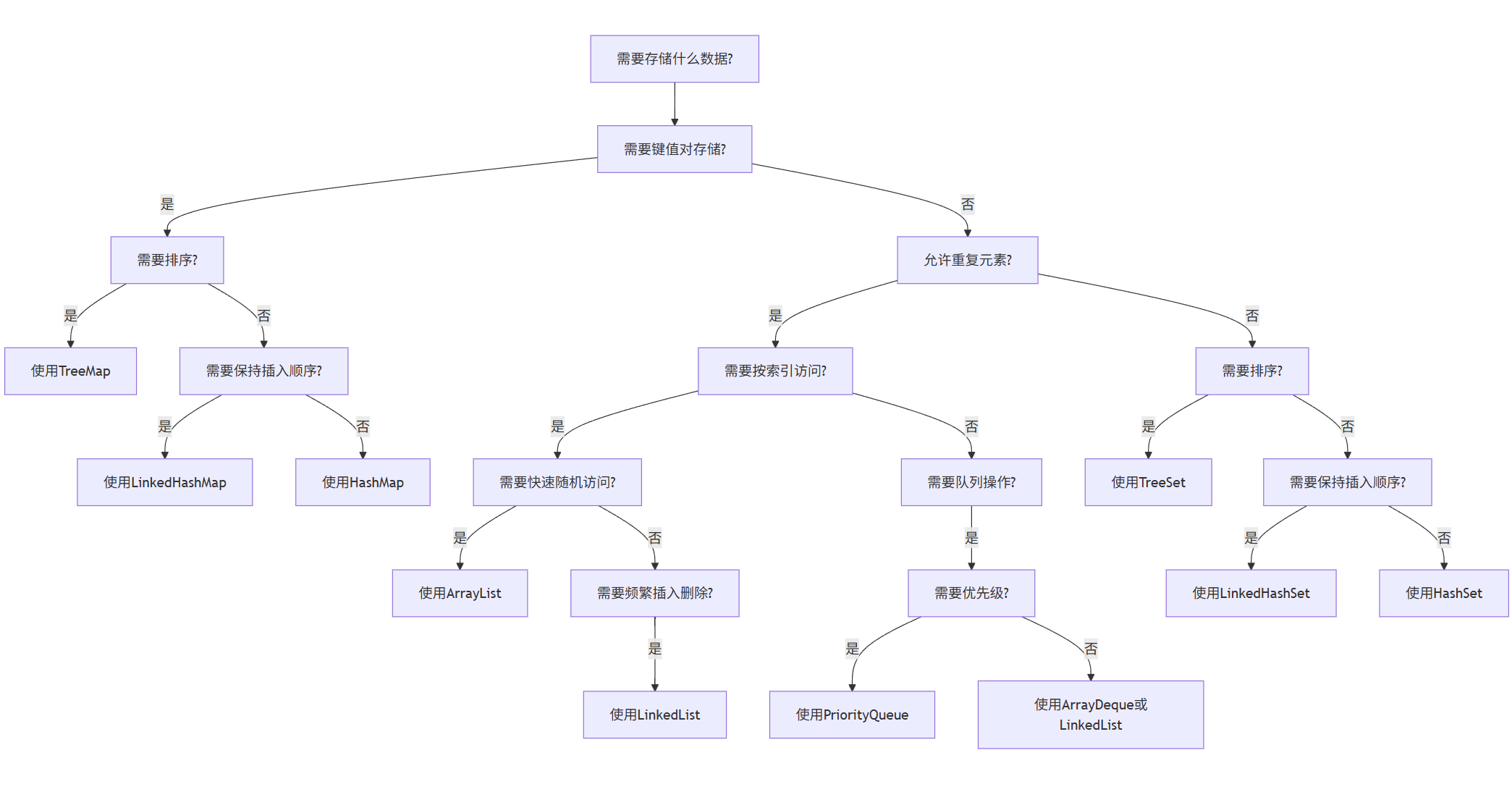
flowchart TD
    A[需要存储什么数据?] --> B[需要键值对存储?]
    B -->|是| C[需要排序?]
    B -->|否| D[允许重复元素?]

    C -->|是| E[使用TreeMap]
    C -->|否| F[需要保持插入顺序?]
    F -->|是| G[使用LinkedHashMap]
    F -->|否| H[使用HashMap]

    D -->|是| I[需要按索引访问?]
    D -->|否| J[需要排序?]

    I -->|是| K[需要快速随机访问?]
    I -->|否| L[需要队列操作?]

    K -->|是| M[使用ArrayList]
    K -->|否| N[需要频繁插入删除?]
    N -->|是| O[使用LinkedList]

    L -->|是| P[需要优先级?]
    P -->|是| Q[使用PriorityQueue]
    P -->|否| R[使用ArrayDeque或LinkedList]

    J -->|是| S[使用TreeSet]
    J -->|否| T[需要保持插入顺序?]
    T -->|是| U[使用LinkedHashSet]
    T -->|否| V[使用HashSet]
9.2 性能优化技巧
java
// 集合性能优化示例
public class CollectionOptimization {

    // 1. 指定初始容量
    public void specifyInitialCapacity() {
        // 不好的做法 - 默认初始容量小,需要多次扩容
        List<String> list1 = new ArrayList<>();

        // 好的做法 - 指定初始容量
        List<String> list2 = new ArrayList<>(1000);
        Map<String, Integer> map = new HashMap<>(1000, 0.75f);
    }

    // 2. 使用批量操作
    public void useBulkOperations() {
        List<Integer> source = Arrays.asList(1, 2, 3, 4, 5);
        List<Integer> target = new ArrayList<>();

        // 不好的做法 - 逐个添加
        for (Integer num : source) {
            target.add(num);
        }

        // 好的做法 - 批量添加
        target.addAll(source);
    }

    // 3. 使用合适的遍历方式
    public void properIteration() {
        List<String> list = Arrays.asList("A", "B", "C", "D");

        // ArrayList - 使用for循环更快
        for (int i = 0; i < list.size(); i++) {
            String element = list.get(i);
            // 处理元素
        }

        // LinkedList - 使用迭代器更快
        for (Iterator<String> it = list.iterator(); it.hasNext(); ) {
            String element = it.next();
            // 处理元素
        }

        // 通用 - 增强for循环
        for (String element : list) {
            // 处理元素
        }
    }

    // 4. 避免在迭代过程中修改集合
    public void avoidModificationDuringIteration() {
        List<String> list = new ArrayList<>(Arrays.asList("A", "B", "C", "D"));

        // 错误做法 - 会抛出ConcurrentModificationException
        /*
        for (String element : list) {
            if ("B".equals(element)) {
                list.remove(element); // 抛出异常
            }
        }
        */

        // 正确做法1 - 使用迭代器的remove方法
        for (Iterator<String> it = list.iterator(); it.hasNext(); ) {
            String element = it.next();
            if ("B".equals(element)) {
                it.remove(); // 安全删除
            }
        }

        // 正确做法2 - 使用removeIf方法(Java 8+)
        list.removeIf(element -> "B".equals(element));

        // 正确做法3 - 使用Stream API过滤
        List<String> filteredList = list.stream()
            .filter(element -> !"B".equals(element))
            .collect(Collectors.toList());
    }

    // 5. 使用不可变集合
    public void useImmutableCollections() {
        // 创建不可变集合
        List<String> immutableList = List.of("A", "B", "C");
        Set<String> immutableSet = Set.of("A", "B", "C");
        Map<String, Integer> immutableMap = Map.of("A", 1, "B", 2, "C", 3);

        // 这些操作会抛出UnsupportedOperationException
        // immutableList.add("D");
        // immutableSet.remove("A");
        // immutableMap.put("D", 4);
    }
}
9.3 线程安全考虑
java
// 集合线程安全示例
public class ThreadSafeCollections {

    // 1. 使用同步包装器
    public void useSynchronizedWrappers() {
        List<String> syncList = Collections.synchronizedList(new ArrayList<>());
        Set<String> syncSet = Collections.synchronizedSet(new HashSet<>());
        Map<String, Integer> syncMap = Collections.synchronizedMap(new HashMap<>());

        // 使用时需要手动同步
        synchronized(syncList) {
            syncList.add("item");
        }

        // 迭代时也需要同步
        synchronized(syncList) {
            for (String item : syncList) {
                // 处理元素
            }
        }
    }

    // 2. 使用并发集合(Java 5+)
    public void useConcurrentCollections() {
        // ConcurrentHashMap - 高效的并发Map实现
        ConcurrentMap<String, Integer> concurrentMap = new ConcurrentHashMap<>();
        concurrentMap.put("key", 1);

        // CopyOnWriteArrayList - 写时复制列表,适合读多写少场景
        List<String> copyOnWriteList = new CopyOnWriteArrayList<>();
        copyOnWriteList.add("item");

        // ConcurrentLinkedQueue - 非阻塞并发队列
        Queue<String> concurrentQueue = new ConcurrentLinkedQueue<>();
        concurrentQueue.offer("item");

        // 这些集合不需要外部同步
        for (String item : copyOnWriteList) {
            // 安全迭代,不会抛出ConcurrentModificationException
        }
    }

    // 3. 使用Java并发工具
    public void useConcurrencyUtilities() {
        // CountDownLatch - 等待多个线程完成
        CountDownLatch latch = new CountDownLatch(3);

        for (int i = 0; i < 3; i++) {
            new Thread(() -> {
                try {
                    // 执行任务
                    Thread.sleep(1000);
                } catch (InterruptedException e) {
                    Thread.currentThread().interrupt();
                } finally {
                    latch.countDown();
                }
            }).start();
        }

        try {
            latch.await(); // 等待所有线程完成
        } catch (InterruptedException e) {
            Thread.currentThread().interrupt();
        }
    }
}
10. AI集成实战:智能数据处理器
现在我们将结合Java集合框架和AI技术,构建一个智能数据处理器。这个处理器能够自动分类、分析和处理各种数据。
10.1 项目概述
我们将创建一个智能数据处理器,它具有以下功能:
-
数据收集和存储
-
自动数据分类
-
情感分析(使用AI服务)
-
数据可视化和报告生成
10.2 项目结构
text
IntelligentDataProcessor/
├── src/
│   ├── main/
│   │   ├── java/
│   │   │   ├── processor/
│   │   │   │   ├── DataCollector.java
│   │   │   │   ├── DataClassifier.java
│   │   │   │   ├── SentimentAnalyzer.java
│   │   │   │   ├── DataVisualizer.java
│   │   │   │   └── ReportGenerator.java
│   │   │   ├── model/
│   │   │   │   ├── DataItem.java
│   │   │   │   ├── Category.java
│   │   │   │   └── Sentiment.java
│   │   │   └── Main.java
│   │   └── resources/
│   └── test/
│       └── java/
└── pom.xml
10.3 核心代码实现
10.3.1 数据模型
java
// DataItem.java
package model;

import java.time.LocalDateTime;
import java.util.Objects;

public class DataItem {
    private String id;
    private String content;
    private Category category;
    private Sentiment sentiment;
    private LocalDateTime timestamp;
    private double confidence;

    public DataItem(String content) {
        this.id = java.util.UUID.randomUUID().toString();
        this.content = content;
        this.timestamp = LocalDateTime.now();
    }

    // Getter和Setter方法
    public String getId() { return id; }
    public String getContent() { return content; }
    public void setContent(String content) { this.content = content; }
    public Category getCategory() { return category; }
    public void setCategory(Category category) { this.category = category; }
    public Sentiment getSentiment() { return sentiment; }
    public void setSentiment(Sentiment sentiment) { this.sentiment = sentiment; }
    public LocalDateTime getTimestamp() { return timestamp; }
    public double getConfidence() { return confidence; }
    public void setConfidence(double confidence) { this.confidence = confidence; }

    @Override
    public boolean equals(Object o) {
        if (this == o) return true;
        if (o == null || getClass() != o.getClass()) return false;
        DataItem dataItem = (DataItem) o;
        return Objects.equals(id, dataItem.id);
    }

    @Override
    public int hashCode() {
        return Objects.hash(id);
    }

    @Override
    public String toString() {
        return "DataItem{" +
                "id='" + id + '\'' +
                ", content='" + content + '\'' +
                ", category=" + category +
                ", sentiment=" + sentiment +
                ", timestamp=" + timestamp +
                ", confidence=" + confidence +
                '}';
    }
}

// Category.java
package model;

public enum Category {
    TECHNOLOGY, SPORTS, POLITICS, ENTERTAINMENT, HEALTH, SCIENCE, BUSINESS, OTHER
}

// Sentiment.java
package model;

public enum Sentiment {
    POSITIVE, NEUTRAL, NEGATIVE, MIXED
}
10.3.2 数据收集器
java
// DataCollector.java
package processor;

import model.DataItem;
import java.util.*;
import java.util.concurrent.ConcurrentLinkedQueue;
import java.util.logging.Logger;

public class DataCollector {
    private static final Logger LOGGER = Logger.getLogger(DataCollector.class.getName());
    private Queue<DataItem> dataQueue;
    private List<DataItem> processedData;
    private Set<String> contentFilter;

    public DataCollector() {
        this.dataQueue = new ConcurrentLinkedQueue<>();
        this.processedData = new ArrayList<>();
        this.contentFilter = new HashSet<>();
    }

    public void collectData(String content) {
        if (content == null || content.trim().isEmpty()) {
            LOGGER.warning("尝试收集空内容");
            return;
        }

        // 检查内容是否已存在(简单的去重)
        if (contentFilter.contains(content)) {
            LOGGER.info("跳过重复内容: " + content);
            return;
        }

        DataItem item = new DataItem(content);
        dataQueue.offer(item);
        contentFilter.add(content);

        LOGGER.info("已收集数据: " + content);
    }

    public DataItem getNextDataItem() {
        return dataQueue.poll();
    }

    public void addProcessedData(DataItem item) {
        processedData.add(item);
    }

    public List<DataItem> getProcessedData() {
        return Collections.unmodifiableList(processedData);
    }

    public int getQueueSize() {
        return dataQueue.size();
    }

    public int getProcessedCount() {
        return processedData.size();
    }

    public void clear() {
        dataQueue.clear();
        processedData.clear();
        contentFilter.clear();
        LOGGER.info("数据收集器已清空");
    }
}
10.3.3 数据分类器
java
// DataClassifier.java
package processor;

import model.DataItem;
import model.Category;
import java.util.*;
import java.util.regex.Pattern;
import java.util.stream.Collectors;

public class DataClassifier {
    private Map<Category, List<String>> keywordMap;
    private Map<Category, Pattern> patternMap;

    public DataClassifier() {
        initializeKeywords();
        compilePatterns();
    }

    private void initializeKeywords() {
        keywordMap = new EnumMap<>(Category.class);

        keywordMap.put(Category.TECHNOLOGY, Arrays.asList(
            "java", "python", "programming", "software", "computer", "ai", "machine learning",
            "algorithm", "code", "developer", "tech", "digital", "internet", "web"
        ));

        keywordMap.put(Category.SPORTS, Arrays.asList(
            "soccer", "football", "basketball", "tennis", "game", "match", "player",
            "team", "score", "win", "championship", "olympics", "sport", "athlete"
        ));

        keywordMap.put(Category.POLITICS, Arrays.asList(
            "government", "election", "president", "policy", "law", "political", "vote",
            "democracy", "congress", "senate", "minister", "leader", "diplomacy"
        ));

        keywordMap.put(Category.ENTERTAINMENT, Arrays.asList(
            "movie", "film", "actor", "celebrity", "music", "song", "album", "show",
            "tv", "hollywood", "entertainment", "star", "award", "festival"
        ));

        keywordMap.put(Category.HEALTH, Arrays.asList(
            "health", "medical", "doctor", "hospital", "disease", "medicine", "treatment",
            "patient", "healthcare", "nutrition", "fitness", "wellness", "vaccine"
        ));

        keywordMap.put(Category.SCIENCE, Arrays.asList(
            "science", "research", "scientist", "discovery", "physics", "chemistry", "biology",
            "experiment", "theory", "space", "nasa", "quantum", "genetic", "climate"
        ));

        keywordMap.put(Category.BUSINESS, Arrays.asList(
            "business", "market", "economy", "company", "financial", "stock", "investment",
            "bank", "money", "trade", "industry", "corporate", "startup", "profit"
        ));
    }

    private void compilePatterns() {
        patternMap = new EnumMap<>(Category.class);

        for (Map.Entry<Category, List<String>> entry : keywordMap.entrySet()) {
            String patternStr = entry.getValue().stream()
                .map(Pattern::quote)
                .collect(Collectors.joining("|", "(?i).*\\b(", ")\\b.*"));
            patternMap.put(entry.getKey(), Pattern.compile(patternStr));
        }
    }

    public Category classify(String content) {
        if (content == null || content.trim().isEmpty()) {
            return Category.OTHER;
        }

        String lowerContent = content.toLowerCase();
        Map<Category, Integer> scoreMap = new EnumMap<>(Category.class);

        // 初始化分数
        for (Category category : Category.values()) {
            scoreMap.put(category, 0);
        }

        // 计算每个类别的匹配分数
        for (Map.Entry<Category, Pattern> entry : patternMap.entrySet()) {
            Category category = entry.getKey();
            Pattern pattern = entry.getValue();

            if (pattern.matcher(lowerContent).matches()) {
                scoreMap.put(category, scoreMap.get(category) + 1);
            }
        }

        // 找到最高分的类别
        Category bestCategory = Category.OTHER;
        int maxScore = 0;

        for (Map.Entry<Category, Integer> entry : scoreMap.entrySet()) {
            if (entry.getValue() > maxScore) {
                maxScore = entry.getValue();
                bestCategory = entry.getKey();
            }
        }

        // 如果没有匹配或分数太低,返回OTHER
        return maxScore > 0 ? bestCategory : Category.OTHER;
    }

    public Map<Category, Long> getCategoryStats(List<DataItem> dataItems) {
        return dataItems.stream()
            .collect(Collectors.groupingBy(
                DataItem::getCategory,
                Collectors.counting()
            ));
    }
}
10.3.4 情感分析器(集成AI)
java
// SentimentAnalyzer.java
package processor;

import model.DataItem;
import model.Sentiment;
import java.util.*;
import java.net.URI;
import java.net.http.HttpClient;
import java.net.http.HttpRequest;
import java.net.http.HttpResponse;
import java.time.Duration;
import com.google.gson.Gson;
import com.google.gson.JsonObject;

public class SentimentAnalyzer {
    private static final String API_URL = "https://api-inference.huggingface.co/models/distilbert-base-uncased-finetuned-sst-2-english";
    private static final String API_KEY = "your_huggingface_api_key_here";

    private HttpClient httpClient;
    private Gson gson;

    public SentimentAnalyzer() {
        this.httpClient = HttpClient.newBuilder()
            .connectTimeout(Duration.ofSeconds(10))
            .build();
        this.gson = new Gson();
    }

    public Sentiment analyzeSentiment(String content) {
        if (content == null || content.trim().isEmpty()) {
            return Sentiment.NEUTRAL;
        }

        try {
            // 构建请求
            JsonObject requestBody = new JsonObject();
            requestBody.addProperty("inputs", content);

            HttpRequest request = HttpRequest.newBuilder()
                .uri(URI.create(API_URL))
                .header("Authorization", "Bearer " + API_KEY)
                .header("Content-Type", "application/json")
                .POST(HttpRequest.BodyPublishers.ofString(gson.toJson(requestBody)))
                .build();

            // 发送请求
            HttpResponse<String> response = httpClient.send(
                request, HttpResponse.BodyHandlers.ofString());

            if (response.statusCode() == 200) {
                return parseSentimentResponse(response.body());
            } else {
                System.err.println("API请求失败: " + response.statusCode());
                return fallbackSentimentAnalysis(content);
            }
        } catch (Exception e) {
            System.err.println("情感分析错误: " + e.getMessage());
            return fallbackSentimentAnalysis(content);
        }
    }

    private Sentiment parseSentimentResponse(String responseBody) {
        try {
            // 解析响应 - 示例响应: [[{"label":"POSITIVE","score":0.9998}]]
            JsonObject[][] responseArray = gson.fromJson(responseBody, JsonObject[][].class);

            if (responseArray.length > 0 && responseArray[0].length > 0) {
                JsonObject result = responseArray[0][0];
                String label = result.get("label").getAsString();
                double score = result.get("score").getAsDouble();

                if ("POSITIVE".equalsIgnoreCase(label)) {
                    return score > 0.7 ? Sentiment.POSITIVE : Sentiment.MIXED;
                } else if ("NEGATIVE".equalsIgnoreCase(label)) {
                    return score > 0.7 ? Sentiment.NEGATIVE : Sentiment.MIXED;
                }
            }
        } catch (Exception e) {
            System.err.println("解析响应错误: " + e.getMessage());
        }

        return Sentiment.NEUTRAL;
    }

    private Sentiment fallbackSentimentAnalysis(String content) {
        // 简单的基于关键词的回退分析
        String lowerContent = content.toLowerCase();

        List<String> positiveWords = Arrays.asList(
            "good", "great", "excellent", "amazing", "wonderful", "fantastic",
            "perfect", "love", "like", "happy", "pleased", "awesome", "best"
        );

        List<String> negativeWords = Arrays.asList(
            "bad", "terrible", "awful", "horrible", "hate", "dislike", "angry",
            "sad", "disappointing", "poor", "worst", "problem", "issue", "fail"
        );

        int positiveCount = 0;
        int negativeCount = 0;

        for (String word : positiveWords) {
            if (lowerContent.contains(word)) {
                positiveCount++;
            }
        }

        for (String word : negativeWords) {
            if (lowerContent.contains(word)) {
                negativeCount++;
            }
        }

        if (positiveCount > negativeCount) {
            return Sentiment.POSITIVE;
        } else if (negativeCount > positiveCount) {
            return Sentiment.NEGATIVE;
        } else if (positiveCount > 0 && negativeCount > 0) {
            return Sentiment.MIXED;
        } else {
            return Sentiment.NEUTRAL;
        }
    }

    public Map<Sentiment, Long> getSentimentStats(List<DataItem> dataItems) {
        return dataItems.stream()
            .collect(Collectors.groupingBy(
                DataItem::getSentiment,
                Collectors.counting()
            ));
    }
}
10.3.5 数据可视化器
java
// DataVisualizer.java
package processor;

import model.Category;
import model.Sentiment;
import model.DataItem;
import java.util.*;
import java.util.stream.Collectors;

public class DataVisualizer {

    public void displayCategoryDistribution(Map<Category, Long> distribution) {
        System.out.println("\n=== 类别分布 ===");

        long total = distribution.values().stream().mapToLong(Long::longValue).sum();

        distribution.entrySet().stream()
            .sorted(Map.Entry.<Category, Long>comparingByValue().reversed())
            .forEach(entry -> {
                double percentage = total > 0 ? (entry.getValue() * 100.0 / total) : 0;
                System.out.printf("%-15s: %d (%.1f%%)%n",
                    entry.getKey(), entry.getValue(), percentage);
            });
    }

    public void displaySentimentDistribution(Map<Sentiment, Long> distribution) {
        System.out.println("\n=== 情感分布 ===");

        long total = distribution.values().stream().mapToLong(Long::longValue).sum();

        distribution.entrySet().stream()
            .sorted(Map.Entry.<Sentiment, Long>comparingByValue().reversed())
            .forEach(entry -> {
                double percentage = total > 0 ? (entry.getValue() * 100.0 / total) : 0;
                System.out.printf("%-10s: %d (%.1f%%)%n",
                    entry.getKey(), entry.getValue(), percentage);
            });
    }

    public void displayTopItemsByCategory(List<DataItem> dataItems, int limit) {
        System.out.println("\n=== 各类别热门内容 ===");

        Map<Category, List<DataItem>> itemsByCategory = dataItems.stream()
            .collect(Collectors.groupingBy(DataItem::getCategory));

        itemsByCategory.forEach((category, items) -> {
            System.out.println("\n" + category + ":");
            items.stream()
                .limit(limit)
                .forEach(item -> System.out.println("  - " +
                    abbreviate(item.getContent(), 50)));
        });
    }

    public void displaySentimentByCategory(List<DataItem> dataItems) {
        System.out.println("\n=== 各类别情感分析 ===");

        Map<Category, Map<Sentiment, Long>> sentimentByCategory = dataItems.stream()
            .collect(Collectors.groupingBy(
                DataItem::getCategory,
                Collectors.groupingBy(
                    DataItem::getSentiment,
                    Collectors.counting()
                )
            ));

        sentimentByCategory.forEach((category, sentimentMap) -> {
            System.out.println("\n" + category + ":");
            sentimentMap.forEach((sentiment, count) -> {
                System.out.printf("  %-10s: %d%n", sentiment, count);
            });
        });
    }

    public void displayProcessingSummary(DataCollector collector,
                                       DataClassifier classifier,
                                       SentimentAnalyzer analyzer) {
        System.out.println("\n=== 处理摘要 ===");
        System.out.println("待处理队列: " + collector.getQueueSize());
        System.out.println("已处理项目: " + collector.getProcessedCount());

        List<DataItem> processedData = collector.getProcessedData();
        if (!processedData.isEmpty()) {
            Map<Category, Long> categoryStats = classifier.getCategoryStats(processedData);
            Map<Sentiment, Long> sentimentStats = analyzer.getSentimentStats(processedData);

            displayCategoryDistribution(categoryStats);
            displaySentimentDistribution(sentimentStats);
        }
    }

    private String abbreviate(String text, int maxLength) {
        if (text.length() <= maxLength) {
            return text;
        }
        return text.substring(0, maxLength - 3) + "...";
    }
}
10.3.6 报告生成器
java
// ReportGenerator.java
package processor;

import model.DataItem;
import model.Category;
import model.Sentiment;
import java.util.*;
import java.time.format.DateTimeFormatter;
import java.time.LocalDateTime;

public class ReportGenerator {

    public String generateTextReport(List<DataItem> dataItems) {
        StringBuilder report = new StringBuilder();
        DateTimeFormatter formatter = DateTimeFormatter.ofPattern("yyyy-MM-dd HH:mm:ss");

        report.append("智能数据处理器报告\n");
        report.append("生成时间: ").append(LocalDateTime.now().format(formatter)).append("\n");
        report.append("分析项目总数: ").append(dataItems.size()).append("\n\n");

        // 类别统计
        Map<Category, Long> categoryStats = dataItems.stream()
            .collect(Collectors.groupingBy(DataItem::getCategory, Collectors.counting()));

        report.append("类别分布:\n");
        categoryStats.entrySet().stream()
            .sorted(Map.Entry.<Category, Long>comparingByValue().reversed())
            .forEach(entry -> {
                report.append("  ").append(entry.getKey()).append(": ")
                      .append(entry.getValue()).append("\n");
            });

        // 情感统计
        Map<Sentiment, Long> sentimentStats = dataItems.stream()
            .collect(Collectors.groupingBy(DataItem::getSentiment, Collectors.counting()));

        report.append("\n情感分布:\n");
        sentimentStats.entrySet().stream()
            .sorted(Map.Entry.<Sentiment, Long>comparingByValue().reversed())
            .forEach(entry -> {
                report.append("  ").append(entry.getKey()).append(": ")
                      .append(entry.getValue()).append("\n");
            });

        // 各类别情感分析
        report.append("\n各类别情感分析:\n");
        Map<Category, Map<Sentiment, Long>> sentimentByCategory = dataItems.stream()
            .collect(Collectors.groupingBy(
                DataItem::getCategory,
                Collectors.groupingBy(
                    DataItem::getSentiment,
                    Collectors.counting()
                )
            ));

        sentimentByCategory.forEach((category, sentimentMap) -> {
            report.append("  ").append(category).append(":\n");
            sentimentMap.forEach((sentiment, count) -> {
                report.append("    ").append(sentiment).append(": ").append(count).append("\n");
            });
        });

        // 最新项目
        report.append("\n最新处理的项目:\n");
        dataItems.stream()
            .sorted(Comparator.comparing(DataItem::getTimestamp).reversed())
            .limit(5)
            .forEach(item -> {
                report.append("  [").append(item.getTimestamp().format(formatter)).append("] ")
                      .append(item.getCategory()).append("/").append(item.getSentiment())
                      .append(": ").append(abbreviate(item.getContent(), 60)).append("\n");
            });

        return report.toString();
    }

    public String generateHTMLReport(List<DataItem> dataItems) {
        StringBuilder html = new StringBuilder();
        DateTimeFormatter formatter = DateTimeFormatter.ofPattern("yyyy-MM-dd HH:mm:ss");

        html.append("""
            <!DOCTYPE html>
            <html>
            <head>
                <title>智能数据处理器报告</title>
                <style>
                    body { font-family: Arial, sans-serif; margin: 40px; }
                    h1 { color: #333; }
                    table { border-collapse: collapse; width: 100%; margin-bottom: 20px; }
                    th, td { border: 1px solid #ddd; padding: 8px; text-align: left; }
                    th { background-color: #f2f2f2; }
                    .positive { color: green; }
                    .negative { color: red; }
                    .neutral { color: blue; }
                    .mixed { color: orange; }
                </style>
            </head>
            <body>
                <h1>智能数据处理器报告</h1>
                <p><strong>生成时间:</strong> """)
            .append(LocalDateTime.now().format(formatter))
            .append("</p>")
            .append("<p><strong>分析项目总数:</strong> ")
            .append(dataItems.size())
            .append("</p>");

        // 类别分布表格
        Map<Category, Long> categoryStats = dataItems.stream()
            .collect(Collectors.groupingBy(DataItem::getCategory, Collectors.counting()));

        html.append("""
            <h2>类别分布</h2>
            <table>
                <tr><th>类别</th><th>数量</th><th>百分比</th></tr>
            """);

        long total = dataItems.size();
        categoryStats.entrySet().stream()
            .sorted(Map.Entry.<Category, Long>comparingByValue().reversed())
            .forEach(entry -> {
                double percentage = total > 0 ? (entry.getValue() * 100.0 / total) : 0;
                html.append("<tr><td>").append(entry.getKey())
                    .append("</td><td>").append(entry.getValue())
                    .append("</td><td>").append(String.format("%.1f%%", percentage))
                    .append("</td></tr>");
            });

        html.append("</table>");

        // 情感分布表格
        Map<Sentiment, Long> sentimentStats = dataItems.stream()
            .collect(Collectors.groupingBy(DataItem::getSentiment, Collectors.counting()));

        html.append("""
            <h2>情感分布</h2>
            <table>
                <tr><th>情感</th><th>数量</th><th>百分比</th></tr>
            """);

        sentimentStats.entrySet().stream()
            .sorted(Map.Entry.<Sentiment, Long>comparingByValue().reversed())
            .forEach(entry -> {
                double percentage = total > 0 ? (entry.getValue() * 100.0 / total) : 0;
                String className = entry.getKey().toString().toLowerCase();
                html.append("<tr><td class=\"").append(className).append("\">")
                    .append(entry.getKey())
                    .append("</td><td>").append(entry.getValue())
                    .append("</td><td>").append(String.format("%.1f%%", percentage))
                    .append("</td></tr>");
            });

        html.append("</table>");

        // 最新项目表格
        html.append("""
            <h2>最新处理的项目</h2>
            <table>
                <tr><th>时间</th><th>类别</th><th>情感</th><th>内容</th></tr>
            """);

        dataItems.stream()
            .sorted(Comparator.comparing(DataItem::getTimestamp).reversed())
            .limit(10)
            .forEach(item -> {
                String sentimentClass = item.getSentiment().toString().toLowerCase();
                html.append("<tr>")
                    .append("<td>").append(item.getTimestamp().format(formatter)).append("</td>")
                    .append("<td>").append(item.getCategory()).append("</td>")
                    .append("<td class=\"").append(sentimentClass).append("\">")
                    .append(item.getSentiment()).append("</td>")
                    .append("<td>").append(abbreviate(item.getContent(), 80)).append("</td>")
                    .append("</tr>");
            });

        html.append("</table></body></html>");

        return html.toString();
    }

    private String abbreviate(String text, int maxLength) {
        if (text.length() <= maxLength) {
            return text;
        }
        return text.substring(0, maxLength - 3) + "...";
    }
}
10.3.7 主应用程序
java
// Main.java
import processor.*;
import model.DataItem;
import model.Category;
import model.Sentiment;
import java.util.*;
import java.util.concurrent.Executors;
import java.util.concurrent.ScheduledExecutorService;
import java.util.concurrent.TimeUnit;

public class Main {
    private DataCollector dataCollector;
    private DataClassifier dataClassifier;
    private SentimentAnalyzer sentimentAnalyzer;
    private DataVisualizer dataVisualizer;
    private ReportGenerator reportGenerator;
    private ScheduledExecutorService scheduler;

    public Main() {
        this.dataCollector = new DataCollector();
        this.dataClassifier = new DataClassifier();
        this.sentimentAnalyzer = new SentimentAnalyzer();
        this.dataVisualizer = new DataVisualizer();
        this.reportGenerator = new ReportGenerator();
        this.scheduler = Executors.newScheduledThreadPool(2);
    }

    public void start() {
        System.out.println("启动智能数据处理器...");

        // 启动数据处理任务
        scheduler.scheduleAtFixedRate(this::processData, 0, 5, TimeUnit.SECONDS);

        // 启动报告生成任务
        scheduler.scheduleAtFixedRate(this::generateReports, 30, 30, TimeUnit.SECONDS);

        // 模拟数据输入
        simulateDataInput();
    }

    public void stop() {
        System.out.println("停止智能数据处理器...");
        scheduler.shutdown();
        try {
            if (!scheduler.awaitTermination(5, TimeUnit.SECONDS)) {
                scheduler.shutdownNow();
            }
        } catch (InterruptedException e) {
            scheduler.shutdownNow();
            Thread.currentThread().interrupt();
        }
    }

    private void processData() {
        int processed = 0;
        DataItem item;

        while ((item = dataCollector.getNextDataItem()) != null && processed < 10) {
            try {
                // 分类
                Category category = dataClassifier.classify(item.getContent());
                item.setCategory(category);

                // 情感分析
                Sentiment sentiment = sentimentAnalyzer.analyzeSentiment(item.getContent());
                item.setSentiment(sentiment);

                // 添加到已处理列表
                dataCollector.addProcessedData(item);
                processed++;

                System.out.println("已处理: " + abbreviate(item.getContent(), 50) +
                                 " [" + category + "/" + sentiment + "]");

            } catch (Exception e) {
                System.err.println("处理数据项时出错: " + e.getMessage());
            }
        }

        if (processed > 0) {
            dataVisualizer.displayProcessingSummary(dataCollector, dataClassifier, sentimentAnalyzer);
        }
    }

    private void generateReports() {
        List<DataItem> processedData = dataCollector.getProcessedData();
        if (processedData.isEmpty()) {
            return;
        }

        // 生成文本报告
        String textReport = reportGenerator.generateTextReport(processedData);
        System.out.println("\n" + textReport);

        // 生成HTML报告(在实际应用中可保存到文件)
        String htmlReport = reportGenerator.generateHTMLReport(processedData);
        // Files.write(Paths.get("report.html"), htmlReport.getBytes());

        System.out.println("已生成报告,处理项目: " + processedData.size());
    }

    private void simulateDataInput() {
        // 模拟数据输入
        List<String> sampleData = Arrays.asList(
            "Java is a great programming language for building enterprise applications.",
            "The new sports car has amazing performance and sleek design.",
            "The government announced new policies to support small businesses.",
            "I really enjoyed the latest Marvel movie, the special effects were fantastic!",
            "Scientists discovered a new species in the Amazon rainforest.",
            "The stock market reached record highs today amid positive economic indicators.",
            "This new health app helps track your fitness goals and nutrition intake.",
            "The weather forecast predicts rain for the weekend, which is disappointing.",
            "Artificial intelligence is transforming industries across the globe.",
            "The soccer team won the championship after an intense final match.",
            "Political leaders gathered for the international climate conference.",
            "The new restaurant serves delicious food with excellent service.",
            "Researchers developed a breakthrough treatment for the disease.",
            "Company profits soared due to successful product launches.",
            "The software update fixed several bugs and improved performance.",
            "I'm frustrated with the poor customer service from that company.",
            "Space exploration continues to reveal mysteries of our universe.",
            "The economic report shows mixed results with some sectors growing while others decline.",
            "The new fitness tracker monitors heart rate and sleep patterns accurately.",
            "Technology companies are investing heavily in quantum computing research."
        );

        // 随机添加数据
        scheduler.scheduleAtFixedRate(() -> {
            if (dataCollector.getQueueSize() < 20) {
                String randomData = sampleData.get(new Random().nextInt(sampleData.size()));
                dataCollector.collectData(randomData);
            }
        }, 0, 3, TimeUnit.SECONDS);
    }

    private String abbreviate(String text, int maxLength) {
        if (text.length() <= maxLength) {
            return text;
        }
        return text.substring(0, maxLength - 3) + "...";
    }

    public static void main(String[] args) {
        Main app = new Main();
        app.start();

        // 运行一段时间后停止
        try {
            Thread.sleep(120000); // 运行2分钟
        } catch (InterruptedException e) {
            Thread.currentThread().interrupt();
        }

        app.stop();
    }
}
11. 项目总结与扩展
11.1 项目总结
本项目实现了一个智能数据处理器,展示了Java集合框架在实际应用中的强大功能:
-
数据收集:使用Queue接口管理待处理数据
-
数据分类:使用Map和正则表达式实现内容分类
-
情感分析:集成外部AI服务进行高级分析
-
数据处理:使用Stream API进行数据转换和分析
-
结果可视化:生成文本和HTML格式的报告
11.2 扩展建议
-
数据库集成:将处理结果保存到数据库而非内存中
-
实时数据源:集成Twitter、新闻API等实时数据源
-
机器学习模型:训练自定义分类和情感分析模型
-
Web界面:开发Web前端展示分析结果
-
警报系统:对特定类型或情感的内容设置警报
-
多语言支持:扩展支持多种语言的内容分析
11.3 学习资源
-
书籍:
-
《Effective Java》 by Joshua Bloch
-
《Java Generics and Collections》 by Maurice Naftalin and Philip Wadler
-
通过本教程,您应该对Java集合框架有了全面的了解,并能够将其应用于实际项目中。集合框架是Java编程的核心组成部分,掌握它将大大提高您的编程效率和代码质量。
更多推荐
 25
25 0
0- 0


 已为社区贡献53条内容

所有评论(0)