
HTTP协议下,C#在.NET Core中如何实现大文件的分片上传和下载?
·
大文件上传解决方案
作为一个同样接外包接到手软的.NET老油条,我完全理解你既要兼容IE8又要20G文件上传还要100块预算的"无理要求"。来,给你整一套"饿不死套餐"!
前端实现 - 兼容IE8的土味方案
    穷逼版大文件上传

        /* 祖传CSS,兼容IE8 */
        .upload-area {
            border: 2px dashed #ccc;
            padding: 20px;
            text-align: center;
            margin: 20px;
        }
        .progress-container {
            width: 100%;
            background-color: #f5f5f5;
            margin: 10px 0;
        }
        .progress-bar {
            height: 20px;
            background-color: #4CAF50;
            width: 0%;
        }
        .file-list {
            margin: 20px;
            border: 1px solid #ddd;
            padding: 10px;
        }


    大文件上传(兼容IE8版)


        拖放文件或文件夹到此处
        或

        选择文件/文件夹


        等待上传文件...


        开始上传
        暂停
        继续


        加密方式:

            SM4国密
            AES


        // 兼容IE8的JSON
        if (typeof JSON === "undefined") {
            document.write('<script src="https://cdnjs.cloudflare.com/ajax/libs/json2/20150503/json2.min.js"><\/script>');
        }

        // 上传队列
        var uploadQueue = [];
        var currentUpload = null;
        var chunkSize = 5 * 1024 * 1024; // 5MB分块

        // 文件选择处理
        document.getElementById('fileInput').addEventListener('change', function(e) {
            handleFiles(e.target.files);
        });

        // 拖放处理
        var dropArea = document.getElementById('dropArea');
        dropArea.addEventListener('dragover', function(e) {
            e.preventDefault();
            dropArea.style.borderColor = '#4CAF50';
        });

        dropArea.addEventListener('dragleave', function() {
            dropArea.style.borderColor = '#ccc';
        });

        dropArea.addEventListener('drop', function(e) {
            e.preventDefault();
            dropArea.style.borderColor = '#ccc';
            handleFiles(e.dataTransfer.files);
        });

        // 处理文件选择
        function handleFiles(files) {
            var fileList = document.getElementById('fileList');
            fileList.innerHTML = '';

            for (var i = 0; i < files.length; i++) {
                var file = files[i];
                var fileItem = document.createElement('div');
                fileItem.innerHTML = file.name + ' (' + formatFileSize(file.size) + ')';
                fileList.appendChild(fileItem);

                uploadQueue.push({
                    file: file,
                    progress: 0,
                    status: 'pending'
                });
            }
        }

        // 开始上传
        function startUpload() {
            if (uploadQueue.length === 0) return;

            currentUpload = uploadQueue[0];
            uploadFile(currentUpload);
        }

        // 上传文件
        function uploadFile(fileItem) {
            var file = fileItem.file;
            var fileId = generateFileId(file);
            var totalChunks = Math.ceil(file.size / chunkSize);

            // 从本地存储加载断点
            var resumeChunk = localStorage.getItem('resume_' + fileId) || 0;

            // 上传分块
            for (var chunkIndex = resumeChunk; chunkIndex < totalChunks; chunkIndex++) {
                if (fileItem.status === 'paused') break;

                var start = chunkIndex * chunkSize;
                var end = Math.min(start + chunkSize, file.size);
                var chunk = file.slice(start, end);

                // 加密分块(伪代码)
                var encryptedChunk = encryptChunk(
                    chunk,
                    document.getElementById('encryptionType').value,
                    document.getElementById('encryptionKey').value
                );

                var formData = new FormData();
                formData.append('fileId', fileId);
                formData.append('chunkIndex', chunkIndex);
                formData.append('totalChunks', totalChunks);
                formData.append('fileName', file.name);
                formData.append('filePath', file.webkitRelativePath || '');
                formData.append('fileSize', file.size);
                formData.append('chunkData', encryptedChunk);
                formData.append('encryption', document.getElementById('encryptionType').value);

                // AJAX上传(兼容IE8)
                var xhr = new XMLHttpRequest();
                xhr.open('POST', '/api/upload/chunk', false); // 同步上传,IE8不支持Promise

                xhr.upload.onprogress = function(e) {
                    var loaded = chunkIndex * chunkSize + e.loaded;
                    fileItem.progress = Math.round((loaded / file.size) * 100);
                    updateProgress();
                };

                xhr.onreadystatechange = function() {
                    if (xhr.readyState === 4) {
                        if (xhr.status === 200) {
                            // 保存断点
                            localStorage.setItem('resume_' + fileId, chunkIndex + 1);

                            if (chunkIndex === totalChunks - 1) {
                                // 合并文件
                                mergeFile(fileId);
                                fileItem.status = 'completed';
                                uploadQueue.shift();
                                startUpload();
                            }
                        } else {
                            console.error('上传失败:', xhr.responseText);
                        }
                    }
                };

                xhr.send(formData);
            }
        }

        // 暂停上传
        function pauseUpload() {
            if (currentUpload) {
                currentUpload.status = 'paused';
            }
        }

        // 继续上传
        function resumeUpload() {
            if (currentUpload && currentUpload.status === 'paused') {
                currentUpload.status = 'uploading';
                uploadFile(currentUpload);
            }
        }

        // 合并文件
        function mergeFile(fileId) {
            var xhr = new XMLHttpRequest();
            xhr.open('POST', '/api/upload/merge', false);
            xhr.setRequestHeader('Content-Type', 'application/json');

            xhr.onreadystatechange = function() {
                if (xhr.readyState === 4 && xhr.status === 200) {
                    console.log('文件合并成功:', xhr.responseText);
                    localStorage.removeItem('resume_' + fileId);
                }
            };

            xhr.send(JSON.stringify({
                fileId: fileId,
                encryption: document.getElementById('encryptionType').value
            }));
        }

        // 生成文件ID
        function generateFileId(file) {
            return file.name + '_' + file.size + '_' + file.lastModifiedDate.getTime();
        }

        // 加密分块(伪实现)
        function encryptChunk(chunk, algorithm, key) {
            // 实际项目中应该使用Web Crypto API或相应库
            console.log('使用' + algorithm + '加密分块,密钥:', key);
            return chunk;
        }

        // 更新进度显示
        function updateProgress() {
            var progressBars = document.querySelectorAll('.progress-bar');
            for (var i = 0; i < progressBars.length; i++) {
                progressBars[i].style.width = uploadQueue[i].progress + '%';
            }
        }

        // 格式化文件大小
        function formatFileSize(bytes) {
            if (bytes === 0) return '0 B';
            var k = 1024;
            var sizes = ['B', 'KB', 'MB', 'GB', 'TB'];
            var i = Math.floor(Math.log(bytes) / Math.log(k));
            return parseFloat((bytes / Math.pow(k, i)).toFixed(2)) + ' ' + sizes[i];
        }
后端实现 - ASP.NET WebForm版
FileUploadHandler.ashx
<%@ WebHandler Language="C#" Class="FileUploadHandler" %>

using System;
using System.Web;
using System.IO;
using System.Collections.Generic;
using System.Linq;

public class FileUploadHandler : IHttpHandler
{
    public void ProcessRequest(HttpContext context)
    {
        context.Response.ContentType = "application/json";

        try
        {
            string action = context.Request["action"];

            switch (action)
            {
                case "upload_chunk":
                    HandleChunkUpload(context);
                    break;
                case "merge_file":
                    HandleMergeFile(context);
                    break;
                default:
                    context.Response.Write("{\"error\":\"无效操作\"}");
                    break;
            }
        }
        catch (Exception ex)
        {
            context.Response.Write("{\"error\":\"" + ex.Message + "\"}");
        }
    }

    private void HandleChunkUpload(HttpContext context)
    {
        string fileId = context.Request["fileId"];
        int chunkIndex = int.Parse(context.Request["chunkIndex"]);
        int totalChunks = int.Parse(context.Request["totalChunks"]);
        string fileName = context.Request["fileName"];
        string filePath = context.Request["filePath"];
        long fileSize = long.Parse(context.Request["fileSize"]);
        string encryption = context.Request["encryption"];

        HttpPostedFile chunkData = context.Request.Files["chunkData"];

        // 保存分块
        string chunkDir = GetChunkDir(fileId);
        if (!Directory.Exists(chunkDir))
        {
            Directory.CreateDirectory(chunkDir);
        }

        string chunkPath = Path.Combine(chunkDir, chunkIndex.ToString() + ".chunk");
        chunkData.SaveAs(chunkPath);

        // 保存断点信息
        SaveResumeInfo(fileId, chunkIndex + 1, totalChunks);

        context.Response.Write("{\"success\":true}");
    }

    private void HandleMergeFile(HttpContext context)
    {
        string fileId = context.Request["fileId"];
        string encryption = context.Request["encryption"];

        // 获取分块信息
        var resumeInfo = GetResumeInfo(fileId);
        if (resumeInfo == null)
        {
            throw new Exception("找不到文件断点信息");
        }

        string chunkDir = GetChunkDir(fileId);
        string fileName = Path.GetFileNameWithoutExtension(resumeInfo.FileName);
        string fileExt = Path.GetExtension(resumeInfo.FileName);

        // 创建目标文件
        string saveDir = Path.Combine(AppDomain.CurrentDomain.BaseDirectory, "Uploads");
        if (!string.IsNullOrEmpty(resumeInfo.FilePath))
        {
            saveDir = Path.Combine(saveDir, resumeInfo.FilePath);
        }

        if (!Directory.Exists(saveDir))
        {
            Directory.CreateDirectory(saveDir);
        }

        string savePath = Path.Combine(saveDir, fileName + fileExt);

        using (FileStream fs = new FileStream(savePath, FileMode.Create))
        {
            // 合并所有分块
            for (int i = 0; i < resumeInfo.TotalChunks; i++)
            {
                string chunkPath = Path.Combine(chunkDir, i + ".chunk");
                byte[] chunkData = File.ReadAllBytes(chunkPath);

                // 解密数据(伪实现)
                byte[] decryptedData = DecryptChunk(chunkData, encryption);

                fs.Write(decryptedData, 0, decryptedData.Length);

                // 删除临时分块
                File.Delete(chunkPath);
            }
        }

        // 删除分块目录
        Directory.Delete(chunkDir);

        // 清理断点信息
        ClearResumeInfo(fileId);

        context.Response.Write("{\"success\":true, \"filePath\":\"" + savePath.Replace("\\", "/") + "\"}");
    }

    private string GetChunkDir(string fileId)
    {
        return Path.Combine(AppDomain.CurrentDomain.BaseDirectory, "Temp", fileId);
    }

    private void SaveResumeInfo(string fileId, int chunkIndex, int totalChunks)
    {
        var info = new ResumeInfo
        {
            FileId = fileId,
            ChunkIndex = chunkIndex,
            TotalChunks = totalChunks,
            LastUpdate = DateTime.Now
        };

        string infoPath = Path.Combine(GetChunkDir(fileId), "resume.info");
        File.WriteAllText(infoPath, Newtonsoft.Json.JsonConvert.SerializeObject(info));
    }

    private ResumeInfo GetResumeInfo(string fileId)
    {
        string infoPath = Path.Combine(GetChunkDir(fileId), "resume.info");
        if (File.Exists(infoPath))
        {
            return Newtonsoft.Json.JsonConvert.DeserializeObject(File.ReadAllText(infoPath));
        }
        return null;
    }

    private void ClearResumeInfo(string fileId)
    {
        string infoPath = Path.Combine(GetChunkDir(fileId), "resume.info");
        if (File.Exists(infoPath))
        {
            File.Delete(infoPath);
        }
    }

    private byte[] DecryptChunk(byte[] encryptedData, string algorithm)
    {
        // 实际项目中应该使用SM4/AES解密
        return encryptedData;
    }

    public bool IsReusable
    {
        get { return true; }
    }

    private class ResumeInfo
    {
        public string FileId { get; set; }
        public string FileName { get; set; }
        public string FilePath { get; set; }
        public int ChunkIndex { get; set; }
        public int TotalChunks { get; set; }
        public DateTime LastUpdate { get; set; }
    }
}
数据库设计 - 乞丐版
CREATE TABLE [dbo].[FileUploadRecords](
    50 NOT NULL,
    255 NOT NULL,
    512 NULL,
    [FileSize] [bigint] NOT NULL,
    512 NOT NULL,
    20 NULL,
    20 NULL,
    50 NULL,
    [UploadTime] [datetime] NOT NULL,
    [CompleteTime] [datetime] NULL,
 CONSTRAINT [PK_FileUploadRecords] PRIMARY KEY CLUSTERED ([Id] ASC)
)
部署指南 - 手把手教学
-
前端部署:
- 把HTML文件扔到IIS网站目录
- 确保启用静态内容
-
后端部署:
- 在Visual Studio中发布WebForm项目
- 部署到IIS,确保应用程序池使用.NET 4.0
-
权限设置:
- 给Uploads和Temp目录添加IIS_IUSRS写权限
-
IE8兼容性:
- 在IIS中添加MIME类型:
.json application/json - 在页面添加X-UA-Compatible标签:
- 在IIS中添加MIME类型:
注意事项
-
加密部分:实际项目中应该使用正规加密库,这里只是伪实现
-
性能问题:IE8下同步上传会阻塞页面,用户体验极差,但甲方爸爸要兼容没办法
-
安全性:记得在前端和后端都做文件类型检查,防止上传恶意文件
-
预算问题:100块真的做不了什么,建议跟甲方商量加点钱
最后忠告
- 下次接单前先谈好兼容性要求
- IE8真的该淘汰了,尽量说服客户升级
- 100块的项目别指望7x24支持,除非你想饿死
- 加群374992201,里面有大佬可以教你如何合理报价
设置框架
安装.NET Framework 4.7.2
https://dotnet.microsoft.com/en-us/download/dotnet-framework/net472
框架选择4.7.2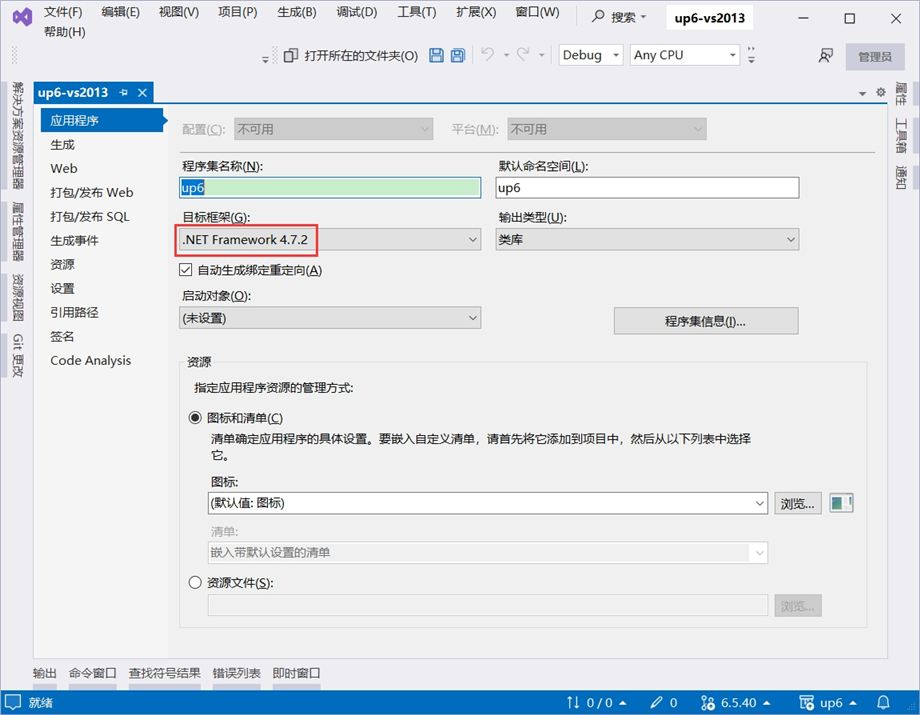
添加3rd引用
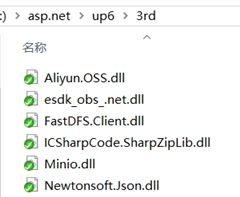
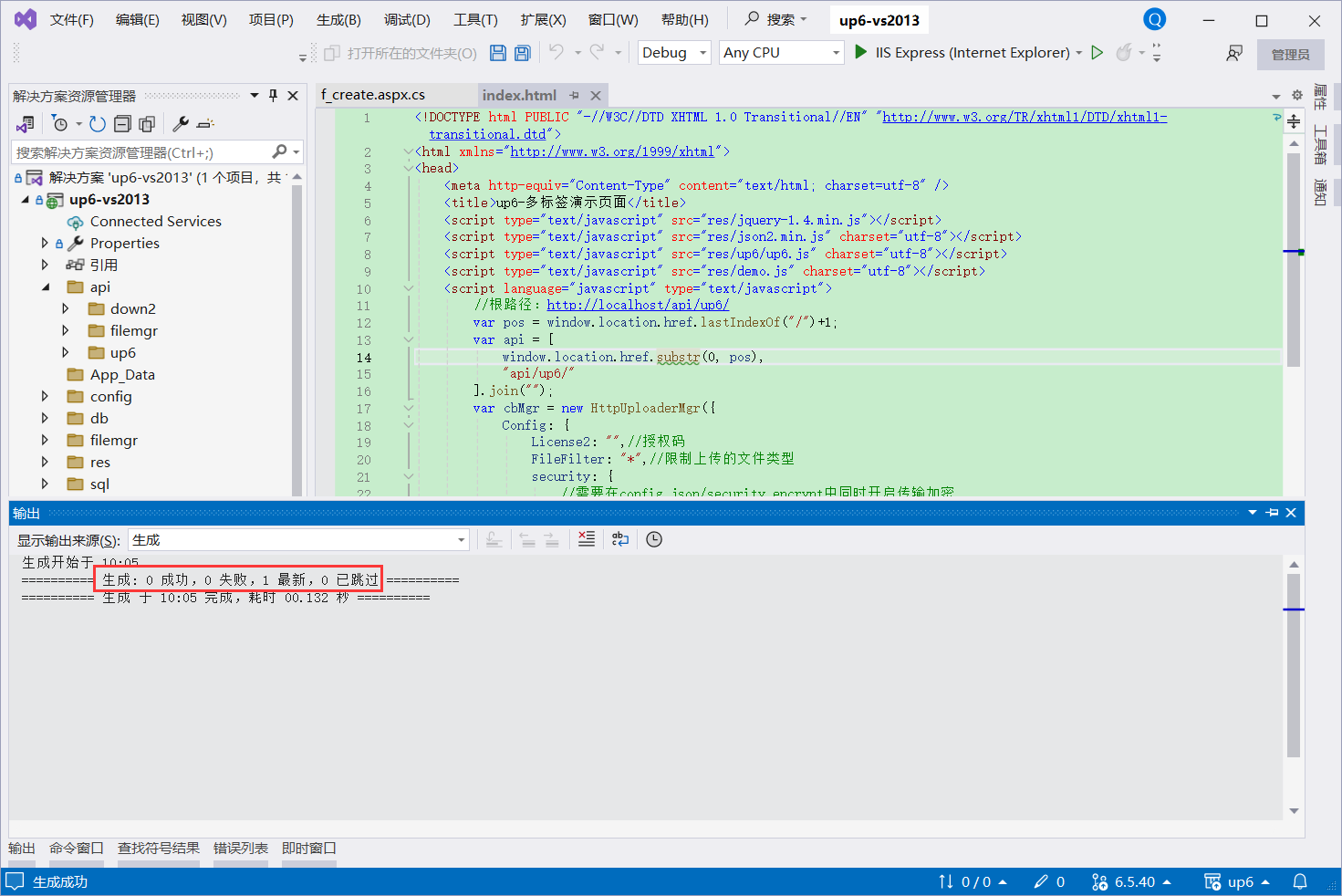
编译项目
NOSQL
NOSQL无需任何配置可直接访问页面进行测试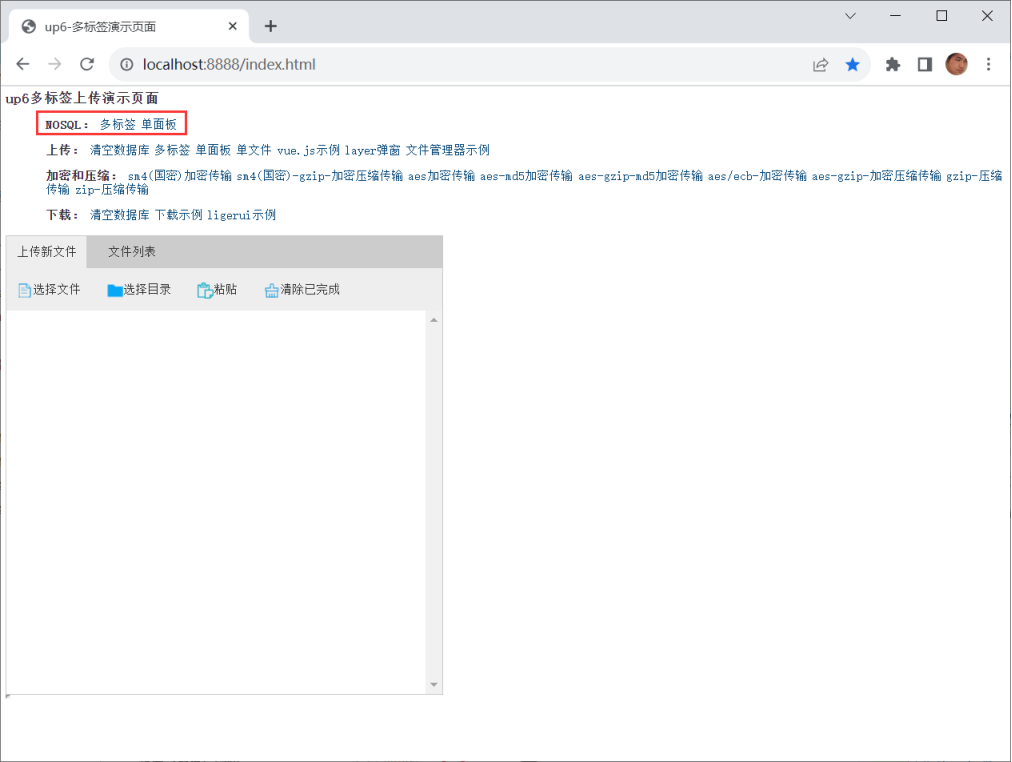
SQL
使用IIS
大文件上传测试推荐使用IIS以获取更高性能。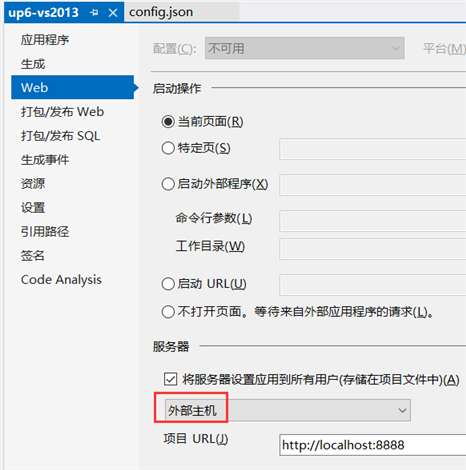
使用IIS Express
小文件上传测试可以使用IIS Express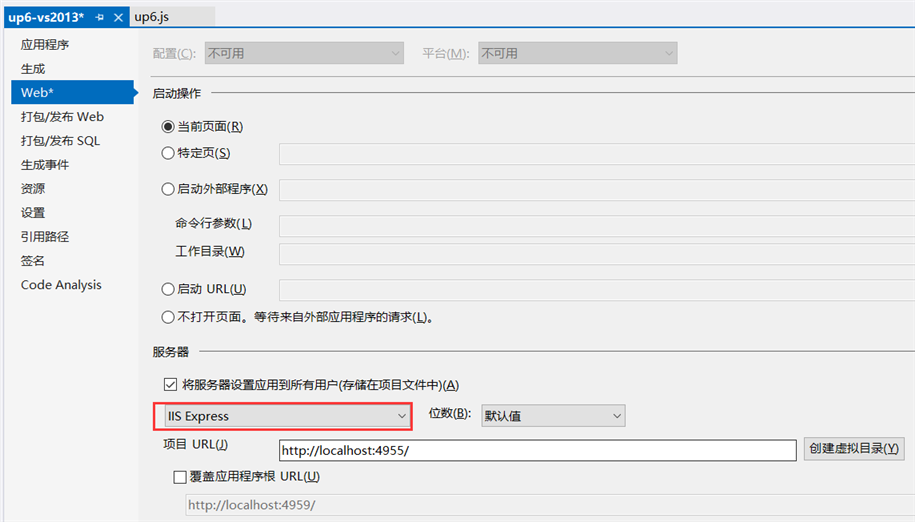
创建数据库
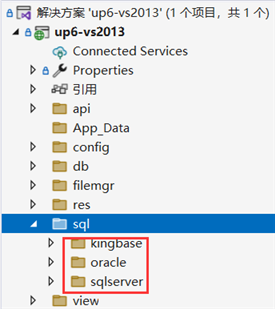
配置数据库连接信息
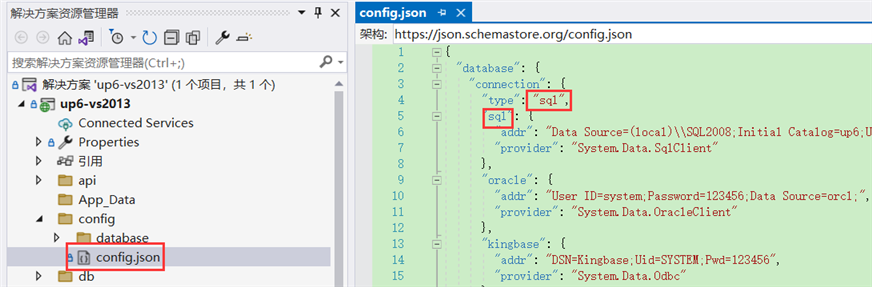
检查数据库配置
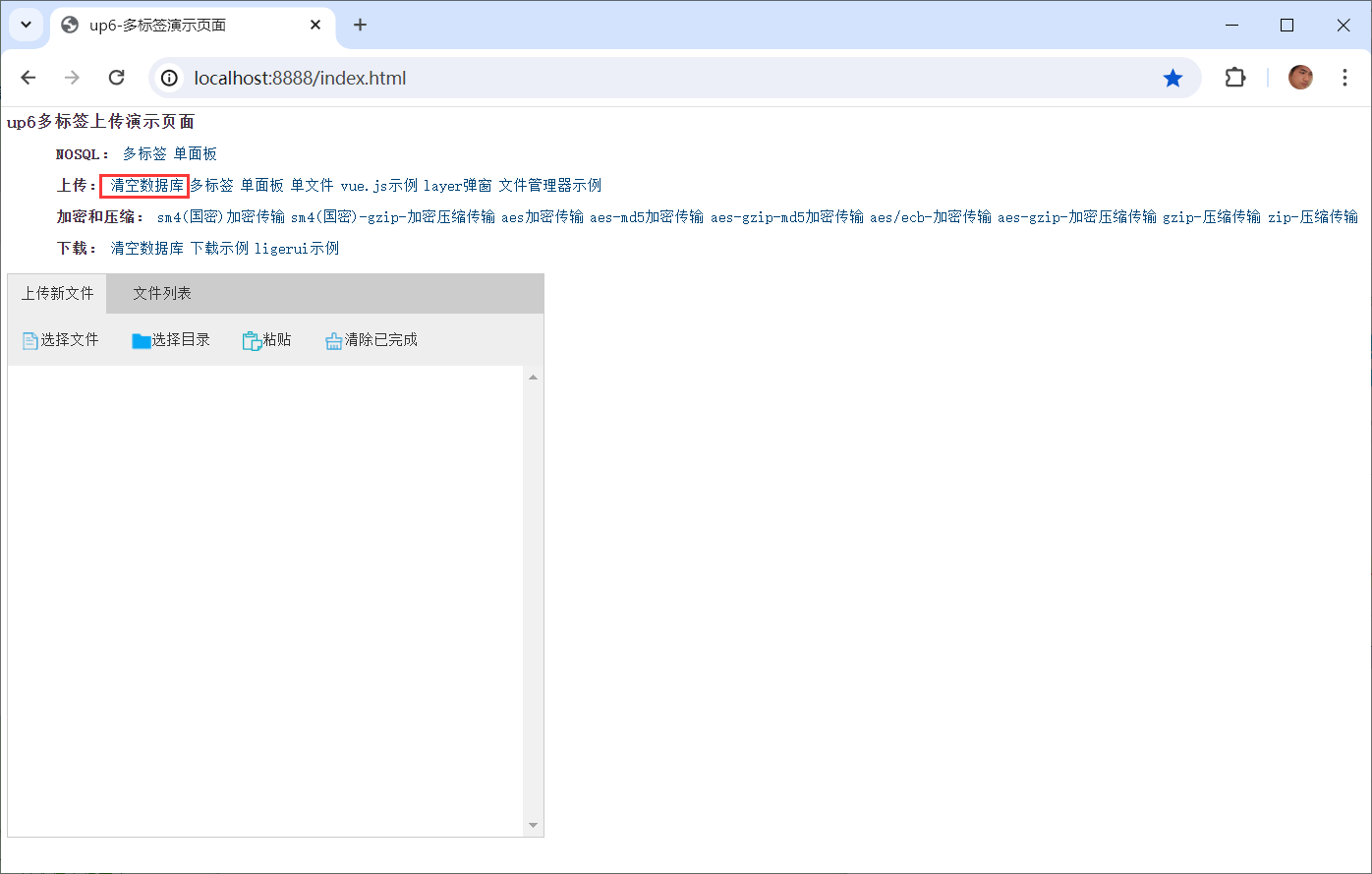
访问页面进行测试
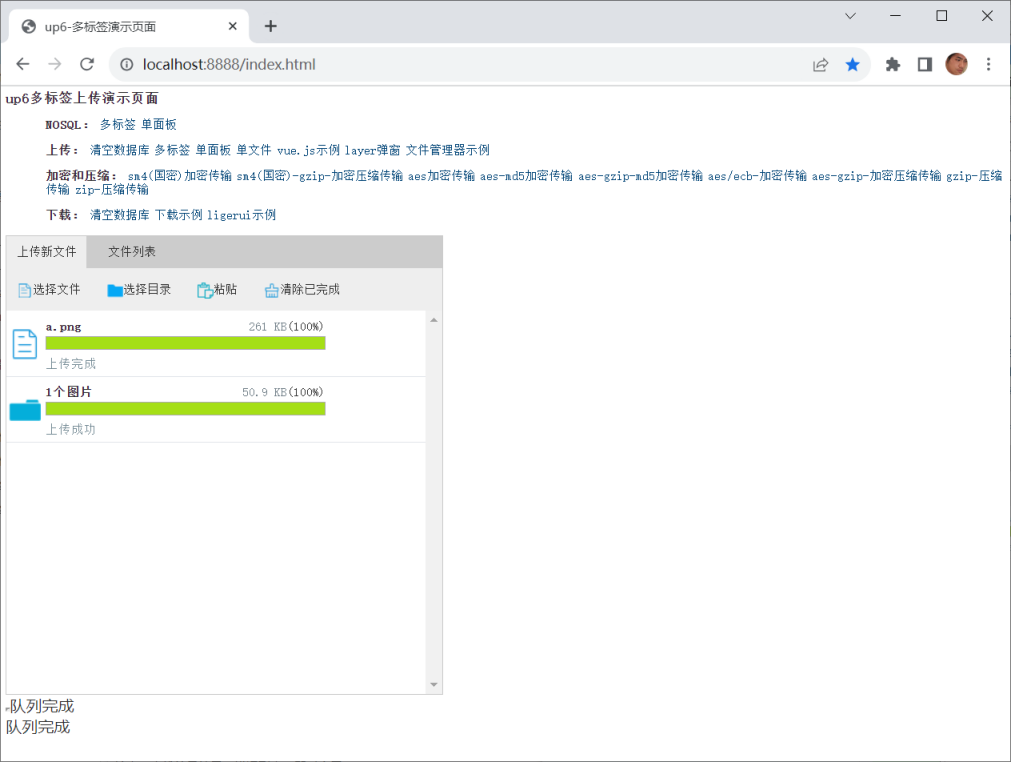
相关参考:
文件保存位置,
效果预览
文件上传
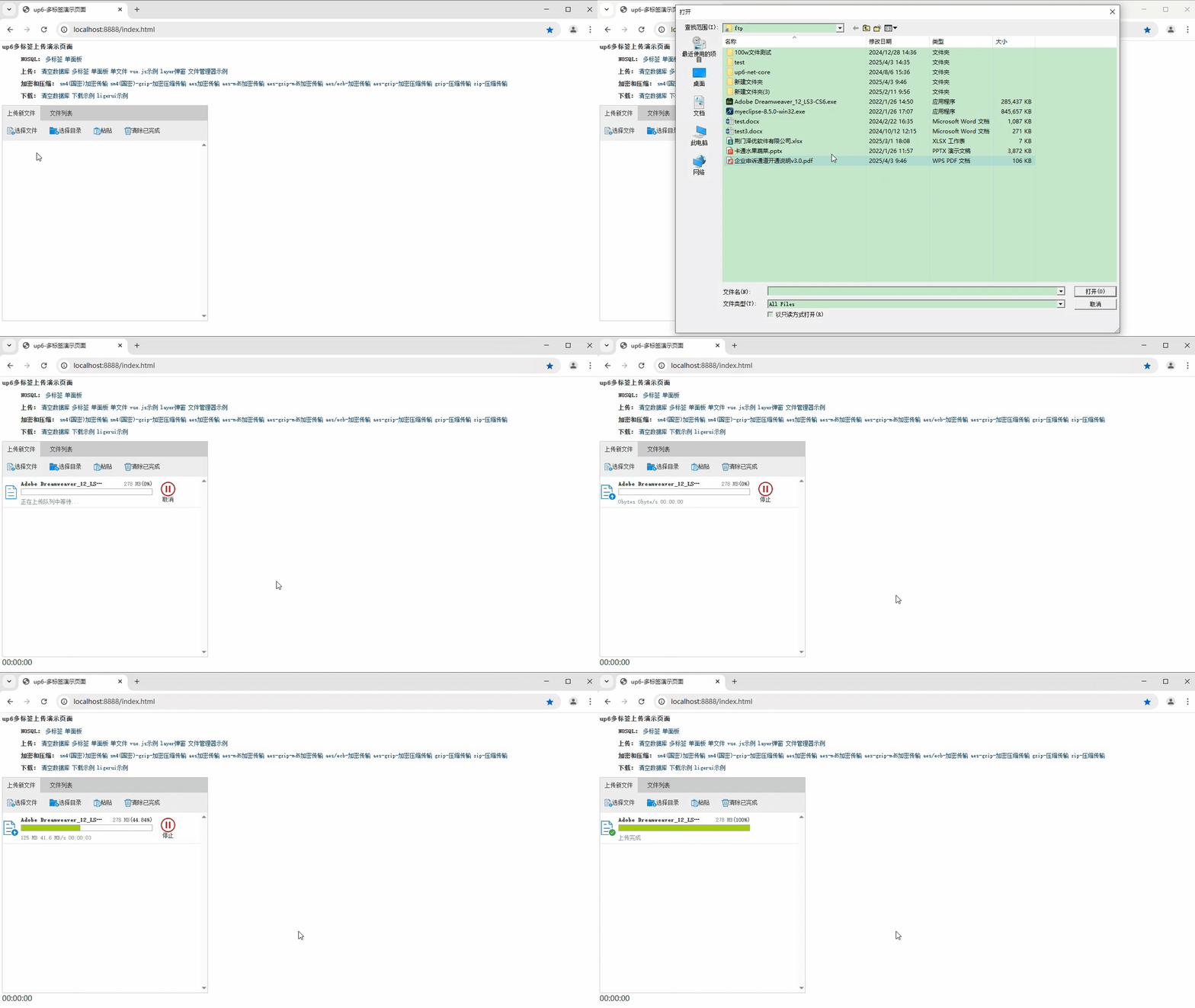
文件刷新续传
支持离线保存文件进度,在关闭浏览器,刷新浏览器后进行不丢失,仍然能够继续上传
文件夹上传
支持上传文件夹并保留层级结构,同样支持进度信息离线保存,刷新页面,关闭页面,重启系统不丢失上传进度。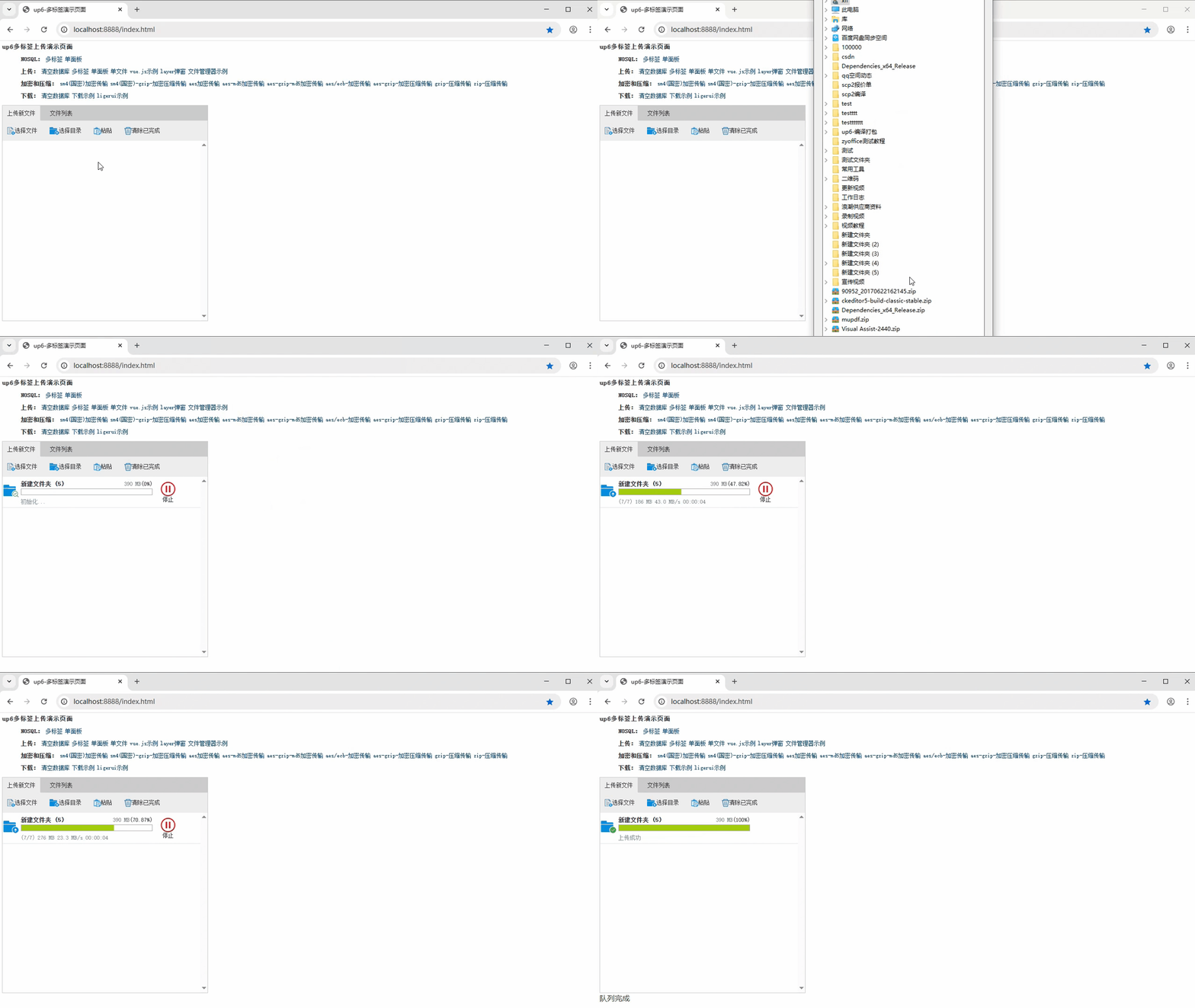
下载完整示例
更多推荐



 24
24 0
0- 0


 已为社区贡献43条内容

所有评论(0)