
Java Swing MVC Example
In this example we are going to demonstrate Java Swing MVC, The MVC pattern is a model of how a user interface can be structured. Therefore it defines the following 3 elements:
- Model that represents the data for the application.
- View that is the visual representation of that data.
- Controller that takes user input on the view and translates that to changes in the model.
1. MVC Components
1.1. Model
A model is an abstraction of something that is presented to the user. The models provided by Swing fall into two general categories: GUI-state models and application-data models. GUI state models are interfaces that define the visual status of a GUI control, such as whether a button is pressed or armed like ButtonModel. An application-data model is an interface that represents some quantifiable data that the UI presents to the user, such as the value of a cell in a table like TableModel.
1.2. View
The view is a UI component that is responsible for presenting data to the user. Thus it is responsible for all UI dependent issues like layout, drawing, etc. JTable is a good example for the view.
1.3. Controller
A controller encapsulates the application code that is executed in order to an user interaction (mouse motion, mouse click, key press, etc.). Controllers might need input for their execution and they produce output. They read their input from models and update models as result of the execution. In swing a controller is normally implemented by an ActionListener or Action.
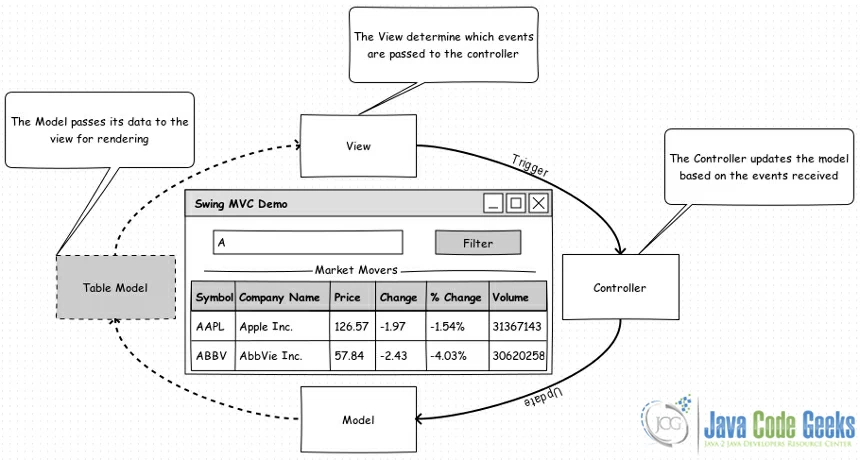
Figure 1: Swing MVC Components
Now, lets see our concrete Swing MVC example where we have an application that let you filter stocks. The application UI contains a text field where the user can enter a filter string, button to start the filter and table where the filter results are displayed.
2. Swing MVC Example
2.1. Model
We create Model.java class which implements the TableModel interface (or, more likely, subclass the AbstractTableModel class). The job of this TableModel implementation is to serve as the interface between your data and the JTable as a view component. Also, we add a supplementary Constants.java class contains constants used through our code.
ADVERTISEMENT
Model.java:
| 01 02 03 04 05 06 07 08 09 10 11 12 13 14 15 16 |
|
Constants.java:
| 01 02 03 04 05 06 07 08 09 10 11 12 13 14 15 16 17 18 19 20 21 22 23 24 25 26 |
|
2.2. View
We create View.java class which contains our main UI components, a JTextField where the user can enter a filter string, JButton to start the filter and JTable where the filter results are displayed.
View.java:
| 01 02 03 04 05 06 07 08 09 10 11 12 13 14 15 16 17 18 19 20 21 22 23 24 25 26 27 28 29 30 31 32 33 34 35 36 37 38 39 40 41 42 43 44 45 46 47 48 49 50 51 52 53 54 55 56 57 58 |
|
2.3. Controller
We create Controller.java class which implements the ActionListener interface, it will be invoked as a result of a user’s action on a view (i.e., it will be invoked because of the filter button click).
Controller.java:
| 01 02 03 04 05 06 07 08 09 10 11 12 13 14 15 16 17 18 19 20 21 22 23 24 25 26 27 28 29 30 31 32 33 34 35 36 37 38 39 40 41 42 43 44 45 46 47 48 49 |
|
2.4. Running the Swing MVC Example
We create SwingMVCDemo.java class which serve as main class to running our example.
SwingMVCDemo.java:
| 01 02 03 04 05 06 07 08 09 10 11 12 13 14 15 16 17 18 19 20 21 22 23 24 25 26 |
|
Output:
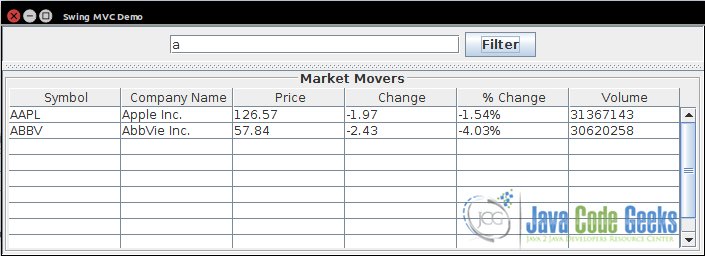
Figure 2: Swing MVC Demo
3. Download the Source Code
This was an example to show Java Swing MVC.
Download
You can download the full source code of this example here: SwingMVCExampleCode.zip
更多推荐

 10
10 0
0- 0


 已为社区贡献68条内容

所有评论(0)