注:使用的视频为mp4,转换成.m3u8播放列表和.ts切片文件

1、安装FFmpeg

我这边是通过Nux Dextop仓库来安装FFmpeg。

(1) 安装EPEL仓库

1

sudo yum install -y epel-release

(2)下载并安装Nux Dextop仓库的RPM包

1

sudo rpm --import http://li.nux.ro/download/nux/RPM-GPG-KEY-nux.ro sudo rpm -Uvh http://li.nux.ro/download/nux/dextop/el7/x86_64/nux-dextop-release-0-5.el7.nux.noarch.rpm

(3)更新YUM缓存

1

sudo yum update -y

(4) 安装FFmpeg

1

sudo yum install -y ffmpeg ffmpeg-devel

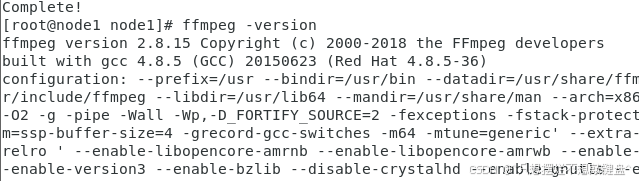
(5)验证安装

1

ffmpeg -version

2、安装PHP

1

sudo yum install php php-cli

验证安装

1

php -v

3、php脚本

1

2

3

4

5

6

7

8

9

10

11

12

13

14

15

16

17

18

19

20

21

22

23

24

25

26

27

28

29

30

31

32

33

34

35

36

37

38

39

<?php

// 设置输入视频文件、切片时长(秒)和输出目录

$videoFile = '/data/video/input.mp4'; // 输入视频文件路径

$segmentDuration = 10; // 切片时长,单位:秒

$outputDir = 'output'; // 输出目录

// 确保输出目录存在

if (!is_dir($outputDir)) {

    mkdir($outputDir, 0777, true);

}

// 构建并执行FFmpeg命令以生成.m3u8播放列表和.ts切片文件

// 使用'-strict -2'参数允许使用实验性编码器'aac'

$cmd = "ffmpeg -i " . escapeshellarg($videoFile) .

       " -codec:v libx264 -codec:a aac -strict -2 -hls_time " . escapeshellarg($segmentDuration) .

       " -hls_list_size 0 -hls_flags delete_segments " . escapeshellarg($outputDir . "/output.m3u8");

// 或者,如果您有 'libfdk_aac' 可用,可以替换 '-codec:a aac -strict -2' 为 '-codec:a libfdk_aac'

// $cmd = "ffmpeg -i " . escapeshellarg($videoFile) .

//        " -codec:v libx264 -codec:a libfdk_aac -hls_time " . escapeshellarg($segmentDuration) .

//        " -hls_list_size 0 -hls_flags delete_segments " . escapeshellarg($outputDir . "/output.m3u8");

shell_exec($cmd);

// 设置目标目录

$targetDir = 'target_dir';

if (!is_dir($targetDir)) {

    mkdir($targetDir, 0777, true);

}

// 检查.m3u8文件是否存在

$playlistFile = $outputDir . '/output.m3u8';

if(file_exists($playlistFile)){

    // 复制.m3u8播放列表文件

    copy($playlistFile, $targetDir . '/output.m3u8');

    // 获取所有.ts切片文件,并将其复制到目标目录

    $tsFiles = glob($outputDir . '/*.ts');

    foreach ($tsFiles as $tsFile) {

        copy($tsFile, $targetDir . '/' . basename($tsFile));

    }

    echo "视频切片及文件复制操作完成。\n";

} else {

    echo "FFmpeg处理失败,未找到输出文件。\n";

}

?>

4、创建目录(/data)

视频目录:/data/video

php脚本目录:/data  脚本名称:slice_video.php 

5、执行脚本

1

php slice_video.php

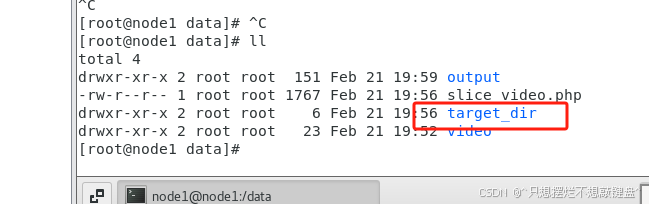
6、生成的切片文件夹

7、安装Nginx

(1)安装

1

sudo yum install nginx -y

(2)启动 Nginx

1

2

sudo systemctl start nginx

sudo systemctl enable nginx

(3) 检查 Nginx 状态

1

sudo systemctl status nginx

(4)关闭防火墙

1

2

3

sudo systemctl stop firewalld

sudo systemctl disable firewalld

sudo systemctl status firewalld

(5)nginx.conf文件配置

文件位置:/etc/nginx/nginx.conf

1

2

3

4

5

6

7

8

9

10

11

12

13

14

15

16

17

18

19

20

21

22

23

24

25

26

27

28

29

30

31

32

33

34

35

36

37

38

39

40

41

42

43

44

45

46

47

sudo nginx -t  # 测试配置文件语法是否正确

sudo systemctl reload nginx  # 重新加载 Nginx使配置生效

user nginx;

worker_processes auto;

error_log /var/log/nginx/error.log;

pid /run/nginx.pid;


include /usr/share/nginx/modules/*.conf;


events {

    worker_connections 1024;

}


http {

    log_format  main  '$remote_addr - $remote_user [$time_local] "$request" '

                      '$status $body_bytes_sent "$http_referer" '

                      '"$http_user_agent" "$http_x_forwarded_for"';


    access_log  /var/log/nginx/access.log  main;


    sendfile            on;

    tcp_nopush          on;

    tcp_nodelay         on;

    keepalive_timeout   65;

    types_hash_max_size 4096;


    include             /etc/nginx/mime.types;

    default_type        application/octet-stream;


    include /etc/nginx/conf.d/*.conf;


    server {

        listen 80;

        server_name 192.168.126.129;


        location /hls/ {

            alias /data/target_dir/; # 替换为你的实际目录路径

            types {

                application/vnd.apple.mpegurl m3u8;

                video/mp2t ts;

         }

            add_header 'Cache-Control' 'no-cache';

            add_header 'Access-Control-Allow-Origin' '*';

        }

    }


}

更多推荐