
Java关于io文件的基本介绍(1)
目录
前言
此篇文件是关于io的相关基础语法和介绍,在其中代码实例部分没有导包的部分代码可能会报错,因此我把导包部分代码单独放在了前面,如有报错可以试试将导包部分代码粘贴到最前然后再执行。关于其中的介绍如果有疏漏或者错误欢迎大家评论区留言
一.文件获取
File类的初始化
File file = new File("D:/study/test1/demo1");File file = new File("D:\\study\\test1\\demo1")关于File文件引号内为电脑内文件的目录,其中windows系统可以同时识别"\\" 与 "/" 分隔符,每个文件之间的父子之间通过这两符号分隔开
基础方法
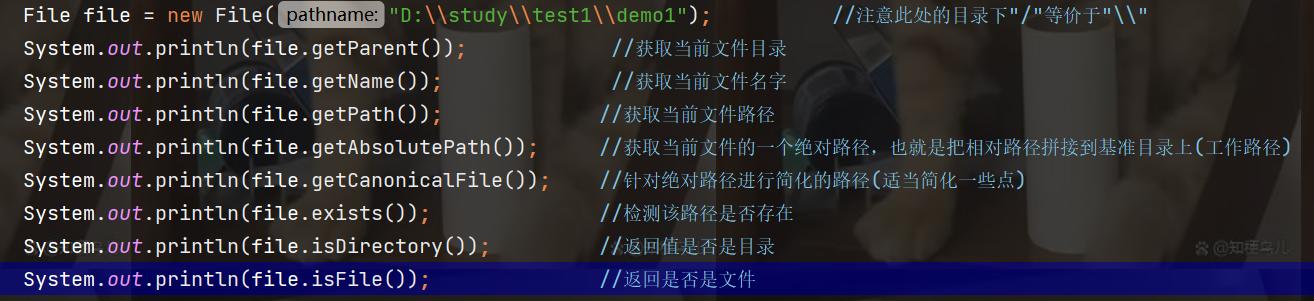
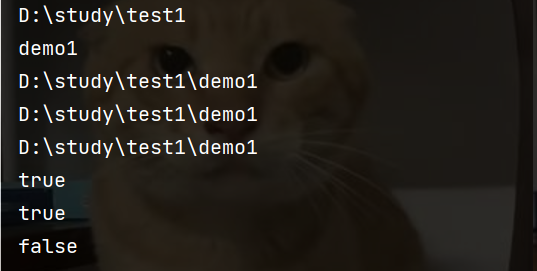
注意:由于此处示例文件在同一个文件中,因此返回的当前文件路径和绝对路径是一样的,两者本质上并不一样。同时也要注意文件和目录的区别,目录则是其他文件和目录的一个容器,也就是所谓的文件夹,这也就是在判断isFile的时候会返回false
创建文件
File file = new File("D:\\study\\test1\\demo1.txt");
        boolean ret = file.createNewFile();
通过方法createNewFile创建文件夹,如果文件夹已经存在则会创建失败,由于该方法返回值是一个boolean类型,因此可定义一个boolean类型的变量用于接受该文件是否创建成功
public class demo2 {
    public static void main(String[] args) throws IOException {
        File file = new File("D:\\demo1.txt");
      //File file = new File("D:\\study\\test1\\demo1.txt");  如果直接创建则会报错
        boolean ret = file.createNewFile();           //在未创建文件之前上述的返回值均为false,创建了以后再次运行就会创建失败
        System.out.println("ret =" + ret);              //接受返回值并打印
        System.out.println(file.exists());               //判断目标是否存在
        System.out.println(file.isDirectory());          //判断是否为目录
        System.out.println(file.isFile());               //判断是否为文件
    }
}
第一次运行上述代码时会在D盘下创建一个名为demo1的txt文本文件再次运行的时候则会报错。如果想在对应的目录下创建文件则需要优先创建对应的目录,如果直接创建对用的文件没有目录的前提下则会报错并创建失败。
删除文件
1.通过createNewFile方法创建文件
public class test1 {
    public static void main(String[] args) throws InterruptedException, IOException {
        File file = new File("D:/test.txt");
        boolean ret =  file.createNewFile();
        System.out.println(ret);
        Thread.sleep(10000);
        System.out.println("休眠结束,文件删除完毕");
        file.delete();
    }
}
此处设计了10秒的延迟创建文件(位置在D盘目录下),先创建文件后才可以删除该文件
2.通过mkdir方法创建目录
public class test1 {
    public static void main(String[] args) throws InterruptedException, IOException {
        File file = new File("D:/test.txt");
        boolean ret = file.mkdir();
        System.out.println(ret);
        Thread.sleep(10000);
        System.out.println("休眠结束,文件删除完毕");
        file.delete();
    }
}
两方法的返回值类型都是boolean类型,都可以设置一个变量来判断文件是否创建成功,由于mkdir方法是强行创建目录,就算是txt的文件后缀都会是目录类型。
文件列表
public class test1 {
    public static void main(String[] args) {
        File file = new File("d:/");
        String[] arr = file.list();            //返回值为String数组类型
        System.out.println(Arrays.toString(arr));
    }
}
list方法会将目标路径下的存在文件名称以数组形式返回出来,因此需要一个String数组形式来接受该方法返回的值,同时打印出来还需要将数组形式转化为String打印出来
文件重命名
public class test1 {
    public static void main(String[] args) throws IOException, InterruptedException {
        File file = new File("d:/test");
        File file1 = new File("d:/demo");


        boolean iscreate = file.createNewFile();
        if(iscreate == true) System.out.println("文件创建成功");
        Thread.sleep(10000);            //此处设置10s延迟用于观察


        boolean ret =  file.renameTo(file1);                 //调用方法的对象是被改名的,方法内对象是新名
        System.out.println(ret);                            //返回值为true则表示改名成功
    }
}
此处是将file文件改为了file1的名称,如果改成的新对象已有重名文件则会改名失败,同时改名对象和新名对象要设置在同一个目录下才能成功
二.读写文件
提供读写的文件的流对象大致可分为字节流和字符流。字节流每次读写的单位是一个bit,主要类有InputStream和OutputStream,而字符流每次读写的单位是一个字符,主要类有Reader和Writer
字符流写(Writer)
public class test1{
    public static void main1(String[] args) throws IOException, InterruptedException {
        //创建文本文件
        File file = new File("d:/test.txt");
        boolean ret = file.createNewFile();
        System.out.println(ret);

        //调用write方法写入字符
        try (Writer writer = new FileWriter(file,true)) {
            writer.write("hello java");
        }
    }
}
注意:在使用Writer初始化对象的时候需要用try将次包围起来
字符流读(Reader)----手动关闭资源
public class test1 {
    public static void main(String[] args) throws IOException {
        Reader reader = new FileReader("d:/test.txt");
        try{
            while(true){
                char[] cbuf = new char[4];
                int n = reader.read(cbuf);

                if(n == -1) break;
                for (int i = 0; i < n; i++) {
                    System.out.print(cbuf[i]);
                }
            }
        }
        finally {
            reader.close();            //手动关闭reader资源
        }
    }
}
关于read方法的返回值:
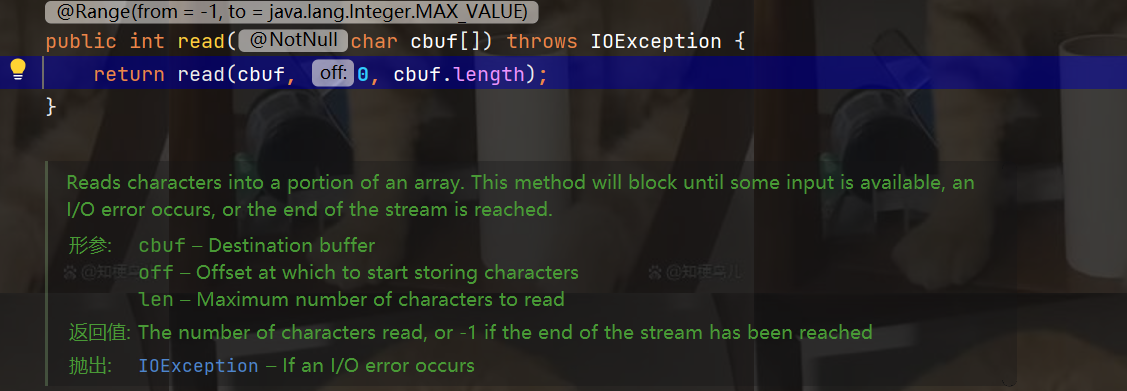
注意:会根据数组最大读出多少个字符,当没有读到字符时候会返回-1,-1就可以作为跳出循环的标志。同时try,finally将代码块包围是为了无论如何都要讲读的资源关闭避免占用系统内存。try代码块无论是以什么方式结束,finally最后的代码部分都会强制执行
自动关闭系统资源
public class demo7 {
    public static void main(String[] args) throws IOException {
        try(Reader reader = new FileReader("d:/mc/jenny.txt")){
            while(true){
                char[] cbuf = new char[2];
                int n = reader.read(cbuf);
                if(n == -1){
                    return;
                }
                for (int i = 0; i < n; i++) {
                    System.out.print(cbuf[i]);
                }
            }
        }
    }
}
自动关闭close的写法仅限于stream流对象才能这么使用
总结
重点掌握文件中的读与写的操作和相关注意事项,在文件的创建中分清目录和文件的相关定义和文件路径在编译器中的写法
更多推荐
 8
8 0
0- 0


 已为社区贡献3条内容

所有评论(0)