
在vue3中使用tmagic-editor
在vue3中使用tmagic-editor
引言
腾讯开源的tmagic-editor是一款功能强大的可视化页面编辑器,但需要注意的是,它并非一个开箱即用的解决方案。在实际项目集成过程中,开发者需要投入一定精力进行配置和开发工作。本文将简要介绍如何将tmagic-editor有效地集成到您的项目中。
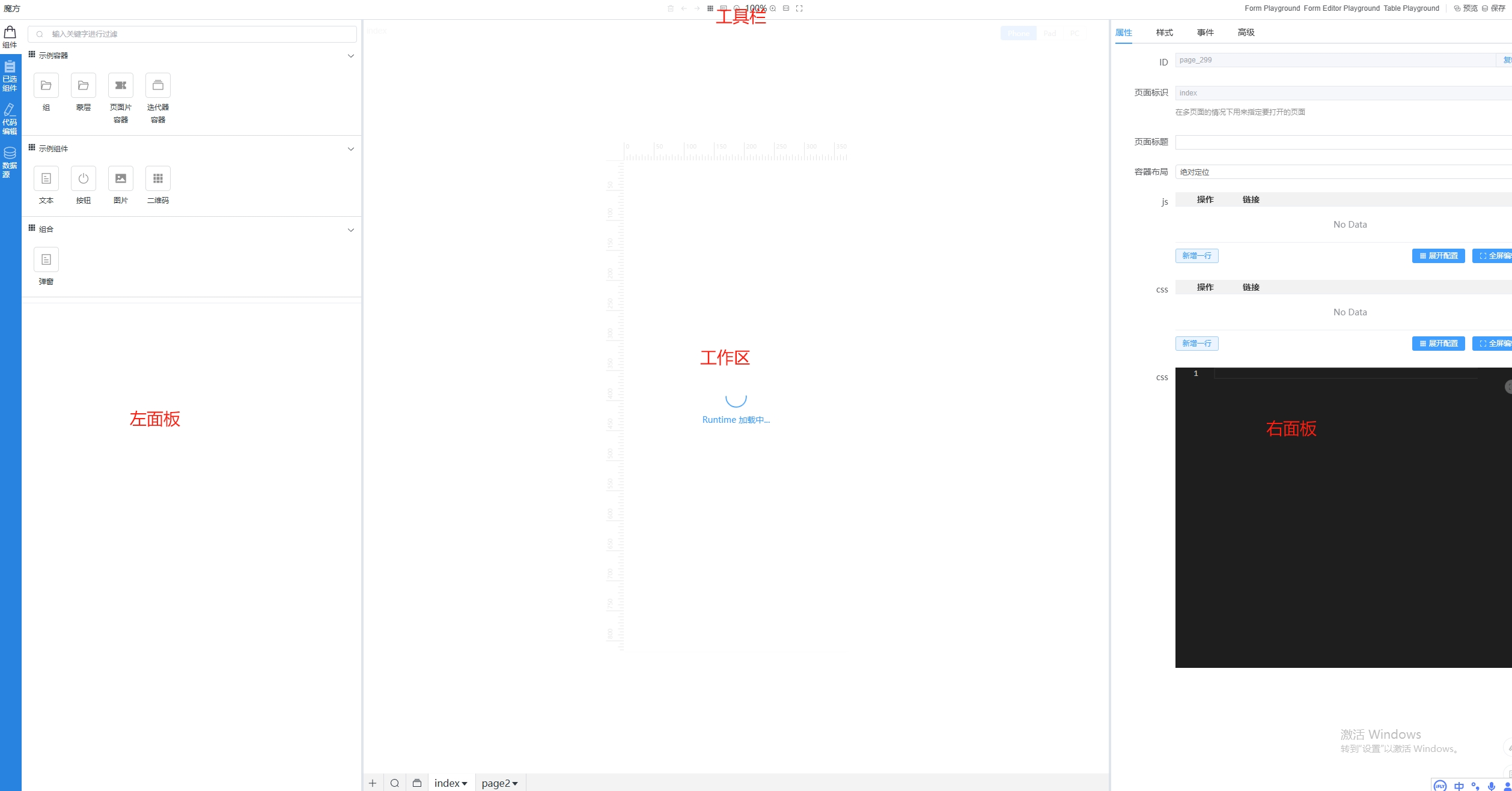
重要概念
- 组件
组件是构建页面的最小可操作单元,在编辑器中通过组合和堆叠多个组件完成页面设计。每个组件具备独立的属性、样式和行为。 - runtime
runtime是动态响应编辑器操作的执行环境,通常以iframe形式嵌入页面,确保编辑效果实时预览。在代码层面需独立创建runtime项目,负责解析组件配置、处理数据绑定及渲染逻辑。 - DSL
DSL是描述页面结构和组件属性的结构化数据,由编辑器生成。组件v-model所对应的值
具体实现
tmagic-editor安装
首先确保你的node.js>=18,然后下载npm包
npm install @tmagic/editor
如果项目中使用了如 Element Plus 等 UI 组件库,要下载对应的适配器:
npm install @tmagic/element-plus-adapter
如果项目中没有 Monaco Editor,也需要安装:
npm install monaco-editor
在 main.js 中引入:
import editorPlugin from '@tmagic/editor';
import MagicElementPlusAdapter from '@tmagic/element-plus-adapter';
import '@tmagic/editor/dist/style.css';
......
app.use(editorPlugin, MagicElementPlusAdapter);
最后创建editor.vue
//editor.vue
<template>
  <m-editor
    v-model="dsl"
    :menu="menu"
    :runtime-url="runtimeUrl"
    :props-configs="propsConfigs"
    :props-values="propsValues"
    :component-group-list="componentGroupList"
  >
  </m-editor>
</template>

<script setup>
import { ref } from "vue";
const dsl = ref({ type: "app", id: 1, items: [] });
const menu = ref({
  left: [
    // 顶部左侧菜单按钮
  ],
  center: [
    // 顶部中间菜单按钮
  ],
  right: [
    // 顶部右侧菜单按钮
  ],
});
const runtimeUrl = "/runtime/vue3/playground/index.html";
const componentGroupList = ref([
  // 组件列表
]);
const propsConfigs = ref([]);
const propsValues = ref([]);

</script>
runtime项目搭建
官方在git源码中提供了不同框架的runtime项目样例,我们可以直接复制过来使用。这里以vue3为例,我们在自己的主项目根目录下创建一个runtime文件夹,将源码中runtime/vue3文件夹粘贴到主项目的runtime下,记得安装一下依赖。接下来我们修改一下runtime项目
build.vite.config.ts中我们要修改bulid.outDir(文件打包路径),base(公共基础路径)。
// build.vite.config.ts
import path from 'path';

import { defineConfig } from 'vite';
import legacy from '@vitejs/plugin-legacy';
import vue from '@vitejs/plugin-vue';
import vueJsx from '@vitejs/plugin-vue-jsx';
// @ts-ignore
import externalGlobals from 'rollup-plugin-external-globals';

const INVALID_CHAR_REGEX = /[\x00-\x1F\x7F<>*#"{}|^[\]`;?:&=+$,]/g;
const DRIVE_LETTER_REGEX = /^[a-z]:/i;

export default defineConfig(({ mode }) => {
  if (['value', 'config', 'event', 'ds:value', 'ds:config', 'ds:event'].includes(mode)) {
    const capitalToken = mode
      .split(':')
      .map((word) => word[0].toUpperCase() + word.slice(1))
      .join('');

    const fileName = mode.replace(':', '-');

    return {
      publicDir: './.tmagic/public',
      build: {
        cssCodeSplit: false,
        sourcemap: true,
        minify: false,
        target: 'esnext',
        outDir: `../../public/entry/vue3/${fileName}`, // 修改项,使文件输出到主项目的 public 下

        lib: {
          entry: `.tmagic/${fileName}-entry.ts`,
          name: `magicPreset${capitalToken}s`,
          fileName: 'index',
          formats: ['umd'],
        },
      },
    };
  }

  if (['page', 'playground'].includes(mode)) {
    return {
      plugins: [
        vue(),
        vueJsx(),
        externalGlobals({ 'vue-demi': 'VueDemi', vue: 'Vue' }, { exclude: [`./${mode}/index.html`] }),
        legacy({
          targets: ['defaults', 'not IE 11'],
        }),
      ],

      root: `./${mode}/`,

      publicDir: '../public',

      base: `/runtime/vue3/${mode}`, // 修改项,要与 editor.vue 中的 runtimeUrl 对应

      optimizeDeps: {
        exclude: ['vue-demi'],
      },

      build: {
        emptyOutDir: true,
        sourcemap: true,
        outDir: path.resolve(process.cwd(), `../../public/runtime/vue3/${mode}`), // 修改项,使文件输出到主项目的 public 下
        rollupOptions: {
          external: ['vue', 'vue-demi'],
          output: {
            // https://github.com/rollup/rollup/blob/master/src/utils/sanitizeFileName.ts
            sanitizeFileName(name) {
              const match = DRIVE_LETTER_REGEX.exec(name);
              const driveLetter = match ? match[0] : '';
              return driveLetter + name.slice(driveLetter.length).replace(INVALID_CHAR_REGEX, '');
            },
          },
        },
      },
    };
  }

  return {};
});
dev.vite.config.ts中的base也要修改,另外,如果你没有别名的需求,可以把resolve.alias也删了
//dev.vite.config.ts
import { defineConfig } from 'vite';
import vue from '@vitejs/plugin-vue';
import vueJsx from '@vitejs/plugin-vue-jsx';

export default defineConfig({
  plugins: [vue(), vueJsx()],

  root: './',

  base: '/runtime/vue3/',//修改项

  publicDir: 'public',

  optimizeDeps: {
    exclude: ['vue-demi'],
  },

  server: {
    host: '0.0.0.0',
    port: 8078,
    strictPort: true,
  },
});
有些小伙伴已经注意到,主项目和runtime项目是不同端口的两个独立项目,那么主项目访问runtime项目是需要设置代理的,我们在主项目的vite.config.ts中设置一下
server: {
    port: 4000,
    proxy: {
      // 选项写法
      '/runtime/vue3/': {
        target: 'http://localhost:8078',
        changeOrigin: true
      }
    }
  }
这时我们启动runtime项目,在编辑器页面新建一个页面,发现我们还无法在空白的页面中创作,因为我们还缺少构建页面的基础——组件
添加组件
想要实现一个组件,必须要有四个文件
- index 入口文件
- formConfig 表单配置
- initValue 表单配置初始值
- component.vue 组件代码
现在我们在runtime项目根目录下添加一个test-component目录,在目录中添加这四个文件
// index.js
// vue
import Index from './Index.vue';

export { default as config } from './formConfig';
export { default as value } from './initValue';

export default Index;
// formConfig.js
export default [
  {
    type: 'select',
    text: '字体颜色',
    name: 'color',
    options: [
      {
        text: '红色字体',
        value: 'red',
      },
      {
        text: '蓝色字体',
        value: 'blue',
      },
    ],
  },
  {
    name: 'text',
    text: '配置文案',
  },
];
// initValue.js
export default {
  color: 'red',
  text: '一段文字',
};
<!-- Index.vue -->
<template>
  <div>
    <span>this is a Test component:</span>
    <span :style="{ color: config.color }">{{ config.text }}</span>
  </div>
</template>

<script>
export default {
  name: 'magic-ui-test',

  props: {
    config: {
      type: Object,
      default: () => ({}),
    },
  },

  setup() {},
};
</script>
然后我们要在runtime项目tmagic.config.ts中注册组件
export default defineConfig({
  packages: [{test:'../../runtime/vue3/test-component'},"@tmagic/ui"],//数组中第一个就是我们刚写的组件,后面是官方提供的组件,我们也注册下,方便后面使用。
  componentFileAffix: '.vue',
  dynamicImport: true,
});
runtime项目中执行
npm run build:libs
执行完后,就能在主项目的public下看到entry/vue3这么一个文件夹,里面包含着有我们组件信息的文件。
最后我们在editor.vue中配置我们要展示的组件
<template>
  <m-editor
    v-model="dsl"
    :menu="menu"
    :runtime-url="runtimeUrl"
    :props-configs="propsConfigs"
    :props-values="propsValues"
    :component-group-list="componentGroupList"
  >
  </m-editor>
</template>

<script setup>
import { ref } from "vue";
import { asyncLoadJs } from "@tmagic/editor";
const dsl = ref({ type: "app", id: 1, items: [] });
const menu = ref({
  left: [
    // 顶部左侧菜单按钮
  ],
  center: [
    // 顶部中间菜单按钮
  ],
  right: [
    // 顶部右侧菜单按钮
  ],
});
const runtimeUrl = "/runtime/vue3/playground/index.html";
const componentGroupList = ref([
  // 组件列表
  {
    title: "基础组件",
    items: [
      {
        text: "测试",
        type: "test",
      },
    ],
  },
]);
const propsConfigs = ref([]);
const propsValues = ref([]);
//获取组件配置列表
asyncLoadJs(`/public/entry/vue3/config/index.umd.cjs`).then(() => {
  propsConfigs.value = globalThis.magicPresetConfigs;
});
//获取组件配置默认值
asyncLoadJs(`/public/entry/vue3/value/index.umd.cjs`).then(() => {
  propsValues.value = globalThis.magicPresetValues;
});

</script>
此刻页面的左面板已经出现了我们自己的test组件,将test组件拖入中间工作区,右面板就会出现相应的配置项了。到了这里,你已经成功在本地搭建tmagic-editor的使用环境,并实现了一个最简单的自定义组件。如果还想了解更多,请前往官方文档
可能出现的问题
- 安装tmagic-editor后可能提示缺少sass或sass-embed依赖,安装对应依赖即可
- 出现Uncaught ReferenceError: global is not defined,在主项目vite.config.ts添加
optimizeDeps: {
    esbuildOptions: {
      define: {
        global: 'globalThis',
      },
    },
  },
注意事项
刚查阅官方文档发现tmagic-editor的安装使用已做优化,具体请以官方文档为准
更多推荐
 18
18 0
0- 0


 已为社区贡献1条内容

所有评论(0)