
C++SLT-string类详解
目录
1.string类简介
C++标准库中的 string 本质上是一个类。
使用时需要:
#include <string>
using namespace std;
string的优点
自动管理空间
string s = "hello";
无需手动申请和释放内存。
支持动态扩容
string s;

s += "hello";
s += " world";
字符串长度会自动增长。
提供大量实用接口
例如:
-
查找
-
截取
-
插入
-
删除
-
拼接
2. string类常用构造函数

1.无参构造
string s1;这个是不带参的构造,默认是空串
2.带参构造
string s2("hello world");
cout << s2 << endl;
这里流提取操作符已经在string里被重载了,所以可以直接使用
3.带参构造的变形1
string s3("hello world", 5);
cout << s3 << endl;
这个接口是在指定的字符串拷贝前5个字符

4.带参构造的变形2
string s4(10, 'X');
cout << s4 << endl;
这个接口是构造10个"x"字符为字符串

5.拷贝构造
string s5(s2);
cout << s5 << endl;
6.拷贝构造的变形
string s6(s2, 6, 5);
cout << s6 << endl;
这个接口是拷贝s2的字串,从下标6的位置开始拷贝5个字符

这里第三个参数如果大于了字串的长度,那么只会拷贝到最后一个位置

它也是有缺省值的,给的npos=size_t = -1;

实际上就是整形的最大值,就是告诉编译器我要拷贝到最后的位置
3. string容量相关接口
3.1 size()
返回有效字符个数。
string s = "hello";

cout << s.size();
输出:
5
3.2 empty()
判断是否为空。
if(s.empty())
{
    cout << "空字符串";
}
3.3 clear()
清空字符串。
s.clear();
注意:
-
仅清空内容
-
不释放空间
3.4 reserve()
预留空间。
s.reserve(100);
作用:
-
减少扩容次数
-
提高效率
3.5 resize()
修改字符串大小。
string s = "hello";

s.resize(10, 'x');
结果:
helloxxxxx
4. string访问与遍历
4.1 operator[]
string s = "hello";
cout << s[0];
输出
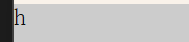
这里【】返回的是引用,所以我们也可以修改这个位置的字符
s[0] = 'x';
cout << s;
输出

4.2 迭代器遍历
正向迭代器
string::iterator it = s.begin();

while(it != s.end())
{
    cout << *it;
    ++it;
}
这里迭代器的用法类似于指针,但不一定是指针
begin()是开始位置的迭代器,end()是最后一个下标的下一个位置的迭代器
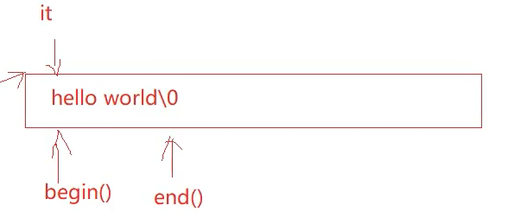

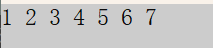
这里迭代器是所有容器都有的,也就是说其他的容器也可以这样访问
#include<list>
int main()
{
	list<int> lt = { 1,2,3,4,5,6,7 };
	list<int>::iterator lit = lt.begin();
	while (lit != lt.end())
	{
		cout << *lit << " ";
		++lit;
	}
	cout << endl;
}
反向迭代器
string::reverse_iterator rit = s2.rbegin();
while (rit != s2.rend())
{
	cout << *rit << " ";
	++rit;
}
cout << endl;
适合反向迭代
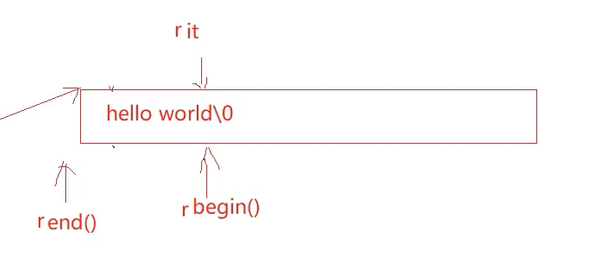
rbegin指向最后一个位置,rend指向第一个位置的前一个位置
注意,rit是++遍历而不是--,因为这是反向++
const迭代器
const迭代器适用于const对象,不希望改变某容器的类容,只读不可写
const string s3("hello world");
	string::const_iterator cit = s3.begin();
	while (cit != s3.end())
	{
		cout << *cit << " ";
		++cit;
	}
const反向迭代器
跟反向迭代器原理一样
string::const_reverse_iterator rcit = s3.rbegin();
while (rcit != s3.rend())
{
	cout << *rcit << " ";
	++rcit;
}
4.3 范围for(c++11提供的)
int main()
{
	string s("hello");
	for (auto ch : s)
	{
		cout << ch;
	}
	return 0;
}
这个表示每次从s取一个字符来打印,auto(c++11提供)表示自动推导类型,也就是说也可以写char
这里会自动赋值,自动迭代,自动判断结束
范围for在底层跟迭代器的原理是一样的
4.4 C++11中的auto
auto关键字的介绍
在早期C/C++中auto的含义是:使用auto修饰的变量,是具有自动存储器的局部变量,后来这个
不重要了。
C++11中,标准委员会变废为宝赋予了auto全新的含义即:auto不再是一个存储类型指示符,而是作为一个新的类型指示符来指示编译器,auto声明的变量必须由编译器在编译时期推导而得。
用auto声明指针类型时,用auto和auto*没有任何区别,但用auto声明引用类型时则必须加&
当在同一行声明多个变量时,这些变量必须是相同的类型,否则编译器将会报错,因为编译器实际
只对第一个类型进行推导,然后用推导出来的类型定义其他变量。
auto不能作为函数的参数,可以做返回值,但是建议谨慎使用
auto不能直接用来声明数组
auto的作用
auto 可以让编译器自动推导变量类型。
基本使用
int a = 10;

auto b = a;
这里:
b -> int
示例
#include<iostream>
using namespace std;

int main()
{
    int a = 10;

    auto b = a;
    auto c = 'a';

    cout << typeid(b).name() << endl;
    cout << typeid(c).name() << endl;

    return 0;
}
auto注意事项
必须初始化
错误写法:
auto x;
一行多个变量必须类型一致
错误:
auto a = 10, b = 3.14;
引用必须加&
int x = 10;

auto& y = x;
auto的优点和缺点
它可以用来简化某些很长的类型的简写

比如map的迭代器,但是这就牺牲了可读性,如果不熟悉迭代器,你可能不知道这是迭代器
5. string修改操作
5.1 push_back()
尾插字符。
string s = "abc";

s.push_back('d');
结果:
abcd
5.2 append()
追加字符串。
s.append("efg");
5.3 operator+=
最常用。
s += 'x';

s += "hello";
5.4 c_str()
转为C风格字符串。常用于数据库的接口使用
返回指针
const char* p = s.c_str();
5.5 find()
查找字符或字符串。
string s = "hello";

cout << s.find('e');
输出初始位置的下标
1
5.6 substr()
字符串截取。
截取0下标开始的5个字符
string s = "hello world";

cout << s.substr(0,5);
输出:
hello
5.7 insert()
指定位置插入字符串
0下标插入
s.insert(0, "hello world ");
	cout << s << endl;
5.8 erase()
最常用的是指定位置删除多少个字符
第6个位置删除1个字符
string s("hello world");
	s.erase(6, 1);
	cout << s << endl;
5.9 replace()
替换字符串某个位置开始的字符串
下面就是替换空格字符开始的一个字符,换成"%%"
string ss("hello world");
ss.replace(5, 1, "%%");
6. getline获取一整行
cin的问题
cin >> str;
遇到空格会停止。
getline
string line;

getline(cin, line);
可以读取整行,这里就是遇到换行符就停止
也可以自定义停止符
比如遇到" * "停止读取
string line;

getline(cin, line,"*");
更多推荐

 6
6 0
0- 0


 已为社区贡献10条内容

所有评论(0)