
每位ADK开发者都应掌握的5种Agent Skill设计模式 5 Agent Skill design patterns every ADK developer should know
5 Agent Skill design patterns every ADK developer should know
每位ADK开发者都应掌握的5种Agent Skill设计模式
https://x.com/GoogleCloudTech/status/2033953579824758855
When it comes to 𝚂𝙺𝙸𝙻𝙻.𝚖𝚍, developers tend to fixate on the format—getting the YAML right, structuring directories, and following the spec. But with more than 30 agent tools (like Claude Code, Gemini CLI, and Cursor) standardizing on the same layout, the formatting problem is practically obsolete.
The challenge now is content design. The specification explains how to package a skill, but offers zero guidance on how to structure the logic inside it. For example, a skill that wraps FastAPI conventions operates completely differently from a four-step documentation pipeline, even though their 𝚂𝙺𝙸𝙻𝙻.𝚖𝚍 files look identical on the outside.
By studying how skills are built across the ecosystem—from Anthropic’s repositories to Vercel and Google's internal guidelines— there are five recurring design patterns that can help developers build agents.
当谈到𝚂𝙺𝙸𝙻𝙻.𝚖𝚍时,开发者往往执着于格式问题——确保YAML正确、目录结构规范以及遵循标准。但随着30多种智能体工具(如Claude Code、Gemini CLI和Cursor)都采用相同布局,格式问题实际上已不复存在。
现在的挑战在于内容设计。规范虽然说明了如何封装技能,却对内部逻辑结构毫无指导。例如,一个封装FastAPI约定的技能与四步文档处理流程的运行机制完全不同,即便它们的𝚂𝙺𝙸𝙻𝙻.𝚖𝚍文件表面看起来一模一样。
通过研究整个生态系统中技能的构建方式——从Anthropic的代码库到Vercel和谷歌的内部指南——我们发现了五种可帮助开发者构建智能体的通用设计模式。
By
and
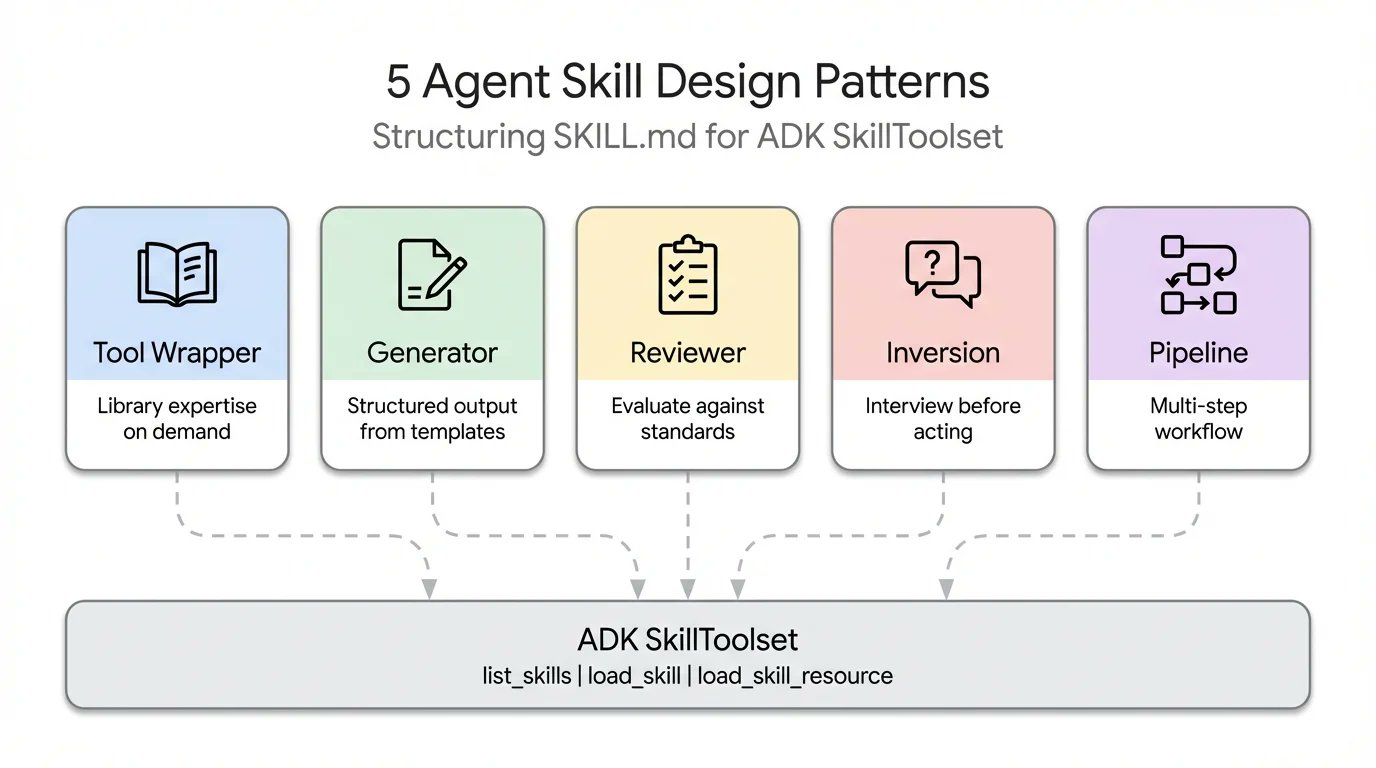
This article covers each one with working ADK code:
-
Tool Wrapper: Make your agent an instant expert on any library
-
Generator: Produce structured documents from a reusable template
-
Reviewer: Score code against a checklist by severity
-
Inversion: The agent interviews you before acting
-
Pipeline: Enforce a strict multi-step workflow with checkpoints
本文涵盖每个功能的实际ADK代码示例:
工具封装器:让您的智能体快速掌握任何库的专长
生成器:基于可复用模板产出结构化文档
评审器:根据严重性分级对照检查清单评估代码
逆向模式:智能体在执行前会先向您提问确认
流程管道:通过检查点强制执行严格的多步骤工作流
Pattern 1: The Tool Wrapper
A Tool Wrapper gives your agent on-demand context for a specific library. Instead of hardcoding API conventions into your system prompt, you package them into a skill. Your agent only loads this context when it actually works with that technology.
模式一:工具封装器
工具封装器为你的智能体提供特定库的按需上下文。无需在系统提示中硬编码API规范,而是将其打包成一项技能。只有当智能体实际操作该技术时,才会加载这部分上下文。
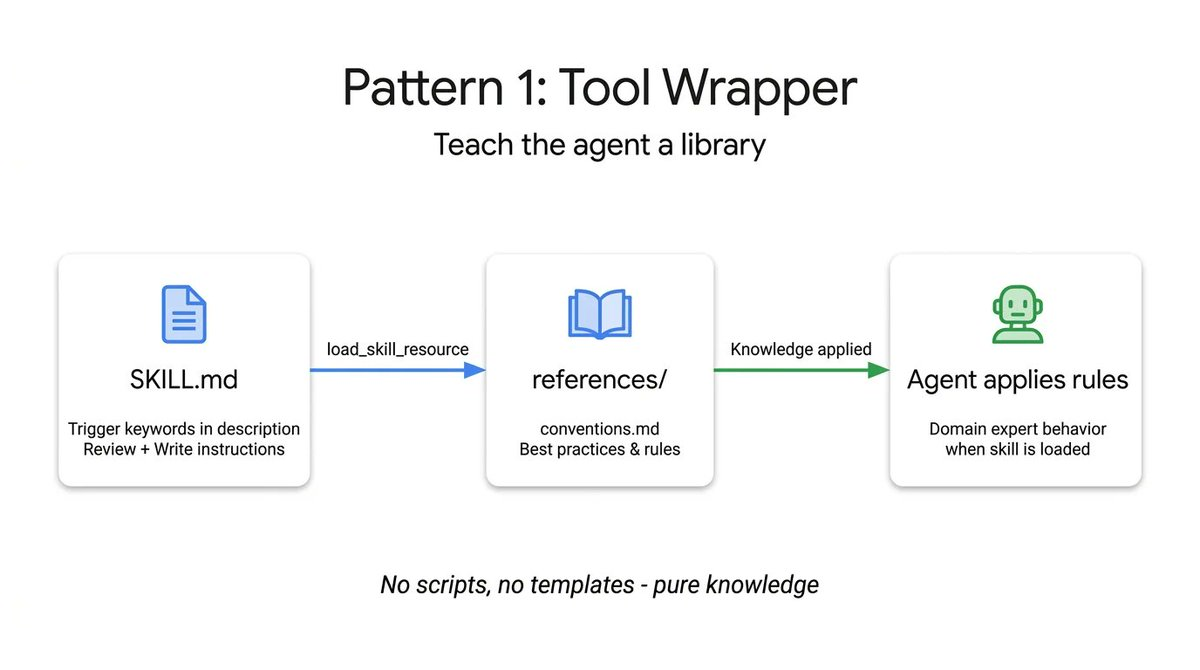
It is the simplest pattern to implement. The 𝚂𝙺𝙸𝙻𝙻.𝚖𝚍 file listens for specific library keywords in the user's prompt, dynamically loads your internal documentation from the 𝚛𝚎𝚏𝚎𝚛𝚎𝚗𝚌𝚎𝚜/ directory, and applies those rules as absolute truth. This is the exact mechanism you use to distribute your team's internal coding guidelines or specific framework best practices directly into your developers' workflows.
Here is an example of a Tool Wrapper that teaches an agent how to write FastAPI code. Notice how the instructions explicitly tell the agent to load the 𝚌𝚘𝚗𝚟𝚎𝚗𝚝𝚒𝚘𝚗𝚜.𝚖𝚍 file only when it starts reviewing or writing code:
这是最简单的实现模式。SKILL.md 文件会监听用户提示中的特定库关键词,动态加载 references/ 目录中的内部文档,并将这些规则视为绝对真理。这正是您用来将团队内部编码规范或特定框架最佳实践直接融入开发者工作流的机制。
以下是教导智能体编写 FastAPI 代码的工具封装示例。请注意指令如何明确告知智能体仅在开始审查或编写代码时才加载 conventions.md 文件:
# skills/api-expert/SKILL.md
---
name: api-expert
description: FastAPI development best practices and conventions. Use when building, reviewing, or debugging FastAPI applications, REST APIs, or Pydantic models.
metadata:
  pattern: tool-wrapper
  domain: fastapi
---

You are an expert in FastAPI development. Apply these conventions to the user's code or question.

## Core Conventions

Load 'references/conventions.md' for the complete list of FastAPI best practices.

## When Reviewing Code
1. Load the conventions reference
2. Check the user's code against each convention
3. For each violation, cite the specific rule and suggest the fix

## When Writing Code
1. Load the conventions reference
2. Follow every convention exactly
3. Add type annotations to all function signatures
4. Use Annotated style for dependency injection
Pattern 2: The Generator
While the Tool Wrapper applies knowledge, the Generator enforces consistent output. If you struggle with an agent generating different document structures on every run, the Generator solves this by orchestrating a fill-in-the-blank process.
模式2:生成器
工具包装器负责应用知识,而生成器则确保输出的一致性。如果您遇到智能体每次运行时生成不同文档结构的问题,生成器通过协调填空流程来解决这一问题。
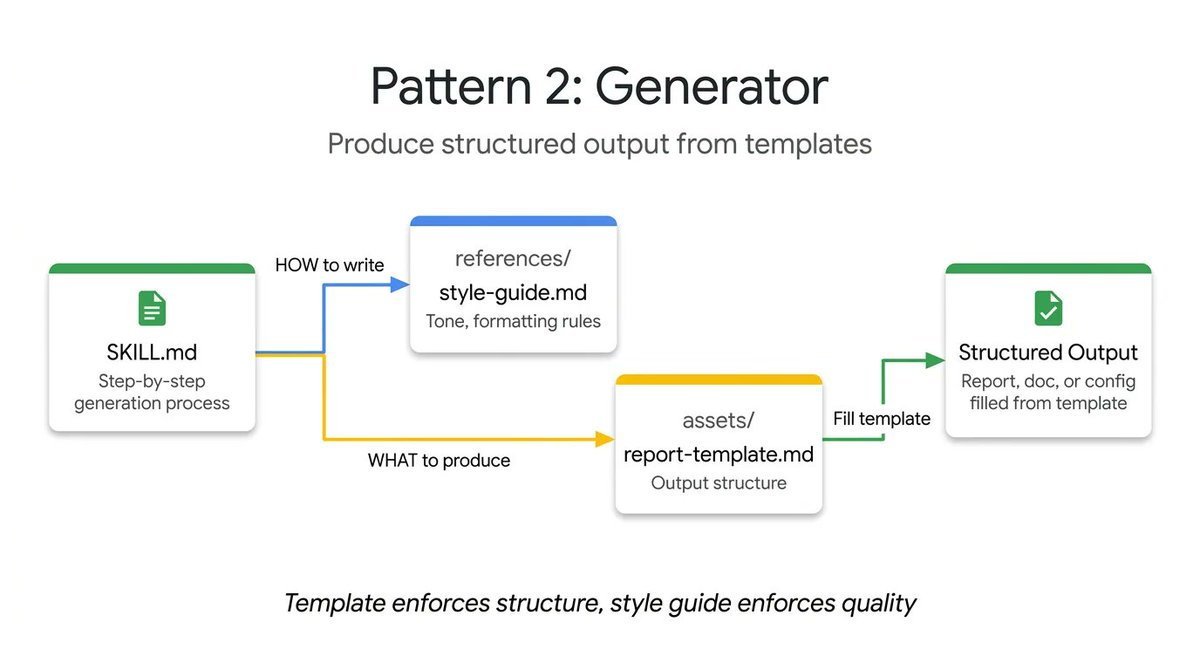
It leverages two optional directories: 𝚊𝚜𝚜𝚎𝚝𝚜/ holds your output template, and 𝚛𝚎𝚏𝚎𝚛𝚎𝚗𝚌𝚎𝚜/ holds your style guide. The instructions act as a project manager. They tell the agent to load the template, read the style guide, ask the user for missing variables, and populate the document. This is practical for generating predictable API documentation, standardizing commit messages, or scaffolding project architectures.
In this technical report generator example, the skill file does not contain the actual layout or the grammar rules. It simply coordinates the retrieval of those assets and forces the agent to execute them step by step:
它利用了两个可选目录:assets/存放输出模板,references/存放样式指南。指令充当项目经理的角色,指示代理加载模板、阅读样式指南、向用户询问缺失变量并填充文档。这种方法适用于生成可预测的API文档、标准化提交消息或搭建项目架构。
在这个技术报告生成器的示例中,技能文件并不包含实际布局或语法规则,它仅负责协调这些资源的检索,并强制代理逐步执行这些步骤:
# skills/report-generator/SKILL.md
---
name: report-generator
description: Generates structured technical reports in Markdown. Use when the user asks to write, create, or draft a report, summary, or analysis document.
metadata:
  pattern: generator
  output-format: markdown
---

You are a technical report generator. Follow these steps exactly:

Step 1: Load 'references/style-guide.md' for tone and formatting rules.

Step 2: Load 'assets/report-template.md' for the required output structure.

Step 3: Ask the user for any missing information needed to fill the template:
- Topic or subject
- Key findings or data points
- Target audience (technical, executive, general)

Step 4: Fill the template following the style guide rules. Every section in the template must be present in the output.

Step 5: Return the completed report as a single Markdown document.
Pattern 3: The Reviewer
The Reviewer pattern separates what to check from how to check it. Rather than writing a long system prompt detailing every code smell, you store a modular rubric inside a 𝚛𝚎𝚏𝚎𝚛𝚎𝚗𝚌𝚎𝚜/𝚛𝚎𝚟𝚒𝚎𝚠-𝚌𝚑𝚎𝚌𝚔𝚕𝚒𝚜𝚝.𝚖𝚍 file.
模式3:评审员
评审员模式将检查内容与检查方式分离。您无需在系统提示中详细列出所有代码异味,而是将模块化的评审标准存储在references/review-checklist.md文件中。
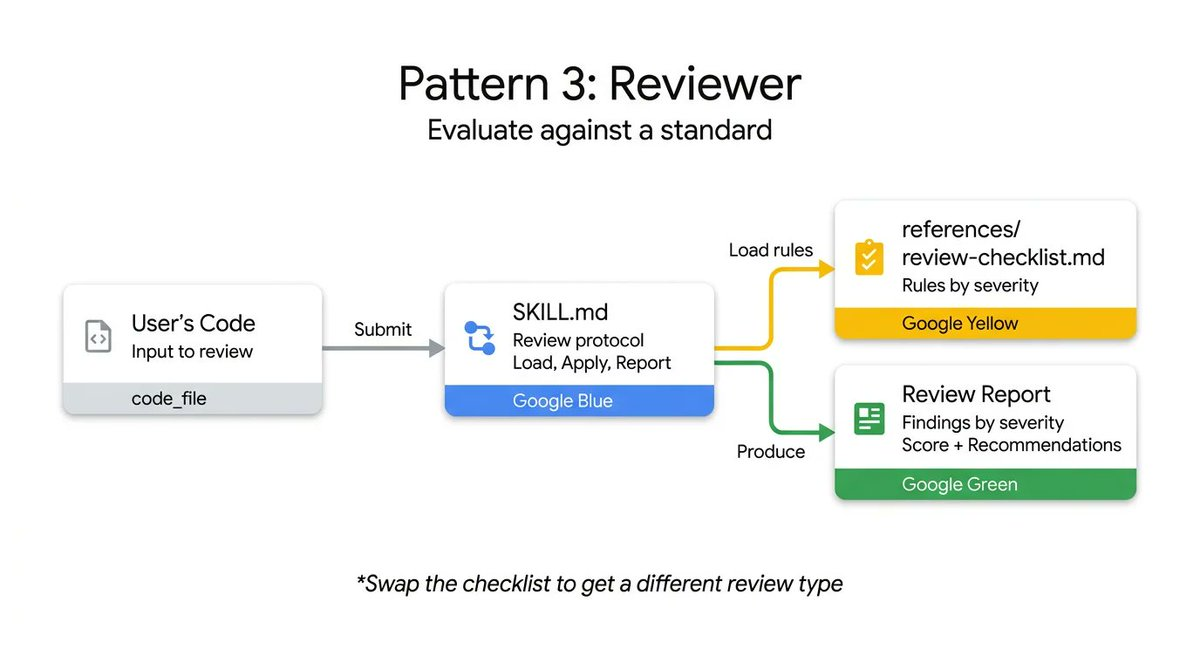
When a user submits code, the agent loads this checklist and methodically scores the submission, grouping its findings by severity. If you swap out a Python style checklist for an OWASP security checklist, you get a completely different, specialized audit using the exact same skill infrastructure. It is a highly effective way to automate PR reviews or catch vulnerabilities before a human looks at the code.
The following code reviewer skill demonstrates this separation. The instructions remain static, but the agent dynamically loads the specific review criteria from an external checklist and forces a structured, severity-based output:
当用户提交代码时,代理会加载这份检查清单并系统性地评估提交内容,按严重程度分类审查结果。如果将Python风格检查清单替换为OWASP安全清单,就能使用完全相同的技能架构获得截然不同的专项审计效果。这是在人工审阅代码前自动化执行PR审查或发现漏洞的高效方法。
以下代码审查技能演示了这种分离机制。审查指令保持静态,但代理会动态加载外部检查清单中的具体评审标准,并强制生成基于严重程度的结构化输出:
# skills/code-reviewer/SKILL.md
---
name: code-reviewer
description: Reviews Python code for quality, style, and common bugs. Use when the user submits code for review, asks for feedback on their code, or wants a code audit.
metadata:
  pattern: reviewer
  severity-levels: error,warning,info
---

You are a Python code reviewer. Follow this review protocol exactly:

Step 1: Load 'references/review-checklist.md' for the complete review criteria.

Step 2: Read the user's code carefully. Understand its purpose before critiquing.

Step 3: Apply each rule from the checklist to the code. For every violation found:
- Note the line number (or approximate location)
- Classify severity: error (must fix), warning (should fix), info (consider)
- Explain WHY it's a problem, not just WHAT is wrong
- Suggest a specific fix with corrected code

Step 4: Produce a structured review with these sections:
- **Summary**: What the code does, overall quality assessment
- **Findings**: Grouped by severity (errors first, then warnings, then info)
- **Score**: Rate 1-10 with brief justification
- **Top 3 Recommendations**: The most impactful improvements
Pattern 4: Inversion
Agents inherently want to guess and generate immediately. The Inversion pattern flips this dynamic. Instead of the user driving the prompt and the agent executing, the agent acts as an interviewer.
代理本质上倾向于立即猜测和生成。反转模式颠覆了这一动态。不是用户驱动提示而代理执行,而是代理充当采访者的角色。
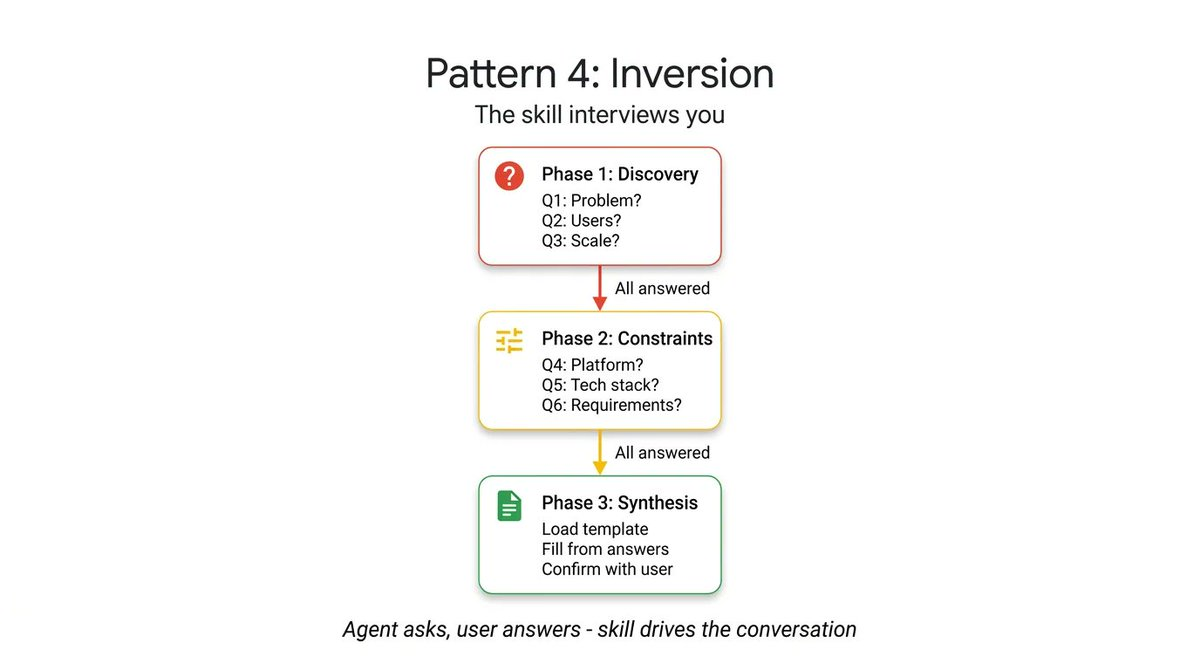
Inversion relies on explicit, non-negotiable gating instructions (like "DO NOT start building until all phases are complete") to force the agent to gather context first. It asks structured questions sequentially and waits for your answers before moving to the next phase. The agent refuses to synthesize a final output until it has a complete picture of your requirements and deployment constraints.
To see this in action, look at this project planner skill. The crucial element here is the strict phasing and the explicit gatekeeping prompt that stops the agent from synthesizing the final plan until all user answers are collected:
逆向工程依赖于明确且不可协商的门控指令(例如“在所有阶段完成前不要开始构建”),强制智能体首先收集上下文信息。它会按顺序提出结构化问题,并在收到你的回答后才进入下一阶段。智能体在全面了解你的需求和部署限制之前,会拒绝生成最终输出方案。
要观察这种机制的实际应用,请看这个项目规划技能示例。其核心在于严格的分阶段设计,以及明确的把关提示——该提示会阻止智能体在收集完所有用户答案前生成最终计划:
# skills/project-planner/SKILL.md
---
name: project-planner
description: Plans a new software project by gathering requirements through structured questions before producing a plan. Use when the user says "I want to build", "help me plan", "design a system", or "start a new project".
metadata:
  pattern: inversion
  interaction: multi-turn
---

You are conducting a structured requirements interview. DO NOT start building or designing until all phases are complete.

## Phase 1 — Problem Discovery (ask one question at a time, wait for each answer)

Ask these questions in order. Do not skip any.

- Q1: "What problem does this project solve for its users?"
- Q2: "Who are the primary users? What is their technical level?"
- Q3: "What is the expected scale? (users per day, data volume, request rate)"

## Phase 2 — Technical Constraints (only after Phase 1 is fully answered)

- Q4: "What deployment environment will you use?"
- Q5: "Do you have any technology stack requirements or preferences?"
- Q6: "What are the non-negotiable requirements? (latency, uptime, compliance, budget)"

## Phase 3 — Synthesis (only after all questions are answered)

1. Load 'assets/plan-template.md' for the output format
2. Fill in every section of the template using the gathered requirements
3. Present the completed plan to the user
4. Ask: "Does this plan accurately capture your requirements? What would you change?"
5. Iterate on feedback until the user confirms
Pattern 5: The Pipeline
For complex tasks, you cannot afford skipped steps or ignored instructions. The Pipeline pattern enforces a strict, sequential workflow with hard checkpoints.
The instructions themselves serve as the workflow definition. By implementing explicit diamond gate conditions (such as requiring user approval before moving from docstring generation to final assembly), the Pipeline ensures an agent cannot bypass a complex task and present an unvalidated final result.
模式5:流水线模式
对于复杂任务,任何步骤遗漏或指令忽视都不可接受。流水线模式通过严格的顺序化工作流程和硬性检查点来确保执行质量。
指令本身即构成流程定义。通过设置显式钻石关卡条件(例如从文档字符串生成阶段进入最终组装前需获得用户批准),该模式确保智能体无法跳过复杂任务环节并提交未经验证的最终结果。
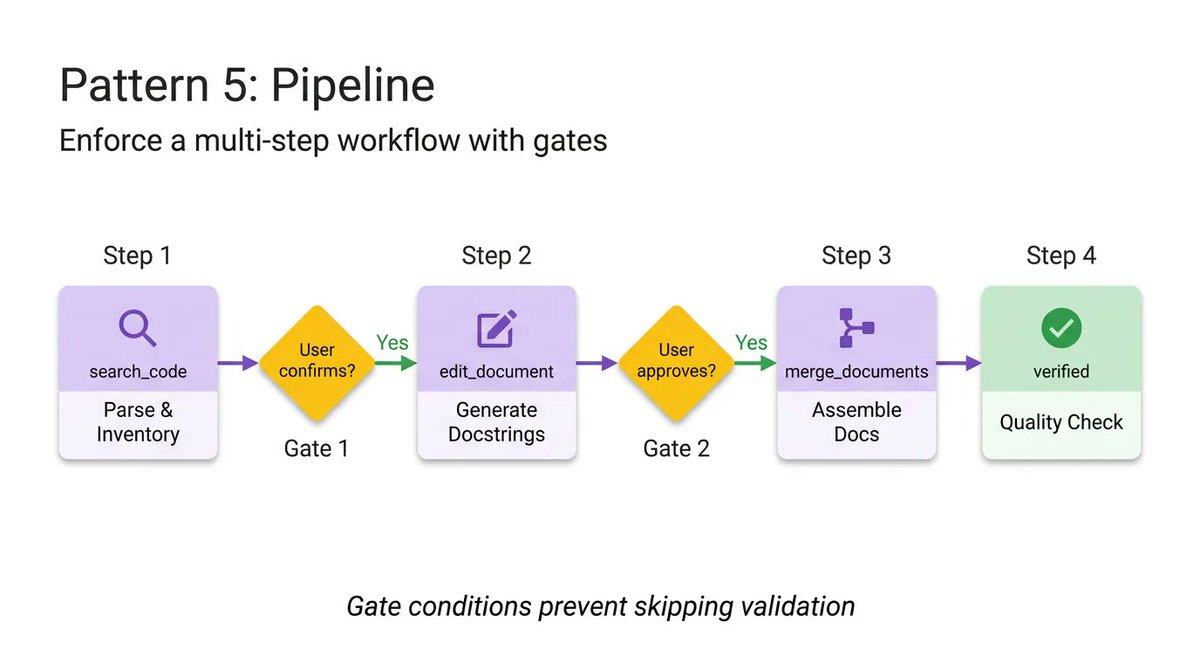
This pattern utilizes all optional directories, pulling in different reference files and templates only at the specific step where they are needed, keeping the context window clean.
In this documentation pipeline example, notice the explicit gate conditions. The agent is explicitly forbidden from moving to the assembly phase until the user confirms the generated docstrings in the previous step:
该模式利用了所有可选目录,仅在需要的特定步骤中引入不同的参考文件和模板,保持上下文窗口的整洁。
在这个文档流水线示例中,请注意明确的关卡条件。在上一步生成的文档字符串未经用户确认前,该代理被明确禁止进入组装阶段。
# skills/doc-pipeline/SKILL.md
---
name: doc-pipeline
description: Generates API documentation from Python source code through a multi-step pipeline. Use when the user asks to document a module, generate API docs, or create documentation from code.
metadata:
  pattern: pipeline
  steps: "4"
---

You are running a documentation generation pipeline. Execute each step in order. Do NOT skip steps or proceed if a step fails.

## Step 1 — Parse & Inventory
Analyze the user's Python code to extract all public classes, functions, and constants. Present the inventory as a checklist. Ask: "Is this the complete public API you want documented?"

## Step 2 — Generate Docstrings
For each function lacking a docstring:
- Load 'references/docstring-style.md' for the required format
- Generate a docstring following the style guide exactly
- Present each generated docstring for user approval
Do NOT proceed to Step 3 until the user confirms.

## Step 3 — Assemble Documentation
Load 'assets/api-doc-template.md' for the output structure. Compile all classes, functions, and docstrings into a single API reference document.

## Step 4 — Quality Check
Review against 'references/quality-checklist.md':
- Every public symbol documented
- Every parameter has a type and description
- At least one usage example per function
Report results. Fix issues before presenting the final document.
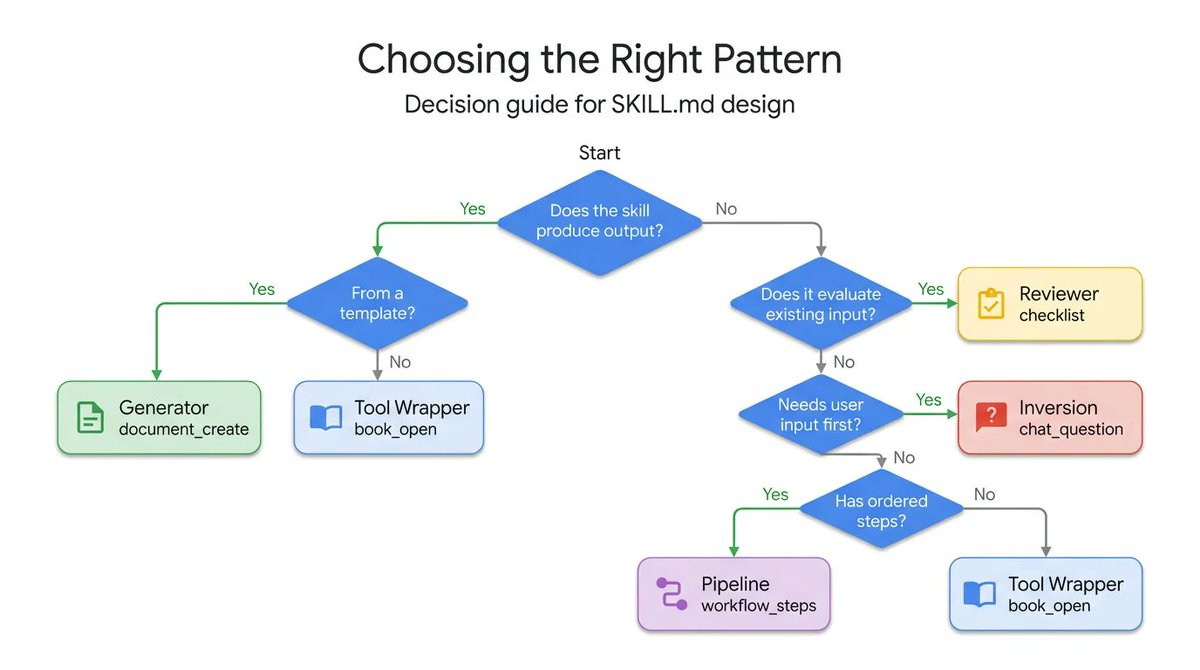
Choosing the right agent skill pattern
Each pattern answers a different question. Use this decision tree to find the right one for your use-case:
And finally, patterns compose
These patterns are not mutually exclusive. They compose.
A Pipeline skill can include a Reviewer step at the end to double-check its own work. A Generator can rely on Inversion at the very beginning to gather the necessary variables before filling out its template. Thanks to ADK's 𝚂𝚔𝚒𝚕𝚕𝚃𝚘𝚘𝚕𝚜𝚎𝚝 and progressive disclosure, your agent only spends context tokens on the exact patterns it needs at runtime.
Stop trying to cram complex and fragile instructions into a single system prompt. Break your workflows down, apply the right structural pattern, and build reliable agents.
这些模式并非相互排斥,它们可以组合使用。
管道技能可以在末尾加入审核步骤来复查自身工作。生成器可以在最初阶段运用逆向模式收集必要变量,再填充模板。得益于ADK的「技能工具集」和渐进式披露机制,您的智能体仅在运行时为其所需的确切模式消耗上下文令牌。
别再试图将复杂脆弱的指令塞进单一系统提示中。请将工作流拆解,应用正确的结构模式,从而构建可靠的智能体。

小龙虾开发者社区是 CSDN 旗下专注 OpenClaw 生态的官方阵地,聚焦技能开发、插件实践与部署教程,为开发者提供可直接落地的方案、工具与交流平台,助力高效构建与落地 AI 应用
更多推荐


 23
23 0
0- 0


 已为社区贡献7条内容

所有评论(0)