
windows和Linux的zabbix agent安装
·
一、Windows版zabbix agent安装
https://www.zabbix.com/cn/download_agentswindows的下载这个包 安装的时候配置下zabbix server 的ip就行
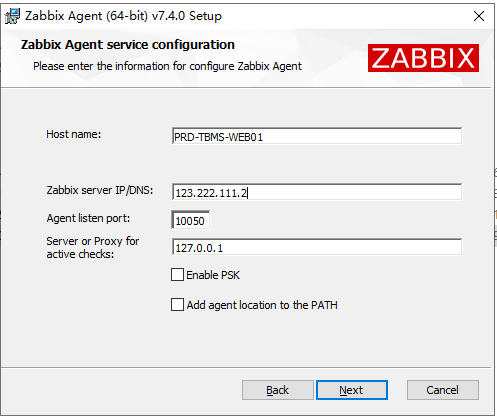
assets/windows和Linux的zabbix agent安装.250702/file-20250702163536771.png
ZABBIX配置如下:
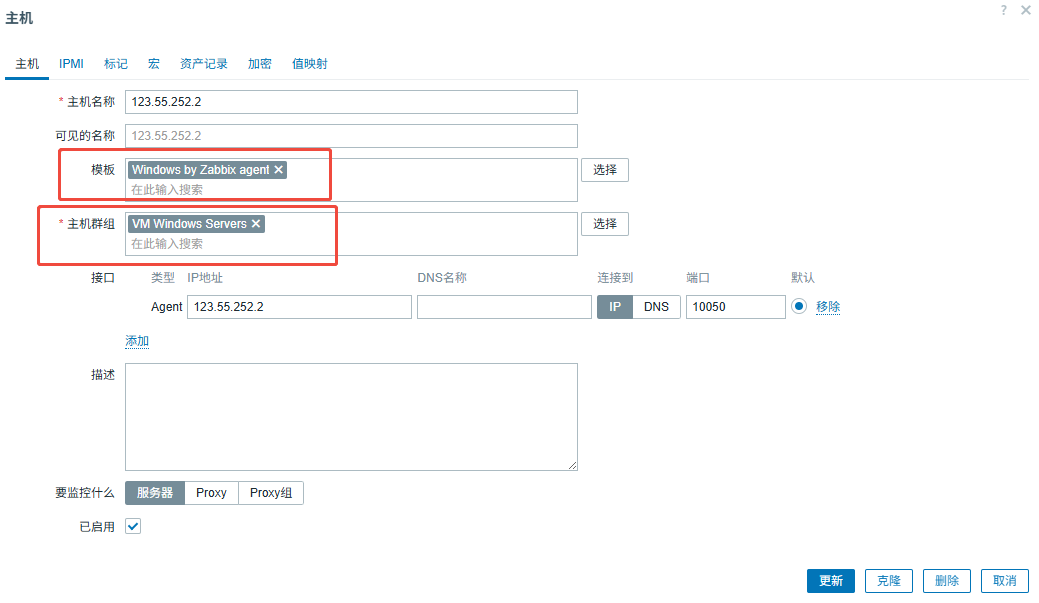
assets/windows和Linux的zabbix agent安装.250702/file-20250702163828356.png
二、Linux版zabbix agent安装
https://www.zabbix.com/cn/download?zabbix=7.4&os_distribution=centos&os_version=7&components=agent&db=&ws=
按照下面的操作引导 按行分步进行安装:
rpm -Uvh https://repo.zabbix.com/zabbix/7.4/release/rhel/7/noarch/zabbix-release-latest-7.4.el7.noarch.rpm

yum clean all

yum install zabbix-agent -y

systemctl restart zabbix-agent

systemctl enable zabbix-agent
配置conf文件,把server的ip更换为zabbix server的IP xxx.xxx.xxx.xxx
vim /etc/zabbix/zabbix_agentd.conf
Sever=xxx.xxx.xxx.xxx
ServerActive=xxx.xxx.xxx.xxx
Hostname=Zabbix Agent
重启即可。

小龙虾开发者社区是 CSDN 旗下专注 OpenClaw 生态的官方阵地,聚焦技能开发、插件实践与部署教程,为开发者提供可直接落地的方案、工具与交流平台,助力高效构建与落地 AI 应用
更多推荐


 9
9 0
0- 0


 已为社区贡献2条内容

所有评论(0)