
AI skills 助力安全编码
·
🐕说到安全代码审计,之前的操作都是上个SAST工具,提交之后库库一顿扫描,发现了问题之后修,修完之后再扫。。
很多时候研发也不知道咋修。
🐕后来有了IDE插件,集成到IDE上,可以在研发环境扫,扫描引擎在本地那结果就是。。。慢。。。
当然也没解决不会修的问题
今天尝试了下skills 实现代码审计和agent自动修复,不得不说,非常可以。
上🔗 https://github.com/BehiSecc/VibeSec-Skill
这是啥:
简单来说它会教你所选用的模型从漏洞挖掘者(Bug Hunter)的视角审视代码,在问题上线之前就发现并拦截安全漏洞。
传统工具代码审计都说基于规则,代入白帽子视角就很哇塞了
摘一段访问控制的
## Access Control Issues

Access control vulnerabilities occur when users can access resources or perform actions beyond their intended permissions.

### Core Requirements

For **every data point and action** that requires authentication:

1. **User-Level Authorization**
   - Each user must only access/modify their own data
   - No user should access data from other users or organizations
   - Always verify ownership at the data layer, not just the route level

2. **Use UUIDs Instead of Sequential IDs**
   - Use UUIDv4 or similar non-guessable identifiers
   - Exception: Only use sequential IDs if explicitly requested by user

3. **Account Lifecycle Handling**
   - When a user is removed from an organization: immediately revoke all access tokens and sessions
   - When an account is deleted/deactivated: invalidate all active sessions and API keys
   - Implement token revocation lists or short-lived tokens with refresh mechanisms
再来段xss的
### Cross-Site Scripting (XSS)

Every input controllable by the user—whether directly or indirectly—must be sanitized against XSS.

#### Input Sources to Protect

**Direct Inputs:**
- Form fields (email, name, bio, comments, etc.)
- Search queries
- File names during upload
- Rich text editors / WYSIWYG content

**Indirect Inputs:**
- URL parameters and query strings
- URL fragments (hash values)
- HTTP headers used in the application (Referer, User-Agent if displayed)
- Data from third-party APIs displayed to users
- WebSocket messages
- postMessage data from iframes
- LocalStorage/SessionStorage values if rendered

**Often Overlooked:**
- Error messages that reflect user input
- PDF/document generators that accept HTML
- Email templates with user data
- Log viewers in admin panels
- JSON responses rendered as HTML
- SVG file uploads (can contain JavaScript)
- Markdown rendering (if allowing HTML)
体验下效果
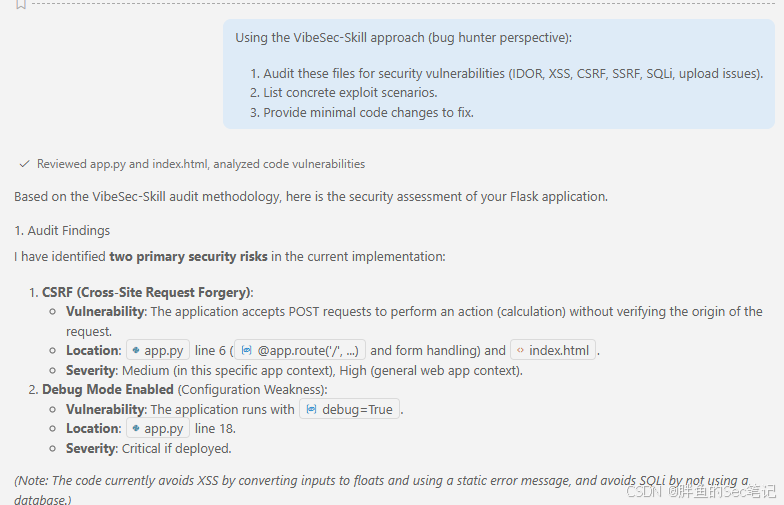
当然自动修复问题就是agent的本事了

小龙虾开发者社区是 CSDN 旗下专注 OpenClaw 生态的官方阵地,聚焦技能开发、插件实践与部署教程,为开发者提供可直接落地的方案、工具与交流平台,助力高效构建与落地 AI 应用
更多推荐

 10
10 0
0- 0


 已为社区贡献1条内容

所有评论(0)