
2. OpenClaw添加自定义skill
1. 背景
之前我有控制过小米的一款智能插座,本例子通过skill集成智能插座的控制功能。
插座是“米家智能插座3”,型号有点老了,用python实现控制的时候废了些功夫。本例就是测试OpenClaw在物联网场景的使用过程,可以根据自己家物联网设备完善。
2. 实现智能插座控制脚本(python)
我只是手上正好有这么一个设备,其他物联网设备参照对应流程。
2.1 plug_ctrl.py脚本实现
python脚本名称“plug_ctrl.py”
"""
Smart Plug Light Controller
Controls Xiaomi smart plugs on/off.

Device Configuration:
NAME:     Mijia Smart Plug 3
MODEL:    cuco.plug.v3
"""

from miio import Device
import logging
import sys

# Device configuration
# 这里的IP地址和TOKEN必须按实际情况填写
PLUG_IP = 'XXXX'
PLUG_TOKEN = 'XXXX'

# Configure logging
logging.basicConfig(
    level=logging.INFO,
    format='%(asctime)s | %(levelname)-8s | %(message)s',
    datefmt='%Y-%m-%d %H:%M:%S'
)

def control_plug(action):
    """Control the smart plug based on action ('on' or 'off')"""
    try:
        # Connect to device
        plug = Device(ip=PLUG_IP, token=PLUG_TOKEN)

        # Map action to value
        if action.lower() == 'on':
            value = True
            message = "开启电源"
        elif action.lower() == 'off':
            value = False
            message = "关闭电源"
        else:
            raise ValueError(f"Invalid action: {action}. Use 'on' or 'off'.")

        # Send control command
        plug.send("set_properties", [{'did': 'MYDID', 'siid': 2, 'piid': 1, 'value': value}])
        logging.info(message)
        print(f"Successfully turned lights {action}")
        return True

    except Exception as e:
        logging.error(f"Failed to control light: {e}")
        print(f"Error: {e}")
        return False

if __name__ == "__main__":
    if len(sys.argv) != 2:
        print("Usage: python light_controller.py <on|off>")
        sys.exit(1)

    action = sys.argv[1]
    success = control_plug(action)
    sys.exit(0 if success else 1)
设备的IP和TOKEN都是硬编码在脚本里的,仅测试使用(注意安全别泄露了),后续再研究别的方法。
2.2 智能插座IP地址和token获取方法
获取IP
# 查找局域网设备
miiocli discover

INFO:miio.miioprotocol:Sending discovery to <broadcast> with timeout of 5s..
INFO:miio.miioprotocol:  IP 192.168.xx.229 (ID: 2e9xx53) - token: b'ffffffffffffffffffffffffffffffff'
INFO:miio.miioprotocol:Discovery done
INFO:miio.discovery:Discovering devices with mDNS for 5 seconds...
可以通过miiocli程序扫描局域网下的小米设备,如上图所示,会列出IP地址和token。有两点说明:
- 获取IP地址失败,首先要确保你和设备在同一个局域网下,如果说你有多个网卡,最好禁用掉其他的
- 获取的token,如果不是全f,那么就是有效的token,如果和我一样,那么是非法的,需要用另外要给方法获取
获取token
git clone https://github.com/PiotrMachowski/Xiaomi-cloud-tokens-extractor
# 切换到源码目录,安装所有的依赖
cd Xiaomi-cloud-tokens-extractor
pip3 install -r requirements.txt
# 执行脚本
python token_extractor.py

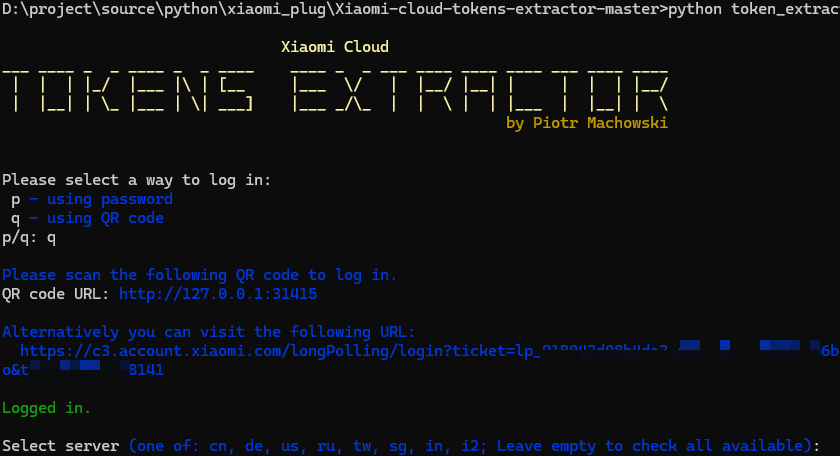
# 执行后有可以选择获取方式,密码或扫码的方式,第一次使用用户名密码,同样报错;然后换扫码方式,
# 出现一个单点登录的网址,点进去以后,跳转到一个登录页面,登录后,成功获取参数!
3. 编写自定义skill
skill起名smart-plug,目录放在文件夹“C:\Users[用户名].openclaw\workspace\skills”下。
目录结果如下:
smart-plug/
├── SKILL.md          # Skill definition for OpenClaw
├── README.md         # This file
└── scripts/
    └── plug_ctrl.py  # Centralized control logic
3.1 SKILL.md
SKILL.md是必须的,描述skill的技能详情及触发方式,智能插座的控制脚本放在scripts目录下,避免篇幅过大,SKILL.md内容节选如下:
---
name: Smart plug control
description: Smart plug control skill for turning plug on/off. Triggers on phrases like "turn off plug", "turn on plug", "打开插座", "关闭插座", or similar plug control commands.
---

# Plug Skill - Smart Plug Control

This skill controls Xiaomi smart plugs to turn on and off. It uses the python-miio library to communicate with smart plug devices.

## Usage

Trigger phrases:
- "turn off plug", "打开插座" - Turns off the smart plug
- "turn on plug", "关闭插座" - Turns on the smart plug
- "plug off", "plug on" - Alternative commands

### Control Commands

1. **Turn plug off** - Executes:
python {baseDir}/scripts/plug_ctrl.py on

2. **Turn plug on** - Executes:
python {baseDir}/scripts/plug_ctrl.py off

...
“—” 部分是必须的,用来描述本skill功能,"name"是skill名称,"description"描述skill是怎么工作的,本例描述里触发这个skill的关键字。
“Usage”描述该skill怎么触发,有些观念我们要转变,以前我们写控制脚本,都是按照逻辑来写,比如第一步判断什么条件,第二部执行某个函数等等。这里我们就像写说明书一样,就像给“人”看一样,就像官网说的,“不要教他怎么成AI,告诉他怎么做就行了”。
其实最初的版本我就写了这两个部分,然后通过OpenClaw执行,他把我的脚本修改成了这样!
3.2 README.md
README.md主要内容如下:
# Smart plug control Skill
This is a simple smart plug control skill for OpenClaw that allows you to control Xiaomi smart plugs.

## Supported Commands
### English
- "turn on plug"
- "turn off plug"
- "plug on"
- "plug off"

### Chinese
- "打开插座"
- "关闭插座"

## Requirements
1. Xiaomi smart plug (tested with cuco.plug.v3 model)
2. Network access to the smart plug's IP address
3. The smart plug's authentication token
4. `python-miio` library installed

## Installation
1. Install the python-miio dependency:
pip install python-miio

...
4. 执行
编辑好以后,重启OpenClaw
openclaw gateway restart
切到“技能”tab页,点击“Refresh”就能刷出我们刚刚创建的skill,然后在“聊天”窗口就可以让他控制小米智能插座了。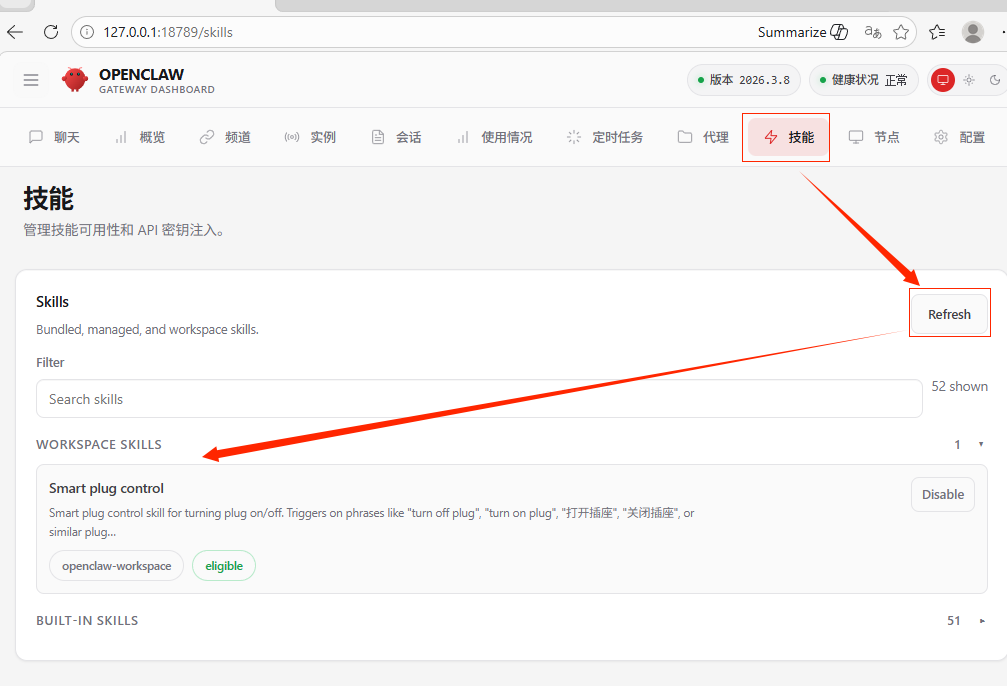
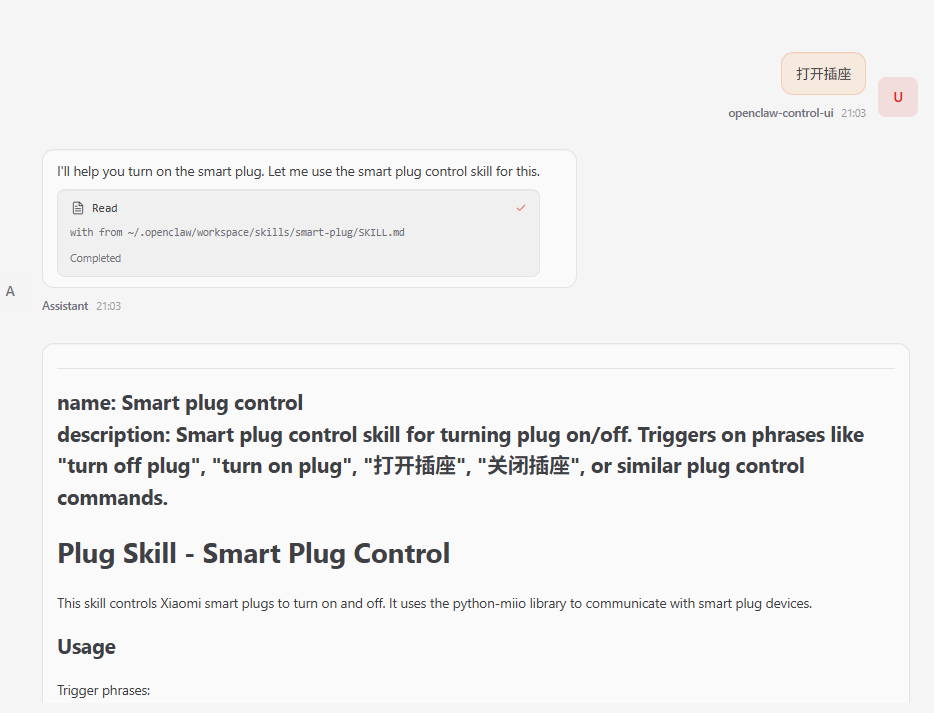
输入命令“打开插座”,就看模型一通跑,我特意没有安装python的“python-miio”库,OpenClaw都帮我安装好了,总之就一句话,你告诉他怎么做就行,他会按照你写的“说明”进行执行,并且会尝试自己解决问题。

小龙虾开发者社区是 CSDN 旗下专注 OpenClaw 生态的官方阵地,聚焦技能开发、插件实践与部署教程,为开发者提供可直接落地的方案、工具与交流平台,助力高效构建与落地 AI 应用
更多推荐


 3
3 0
0- 0


 已为社区贡献3条内容

所有评论(0)