

I've been struggling for a few days with WooCommerce / Imagick timing out during creation of a product via the API.
Whenever I push up a batch of products (even a small batch) the Imagick thumbnail generation process times out after 70 seconds: 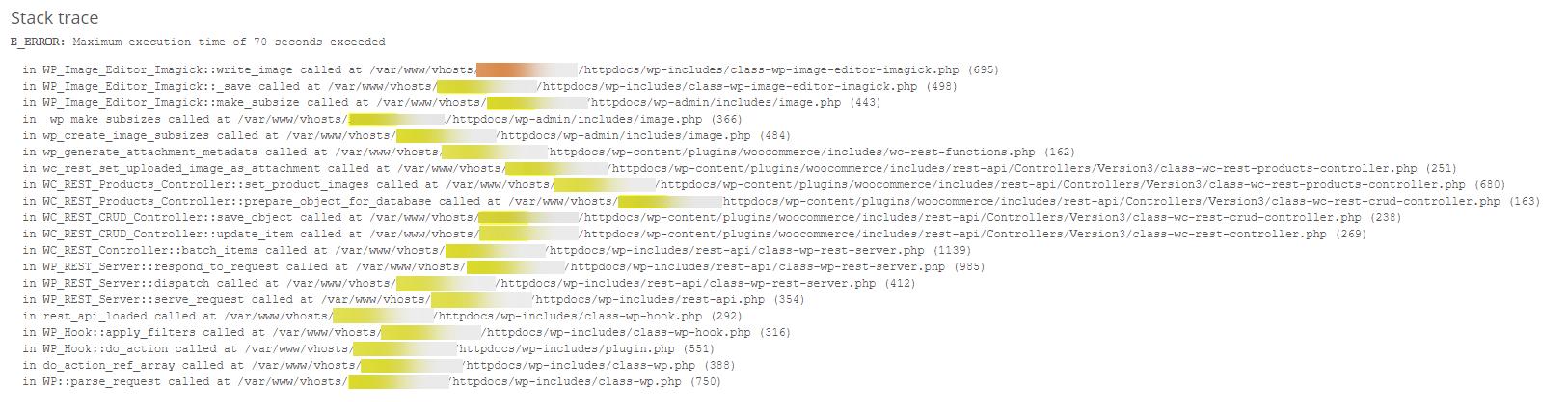
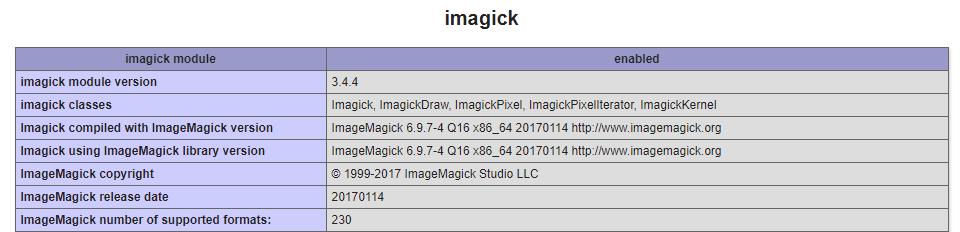
My phpinfo() page shows max_execution_time is set to 600 seconds (which I've definitely set inside plesk) but for whatever reason the Imagick / Thumbnail process seems to ignore that timeout.

I am at a loss as to where the 70 second timeout is coming from and how to control it.
I've tried:
- Specifying recursive php.ini in .htaccess - no change
- Setting php_value in .htaccess - This is no longer supported by Apache/Plesk
- Reading the source code - I get lost very quickly trying to reverse engineer this PHP
Any advice or help would be very much appreciated at this point. Thanks!
Extra Context:
Wordpress Site Health Info
### wp-core ###

version: 5.7
site_language: en_US
user_language: en_US
timezone: +10:00
permalink: /%postname%/
https_status: true
multisite: false
user_registration: 1
blog_public: 0
default_comment_status: open
environment_type: production
user_count: 2
dotorg_communication: true

### wp-paths-sizes ###

wordpress_path: /var/www/vhosts/REDACTED/httpdocs
wordpress_size: 46.52 MB (48782795 bytes)
uploads_path: /var/www/vhosts/REDACTED/httpdocs/wp-content/uploads
uploads_size: 733.78 MB (769420958 bytes)
themes_path: /var/www/vhosts/REDACTED/httpdocs/wp-content/themes
themes_size: 31.95 MB (33503279 bytes)
plugins_path: /var/www/vhosts/REDACTED/httpdocs/wp-content/plugins
plugins_size: 94.83 MB (99434224 bytes)
database_size: 242.02 MB (253771776 bytes)
total_size: 1.12 GB (1204913032 bytes)

### wp-dropins (2) ###

advanced-cache.php: true
maintenance.php: true

### wp-active-theme ###

name: Porto (porto)
version: 6.0.6
author: P-THEMES
author_website: http://www.portotheme.com/
parent_theme: none
theme_features: core-block-patterns, post-thumbnails, title-tag, editor-style, automatic-feed-links, woocommerce, menus, post-formats, html5, wp-block-styles, responsive-embeds, align-wide, editor-styles, editor-color-palette, widgets
theme_path: /var/www/vhosts/REDACTED/httpdocs/wp-content/themes/porto
auto_update: Enabled

### wp-mu-plugins (1) ###

BPS MU Tools: version: 6.0, author: AITpro

### wp-plugins-active (15) ###

Braintree for WooCommerce Payment Gateway: version: 2.4.3, author: WooCommerce, Auto-updates disabled
BulletProof Security: version: 4.7, author: AITpro Website Security, Auto-updates disabled
Classic Editor: version: 1.6, author: WordPress Contributors, Auto-updates disabled
Contact Form 7: version: 5.4, author: Takayuki Miyoshi, Auto-updates disabled
Media Deduper: version: 1.5.3, author: Cornershop Creative, Auto-updates disabled
Media Deduper Pro: version: 1.4.0, author: Cornershop Creative, Auto-updates disabled
Porto Theme - Functionality: version: 2.0.5, author: P-Themes, Auto-updates disabled
Tawk.to Live Chat: version: 0.5.2, author: Tawkto, Auto-updates disabled
WooCommerce: version: 5.1.0, author: Automattic, Auto-updates disabled
WooCommerce Menu Cart: version: 2.9.7, author: Jeremiah Prummer, Ewout Fernhout, Auto-updates disabled
WooCommerce Stripe Gateway: version: 4.9.0, author: WooCommerce, Auto-updates disabled
WooCommerce Table Rate Shipping: version: 3.0.30, author: WooCommerce, Auto-updates disabled
WP Mail SMTP: version: 2.6.0, author: WPForms, Auto-updates disabled
WP Super Cache: version: 1.7.2, author: Automattic, Auto-updates disabled
Yoast SEO: version: 15.9.2, author: Team Yoast, Auto-updates disabled

### wp-plugins-inactive (2) ###

Slider Revolution: version: 6.4.2, author: ThemePunch, Auto-updates disabled
WPBakery Page Builder: version: 6.6.0, author: Michael M - WPBakery.com, Auto-updates disabled

### wp-media ###

image_editor: WP_Image_Editor_Imagick
imagick_module_version: 1687
imagemagick_version: ImageMagick 6.9.7-4 Q16 x86_64 20170114 http://www.imagemagick.org
file_uploads: File uploads is turned off
post_max_size: 64M
upload_max_filesize: 64M
max_effective_size: 64 MB
max_file_uploads: 20
imagick_limits:
    imagick::RESOURCETYPE_AREA: 122 MB
    imagick::RESOURCETYPE_DISK: 1073741824
    imagick::RESOURCETYPE_FILE: 6144
    imagick::RESOURCETYPE_MAP: 512 MB
    imagick::RESOURCETYPE_MEMORY: 256 MB
    imagick::RESOURCETYPE_THREAD: 6
gd_version: bundled (2.1.0 compatible)
ghostscript_version: 9.26

### wp-server ###

server_architecture: Linux 4.15.0-124-generic x86_64
httpd_software: Apache
php_version: 7.4.16 64bit
php_sapi: fpm-fcgi
max_input_variables: 2000
time_limit: 660
memory_limit: 512M
max_input_time: 600
upload_max_filesize: 64M
php_post_max_size: 64M
curl_version: 7.58.0 OpenSSL/1.1.1
suhosin: false
imagick_availability: true
pretty_permalinks: true
htaccess_extra_rules: true

### wp-database ###

extension: mysqli
server_version: 10.1.47-MariaDB-0ubuntu0.18.04.1
client_version: mysqlnd 7.4.16

### wp-constants ###

WP_HOME: undefined
WP_SITEURL: undefined
WP_CONTENT_DIR: /var/www/vhosts/REDACTED/httpdocs/wp-content
WP_PLUGIN_DIR: /var/www/vhosts/REDACTED/httpdocs/wp-content/plugins
WP_MEMORY_LIMIT: 256M
WP_MAX_MEMORY_LIMIT: 512M
WP_DEBUG: false
WP_DEBUG_DISPLAY: false
WP_DEBUG_LOG: false
SCRIPT_DEBUG: false
WP_CACHE: true
CONCATENATE_SCRIPTS: false
COMPRESS_SCRIPTS: undefined
COMPRESS_CSS: undefined
WP_LOCAL_DEV: undefined
DB_CHARSET: utf8
DB_COLLATE: undefined

### wp-filesystem ###

wordpress: writable
wp-content: writable
uploads: writable
plugins: writable
themes: writable
mu-plugins: writable

### wp_mail_smtp ###

version: 2.6.0
license_key_type: lite
debug: No debug notices found.
db_tables: 3jJjCP_wpmailsmtp_tasks_meta
lite_install_date: Mar 16, 2021 @ 10:36am


 已为社区贡献1260条内容

所有评论(0)