I am setting wholesale store with Woocommerce and can't figure out following issue.
I want to auto hide or delate all products, that have price set to zero or if product don't have price at all!
I surf the web and found following code that should do exactly what i need, but i put it in my child theme functions.php file and it is not working for me!
Hide products with the price set to zero in WooCommerce
add_action( 'woocommerce_product_query', 'react2wp_hide_products_higher_than_zero' );
function react2wp_hide_products_higher_than_zero( $q ){
   $meta_query = $q->get( 'meta_query' );
   $meta_query[] = array(
      'key'       => '_price',
      'value'     => 0,
      'compare'   => '>'
   );
   $q->set( 'meta_query', $meta_query );
}
Hide products without price in WooCommerce
add_action( 'woocommerce_product_query', 'react2wp_hide_products_without_price' );
function react2wp_hide_products_without_price( $q ){
   $meta_query = $q->get( 'meta_query' );
   $meta_query[] = array(
      'key'       => '_price',
      'value'     => '',
      'compare'   => '!='
   );
   $q->set( 'meta_query', $meta_query );
}
Source - https://react2wp.com/woocommerce-hide-products-without-price-simple-fix/
I am using Woocommerce 3.4.5 and Flatsome theme (changing theme didn't help too)
How to figure out why code doesn't works?
Any help is appreciated.
Update - Added an addition to auto move to trash products with zero or empty price
To hide both products that have no price or that have zero price from archive pages as shop, use the following:
add_filter( 'woocommerce_product_query_meta_query', 'shop_only_instock_products', 10, 2 );
function shop_only_instock_products( $meta_query, $query ) {
    // In frontend only
    if( is_admin() ) return $meta_query;

    $meta_query['relation'] = 'OR';

    $meta_query[] = array(
        'key'     => '_price',
        'value'   => '',
        'type'    => 'numeric',
        'compare' => '!='
    );
    $meta_query[] = array(
        'key'     => '_price',
        'value'   => 0,
        'type'    => 'numeric',
        'compare' => '!='
    );
    return $meta_query;
}
Code goes in function.php file of your active child theme (or active theme). Tested and works.
But using something like your first code snippet will do give same result (prices bigger than zero):
add_filter( 'woocommerce_product_query_meta_query', 'shop_only_instock_products', 10, 2 );
function shop_only_instock_products( $meta_query, $query ) {
    // In frontend only
    if( is_admin() ) return $meta_query;

    $meta_query[] = array(
        'key'     => '_price',
        'value'   => 0,
        'type'    => 'numeric',
        'compare' => '>'
    );
    return $meta_query;
}
Code goes in function.php file of your active child theme (or active theme). Tested and works.
Moving products to trash (without deleting them) that have Zero or empty price.
The following code will update the status of all products that have Zero or empty price to trash with a very light direct SQL query.
You need to run it just once each time you want it.
// Function that will add products to trash that have Zero price or no price
function auto_add_product_to_trash(){
    global $wpdb;

    $number_of_products_processed = $wpdb->query("
        UPDATE {$wpdb->prefix}posts as a
        JOIN {$wpdb->prefix}postmeta AS b ON a.ID = b.post_id
        JOIN {$wpdb->prefix}postmeta AS c ON a.ID = c.post_id
        SET a.post_status = 'trash'
        WHERE a.post_status LIKE 'publish' AND a.post_type LIKE 'product'
        AND b.meta_key LIKE '_price' AND c.meta_key LIKE '_sale_price'
        AND ( b.meta_value LIKE '' OR b.meta_value LIKE '0' )
        AND c.meta_value != '0'
    ");

    // Return the number of products added to trash
    return $number_of_products_processed;
}

// Execute the function - Run it just once and comment it
auto_add_product_to_trash();
Code goes in function.php file of your active child theme (or active theme). Tested and works.
Now when going to your products in Backend, all products with zero or empty price are in trash. You can review them one by one and delete them easily:
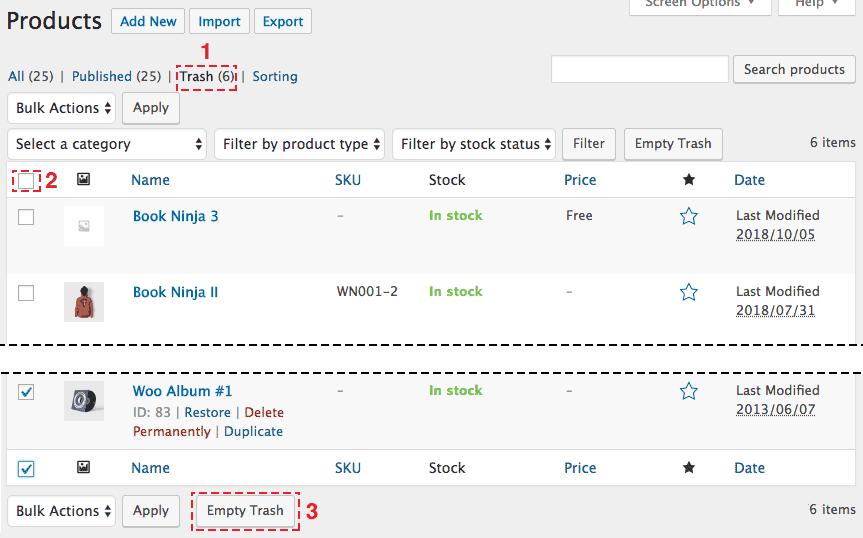
This way everything is secure as you can restore any product added to trash. If you restore a product, you will have to set its status to published (restored products get a "draft" status)




 已为社区贡献1260条内容

所有评论(0)