【ElementUI如何上传文件夹】
项目用的Vue3+ElementUI+TS,要实现一个上传文件夹的功能。官网的Element-plus目前没有上传文件夹的功能,虽然支持上传多个文件,但是项目要求要带相对路径,所以需要做一个上传文件夹的功能。
·
项目场景/问题描述:
项目用的Vue3+ElementUI+TS,要实现一个上传文件夹的功能。官网的Element-plus目前没有上传文件夹的功能,虽然支持上传多个文件,但是项目要求要带相对路径,所以需要做一个上传文件夹的功能。
原因分析:
原生的input表单,可以通过配置webkitdirectory 来实现文件夹上传功能。
因此,我有两种解决方案。
解决方案:
方案一 :定位到input元素,然后选中它并给它增加webkitdirectory 属性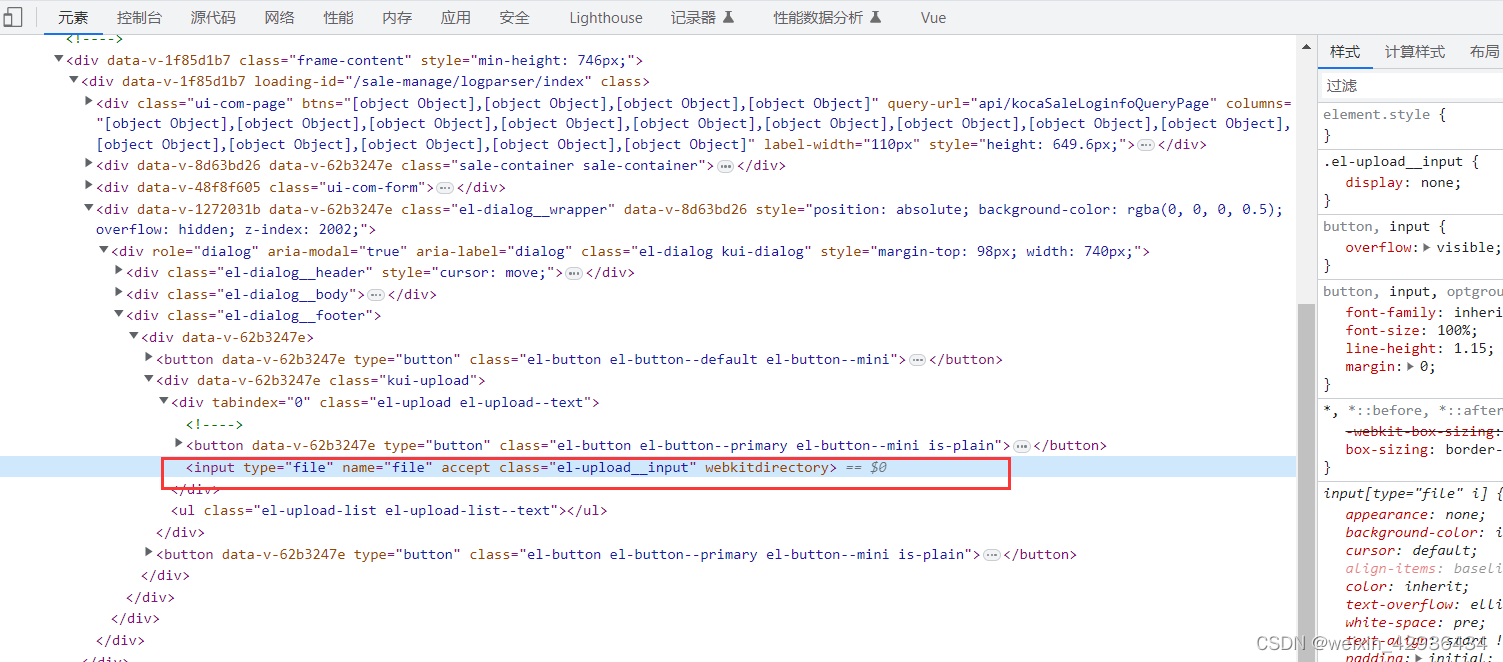
代码如下:
this.$nextTick(() => {
      const Ele = document.querySelector(".el-upload__input");
      Ele["webkitdirectory"] = true;
});
方案二:使用原生的标签写
dom元素:
<el-button @click="onAddFolder">上传文件夹</el-button>
js部分:
 onAddFolder() {
    const input = document.createElement("input");
    // input["style"] = "background: rgba(255, 255, 255, 0);overflow: hidden;position: fixed;width: 1px;height: 1px;z-index: -1;opacity: 0;";
    input.type = "file";
    input.setAttribute("allowdirs", "true");
    input.setAttribute("directory", "true");
    input.setAttribute("webkitdirectory", "true");
    input.multiple = true;
    document.querySelector("body").appendChild(input);
    // todo 这里增加了input标签,可以给它删掉
    input.click();
    const _this = this;
    input.onchange = async function(e) {
      const formData = new FormData();
      const file = e.target["files"];
      for (let i = 0; i < file.length; i++) {
        formData.append("files", file[i], file[i].webkitRelativePath);
      }
      const { msg } = await _this.$http.post("file/upload", formData);
      _this.$message.success(msg);
      // document.querySelector("body").removeChild(input);
   };
}

Vue社区为您提供最前沿的新闻资讯和知识内容
更多推荐



 4
4 0
0- 0


 已为社区贡献5条内容

所有评论(0)