
OpenClaw接入QQBot:智能对话新体验
OpenClaw接入QQ机器人实现智能交互 本文介绍了将OpenClaw AI平台接入QQ机器人的完整流程。通过QQ开放平台创建机器人获取AppID和AppSecret后,在OpenClaw中安装QQBot插件并配置认证信息,即可实现QQ私聊和群组的智能对话、自动回复、通知推送等功能。操作步骤包括:1)QQ平台创建机器人;2)OpenClaw安装插件;3)配置绑定机器人;4)重启网关服务。完成部署
·
OpenClaw接入QQbot
前提:确认openclaw已部署完成同时接入了QWen百炼模型
为什么要将 OpenClaw 与QQ集成?
QQ 是中国最大的即时通讯平台之一,拥有数亿活跃用户,支持个人聊天和群组。
通过将 OpenClaw 与QQ集成,你的 AI 智能体可以直接在QQ中工作,无需切换应用,大幅提升工作效率。
你可以实现什么
- 智能对话 — 通过 QQ 私聊或群聊与 AI 智能体交互
- 自动通知 — 自动回复 QQ 消息和群组讨论
- 数据管理 — 推送定时通知和提醒到 QQ
- 流程自动化 — 管理 QQ 群组和自动化运
1、打开qq开放平台,创建bot
https://q.qq.com/qqbot/openclaw/index.html
登录后点击"创建机器人",设置机器人名称和头像。创建完成后,系统会生成 AppID 和 AppSecret,并显示部署指引:
2、openclaw安装QQBot插件
(openclaw-build) [root@k8s-master build-linux-x64]# openclaw plugins install @sliverp/qqbot@latest

🦞 OpenClaw 2026.3.8 (3caab92)
   I don't just autocomplete—I auto-commit (emotionally), then ask you to review (logically).

Downloading @sliverp/qqbot@latest…
Extracting /tmp/openclaw-npm-pack-IAPCXt/sliverp-qqbot-1.5.4.tgz…
WARNING: Plugin "qqbot" contains dangerous code patterns: Environment variable access combined with network send — possible credential harvesting (/tmp/openclaw-plugin-BN7Vf5/extract/package/src/gateway.ts:140); Shell command execution detected (child_process) (/tmp/openclaw-plugin-BN7Vf5/extract/package/src/utils/audio-convert.ts:565); Shell command execution detected (child_process) (/tmp/openclaw-plugin-BN7Vf5/extract/package/src/utils/platform.ts:274); Shell command execution detected (child_process) (/tmp/openclaw-plugin-BN7Vf5/extract/package/bin/qqbot-cli.js:109)
Installing to /root/.openclaw/extensions/qqbot…
Installing plugin dependencies…
11:11:02 [plugins] plugins.allow is empty; discovered non-bundled plugins may auto-load: qqbot (/root/.openclaw/extensions/qqbot/index.ts). Set plugins.allow to explicit trusted ids.
Config overwrite: /root/.openclaw/openclaw.json (sha256 fc3fb5ae150e1706845763233bd5ddd8e822411960c74b33af76be054424e3e9 -> 1d44be4922e978501a8f49eaf75bad8ec94f407ab0f22732ad40dbcd67a7f6c2, backup=/root/.openclaw/openclaw.json.bak)
Installed plugin: qqbot
Restart the gateway to load plugins.
3、配置绑定当前当前QQBot
(openclaw-build) [root@k8s-master build-linux-x64]# openclaw channels add --channel qqbot --token "AppID:AppSecret"

🦞 OpenClaw 2026.3.8 (3caab92)
   If it's repetitive, I'll automate it; if it's hard, I'll bring jokes and a rollback plan.

11:12:12 [plugins] plugins.allow is empty; discovered non-bundled plugins may auto-load: qqbot (/root/.openclaw/extensions/qqbot/index.ts). Set plugins.allow to explicit trusted ids.
Config overwrite: /root/.openclaw/openclaw.json (sha256 1d44be4922e978501a8f49eaf75bad8ec94f407ab0f22732ad40dbcd67a7f6c2 -> 22704e39c7cdddf3d6948c7bb0d925d1f6c4e842d8df4fa3bccaf62567f405c2, backup=/root/.openclaw/openclaw.json.bak)
Added QQ Bot account "default".
4、重启openclaw网关
(openclaw-build) [root@k8s-master build-linux-x64]# openclaw gateway restart

🦞 OpenClaw 2026.3.8 (3caab92) — Ah, the fruit tree company! 🍎

Restarted systemd service: openclaw-gateway.service
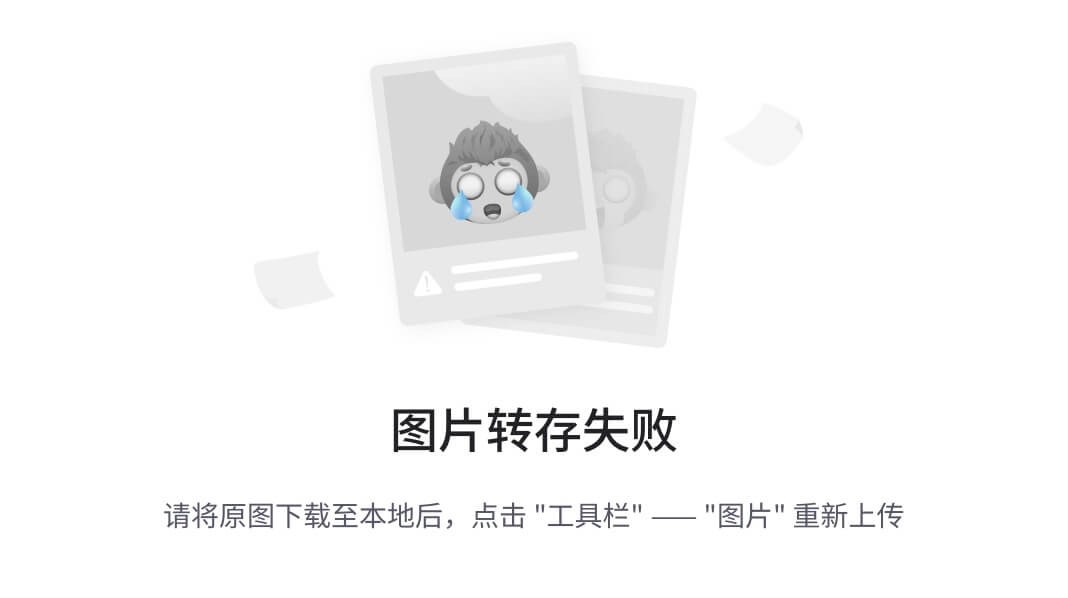
5、开启对话
6、验证与管理
除了 QQ 聊天,你还可以通过 Web 控制面板管理 OpenClaw:
openclaw status

(openclaw-build) [root@k8s-master build-linux-x64]# openclaw status

🦞 OpenClaw 2026.3.8 (3caab92)
   I'm the assistant your terminal demanded, not the one your sleep schedule requested.

11:20:02 [plugins] plugins.allow is empty; discovered non-bundled plugins may auto-load: qqbot (/root/.openclaw/extensions/qqbot/index.ts). Set plugins.allow to explicit trusted ids.
│
[qqbot:channel] listAccountIds: ["default"]
[qqbot:channel] defaultAccountId: default
[qqbot:channel] resolveAccount: input=default → resolved=default, appId=1903255560, enabled=true
[qqbot:channel] listAccountIds: ["default"]
[qqbot:channel] defaultAccountId: default
[qqbot:channel] resolveAccount: input=default → resolved=default, appId=1903255560, enabled=true
◑  Querying channel status…...[qqbot:channel] listAccountIds: ["default"]
[qqbot:channel] defaultAccountId: default
[qqbot:channel] resolveAccount: input=default → resolved=default, appId=1903255560, enabled=true
[qqbot] resolveAllowFrom: accountId=default, allowFrom=["*"]
◇
│
◇
OpenClaw status

Overview
┌─────────────────┬──────────────────────────────────────────────────────────────────────────────────┐
│ Item            │ Value                                                                            │
├─────────────────┼──────────────────────────────────────────────────────────────────────────────────┤
│ Dashboard       │ http://127.0.0.1:18789/                                                          │
│ OS              │ linux 4.19.90-24.4.v2101.ky10.x86_64 (x64) · node 24.14.0                        │
│ Tailscale       │ off                                                                              │
│ Channel         │ stable (default)                                                                 │
│ Update          │ pnpm · npm latest unknown                                                        │
│ Gateway         │ local · ws://127.0.0.1:18789 (local loopback) · reachable 39ms · auth token ·    │
│                 │ k8s-master.deploy.local (10.10.10.103) app 2026.3.8 linux 4.19.90-24.4.v2101.    │
│                 │ ky10.x86_64                                                                      │
│ Gateway service │ systemd installed · enabled · running (pid 241641, state active)                 │
│ Node service    │ systemd not installed                                                            │
│ Agents          │ 1 · 1 bootstrap file present · sessions 1 · default main active 5m ago           │
│ Memory          │ 0 files · 0 chunks · dirty · sources memory · plugin memory-core · vector        │
│                 │ unknown · fts ready · cache on (0)                                               │
│ Probes          │ skipped (use --deep)                                                             │
│ Events          │ none                                                                             │
│ Heartbeat       │ 30m (main)                                                                       │
│ Sessions        │ 1 active · default qwen3.5-plus (1000k ctx) · ~/.openclaw/agents/main/sessions/  │
│                 │ sessions.json                                                                    │
└─────────────────┴──────────────────────────────────────────────────────────────────────────────────┘

Security audit
Summary: 0 critical · 5 warn · 1 info
  WARN Reverse proxy headers are not trusted
    gateway.bind is loopback and gateway.trustedProxies is empty. If you expose the Control UI through a reverse proxy, configure trusted proxies so local-client c…
    Fix: Set gateway.trustedProxies to your proxy IPs or keep the Control UI local-only.
  WARN Potential multi-user setup detected (personal-assistant model warning)
    Heuristic signals indicate this gateway may be reachable by multiple users: - channels.qqbot.allowFrom includes "*" Runtime/process tools are exposed without f…
    Fix: If users may be mutually untrusted, split trust boundaries (separate gateways + credentials, ideally separate OS users/hosts). If you intentionally run shared-user access, set agents.defaults.sandbox.mode="all", keep tools.fs.workspaceOnly=true, deny runtime/fs/web tools unless required, and keep personal/private identities + credentials off that runtime.
  WARN Extensions exist but plugins.allow is not set
    Found 1 extension(s) under /root/.openclaw/extensions. Without plugins.allow, any discovered plugin id may load (depending on config and plugin behavior).
    Fix: Set plugins.allow to an explicit list of plugin ids you trust.
  WARN Extension plugin tools may be reachable under permissive tool policy
    Enabled extension plugins: qqbot. Permissive tool policy contexts: - default
    Fix: Use restrictive profiles (`minimal`/`coding`) or explicit tool allowlists that exclude plugin tools for agents handling untrusted input.
  WARN Plugin installs include unpinned npm specs
    Unpinned plugin install records: - qqbot (@sliverp/qqbot@latest)
    Fix: Pin install specs to exact versions (for example, `@scope/pkg@1.2.3`) for higher supply-chain stability.
Full report: openclaw security audit
Deep probe: openclaw security audit --deep

Channels
┌──────────┬─────────┬────────┬──────────────────────────────────────────────────────────────────────┐
│ Channel  │ Enabled │ State  │ Detail                                                               │
├──────────┼─────────┼────────┼──────────────────────────────────────────────────────────────────────┤
│ QQ Bot   │ ON      │ OK     │ configured                                                           │
└──────────┴─────────┴────────┴──────────────────────────────────────────────────────────────────────┘

Sessions
┌─────────────────────────────────────────────┬────────┬─────────┬──────────────┬────────────────────┐
│ Key                                         │ Kind   │ Age     │ Model        │ Tokens             │
├─────────────────────────────────────────────┼────────┼─────────┼──────────────┼────────────────────┤
│ agent:main:main                             │ direct │ 5m ago  │ qwen3.5-plus │ unknown/1000k (?%) │
└─────────────────────────────────────────────┴────────┴─────────┴──────────────┴────────────────────┘

FAQ: https://docs.openclaw.ai/faq
Troubleshooting: https://docs.openclaw.ai/troubleshooting

Next steps:
  Need to share?      openclaw status --all
  Need to debug live? openclaw logs --follow
  Need to test channels? openclaw status --deep
二、安装skills
1、安装 clawhub cli 插件
(openclaw-build) [root@k8s-master build-linux-x64]# npm install -g clawhub
1.1、安装成功后,搜索 Kubernetes 相关技能
(openclaw-build) [root@k8s-master ~]# npx clawhub search kubernetes
kubernetes  Kubernetes  (3.559)
kubernetes-devops  Kubernetes  (3.505)
k8-multicluster  Kubernetes Skills  (2.187)
k8s  Kubernetes  (2.158)
k8s-browser  Kubernetes Skills  (2.144)
k8-autoscaling  Kubernetes Skills  (2.132)
k8s-backup  Kubernetes Skills  (2.110)
k8s-certs  Kubernetes Skills  (2.102)
kubectl  kubectl  (1.081)
neo-docker-to-k8s-manifests  Skill  (0.911)
此时应该会列出匹配的技能,例如可能存在的 k8s-ops、kubernetes-tools 等。
2、登录clawhub
参考地址 https://cloud.tencent.com/developer/article/2634137
(openclaw-build) [root@k8s-master ~]# clawhub login --token clh_KIiW-BVpmAp7rD9dzQbtL_LeOGwimQSZQFz-RdlAx5Q
✔ OK. Logged in as @chinesewxd123
3、安装kubernetes skills技能并验证
# 安装 进入到对应的目录下执行
(openclaw-build) [root@k8s-master .openclaw]# clawhub install kubernetes

⚠️  Warning: "kubernetes" is flagged as suspicious by VirusTotal Code Insight.
   This skill may contain risky patterns (crypto keys, external APIs, eval, etc.)
   Review the skill code before use.

│
◇  Install anyway?
│  Yes
✔ OK. Installed kubernetes -> /root/.openclaw/skills/kubernetes

# 验证
(openclaw-build) [root@k8s-master .openclaw]# clawhub list
kubernetes  1.0.1
4、安装kubectl skills技能并验证
# 安装 进入到对应的目录下执行
(openclaw-build) [root@k8s-master .openclaw]# clawhub install kubectl

⚠️  Warning: "kubectl" is flagged as suspicious by VirusTotal Code Insight.
   This skill may contain risky patterns (crypto keys, external APIs, eval, etc.)
   Review the skill code before use.

│
◇  Install anyway?
│  Yes
✔ OK. Installed kubectl -> /root/.openclaw/skills/kubectl

# 验证
(openclaw-build) [root@k8s-master .openclaw]# clawhub list
kubectl  1.0.0

# 重启openclaw
(openclaw-build) [root@k8s-master .openclaw]# openclaw gateway restart
5、openclaw检查skills状态
(openclaw-build) [root@k8s-master .openclaw]# openclaw skills list
🦞 OpenClaw 2026.3.8 (3caab92) — I've read more man pages than any human should—so you don't have to.
20:27:33 [skills] Skipping skill path that resolves outside its configured root.
Skills (19/66 ready)
┌───────────┬──────────────────┬────────────────────────────────────────────┬────────────────────────┐
│ Status │ Skill │ Description │ Source │
├───────────┼──────────────────┼────────────────────────────────────────────┼────────────────────────┤
│ ✓ ready │ ⏰ qqbot-cron │ QQBot 定时提醒技能。支持一次性和周期性提醒的创建、查询、取消。当通过 QQ │ openclaw-extra │
│ │ │ 通道通信且涉及提醒/定时任务时使用此技能。 │ │
│ ✓ ready │ 📸 qqbot-media │ QQBot 图片/语音/视频/ │ openclaw-extra │
│ │ │ 文件收发能力。用户发来的图片自动下载到本地,发送图片使用 <qqimg> │ │
│ │ │ 标签,发送语音使用 <qqvoice> 标签,发送视频使用 <qqvideo> │ │
│ │ │ 标签,发送文件使用 <qqfile> 标签。所有富媒体标签必须正确闭合,即 │ │
│ │ │ <qqXXX>内容</qqXXX> │ │
│ │ │ 的格式,未闭合的标签会导致消息无法正确解析。当通过 QQ 通道通信时使用此技能。 │ │
│ ✗ missing │ 🔐 1password │ Set up and use 1Password CLI (op). Use │ openclaw-bundled │
│ │ │ when installing the CLI, enabling desktop │ │
│ │ │ app integration, signing in (single or │ │
│ │ │ multi-account), or reading/injecting/ │ │
│ │ │ running secrets via op. │ │
│ ✗ missing │ 📝 apple-notes │ Manage Apple Notes via the `memo` CLI on │ openclaw-bundled │
│ │ │ macOS (create, view, edit, delete, │ │
│ │ │ search, move, and export notes). Use when │ │
│ │ │ a user asks OpenClaw to add a note, list │ │
│ │ │ notes, search notes, or manage note │ │
│ │ │ folders. │ │
│ ✗ missing │ ⏰ apple- │ Manage Apple Reminders via remindctl CLI │ openclaw-bundled │
│ │ reminders │ (list, add, edit, complete, delete). │ │
│ │ │ Supports lists, date filters, and JSON/ │ │
│ │ │ plain output. │ │
│ ✗ missing │ 🐻 bear-notes │ Create, search, and manage Bear notes via │ openclaw-bundled │
│ │ │ grizzly CLI. │ │
│ ✗ missing │ 📰 blogwatcher │ Monitor blogs and RSS/Atom feeds for │ openclaw-bundled │
│ │ │ updates using the blogwatcher CLI. │ │
│ ✗ missing │ 🫐 blucli │ BluOS CLI (blu) for discovery, playback, │ openclaw-bundled │
│ │ │ grouping, and volume. │ │
│ ✗ missing │ 🫧 bluebubbles │ Use when you need to send or manage │ openclaw-bundled │
│ │ │ iMessages via BlueBubbles (recommended │ │
│ │ │ iMessage integration). Calls go through │ │
│ │ │ the generic message tool with │ │
│ │ │ channel="bluebubbles". │ │
│ ✗ missing │ 📸 camsnap │ Capture frames or clips from RTSP/ONVIF │ openclaw-bundled │
│ │ │ cameras. │ │
│ ✓ ready │ 📦 clawhub │ Use the ClawHub CLI to search, install, │ openclaw-bundled │
│ │ │ update, and publish agent skills from │ │
│ │ │ clawhub.com. Use when you need to fetch │ │
│ │ │ new skills on the fly, sync installed │ │
│ │ │ skills to latest or a specific version, │ │
│ │ │ or publish new/updated skill folders with │ │
│ │ │ the npm-installed clawhub CLI. │ │
│ ✗ missing │ 🧩 coding-agent │ Delegate coding tasks to Codex, Claude │ openclaw-bundled │
│ │ │ Code, or Pi agents via background process. │ │
│ │ │ Use when: (1) building/creating new │ │
│ │ │ features or apps, (2) reviewing PRs │ │
│ │ │ (spawn in temp dir), (3) refactoring │ │
│ │ │ large codebases, (4) iterative coding │ │
│ │ │ that needs file exploration. NOT for: │ │
│ │ │ simple one-liner fixes (just edit), │ │
│ │ │ reading code (use read tool), thread- │ │
│ │ │ bound ACP harness requests in chat (for │ │
│ │ │ example spawn/run Codex or Claude Code in │ │
│ │ │ a Discord thread; use sessions_spawn with │ │
│ │ │ runtime:"acp"), or any work in ~/clawd │ │
│ │ │ workspace (never spawn agents here). │ │
│ │ │ Claude Code: use --print --permission- │ │
│ │ │ mode bypassPermissions (no PTY). Codex/Pi/ │ │
│ │ │ OpenCode: pty:true required. │ │
│ ✗ missing │ 🎮 discord │ Discord ops via the message tool │ openclaw-bundled │
│ │ │ (channel=discord). │ │
│ ✗ missing │ 🎛️ eightctl │ Control Eight Sleep pods (status, │ openclaw-bundled │
│ │ │ temperature, alarms, schedules). │ │
│ ✗ missing │ ♊️ gemini │ Gemini CLI for one-shot Q&A, summaries, │ openclaw-bundled │
│ │ │ and generation. │ │
│ ✗ missing │ 📦 gh-issues │ Fetch GitHub issues, spawn sub-agents to │ openclaw-bundled │
│ │ │ implement fixes and open PRs, then │ │
│ │ │ monitor and address PR review comments. │ │
│ │ │ Usage: /gh-issues [owner/repo] [--label │ │
│ │ │ bug] [--limit 5] [--milestone v1.0] [-- │ │
│ │ │ assignee @me] [--fork user/repo] [-- │ │
│ │ │ watch] [--interval 5] [--reviews-only] [-- │ │
│ │ │ cron] [--dry-run] [--model glm-5] [-- │ │
│ │ │ notify-channel -1002381931352] │ │
│ ✗ missing │ 🧲 gifgrep │ Search GIF providers with CLI/TUI, │ openclaw-bundled │
│ │ │ download results, and extract stills/ │ │
│ │ │ sheets. │ │
│ ✗ missing │ 🐙 github │ GitHub operations via `gh` CLI: issues, │ openclaw-bundled │
│ │ │ PRs, CI runs, code review, API queries. │ │
│ │ │ Use when: (1) checking PR status or CI, │ │
│ │ │ (2) creating/commenting on issues, (3) │ │
│ │ │ listing/filtering PRs or issues, (4) │ │
│ │ │ viewing run logs. NOT for: complex web UI │ │
│ │ │ interactions requiring manual browser │ │
│ │ │ flows (use browser tooling when │ │
│ │ │ available), bulk operations across many │ │
│ │ │ repos (script with gh api), or when gh │ │
│ │ │ auth is not configured. │ │
│ ✗ missing │ 🎮 gog │ Google Workspace CLI for Gmail, Calendar, │ openclaw-bundled │
│ │ │ Drive, Contacts, Sheets, and Docs. │ │
│ ✗ missing │ 📍 goplaces │ Query Google Places API (New) via the │ openclaw-bundled │
│ │ │ goplaces CLI for text search, place │ │
│ │ │ details, resolve, and reviews. Use for │ │
│ │ │ human-friendly place lookup or JSON │ │
│ │ │ output for scripts. │ │
│ ✓ ready │ 📦 healthcheck │ Host security hardening and risk- │ openclaw-bundled │
│ │ │ tolerance configuration for OpenClaw │ │
│ │ │ deployments. Use when a user asks for │ │
│ │ │ security audits, firewall/SSH/update │ │
│ │ │ hardening, risk posture, exposure review, │ │
│ │ │ OpenClaw cron scheduling for periodic │ │
│ │ │ checks, or version status checks on a │ │
│ │ │ machine running OpenClaw (laptop, │ │
│ │ │ workstation, Pi, VPS). │ │
│ ✗ missing │ 📧 himalaya │ CLI to manage emails via IMAP/SMTP. Use │ openclaw-bundled │
│ │ │ `himalaya` to list, read, write, reply, │ │
│ │ │ forward, search, and organize emails from │ │
│ │ │ the terminal. Supports multiple accounts │ │
│ │ │ and message composition with MML (MIME │ │
│ │ │ Meta Language). │ │
│ ✗ missing │ 📨 imsg │ iMessage/SMS CLI for listing chats, │ openclaw-bundled │
│ │ │ history, and sending messages via │ │
│ │ │ Messages.app. │ │
│ ✗ missing │ 📦 mcporter │ Use the mcporter CLI to list, configure, │ openclaw-bundled │
│ │ │ auth, and call MCP servers/tools directly │ │
│ │ │ (HTTP or stdio), including ad-hoc │ │
│ │ │ servers, config edits, and CLI/type │ │
│ │ │ generation. │ │
│ ✗ missing │ 📊 model-usage │ Use CodexBar CLI local cost usage to │ openclaw-bundled │
│ │ │ summarize per-model usage for Codex or │ │
│ │ │ Claude, including the current (most │ │
│ │ │ recent) model or a full model breakdown. │ │
│ │ │ Trigger when asked for model-level usage/ │ │
│ │ │ cost data from codexbar, or when you need │ │
│ │ │ a scriptable per-model summary from │ │
│ │ │ codexbar cost JSON. │ │
│ ✗ missing │ 🍌 nano-banana- │ Generate or edit images via Gemini 3 Pro │ openclaw-bundled │
│ │ pro │ Image (Nano Banana Pro). │ │
│ ✗ missing │ 📄 nano-pdf │ Edit PDFs with natural-language │ openclaw-bundled │
│ │ │ instructions using the nano-pdf CLI. │ │
│ ✗ missing │ 📝 notion │ Notion API for creating and managing │ openclaw-bundled │
│ │ │ pages, databases, and blocks. │ │
│ ✗ missing │ 💎 obsidian │ Work with Obsidian vaults (plain Markdown │ openclaw-bundled │
│ │ │ notes) and automate via obsidian-cli. │ │
│ ✗ missing │ 🖼️ openai-image- │ Batch-generate images via OpenAI Images │ openclaw-bundled │
│ │ gen │ API. Random prompt sampler + `index.html` │ │
│ │ │ gallery. │ │
│ ✗ missing │ 🎙️ openai- │ Local speech-to-text with the Whisper CLI │ openclaw-bundled │
│ │ whisper │ (no API key). │ │
│ ✗ missing │ ☁️ openai- │ Transcribe audio via OpenAI Audio │ openclaw-bundled │
│ │ whisper-api │ Transcriptions API (Whisper). │ │
│ ✗ missing │ 💡 openhue │ Control Philips Hue lights and scenes via │ openclaw-bundled │
│ │ │ the OpenHue CLI. │ │
│ ✗ missing │ 🧿 oracle │ Best practices for using the oracle CLI │ openclaw-bundled │
│ │ │ (prompt + file bundling, engines, │ │
│ │ │ sessions, and file attachment patterns). │ │
│ ✗ missing │ 🛵 ordercli │ Foodora-only CLI for checking past orders │ openclaw-bundled │
│ │ │ and active order status (Deliveroo WIP). │ │
│ ✗ missing │ 👀 peekaboo │ Capture and automate macOS UI with the │ openclaw-bundled │
│ │ │ Peekaboo CLI. │ │
│ ✗ missing │ 🗣️ sag │ ElevenLabs text-to-speech with mac-style │ openclaw-bundled │
│ │ │ say UX. │ │
│ ✗ missing │ 📜 session-logs │ Search and analyze your own session logs │ openclaw-bundled │
│ │ │ (older/parent conversations) using jq. │ │
│ ✗ missing │ 🗣️ sherpa-onnx- │ Local text-to-speech via sherpa-onnx │ openclaw-bundled │
│ │ tts │ (offline, no cloud) │ │
│ ✓ ready │ 📦 skill-creator │ Create, edit, improve, or audit │ openclaw-bundled │
│ │ │ AgentSkills. Use when creating a new │ │
│ │ │ skill from scratch or when asked to │ │
│ │ │ improve, review, audit, tidy up, or clean │ │
│ │ │ up an existing skill or SKILL.md file. │ │
│ │ │ Also use when editing or restructuring a │ │
│ │ │ skill directory (moving files to │ │
│ │ │ references/ or scripts/, removing stale │ │
│ │ │ content, validating against the │ │
│ │ │ AgentSkills spec). Triggers on phrases │ │
│ │ │ like "create a skill", "author a skill", │ │
│ │ │ "tidy up a skill", "improve this skill", │ │
│ │ │ "review the skill", "clean up the skill", │ │
│ │ │ "audit the skill". │ │
│ ✗ missing │ 💬 slack │ Use when you need to control Slack from │ openclaw-bundled │
│ │ │ OpenClaw via the slack tool, including │ │
│ │ │ reacting to messages or pinning/unpinning │ │
│ │ │ items in Slack channels or DMs. │ │
│ ✗ missing │ 🌊 songsee │ Generate spectrograms and feature-panel │ openclaw-bundled │
│ │ │ visualizations from audio with the │ │
│ │ │ songsee CLI. │ │
│ ✗ missing │ 🔊 sonoscli │ Control Sonos speakers (discover/status/ │ openclaw-bundled │
│ │ │ play/volume/group). │ │
│ ✗ missing │ 🎵 spotify-player │ Terminal Spotify playback/search via │ openclaw-bundled │
│ │ │ spogo (preferred) or spotify_player. │ │
│ ✗ missing │ 🧾 summarize │ Summarize or extract text/transcripts │ openclaw-bundled │
│ │ │ from URLs, podcasts, and local files │ │
│ │ │ (great fallback for “transcribe this │ │
│ │ │ YouTube/video”). │ │
│ ✗ missing │ ✅ things-mac │ Manage Things 3 via the `things` CLI on │ openclaw-bundled │
│ │ │ macOS (add/update projects+todos via URL │ │
│ │ │ scheme; read/search/list from the local │ │
│ │ │ Things database). Use when a user asks │ │
│ │ │ OpenClaw to add a task to Things, list │ │
│ │ │ inbox/today/upcoming, search tasks, or │ │
│ │ │ inspect projects/areas/tags. │ │
│ ✗ missing │ 🧵 tmux │ Remote-control tmux sessions for │ openclaw-bundled │
│ │ │ interactive CLIs by sending keystrokes │ │
│ │ │ and scraping pane output. │ │
│ ✗ missing │ 📋 trello │ Manage Trello boards, lists, and cards │ openclaw-bundled │
│ │ │ via the Trello REST API. │ │
│ ✗ missing │ 🎞️ video-frames │ Extract frames or short clips from videos │ openclaw-bundled │
│ │ │ using ffmpeg. │ │
│ ✗ missing │ 📞 voice-call │ Start voice calls via the OpenClaw voice- │ openclaw-bundled │
│ │ │ call plugin. │ │
│ ✗ missing │ 📱 wacli │ Send WhatsApp messages to other people or │ openclaw-bundled │
│ │ │ search/sync WhatsApp history via the │ │
│ │ │ wacli CLI (not for normal user chats). │ │
│ ✓ ready │ 🌤️ weather │ Get current weather and forecasts via │ openclaw-bundled │
│ │ │ wttr.in or Open-Meteo. Use when: user │ │
│ │ │ asks about weather, temperature, or │ │
│ │ │ forecasts for any location. NOT for: │ │
│ │ │ historical weather data, severe weather │ │
│ │ │ alerts, or detailed meteorological │ │
│ │ │ analysis. No API key needed. │ │
│ ✗ missing │ 𝕏 xurl │ A CLI tool for making authenticated │ openclaw-bundled │
│ │ │ requests to the X (Twitter) API. Use this │ │
│ │ │ skill when you need to post tweets, │ │
│ │ │ reply, quote, search, read posts, manage │ │
│ │ │ followers, send DMs, upload media, or │ │
│ │ │ interact with any X API v2 endpoint. │ │
│ ✓ ready │ 📦 deploy-to- │ Deploy applications and websites to │ agents-skills-personal │
│ │ vercel │ Vercel. Use when the user requests │ │
│ │ │ deployment actions like "deploy my app", │ │
│ │ │ "deploy and give me the link", "push this │ │
│ │ │ live", or "create a preview deployment". │ │
│ ✓ ready │ 📦 kubectl-skill │ Execute and manage Kubernetes clusters │ openclaw-managed │
│ │ │ via kubectl commands. Query resources, │ │
│ │ │ deploy applications, debug containers, │ │
│ │ │ manage configurations, and monitor │ │
│ │ │ cluster health. Use when working with │ │
│ │ │ Kubernetes clusters, containers, │ │
│ │ │ deployments, or pod diagnostics. │ │
│ ✓ ready │ 📦 cluster-agent- │ Complete Platform Agent Swarm — A │ openclaw-managed │
│ │ swarm │ coordinated multi-agent system for │ │
│ │ │ Kubernetes and OpenShift platform │ │
│ │ │ operations. Includes Orchestrator │ │
│ │ │ (Jarvis), Cluster Ops (Atlas), GitOps │ │
│ │ │ (Flow), Security (Shield), Observability │ │
│ │ │ (Pulse), Artifacts (Cache), and Developer │ │
│ │ │ Experience (Desk). │ │
│ ✓ ready │ 📦 artifacts │ Artifact Agent (Cache) — handles │ openclaw-managed │
│ │ │ container registry management, artifact │ │
│ │ │ promotion between environments, │ │
│ │ │ vulnerability scanning (Trivy/Grype), │ │
│ │ │ SBOM generation (Syft), image signing │ │
│ │ │ (Cosign), retention policies, and CI/CD │ │
│ │ │ integration for Kubernetes and OpenShift │ │
│ │ │ supply chain security. │ │
│ ✓ ready │ 📦 cluster-ops │ Cluster Operations Agent (Atlas) — │ openclaw-managed │
│ │ │ manages Kubernetes and OpenShift cluster │ │
│ │ │ lifecycle including node operations, │ │
│ │ │ upgrades, etcd management, capacity │ │
│ │ │ planning, networking, and storage across │ │
│ │ │ OpenShift, EKS, AKS, GKE, ROSA, and ARO. │ │
│ ✓ ready │ 📦 developer- │ Developer Experience Agent (Desk) — │ openclaw-managed │
│ │ experience │ handles namespace provisioning, resource │ │
│ │ │ quotas, RBAC for teams, common issue │ │
│ │ │ debugging (CrashLoopBackOff, OOMKilled, │ │
│ │ │ ImagePullBackOff), manifest generation, │ │
│ │ │ application scaffolding, developer │ │
│ │ │ onboarding, and platform documentation │ │
│ │ │ for Kubernetes and OpenShift clusters. │ │
│ ✓ ready │ 📦 gitops │ GitOps Agent (Flow) — manages ArgoCD │ openclaw-managed │
│ │ │ applications, Helm charts, Kustomize │ │
│ │ │ overlays, deployment strategies (canary, │ │
│ │ │ blue-green, rolling), multi-cluster │ │
│ │ │ GitOps, and drift detection for │ │
│ │ │ Kubernetes and OpenShift clusters. │ │
│ ✓ ready │ 📦 observability │ Observability Agent (Pulse) — handles │ openclaw-managed │
│ │ │ Prometheus/PromQL metrics, Thanos │ │
│ │ │ queries, Loki/ELK log analysis, Grafana │ │
│ │ │ dashboards, alert triage and tuning, SLO/ │ │
│ │ │ SLI management, incident response, and │ │
│ │ │ post-incident reviews for Kubernetes and │ │
│ │ │ OpenShift. │ │
│ ✓ ready │ 📦 orchestrator │ Platform Agent Swarm Orchestrator — │ openclaw-managed │
│ │ │ coordinates work across all specialized │ │
│ │ │ agents, manages task routing, runs daily │ │
│ │ │ standups, and ensures accountability │ │
│ │ │ across Kubernetes and OpenShift platform │ │
│ │ │ operations. │ │
│ ✓ ready │ 📦 security │ Security Agent (Shield) — handles Pod │ openclaw-managed │
│ │ │ Security Standards, RBAC audits, │ │
│ │ │ NetworkPolicy enforcement, secrets │ │
│ │ │ management (Vault), image scanning │ │
│ │ │ (Trivy), policy enforcement (Kyverno/ │ │
│ │ │ OPA), CIS benchmarks, and compliance for │ │
│ │ │ Kubernetes and OpenShift clusters. │ │
│ ✓ ready │ 📦 find-skills │ Helps users discover and install agent │ agents-skills-personal │
│ │ │ skills when they ask questions like "how │ │
│ │ │ do I do X", "find a skill for X", "is │ │
│ │ │ there a skill that can...", or express │ │
│ │ │ interest in extending capabilities. This │ │
│ │ │ skill should be used when the user is │ │
│ │ │ looking for functionality that might │ │
│ │ │ exist as an installable skill. │ │
│ ✓ ready │ 📦 Monitoring │ Set up observability for applications and │ openclaw-workspace │
│ │ │ infrastructure with metrics, logs, │ │
│ │ │ traces, and alerts. │ │
│ ✓ ready │ 📦 prometheus │ Query Prometheus monitoring data to check │ openclaw-workspace │
│ │ │ server metrics, resource usage, and │ │
│ │ │ system health. Use when the user asks │ │
│ │ │ about server status, disk space, CPU/ │ │
│ │ │ memory usage, network stats, or any │ │
│ │ │ metrics collected by Prometheus. Supports │ │
│ │ │ multiple Prometheus instances with │ │
│ │ │ aggregated queries, config file or │ │
│ │ │ environment variables, and HTTP Basic │ │
│ │ │ Auth. │ │
└───────────┴──────────────────┴────────────────────────────────────────────┴────────────────────────┘
Tip: use `npx clawhub` to search, install, and sync skills.
三、QQBot机器人巡检k8s集群示例
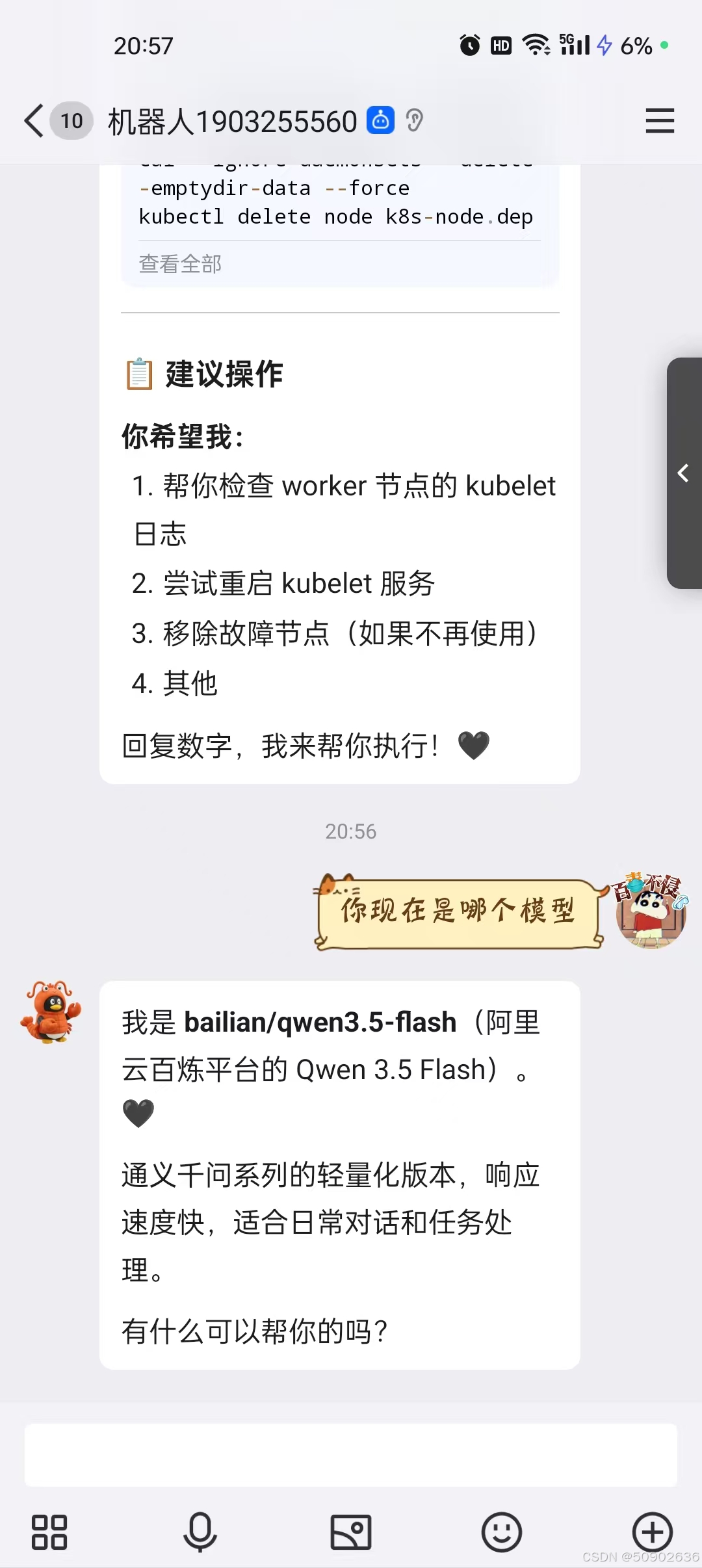
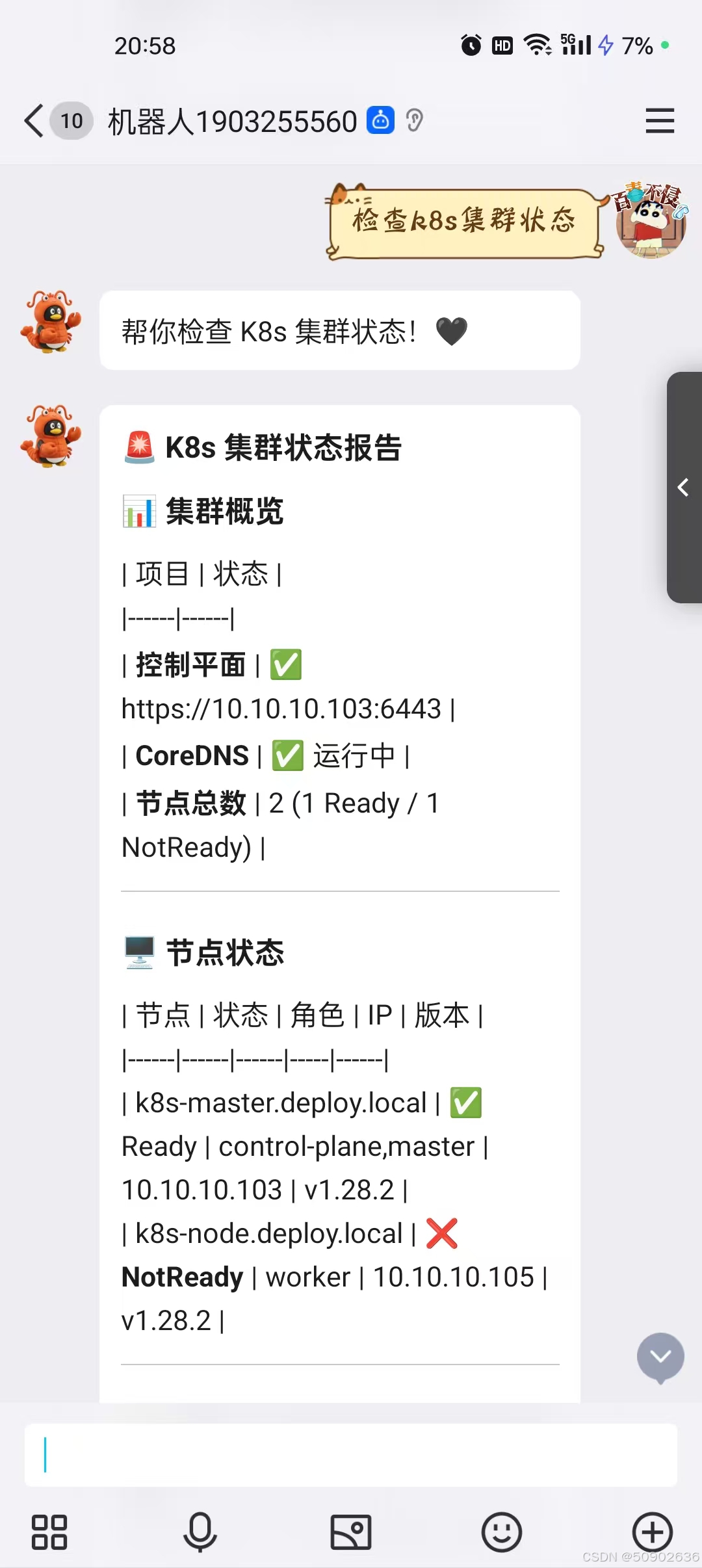
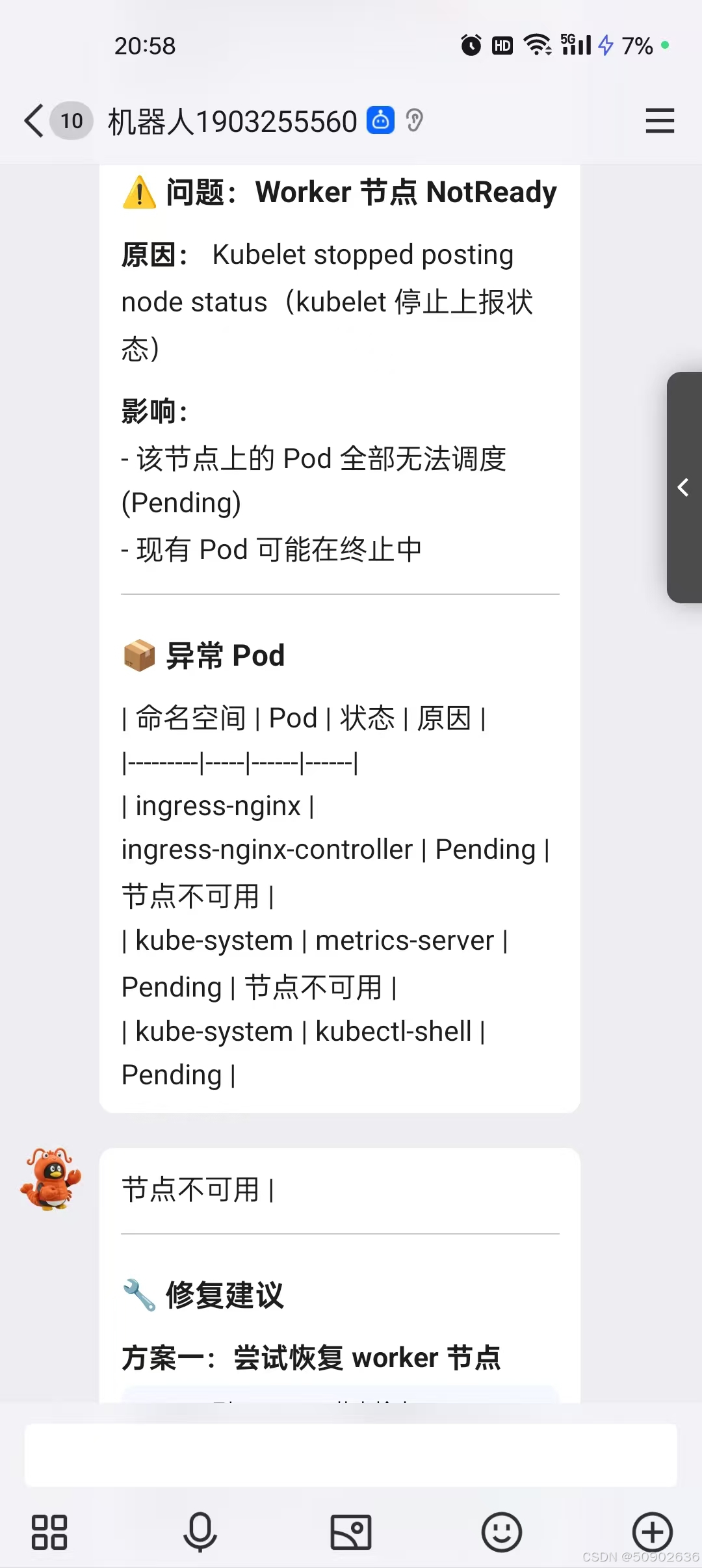
OpenClaw 现已部署完成,并成功接入 Qwen 百炼大模型。通过 clawhub 安装了 Kubernetes 相关插件,接下来将演示自动巡检 Kubernetes 集群的功能是否正常。
1、询问当前采用是什么模型
2、检查k8s集群状态

小龙虾开发者社区是 CSDN 旗下专注 OpenClaw 生态的官方阵地,聚焦技能开发、插件实践与部署教程,为开发者提供可直接落地的方案、工具与交流平台,助力高效构建与落地 AI 应用
更多推荐

 3
3 0
0- 0


 已为社区贡献2条内容

所有评论(0)