
更换 OpenClaw API Key 为 硅基流动 Siliconflow 的方式
·
参考硅基流动官方文档硅基流动-文档-场景示例-OpenClaw
第 1 步:准备好硅基流动 API
-
使用硅基流动注册链接该链接进行注册
-
进行实名认证
-
生成 API Key
-
确认以下信息
- 硅基流动 API Key (密钥)
- 以 sk- 开头的字符串。
- Base URL (接口地址)
- 地址: https://api.siliconflow.cn/v1
- 重要: 务必包含末尾的 /v1
- 模型名称
- 请在硅基流动模型广场复制完整模型名称,如:deepseek-ai/DeepSeek-V3
- 硅基流动 API Key (密钥)
第 2 步:修改模型
方法一:使用命令行
- baseUrl :保持默认
- apiKey:使用自己的 API Key,sk 开头的
- id: 修改为你需要的模型,从模型广场上复制
- name: 自定义即可,一般是 id 的最后一段
openclaw config set 'models.providers.siliconflow' --json '{
  "baseUrl": "https://api.siliconflow.cn/v1",
  "apiKey": " 你的 API Key",
  "api": "openai-completions",
  "models": [
    { "id": "Pro/zai-org/GLM-5", "name": "GLM-5" },
    { "id": "Pro/MiniMaxAI/MiniMax-M2.5", "name": "MiniMax-M2.5" },
    { "id": "zai-org/GLM-4.6", "name": "GLM-4.6" },
  ]
}'
openclaw config set models.mode merge
openclaw models set siliconflow/Pro/zai-org/GLM-5
openclaw models set siliconflow/Pro/MiniMaxAI/MiniMax-M2.5
openclaw models set siliconflow/zai-org/GLM-4.6

openclaw gateway restart
方法二:修改配置文件
打开配置文件(~/.openclaw/openclaw.json)
修改前务必备份配置文件
将以下内容复制并合并到您的文件中(注意替换您的 API Key 和您需要的模型 id。 注:如果已经配置过自定义模型请从第三行开始合并到文件中。
"models": {
    "providers": {
      "siliconflow": {
        "baseUrl": "https://api.siliconflow.cn/v1",
        "apiKey": "您的_SILICONFLOW_API_KEY",
        "api": "openai-completions",
        "models": [
          {
            "id": "zai-org/GLM-4.6",
            "name": "GLM-4.6",
            "reasoning": false,
            "input": [
              "text"
            ],
            "cost": {
              "input": 0,
              "output": 0,
              "cacheRead": 0,
              "cacheWrite": 0
            },
            "contextWindow": 200000,
            "maxTokens": 8192
          }
        ]
      },
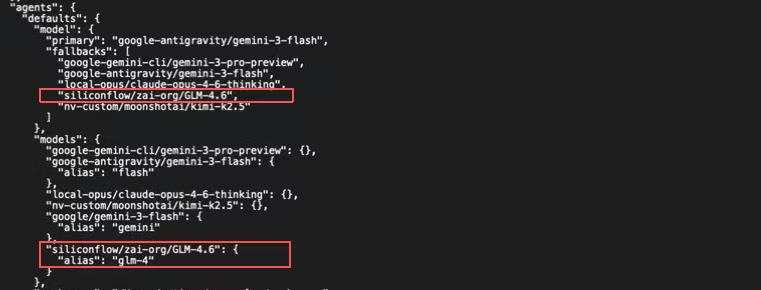
将以下内容合并到 openclaw.json 中的 agents 配置项中(如下图)。
siliconflow/zai-org/GLM-4.6 中的模型模型 id 需与您上一步配置的模型 id 保持一致,建议先将模型配置到:fallbacks 中,以避免模型配置不正确而导致错误。
在终端输入 openclaw models list 就可以看到您配置的 siliconflow 模型。

小龙虾开发者社区是 CSDN 旗下专注 OpenClaw 生态的官方阵地,聚焦技能开发、插件实践与部署教程,为开发者提供可直接落地的方案、工具与交流平台,助力高效构建与落地 AI 应用
更多推荐

 6
6 0
0- 0


 已为社区贡献3条内容

所有评论(0)