vscode报错 :无法打开源文件 #include“ros/ros.h“
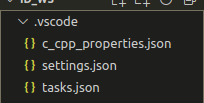
这种情况一般是vscode里面自己生成的.vscode文件夹里面的c_cpp_properties.json没有配置好修改c_cpp_properties.json即可解决问题{"configurations": [{"browse": {"databaseFilename": "","limitSymbolsToIncludedHeaders": true},"includePath": [
·
这种情况一般是vscode里面自己生成的.vscode文件夹里面的c_cpp_properties.json没有配置好
"
修改c_cpp_properties.json即可解决问题
一般是你的"includePath"那里,每次我们新增加功能包的时候,我们是需要去给它加路径的
比如,我现在新建立了一个叫做pub_and_sub的功能包,我就需要再去给它添加一个路径
{
  "configurations": [
    {
      "browse": {
        "databaseFilename": "",
        "limitSymbolsToIncludedHeaders": true
      },
      "includePath": [
        "/home/justin/id_ws/devel/include/**",
        "/opt/ros/melodic/include/**",
        "/home/justin/id_ws/src/identify_pkg/include/**",
        "/home/justin/id_ws/src/test_pkg/include/**",
        "/usr/include/**"
      ],
      "name": "ROS",
      "intelliSenseMode": "gcc-x64",
      "compilerPath": "/usr/bin/gcc",
      "cStandard": "c11",
      "cppStandard": "c++17"
    }
  ],
  "version": 4

以及注意下面那个部分,“name” :“ROS” 那部分。复制过去看看还有没有问题。

获得宣传、场地、资金和创业导师资源
更多推荐

 8
8 0
0- 0


 已为社区贡献1条内容

所有评论(0)