60分钟入门pytorch
1. Pytorch 是什么Pytorch 是一个基于 Python 的科学计算库,它面向以下两种人群:希望将其代替 Numpy 来利用 GPUs 的威力;一个可以提供更加灵活和快速的深度学习研究平台。1.1 安装略1.2 张量(Tensors)Pytorch 的一大作用就是可以代替 Numpy 库,所以首先介绍 Tensors ,也就是张量,它相当于 Numpy 的多维数组(nd...
1. Pytorch 是什么
Pytorch 是一个基于 Python 的科学计算库,它面向以下两种人群:
希望将其代替 Numpy 来利用 GPUs 的威力;
一个可以提供更加灵活和快速的深度学习研究平台。
1.1 安装
略
1.2 张量(Tensors)
Pytorch 的一大作用就是可以代替 Numpy 库,所以首先介绍 Tensors ,也就是张量,它相当于 Numpy 的多维数组(ndarrays)。两者的区别就是 Tensors 可以应用到 GPU 上加快计算速度。
首先导入必须的库,主要是 torch
from __future__ import print_function
import torch
1.2.1 声明和定义
首先是对 Tensors 的声明和定义方法,分别有以下几种:
torch.empty(): 声明一个未初始化的矩阵。
# 创建一个 5*3 的矩阵
x = torch.empty(5, 3)
print(x)
tensor([[-1.5295e+17,  6.0536e-43, -7.3276e-34],
        [ 6.0536e-43, -1.8921e+17,  6.0536e-43],
        [-7.3276e-34,  6.0536e-43, -1.5295e+17],
        [ 6.0536e-43, -4.4784e-38,  6.0536e-43],
        [-1.8921e+17,  6.0536e-43, -7.3277e-34]])
torch.rand():随机初始化一个矩阵
# 创建一个随机初始化的 5*3 矩阵
rand_x = torch.rand(5, 3)
print(rand_x)
tensor([[0.1696, 0.8806, 0.9775],
        [0.2274, 0.8217, 0.6517],
        [0.2400, 0.4360, 0.9738],
        [0.6987, 0.4369, 0.4041],
        [0.3466, 0.5234, 0.9666]])
torch.zeros():创建数值皆为 0 的矩阵
# 创建一个数值皆是 0,类型为 long 的矩阵
zero_x = torch.zeros(5, 3, dtype=torch.long)
print(zero_x)
tensor([[0, 0, 0],
        [0, 0, 0],
        [0, 0, 0],
        [0, 0, 0],
        [0, 0, 0]])
类似的也可以创建数值都是 1 的矩阵,调用 torch.ones
torch.tensor():直接传递 tensor 数值来创建
# tensor 数值是 [5.5, 3]
tensor1 = torch.tensor([5.5, 3])
print(tensor1)
#tensor0 = torch.tensor([[1,2],[3,4],[5,6]])
#print(tensor0)
tensor([5.5000, 3.0000])
除了上述几种方法,还可以根据已有的 tensor 变量创建新的 tensor 变量,这种做法的好处就是可以保留已有 tensor 的一些属性,包括尺寸大小、数值属性,除非是重新定义这些属性。相应的实现方法如下:
tensor.new_ones(row,cloumn,dtype):方法需要输入尺寸大小
# 显示定义新的尺寸是 5*3,数值类型是 torch.double
tensor2 = tensor1.new_ones(5, 3, dtype=torch.double)  # new_* 方法需要输入 tensor 大小
print(tensor2)
tensor([[1., 1., 1.],
        [1., 1., 1.],
        [1., 1., 1.],
        [1., 1., 1.],
        [1., 1., 1.]], dtype=torch.float64)
torch.randn_like(old_tensor):保留相同的尺寸大小
# 修改数值类型
tensor3 = torch.randn_like(tensor2, dtype=torch.float)
print('tensor3: ', tensor3)
tensor3:  tensor([[-1.0496, -0.9908, -0.4547],
        [ 0.6977, -0.9557, -0.8079],
        [ 0.3000,  2.5064,  2.8341],
        [ 1.6385,  0.3932, -1.0152],
        [-1.4500,  1.0717, -0.1984]])
输出结果,这里是根据上个方法声明的 tensor2 变量来声明新的变量,可以看出尺寸大小都是 5*3,但是数值类型是改变了的。
最后,对 tensors 的尺寸大小获取可以采用 tensor.size() 方法:
print(tensor3.size())
# 输出: torch.Size([5, 3])
torch.Size([5, 3])
注意: torch.Size 实际上是元组(tuple)类型,所以支持所有的元组操作。
1.2.2 操作(Operations)
操作也包含了很多语法,但这里作为快速入门,仅仅以加法操作作为例子进行介绍,更多的操作介绍可以点击下面网址查看官方文档,包括转置、索引、切片、数学计算、线性代数、随机数等等:
https://pytorch.org/docs/stable/torch.html
对于加法的操作,有几种实现方式:
- 加号(+) 运算符
- torch.add(tensor1, tensor2, [out=tensor3]),以新的张量tensor3输出
- tensor1.add_(tensor2):直接修改 tensor 变量
tensor4 = torch.rand(5, 3)
print('tensor3 + tensor4= ', tensor3 + tensor4)
print('tensor3 + tensor4= ', torch.add(tensor3, tensor4))
# 新声明一个 tensor 变量保存加法操作的结果
result = torch.empty(5, 3)
torch.add(tensor3, tensor4, out=result)
print('add result= ', result)
# 直接修改变量
tensor3.add_(tensor4)
print('tensor3= ', tensor3)
tensor3 + tensor4=  tensor([[-0.5615, -0.7841, -0.1440],
        [ 1.1251, -0.5450,  0.0642],
        [ 0.4851,  2.8179,  3.4867],
        [ 2.0238,  0.9959, -0.0265],
        [-1.2165,  1.5306,  0.7595]])
tensor3 + tensor4=  tensor([[-0.5615, -0.7841, -0.1440],
        [ 1.1251, -0.5450,  0.0642],
        [ 0.4851,  2.8179,  3.4867],
        [ 2.0238,  0.9959, -0.0265],
        [-1.2165,  1.5306,  0.7595]])
add result=  tensor([[-0.5615, -0.7841, -0.1440],
        [ 1.1251, -0.5450,  0.0642],
        [ 0.4851,  2.8179,  3.4867],
        [ 2.0238,  0.9959, -0.0265],
        [-1.2165,  1.5306,  0.7595]])
tensor3=  tensor([[-0.5615, -0.7841, -0.1440],
        [ 1.1251, -0.5450,  0.0642],
        [ 0.4851,  2.8179,  3.4867],
        [ 2.0238,  0.9959, -0.0265],
        [-1.2165,  1.5306,  0.7595]])
注意:可以改变 tensor 变量的操作都带有一个后缀_, 例如 x.copy_(y), x.t_() 都可以改变 x 变量
除了加法运算操作,对于 Tensor 的访问,和 Numpy 对数组类似,可以使用索引来访问某一维的数据,如下所示:
# 访问 tensor3 第一列数据
print(tensor3[:, 0])
tensor([-0.5615, 1.1251, 0.4851, 2.0238, -1.2165])
对 Tensor 的尺寸修改,可以采用 torch.view() ,如下所示:
x = torch.randn(4, 4)
y = x.view(16)
# -1 表示给定列维度8之后,用16/8=2计算的另一维度数
z = x.view(-1, 8)
print("x = ",x)
print("y = ",y)
print("z = ",z)
print(x.size(), y.size(), z.size())
x =  tensor([[-0.3114,  0.2321,  0.1309, -0.1945],
        [ 0.6532, -0.8361, -2.0412,  1.3622],
        [ 0.7440, -0.2242,  0.6189, -1.0640],
        [-0.1256,  0.6199, -1.5032, -1.0438]])
y =  tensor([-0.3114,  0.2321,  0.1309, -0.1945,  0.6532, -0.8361, -2.0412,  1.3622,
         0.7440, -0.2242,  0.6189, -1.0640, -0.1256,  0.6199, -1.5032, -1.0438])
z =  tensor([[-0.3114,  0.2321,  0.1309, -0.1945,  0.6532, -0.8361, -2.0412,  1.3622],
        [ 0.7440, -0.2242,  0.6189, -1.0640, -0.1256,  0.6199, -1.5032, -1.0438]])
torch.Size([4, 4]) torch.Size([16]) torch.Size([2, 8])
如果 tensor 仅有一个元素,可以采用 .item() 来获取类似 Python 中整数类型的数值:
x = torch.randn(1)
print(x)
print(x.item())
#x1 = torch.rand(1,5)
#print(x1)
#only one element tensors can be converted to Python scalars,所以下面的语句不对
#for x0 in x1.item():
    #print(x0)
tensor([-0.7328])
-0.7328450083732605
更多的运算操作可以查看官方文档的介绍:
https://pytorch.org/docs/stable/torch.html
1.3 和 Numpy 数组的转换
Tensor 和 Numpy 的数组可以相互转换,并且两者转换后共享在 CPU 下的内存空间,即改变其中一个的数值,另一个变量也会随之改变。
1.3.1 Tensor 转换为 Numpy 数组
实现 Tensor 转换为 Numpy 数组的例子如下所示,调用 tensor.numpy() 可以实现这个转换操作。
a = torch.ones(5)
print(a)
b = a.numpy()
print(b)
tensor([1., 1., 1., 1., 1.])
[1. 1. 1. 1. 1.]
此外,刚刚说了两者是共享同个内存空间的,例子如下所示,修改 tensor 变量 a,看看从 a 转换得到的 Numpy 数组变量 b 是否发生变化。
a.add_(1)
print(a)
print(b)
tensor([2., 2., 2., 2., 2.])
[2. 2. 2. 2. 2.]
很明显,b 也随着 a 的改变而改变。
1.3.2 Numpy 数组转换为 Tensor
转换的操作是调用 torch.from_numpy(numpy_array) 方法。例子如下所示:
import numpy as np
a = np.ones(5)
b = torch.from_numpy(a)
np.add(a, 1, out=a)
print(a)
print(b)
[2. 2. 2. 2. 2.]
tensor([2., 2., 2., 2., 2.], dtype=torch.float64)
在 CPU 上,除了 CharTensor 外的所有 Tensor 类型变量,都支持和 Numpy数组的相互转换操作。
1.4. CUDA 张量
Tensors 可以通过 .to 方法转换到不同的设备上,即 CPU 或者 GPU 上。例子如下所示:
# 当 CUDA 可用的时候,可用运行下方这段代码,采用 torch.device() 方法来改变 tensors 是否在 GPU 上进行计算操作
if torch.cuda.is_available():
    device = torch.device("cuda")  # 定义一个 CUDA 设备对象
    y = torch.ones_like(x, device=device)  # 显示创建在 GPU 上的一个 tensor
    x = x.to(device)                       # 也可以采用 .to("cuda")
    z = x + y
    print(z)
    print(z.to("cpu", torch.double))       # .to() 方法也可以改变数值类型
tensor([0.2672], device='cuda:0')
tensor([0.2672], dtype=torch.float64)
输出结果,第一个结果就是在 GPU 上的结果,打印变量的时候会带有 device=‘cuda:0’,而第二个是在 CPU 上的变量。
本小节教程:
https://pytorch.org/tutorials/beginner/blitz/tensor_tutorial.html
本小节的代码:
https://github.com/ccc013/DeepLearning_Notes/blob/master/Pytorch/practise/basic_practise.ipynb
2. autograd
对于 Pytorch 的神经网络来说,非常关键的一个库就是 autograd ,它主要是提供了对 Tensors 上所有运算操作的自动微分功能,也就是计算梯度的功能。它属于 define-by-run 类型框架,即反向传播操作的定义是根据代码的运行方式,因此每次迭代都可以是不同的。
接下来会简单介绍一些例子来说明这个库的作用。
2.1 张量
torch.Tensor 是 Pytorch 最主要的库,当设置它的属性 .requires_grad=True,那么就会开始追踪在该变量上的所有操作,而完成计算后,可以调用 .backward() 并自动计算所有的梯度,得到的梯度都保存在属性 .grad 中。
调用 .detach() 方法分离出计算的历史,可以停止一个 tensor 变量继续追踪其历史信息 ,同时也防止未来的计算会被追踪。
而如果是希望防止跟踪历史(以及使用内存),可以将代码块放在 with torch.no_grad(): 内,这个做法在使用一个模型进行评估的时候非常有用,因为模型会包含一些带有 requires_grad=True 的训练参数,但实际上并不需要它们的梯度信息。
对于 autograd 的实现,还有一个类也是非常重要-- Function 。
Tensor 和 Function 两个类是有关联并建立了一个非循环的图,可以编码一个完整的计算记录。每个 tensor 变量都带有属性 .grad_fn ,该属性引用了创建了这个变量的 Function (除了由用户创建的 Tensors,它们的 grad_fn=None )。
如果要进行求导运算,可以调用一个 Tensor 变量的方法 .backward() 。如果该变量是一个标量,即仅有一个元素,那么不需要传递任何参数给方法 .backward(),当包含多个元素的时候,就必须指定一个 gradient 参数,表示匹配尺寸大小的 tensor,这部分见第二小节介绍梯度的内容。
接下来就开始用代码来进一步介绍。
首先导入必须的库:
import torch
开始创建一个 tensor, 并让 requires_grad=True 来追踪该变量相关的计算操作:
x = torch.ones(2, 2, requires_grad=True)
print(x)
tensor([[1., 1.],
        [1., 1.]], requires_grad=True)
执行任意计算操作,这里进行简单的加法运算:
y = x + 2
print(y)
tensor([[3., 3.],
        [3., 3.]], grad_fn=<AddBackward0>)
y 是一个操作的结果,所以它带有属性 grad_fn:
print(y.grad_fn)
<AddBackward0 object at 0x000001B088735550>
继续对变量 y 进行操作:
z = y * y * 3
out = z.mean()

print('z=', z)
print('out=', out)
z= tensor([[27., 27.],
        [27., 27.]], grad_fn=<MulBackward0>)
out= tensor(27., grad_fn=<MeanBackward0>)
实际上,一个 Tensor 变量的默认 requires_grad 是 False ,可以像上述定义一个变量时候指定该属性是 True,当然也可以定义变量后,调用 .requires_grad_(True) 设置为 True ,这里带有后缀_ 是会改变变量本身的属性,在上一节介绍加法操作 add_() 说明过,下面是一个代码例子:
#randn函数会因为样本太少而产生较大误差(均值不为0,方差不为1)!!
a = torch.randn(2, 2)
a = ((a * 3) / (a - 1))
#如果有一个单一的输入操作需要梯度,它的输出也需要梯度。相反,只有所有输入都不需要梯度,输出才不需要。
print(a.requires_grad)
a.requires_grad_(True)
print(a.requires_grad)
b = (a * a).sum()
print(b.grad_fn)
False
True
<SumBackward0 object at 0x000001B0887350B8>
第一行是为设置 requires_grad 的结果,接着显示调用 .requires_grad_(True),输出结果就是 True 。
2.2 梯度
接下来就是开始计算梯度,进行反向传播的操作。out 变量是上一小节中定义的,它是一个标量,因此 out.backward() 相当于 out.backward(torch.tensor(1.)) ,代码如下:
out.backward()
# 输出梯度 d(out)/dx
print(x.grad)
tensor([[4.5000, 4.5000],
        [4.5000, 4.5000]])
结果应该就是得到数值都是 4.5 的矩阵。这里我们用 o 表示 out 变量,那么根据之前的定义会有:
o = 1 4 ∑ i z i o = \frac{1}{4}\sum_iz_i o=41i∑zi
z i = 3 ( x i + 2 ) 2 z_i = 3(x_i+2)^2 zi=3(xi+2)2
z i ∣ x i = 1 = 27 z_i\mid_{x_i=1}=27 zi∣xi=1=27
详细来说,初始定义的 x 是一个全为 1 的矩阵,然后加法操作 x+2 得到 y ,接着 y*y*3, 得到 z ,并且此时 z 是一个 2*2 的矩阵,所以整体求平均得到 out 变量应该是除以 4,所以得到上述三条公式。
因此,计算梯度:
∂ o ∂ x i = 3 2 ( x i + 2 ) \frac{\partial o}{\partial x_i}=\frac{3}{2}(x_i+2) ∂xi∂o=23(xi+2)
∂ o ∂ x i ∣ x i = 1 = 9 2 = 4.5 \frac{\partial o}{\partial x_i}\mid_{x_i=1}=\frac{9}{2}=4.5 ∂xi∂o∣xi=1=29=4.5
从数学上来说,如果你有一个向量值函数:
y ⃗ = f ( x ⃗ ) \vec y=f(\vec x) y=f(x)
那么对应的梯度是一个雅克比矩阵(Jacobian matrix):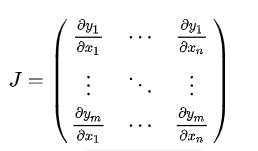
一般来说,torch.autograd 就是用于计算雅克比向量(vector-Jacobian)乘积的工具。这里略过数学公式,直接上代码例子介绍:
x = torch.randn(3, requires_grad=True)

y = x * 2
while y.data.norm() < 1000: #没太看懂
    y = y * 2

print(y)
输出结果:
tensor([ 237.5009, 1774.2396, 274.0625], grad_fn=< M u l B a c k w a r d MulBackward MulBackward>)
这里得到的变量 y 不再是一个标量,torch.autograd 不能直接计算完整的雅克比行列式,但我们可以通过简单的传递向量给 backward() 方法作为参数得到雅克比向量的乘积,例子如下所示:
v = torch.tensor([0.1, 1.0, 0.0001], dtype=torch.float)
y.backward(v)

print(x.grad)
输出结果:
tensor([ 102.4000, 1024.0000, 0.1024])
最后,加上 with torch.no_grad() 就可以停止追踪变量历史进行自动梯度计算:
print(x.requires_grad)
print((x ** 2).requires_grad)

with torch.no_grad():
    print((x ** 2).requires_grad)
输出结果:
True
True
False
更多有关 autograd 和 Function 的介绍:
https://pytorch.org/docs/autograd
本小节教程:
https://pytorch.org/tutorials/beginner/blitz/autograd_tutorial.html
本小节的代码:
https://github.com/ccc013/DeepLearning_Notes/blob/master/Pytorch/practise/autograd.ipynb
3. 神经网络
在 PyTorch 中 torch.nn 专门用于实现神经网络。其中 nn.Module 包含了网络层的搭建,以及一个方法-- forward(input) ,并返回网络的输出 outptu .
下面是一个经典的 LeNet 网络,用于对字符进行分类。
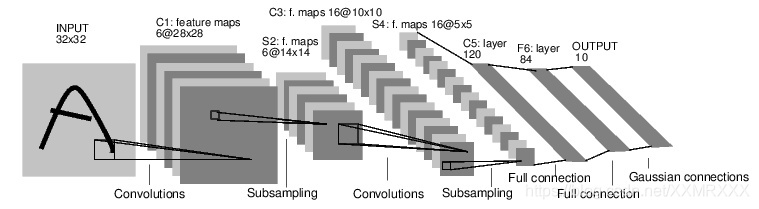
对于神经网络来说,一个标准的训练流程是这样的:
1.定义一个多层的神经网络
2.对数据集的预处理并准备作为网络的输入
3.将数据输入到网络
4.计算网络的损失
5.反向传播,计算梯度
6.更新网络的梯度,一个简单的更新规则是 weight = weight - learning_rate * gradient
3.1 定义网络
首先定义一个神经网络,下面是一个 5 层的卷积神经网络,包含两层卷积层和三层全连接层:
import torch
import torch.nn as nn
import torch.nn.functional as F

class Net(nn.Module):

    def __init__(self):
        super(Net, self).__init__()
        # 输入图像是单通道,conv1 kenrnel size=5*5,输出通道 6
        self.conv1 = nn.Conv2d(1, 6, 5)
        # conv2 kernel size=5*5, 输出通道 16
        self.conv2 = nn.Conv2d(6, 16, 5)
        # 全连接层
        self.fc1 = nn.Linear(16*5*5, 120)
        self.fc2 = nn.Linear(120, 84)
        self.fc3 = nn.Linear(84, 10)

    def forward(self, x):
        # max-pooling 采用一个 (2,2) 的滑动窗口
        x = F.max_pool2d(F.relu(self.conv1(x)), (2, 2))
        # 核(kernel)大小是方形的话,可仅定义一个数字,如 (2,2) 用 2 即可
        x = F.max_pool2d(F.relu(self.conv2(x)), 2)
        x = x.view(-1, self.num_flat_features(x))
        x = F.relu(self.fc1(x))
        x = F.relu(self.fc2(x))
        x = self.fc3(x)
        return x

    def num_flat_features(self, x):
        # 除了 batch 维度外的所有维度
        size = x.size()[1:]
        num_features = 1
        for s in size:
            num_features *= s
        return num_features

net = Net()
print(net)
Net(
  (conv1): Conv2d(1, 6, kernel_size=(5, 5), stride=(1, 1))
  (conv2): Conv2d(6, 16, kernel_size=(5, 5), stride=(1, 1))
  (fc1): Linear(in_features=400, out_features=120, bias=True)
  (fc2): Linear(in_features=120, out_features=84, bias=True)
  (fc3): Linear(in_features=84, out_features=10, bias=True)
)
这里必须实现 forward 函数,而 backward 函数在采用 autograd 时就自动定义好了,在 forward 方法可以采用任何的张量操作。
net.parameters() 可以返回网络的训练参数,使用例子如下:
params = list(net.parameters())
print('参数数量: ', len(params))
# conv1.weight
print('第一个参数大小: ', params[0].size())
参数数量:  10
第一个参数大小:  torch.Size([6, 1, 5, 5])
然后简单测试下这个网络,随机生成一个 32*32 的输入:
# 随机定义一个变量输入网络
input = torch.randn(1, 1, 32, 32)
out = net(input)
print(out)
tensor([[ 0.0527,  0.0785, -0.0961, -0.0425,  0.0973,  0.1605, -0.0440, -0.0142,
          0.0985, -0.0596]], grad_fn=<AddmmBackward>)
接着反向传播需要先清空梯度缓存,并反向传播随机梯度:
# 清空所有参数的梯度缓存,然后计算随机梯度进行反向传播
net.zero_grad()
out.backward(torch.randn(1, 10))
注意:
torch.nn 只支持小批量(mini-batches)数据,也就是输入不能是单个样本,比如对于 nn.Conv2d 接收的输入是一个 4 维张量–nSamples * nChannels * Height * Width 。
所以,如果你输入的是单个样本,需要采用 input.unsqueeze(0) 来扩充一个假的 batch 维度,即从 3 维变为 4 维。
3.2 损失函数
损失函数的输入是 (output, target) ,即网络输出和真实标签对的数据,然后返回一个数值表示网络输出和真实标签的差距。
PyTorch 中其实已经定义了不少的损失函数,这里仅采用简单的均方误差:nn.MSELoss ,例子如下:
output = net(input)
# 定义伪标签
target = torch.randn(10)
# 调整大小,使得和 output 一样的 size
target = target.view(1, -1)
criterion = nn.MSELoss()

loss = criterion(output, target)
print(loss)
tensor(0.7520, grad_fn=<MseLossBackward>)
这里,整个网络的数据输入到输出经历的计算图如下所示,其实也就是数据从输入层到输出层,计算 loss 的过程。
input -> conv2d -> relu -> maxpool2d -> conv2d -> relu -> maxpool2d
  -> view -> linear -> relu -> linear -> relu -> linear

  -> MSELoss

  -> loss
如果调用 loss.backward() ,那么整个图都是可微分的,也就是说包括 loss ,图中的所有张量变量,只要其属性 requires_grad=True ,那么其梯度 .grad张量都会随着梯度一直累计。
用代码来说明:
# MSELoss
print(loss.grad_fn)
# Linear layer
print(loss.grad_fn.next_functions[0][0])
# Relu
print(loss.grad_fn.next_functions[0][0].next_functions[0][0])
<MseLossBackward object at 0x000002830E0584A8>
<AddmmBackward object at 0x000002830E058CF8>
<AccumulateGrad object at 0x000002830E0584A8>
3.3 反向传播
反向传播的实现只需要调用 loss.backward() 即可,当然首先需要清空当前梯度缓存,即.zero_grad() 方法,否则之前的梯度会累加到当前的梯度,这样会影响权值参数的更新。
下面是一个简单的例子,以 conv1 层的偏置参数 bias 在反向传播前后的结果为例:
# 清空所有参数的梯度缓存
net.zero_grad()
print('conv1.bias.grad before backward')
print(net.conv1.bias.grad)

loss.backward()

print('conv1.bias.grad after backward')
print(net.conv1.bias.grad)
conv1.bias.grad before backward
tensor([0., 0., 0., 0., 0., 0.])
conv1.bias.grad after backward
tensor([ 0.0127, -0.0079, -0.0007,  0.0046,  0.0076, -0.0117])
了解更多有关 torch.nn 库,可以查看官方文档:
https://pytorch.org/docs/stable/nn.html
3.4 更新权重
采用随机梯度下降(Stochastic Gradient Descent, SGD)方法的最简单的更新权重规则如下:
weight = weight - learning_rate * gradient
按照这个规则,代码实现如下所示:
# 简单实现权重的更新例子
learning_rate = 0.01
for f in net.parameters():
    f.data.sub_(f.grad.data * learning_rate)
但是这只是最简单的规则,深度学习有很多的优化算法,不仅仅是 SGD,还有 Nesterov-SGD, Adam, RMSProp 等等,为了采用这些不同的方法,这里采用 torch.optim 库,使用例子如下所示:
import torch.optim as optim
# 创建优化器
optimizer = optim.SGD(net.parameters(), lr=0.01)

# 在训练过程中执行下列操作
optimizer.zero_grad() # 清空梯度缓存
output = net(input)
loss = criterion(output, target)
loss.backward()
# 更新权重
optimizer.step()
注意,同样需要调用 optimizer.zero_grad() 方法清空梯度缓存。
本小节教程:
https://pytorch.org/tutorials/beginner/blitz/neural_networks_tutorial.html
本小节的代码:
https://github.com/ccc013/DeepLearning_Notes/blob/master/Pytorch/practise/neural_network.ipynb
4. 训练分类器
上一节介绍了如何构建神经网络、计算 loss 和更新网络的权值参数,接下来需要做的就是实现一个图片分类器。
4.1 训练数据
在训练分类器前,当然需要考虑数据的问题。通常在处理如图片、文本、语音或者视频数据的时候,一般都采用标准的 Python 库将其加载并转成 Numpy 数组,然后再转回为 PyTorch 的张量。
·对于图像,可以采用 Pillow, OpenCV 库;
·对于语音,有 scipy 和 librosa;
·对于文本,可以选择原生 Python 或者 Cython 进行加载数据,或者使用 NLTK 和 SpaCy 。
PyTorch 对于计算机视觉,特别创建了一个 torchvision 的库,它包含一个数据加载器(data loader),可以加载比较常见的数据集,比如 Imagenet, CIFAR10, MNIST 等等,然后还有一个用于图像的数据转换器(data transformers),调用的库是 torchvision.datasets 和 torch.utils.data.DataLoader 。
在本教程中,将采用 CIFAR10 数据集,它包含 10 个类别,分别是飞机、汽车、鸟、猫、鹿、狗、青蛙、马、船和卡车。数据集中的图片都是 3x32x32。一些例子如下所示: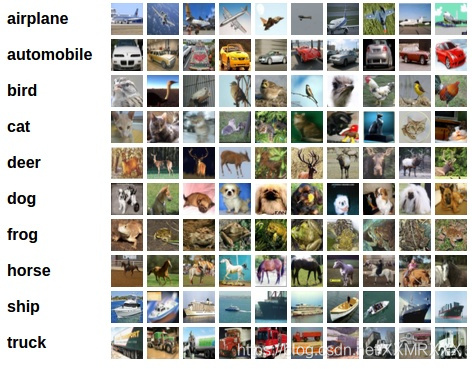
4.2 训练图片分类器
训练流程如下:
1.通过调用 torchvision 加载和归一化 CIFAR10 训练集和测试集;
2.构建一个卷积神经网络;
3.定义一个损失函数;
4.在训练集上训练网络;
5.在测试集上测试网络性能。
4.2.1 加载和归一化 CIFAR10
首先导入必须的包:
import torch
import torchvision
import torchvision.transforms as transforms
torchvision 的数据集输出的图片都是 PILImage ,即取值范围是 [0, 1] ,这里需要做一个转换,变成取值范围是 [-1, 1] , 代码如下所示:
# 将图片数据从 [0,1] 归一化为 [-1, 1] 的取值范围
transform = transforms.Compose(
    [transforms.ToTensor(),
     transforms.Normalize((0.5, 0.5, 0.5), (0.5, 0.5, 0.5))])

trainset = torchvision.datasets.CIFAR10(root='./data', train=True,
                                        download=True, transform=transform)
trainloader = torch.utils.data.DataLoader(trainset, batch_size=4,
                                          shuffle=True, num_workers=2)

testset = torchvision.datasets.CIFAR10(root='./data', train=False,
                                       download=True, transform=transform)
testloader = torch.utils.data.DataLoader(testset, batch_size=4,
                                         shuffle=False, num_workers=2)

classes = ('plane', 'car', 'bird', 'cat',
           'deer', 'dog', 'frog', 'horse', 'ship', 'truck')
Files already downloaded and verified
Files already downloaded and verified
这里下载好数据后,可以可视化部分训练图片,代码如下:
import matplotlib.pyplot as plt
import numpy as np

# 展示图片的函数
def imshow(img):
    img = img / 2 + 0.5     # 非归一化
    npimg = img.numpy()
    plt.imshow(np.transpose(npimg, (1, 2, 0)))
    plt.show()


# 随机获取训练集图片
dataiter = iter(trainloader)
images, labels = dataiter.next()

# 展示图片
imshow(torchvision.utils.make_grid(images))
# 打印图片类别标签
print(' '.join('%5s' % classes[labels[j]] for j in range(4)))
[外链图片转存失败(img-S87eezU5-1568535314521)(output_38_0.png)]
truck cat plane horse
展示图片如下所示: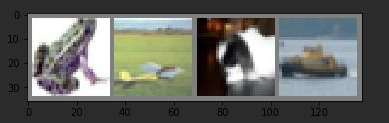
其类别标签为:
frog plane dog ship
4.2.2 构建一个卷积神经网络
这部分内容其实直接采用上一节定义的网络即可,除了修改 conv1 的输入通道,从 1 变为 3,因为这次接收的是 3 通道的彩色图片。
import torch.nn as nn
import torch.nn.functional as F


class Net(nn.Module):
    def __init__(self):
        super(Net, self).__init__()
        self.conv1 = nn.Conv2d(3, 6, 5)
        self.pool = nn.MaxPool2d(2, 2)
        self.conv2 = nn.Conv2d(6, 16, 5)
        self.fc1 = nn.Linear(16 * 5 * 5, 120)
        self.fc2 = nn.Linear(120, 84)
        self.fc3 = nn.Linear(84, 10)

    def forward(self, x):
        x = self.pool(F.relu(self.conv1(x)))
        x = self.pool(F.relu(self.conv2(x)))
        x = x.view(-1, 16 * 5 * 5)
        x = F.relu(self.fc1(x))
        x = F.relu(self.fc2(x))
        x = self.fc3(x)
        return x


net = Net()
4.2.3 定义损失函数和优化器
这里采用类别交叉熵函数和带有动量的 SGD 优化方法:
import torch.optim as optim

criterion = nn.CrossEntropyLoss()
optimizer = optim.SGD(net.parameters(), lr=0.001, momentum=0.9)
4.2.4 训练网络
第四步自然就是开始训练网络,指定需要迭代的 epoch,然后输入数据,指定次数打印当前网络的信息,比如 loss 或者准确率等性能评价标准。
import time
start = time.time()
for epoch in range(2):

    running_loss = 0.0
    for i, data in enumerate(trainloader, 0):
        # 获取输入数据
        inputs, labels = data
        # 清空梯度缓存
        optimizer.zero_grad()

        outputs = net(inputs)
        loss = criterion(outputs, labels)
        loss.backward()
        optimizer.step()

        # 打印统计信息
        running_loss += loss.item()
        if i % 2000 == 1999:
            # 每 2000 次迭代打印一次信息
            print('[%d, %5d] loss: %.3f' % (epoch + 1, i+1, running_loss / 2000))
            running_loss = 0.0
print('Finished Training! Total cost time in CPU: ', time.time()-start)
[1,  2000] loss: 2.260
[1,  4000] loss: 1.915
[1,  6000] loss: 1.706
[1,  8000] loss: 1.565
[1, 10000] loss: 1.529
[1, 12000] loss: 1.451
[2,  2000] loss: 1.395
[2,  4000] loss: 1.378
[2,  6000] loss: 1.342
[2,  8000] loss: 1.314
[2, 10000] loss: 1.321
[2, 12000] loss: 1.272
Finished Training! Total cost time in CPU:  92.60148167610168
这里定义训练总共 2 个 epoch,训练信息如下,大概耗时为 92s。
4.2.5 测试模型性能
训练好一个网络模型后,就需要用测试集进行测试,检验网络模型的泛化能力。对于图像分类任务来说,一般就是用准确率作为评价标准。
首先,我们先用一个 batch 的图片进行小小测试,这里 batch=4 ,也就是 4 张图片,代码如下:
dataiter = iter(testloader)
images, labels = dataiter.next()

# 打印图片
imshow(torchvision.utils.make_grid(images))
print('GroundTruth: ', ' '.join('%5s' % classes[labels[j]] for j in range(4)))
图片和标签分别如下所示: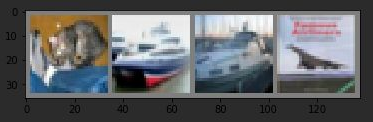
GroundTruth: cat ship ship plane
然后用这四张图片输入网络,看看网络的预测结果:
# 网络输出
outputs = net(images)

# 预测结果
_, predicted = torch.max(outputs, 1)
print('Predicted: ', ' '.join('%5s' % classes[predicted[j]] for j in range(4)))
Predicted: cat ship car ship
前面三张图片都预测正确了,第四张图片错误预测飞机为船。
接着,让我们看看在整个测试集上的准确率可以达到多少吧!
correct = 0
total = 0
with torch.no_grad():
    for data in testloader:
        images, labels = data
        outputs = net(images)
        _, predicted = torch.max(outputs.data, 1)
        total += labels.size(0)
        correct += (predicted == labels).sum().item()

print('Accuracy of the network on the 10000 test images: %d %%' % (100 * correct / total))
Accuracy of the network on the 10000 test images: 56 %
这里可能准确率并不一定一样,教程中的结果是 51% ,因为权重初始化问题,可能多少有些浮动,相比随机猜测 10 个类别的准确率(即 10%),这个结果是不错的,当然实际上是非常不好,不过我们仅仅采用 5 层网络,而且仅仅作为教程的一个示例代码。
然后,还可以再进一步,查看每个类别的分类准确率,跟上述代码有所不同的是,计算准确率部分是 c = (predicted == labels).squeeze(),这段代码其实会根据预测和真实标签是否相等,输出 1 或者 0,表示真或者假,因此在计算当前类别正确预测数量时候直接相加,预测正确自然就是加 1,错误就是加 0,也就是没有变化。
class_correct = list(0. for i in range(10))
class_total = list(0. for i in range(10))
with torch.no_grad():
    for data in testloader:
        images, labels = data
        outputs = net(images)
        _, predicted = torch.max(outputs, 1)
        c = (predicted == labels).squeeze()
        for i in range(4):
            label = labels[i]
            class_correct[label] += c[i].item()
            class_total[label] += 1


for i in range(10):
    print('Accuracy of %5s : %2d %%' % (classes[i], 100 * class_correct[i] / class_total[i]))
Accuracy of plane : 57 %
Accuracy of   car : 60 %
Accuracy of  bird : 40 %
Accuracy of   cat : 34 %
Accuracy of  deer : 38 %
Accuracy of   dog : 52 %
Accuracy of  frog : 70 %
Accuracy of horse : 65 %
Accuracy of  ship : 77 %
Accuracy of truck : 68 %
4.3 在 GPU 上训练
深度学习自然需要 GPU 来加快训练速度的。所以接下来介绍如果是在 GPU 上训练,应该如何实现。
首先,需要检查是否有可用的 GPU 来训练,代码如下:
device = torch.device("cuda:0" if torch.cuda.is_available() else "cpu")
print(device)
cuda:0
输出结果表明你的第一块 GPU 显卡或者唯一的 GPU 显卡是空闲可用状态,否则会打印 cpu 。
既然有可用的 GPU ,接下来就是在 GPU 上进行训练了,其中需要修改的代码如下,分别是需要将网络参数和数据都转移到 GPU 上:
net.to(device)
inputs, labels = inputs.to(device), labels.to(device)
修改后的训练部分代码:
import time
# 在 GPU 上训练注意需要将网络和数据放到 GPU 上
net.to(device)
criterion = nn.CrossEntropyLoss()
optimizer = optim.SGD(net.parameters(), lr=0.001, momentum=0.9)

start = time.time()
for epoch in range(2):

    running_loss = 0.0
    for i, data in enumerate(trainloader, 0):
        # 获取输入数据
        inputs, labels = data
        inputs, labels = inputs.to(device), labels.to(device)
        # 清空梯度缓存
        optimizer.zero_grad()

        outputs = net(inputs)
        loss = criterion(outputs, labels)
        loss.backward()
        optimizer.step()

        # 打印统计信息
        running_loss += loss.item()
        if i % 2000 == 1999:
            # 每 2000 次迭代打印一次信息
            print('[%d, %5d] loss: %.3f' % (epoch + 1, i+1, running_loss / 2000))
            running_loss = 0.0
print('Finished Training! Total cost time in GPU: ', time.time() - start)
[1,  2000] loss: 1.220
[1,  4000] loss: 1.216
[1,  6000] loss: 1.198
[1,  8000] loss: 1.172
[1, 10000] loss: 1.181
[1, 12000] loss: 1.197
[2,  2000] loss: 1.113
[2,  4000] loss: 1.109
[2,  6000] loss: 1.099
[2,  8000] loss: 1.091
[2, 10000] loss: 1.122
[2, 12000] loss: 1.113
Finished Training! Total cost time in GPU:  135.38129496574402
注意,这里调用 net.to(device) 后,需要定义下优化器,即传入的是 CUDA 张量的网络参数。训练结果和之前的类似,而且其实因为这个网络非常小,转移到 GPU 上并不会有多大的速度提升,而且我的训练结果看来反而变慢了,也可能是因为我的笔记本的 GPU 显卡问题。
如果需要进一步提升速度,可以考虑采用多 GPUs,也就是下一节的内容。
本小节教程:
https://pytorch.org/tutorials/beginner/blitz/cifar10_tutorial.html
本小节的代码:
5. 数据并行
这部分教程将学习如何使用 DataParallel 来使用多个 GPUs 训练网络。
首先,在 GPU 上训练模型的做法很简单,如下代码所示,定义一个 device 对象,然后用 .to() 方法将网络模型参数放到指定的 GPU 上。
这部分教程将学习如何使用 DataParallel 来使用多个 GPUs 训练网络。
首先,在 GPU 上训练模型的做法很简单,如下代码所示,定义一个 device 对象,然后用 .to() 方法将网络模型参数放到指定的 GPU 上。
device = torch.device(“cuda:0”)
model.to(device)
接着就是将所有的张量变量放到 GPU 上:
mytensor = my_tensor.to(device)
注意,这里 my_tensor.to(device) 是返回一个 my_tensor 的新的拷贝对象,而不是直接修改 my_tensor 变量,因此你需要将其赋值给一个新的张量,然后使用这个张量。
Pytorch 默认只会采用一个 GPU,因此需要使用多个 GPU,需要采用 DataParallel ,代码如下所示:
model = nn.DataParallel(model)
这代码也就是本节教程的关键,接下来会继续详细介绍。
5.1 导入和参数
首先导入必须的库以及定义一些参数:
import torch
import torch.nn as nn
from torch.utils.data import Dataset, DataLoader

# Parameters and DataLoaders
input_size = 5
output_size = 2

batch_size = 30
data_size = 100

device = torch.device("cuda:0" if torch.cuda.is_available() else "cpu")
这里主要定义网络输入大小和输出大小,batch 以及图片的大小,并定义了一个 device 对象。
5.2 构建一个假数据集
接着就是构建一个假的(随机)数据集。实现代码如下:
class RandomDataset(Dataset):

    def __init__(self, size, length):
        self.len = length
        self.data = torch.randn(length, size)

    def __getitem__(self, index):
        return self.data[index]

    def __len__(self):
        return self.len

rand_loader = DataLoader(dataset=RandomDataset(input_size, data_size),
                         batch_size=batch_size, shuffle=True)
5.3 简单的模型
接下来构建一个简单的网络模型,仅仅包含一层全连接层的神经网络,加入 print() 函数用于监控网络输入和输出 tensors 的大小:
class Model(nn.Module):
    # Our model

    def __init__(self, input_size, output_size):
        super(Model, self).__init__()
        self.fc = nn.Linear(input_size, output_size)

    def forward(self, input):
        output = self.fc(input)
        print("\tIn Model: input size", input.size(),
              "output size", output.size())

        return output
5.4 创建模型和数据平行
这是本节的核心部分。首先需要定义一个模型实例,并且检查是否拥有多个 GPUs,如果是就可以将模型包裹在 nn.DataParallel ,并调用 model.to(device) 。代码如下:
model = Model(input_size, output_size)
if torch.cuda.device_count() > 1:
  print("Let's use", torch.cuda.device_count(), "GPUs!")
  # dim = 0 [30, xxx] -> [10, ...], [10, ...], [10, ...] on 3 GPUs
  model = nn.DataParallel(model)

model.to(device)
Model(
  (fc): Linear(in_features=5, out_features=2, bias=True)
)
5.5 运行模型
接着就可以运行模型,看看打印的信息:
for data in rand_loader:
    input = data.to(device)
    output = model(input)
    print("Outside: input size", input.size(),
          "output_size", output.size())
	In Model: input size torch.Size([30, 5]) output size torch.Size([30, 2])
Outside: input size torch.Size([30, 5]) output_size torch.Size([30, 2])
	In Model: input size torch.Size([30, 5]) output size torch.Size([30, 2])
Outside: input size torch.Size([30, 5]) output_size torch.Size([30, 2])
	In Model: input size torch.Size([30, 5]) output size torch.Size([30, 2])
Outside: input size torch.Size([30, 5]) output_size torch.Size([30, 2])
	In Model: input size torch.Size([10, 5]) output size torch.Size([10, 2])
Outside: input size torch.Size([10, 5]) output_size torch.Size([10, 2])
5.6 运行结果
如果仅仅只有 1 个或者没有 GPU ,那么 batch=30 的时候,模型会得到输入输出的大小都是 30。但如果有多个 GPUs,那么结果如下:
2 GPUs
# on 2 GPUs
Let’s use 2 GPUs!
In Model: input size torch.Size([15, 5]) output size torch.Size([15, 2])
In Model: input size torch.Size([15, 5]) output size torch.Size([15, 2])
Outside: input size torch.Size([30, 5]) output_size torch.Size([30, 2])
In Model: input size torch.Size([15, 5]) output size torch.Size([15, 2])
In Model: input size torch.Size([15, 5]) output size torch.Size([15, 2])
Outside: input size torch.Size([30, 5]) output_size torch.Size([30, 2])
In Model: input size torch.Size([15, 5]) output size torch.Size([15, 2])
In Model: input size torch.Size([15, 5]) output size torch.Size([15, 2])
Outside: input size torch.Size([30, 5]) output_size torch.Size([30, 2])
In Model: input size torch.Size([5, 5]) output size torch.Size([5, 2])
In Model: input size torch.Size([5, 5]) output size torch.Size([5, 2])
Outside: input size torch.Size([10, 5]) output_size torch.Size([10, 2])
3 GPUs
Let’s use 3 GPUs!
In Model: input size torch.Size([10, 5]) output size torch.Size([10, 2])
In Model: input size torch.Size([10, 5]) output size torch.Size([10, 2])
In Model: input size torch.Size([10, 5]) output size torch.Size([10, 2])
Outside: input size torch.Size([30, 5]) output_size torch.Size([30, 2])
In Model: input size torch.Size([10, 5]) output size torch.Size([10, 2])
In Model: input size torch.Size([10, 5]) output size torch.Size([10, 2])
In Model: input size torch.Size([10, 5]) output size torch.Size([10, 2])
Outside: input size torch.Size([30, 5]) output_size torch.Size([30, 2])
In Model: input size torch.Size([10, 5]) output size torch.Size([10, 2])
In Model: input size torch.Size([10, 5]) output size torch.Size([10, 2])
In Model: input size torch.Size([10, 5]) output size torch.Size([10, 2])
Outside: input size torch.Size([30, 5]) output_size torch.Size([30, 2])
In Model: input size torch.Size([4, 5]) output size torch.Size([4, 2])
In Model: input size torch.Size([4, 5]) output size torch.Size([4, 2])
In Model: input size torch.Size([2, 5]) output size torch.Size([2, 2])
Outside: input size torch.Size([10, 5]) output_size torch.Size([10, 2])
8 GPUs
Let’s use 8 GPUs!
In Model: input size torch.Size([4, 5]) output size torch.Size([4, 2])
In Model: input size torch.Size([4, 5]) output size torch.Size([4, 2])
In Model: input size torch.Size([2, 5]) output size torch.Size([2, 2])
In Model: input size torch.Size([4, 5]) output size torch.Size([4, 2])
In Model: input size torch.Size([4, 5]) output size torch.Size([4, 2])
In Model: input size torch.Size([4, 5]) output size torch.Size([4, 2])
In Model: input size torch.Size([4, 5]) output size torch.Size([4, 2])
In Model: input size torch.Size([4, 5]) output size torch.Size([4, 2])
Outside: input size torch.Size([30, 5]) output_size torch.Size([30, 2])
In Model: input size torch.Size([4, 5]) output size torch.Size([4, 2])
In Model: input size torch.Size([4, 5]) output size torch.Size([4, 2])
In Model: input size torch.Size([4, 5]) output size torch.Size([4, 2])
In Model: input size torch.Size([4, 5]) output size torch.Size([4, 2])
In Model: input size torch.Size([4, 5]) output size torch.Size([4, 2])
In Model: input size torch.Size([4, 5]) output size torch.Size([4, 2])
In Model: input size torch.Size([2, 5]) output size torch.Size([2, 2])
In Model: input size torch.Size([4, 5]) output size torch.Size([4, 2])
Outside: input size torch.Size([30, 5]) output_size torch.Size([30, 2])
In Model: input size torch.Size([4, 5]) output size torch.Size([4, 2])
In Model: input size torch.Size([4, 5]) output size torch.Size([4, 2])
In Model: input size torch.Size([4, 5]) output size torch.Size([4, 2])
In Model: input size torch.Size([4, 5]) output size torch.Size([4, 2])
In Model: input size torch.Size([4, 5]) output size torch.Size([4, 2])
In Model: input size torch.Size([4, 5]) output size torch.Size([4, 2])
In Model: input size torch.Size([4, 5]) output size torch.Size([4, 2])
In Model: input size torch.Size([2, 5]) output size torch.Size([2, 2])
Outside: input size torch.Size([30, 5]) output_size torch.Size([30, 2])
In Model: input size torch.Size([2, 5]) output size torch.Size([2, 2])
In Model: input size torch.Size([2, 5]) output size torch.Size([2, 2])
In Model: input size torch.Size([2, 5]) output size torch.Size([2, 2])
In Model: input size torch.Size([2, 5]) output size torch.Size([2, 2])
In Model: input size torch.Size([2, 5]) output size torch.Size([2, 2])
Outside: input size torch.Size([10, 5]) output_size torch.Size([10, 2])
5.7 总结
DataParallel 会自动分割数据集并发送任务给多个 GPUs 上的多个模型。然后等待每个模型都完成各自的工作后,它又会收集并融合结果,然后返回。
更详细的数据并行教程:
https://pytorch.org/tutorials/beginner/former_torchies/parallelism_tutorial.html
本小节教程:
https://pytorch.org/tutorials/beginner/blitz/data_parallel_tutorial.html

欢迎加入西安开发者社区!我们致力于为西安地区的开发者提供学习、合作和成长的机会。参与我们的活动,与专家分享最新技术趋势,解决挑战,探索创新。加入我们,共同打造技术社区!
更多推荐


 90
90 0
0- 0


 已为社区贡献1条内容

所有评论(0)