在 Python 中使用 Redis Stream
问题:
我想存储大量输出(一种日志),一旦我已经在我的项目(Postgres)中配置了一个数据存储,我就创建了一个新表并将这些数据保存在那里。本地一切都很好,但是,在生产和大量请求中,我开始收到奇怪的 postgres/transactions 错误。
解决方案
尽管可能有 Postgres 错误的解决方案/配置,但我正在开箱即用地进行研究。我还记得一位同事提到过 Redis Streams。所以,我做了一个概念证明(我在这里分享)并且效果很好。
Redis 是缓存吧?
不! Redis 背后有很多产品,也许缓存是最知名的,但是,还有很多其他的,我可能会写另一篇文章。
Redis 流
我不会在这篇文章中解释 Redis Stream 以及你可以在哪里使用它,主要是因为那里有关于这个主题的好文章(我将在下面链接其中的一些)。我更喜欢使用 Python 展示我的 POC 来生成和使用来自 Redis Stream 的数据,请查看。如果这篇文章有什么有用的,请留下反应👏或请留下评论💬
但是,我将总结一些我们在redis-py包中在幕后执行的有用命令。
- 将user_id、venue_id和star_rating写入
mystream1Redis Stream
XADD mystream1 * user_id 9000 venue_id 123 star_rating 3
"1612299047621-0"   👉 The unique key output

XADD mystream1 * user_id 8701 venue_id 3226 star_rating 4
"1612299047621-1"
注意:*告诉 Redis 添加唯一的时间戳 ID + 序列号
- 基于时间段读取流(顺序较旧在前):
XRANGE mystream1 1612299047621 1612299137690
XRANGE mystream1 1612299047621 1612299137690 COUNT 2
注意: COUNT 将限制为仅获取两行
- 读取流(最近的第一个):
XREVRANGE mystream1 1612299137690 1612299047621
但是,我们正在寻找的命令是XREAD,它将不断获取行:
XREAD COUNT 1 BLOCK 5000 STREAMS mystream1 1612299137697
注意:还有更多仅与 Stream 有关的命令,但是,我们在这里只需要XADD和XREAD。
POC结构
├── client               👉 A web app (FastAPI) consuming in real time
│   ├── main.py
│   └── templates
│       └── index.htm
├── producer.py          👉 The producer to write data into the Stream
├── consumer.py          👉  Another way to consume the Stream
├── docker-compose.yml   👉 It runs a Redis locally easily
└── requirements.txt     👉 The project dependencies
要求
-
你需要一个 redis 运行,我们正在使用 docker-compose(有一个链接如何在基于 ubuntu 的 linux 上安装 docker)
-
好主意,使用python virtualenv安装依赖
让 Redis 在本地运行
安装好 docker 和 docker-compose 后,在下面创建docker-compose.yml文件
# docker-compose.yml

version: "3.4"
services:
  redis:
    image: redis
    ports:
      - 6379:6379
    expose:
      - "6379"
使用以下命令运行 redis 容器:
docker-compose up -d
依赖项
创建 requirements.txt
# requirements.txt

# PRODUCER/CONSUMER (redis-py only)
redis==3.5.3

# CLIENT (using fastapi + websocket)
fastapi==0.65.2
asgiref==3.4.1
click==8.0.1
h11==0.12.0
httptools==0.2.0
Jinja2==3.0.1
MarkupSafe==2.0.1
pydantic==1.8.2
python-dotenv==0.18.0
PyYAML==5.4.1
starlette==0.14.2
typing-extensions==3.10.0.0
uvicorn==0.14.0
uvloop==0.15.2
watchgod==0.7
websockets==9.1
在您的 virtualenv 中,安装依赖项:
pip install -r requirements.txt
注意:基本上您只需要redis-py!所有其他依赖项都是因为我们正在使用 Web 应用程序来使用数据。
生产者
创建producer.py文件:
# producer.py
"""
It sends a python dict (producer, some_id, count)
to REDIS STREAM (using the xadd method)

Usage:
  PRODUCER=Roger MESSAGES=10 python producer.py
"""
from os import environ
from redis import Redis
from uuid import uuid4
from time import sleep

stream_key = environ.get("STREAM", "jarless-1")
producer = environ.get("PRODUCER", "user-1")
MAX_MESSAGES = int(environ.get("MESSAGES", "2"))


def connect_to_redis():
    hostname = environ.get("REDIS_HOSTNAME", "localhost")
    port = environ.get("REDIS_PORT", 6379)

    r = Redis(hostname, port, retry_on_timeout=True)
    return r


def send_data(redis_connection, max_messages):
    count = 0
    while count < max_messages:
        try:
            data = {
                "producer": producer,
                "some_id": uuid4().hex,  # Just some random data
                "count": count,
            }
            resp = redis_connection.xadd(stream_key, data)
            print(resp)
            count += 1

        except ConnectionError as e:
            print("ERROR REDIS CONNECTION: {}".format(e))

        sleep(0.5)


if __name__ == "__main__":
    connection = connect_to_redis()
    send_data(connection, MAX_MESSAGES)
消费者
创建consumer.py文件
"""
It reads the REDIS STREAM events
Using the xread, it gets 1 event per time (from the oldest to the last one)

Usage:
  python consumer.py
"""
from os import environ
from redis import Redis

stream_key = environ.get("STREAM", "jarless-1")


def connect_to_redis():
    hostname = environ.get("REDIS_HOSTNAME", "localhost")
    port = environ.get("REDIS_PORT", 6379)

    r = Redis(hostname, port, retry_on_timeout=True)
    return r


def get_data(redis_connection):
    last_id = 0
    sleep_ms = 5000
    while True:
        try:
            resp = redis_connection.xread(
                {stream_key: last_id}, count=1, block=sleep_ms
            )
            if resp:
                key, messages = resp[0]
                last_id, data = messages[0]
                print("REDIS ID: ", last_id)
                print("      --> ", data)

        except ConnectionError as e:
            print("ERROR REDIS CONNECTION: {}".format(e))


if __name__ == "__main__":
    connection = connect_to_redis()
    get_data(connection)
然后,如果您在不同的终端中运行以下两个命令,您将看到一个正在发送数据,另一个正在获取数据。
# Terminal 1
PRODUCER=Roger MESSAGES=42 python producer.py

# Terminal 2
python consumer.py
实时从网络获取流数据
创建客户端/main.py
# client/main.py

import asyncio
from os import environ

from fastapi import FastAPI
from fastapi import Request
from fastapi import WebSocket
from fastapi.templating import Jinja2Templates
from redis import Redis


app = FastAPI()
templates = Jinja2Templates(directory="templates")

stream_key = environ.get("STREAM", "jarless-1")
hostname = environ.get("REDIS_HOSTNAME", "localhost")
port = environ.get("REDIS_PORT", 6379)
redis_cli = Redis(hostname, port, retry_on_timeout=True)


@app.get("/")
def read_root(request: Request):
    return templates.TemplateResponse("index.htm", {"request": request})


@app.websocket("/ws")
async def websocket_endpoint(websocket: WebSocket):
    """
    TODO:
    - Understand deeply the redis-py.xread method:
      - why we need to send a list of stream? I didn't want get the first [0] element
      - why it returns bytes, Is the .decode a good way?
      - is there a better way to convert it to python dict?
      - what is the a good number for the sleep/block?
    """
    last_id = 0
    sleep_ms = 5000

    await websocket.accept()
    while True:
        await asyncio.sleep(0.3)
        resp = redis_cli.xread({stream_key: last_id}, count=1, block=sleep_ms)
        print("Waitting...")
        if resp:
            key, messages = resp[0]  # :(
            last_id, data = messages[0]

            data_dict = {k.decode("utf-8"): data[k].decode("utf-8") for k in data}
            data_dict["id"] = last_id.decode("utf-8")
            data_dict["key"] = key.decode("utf-8")
            await websocket.send_json(data_dict)
创建客户端/模板/index.html
# client/templates/index.html

<!DOCTYPE html>
<html>
    <head>
        <title>POC - Redis Stream</title>
        <style>
            body {
                background-color: #24292e;
            }
            #mydata {
                padding: 20px;
                color: aliceblue;
                font-family: ui-monospace,SFMono-Regular,SF Mono,Consolas,Liberation Mono,Menlo,monospace!important;
                font-size: 0.8em;
            }
        </style>
    </head>
    <body>
        <h1>Redis Stream Consumer</h1>
        <div id="mydata"></div>
        <script>
            var el = document.getElementById("mydata");
            const ws = new WebSocket("ws://localhost:8000/ws");
            ws.onmessage = function(event) {
                const mydata = JSON.parse(event.data);
                var tag = document.createElement("p");
                var text = document.createTextNode(
                    `${mydata.id}: ${mydata.some_id} (${mydata.producer})`);
                tag.appendChild(text);
                el.appendChild(tag);
                window.scrollTo(0,document.body.scrollHeight);
            };
        </script>
    </body>
</html>
运行网络应用程序:
cd client
uvicorn main:app --reload

👉 go to http://localhost:8000
再次运行生产者脚本:
PRODUCER=John MESSAGES=20 python producer.py
控制台发送数据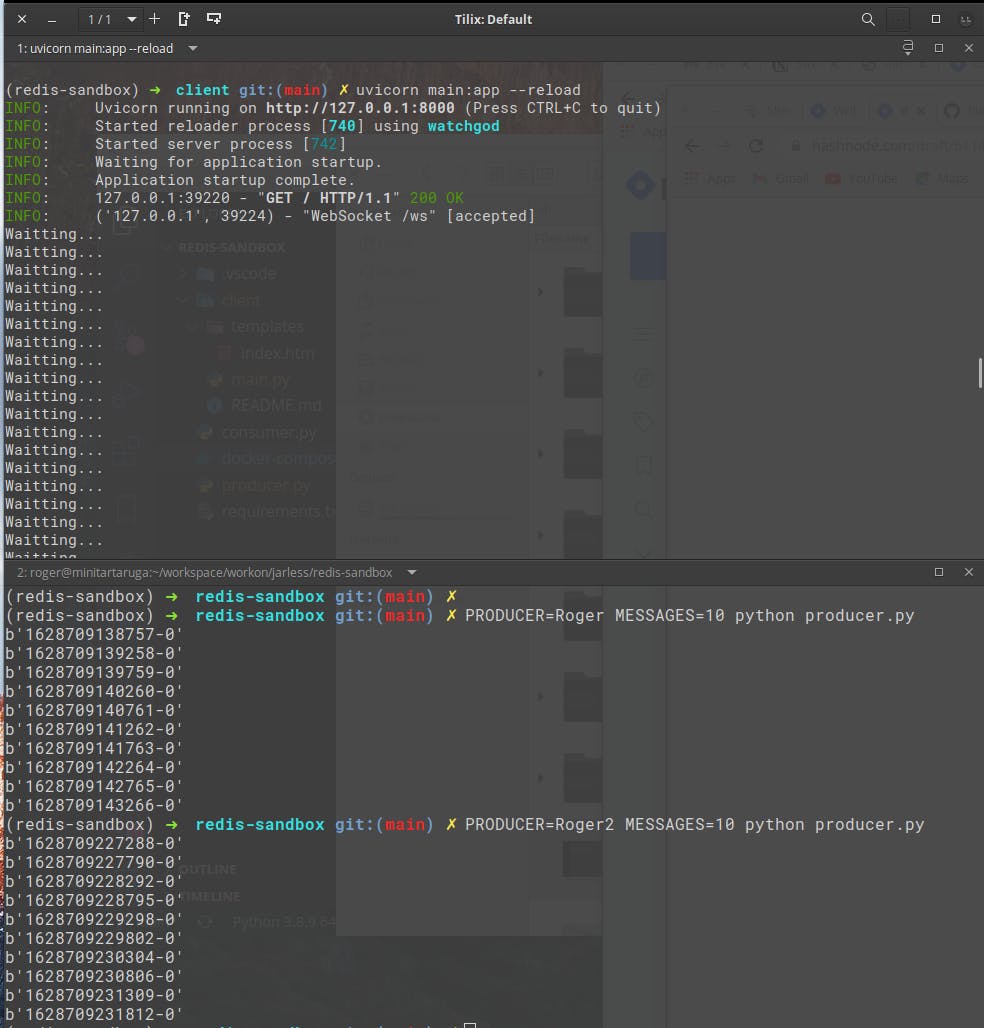
浏览器获取数据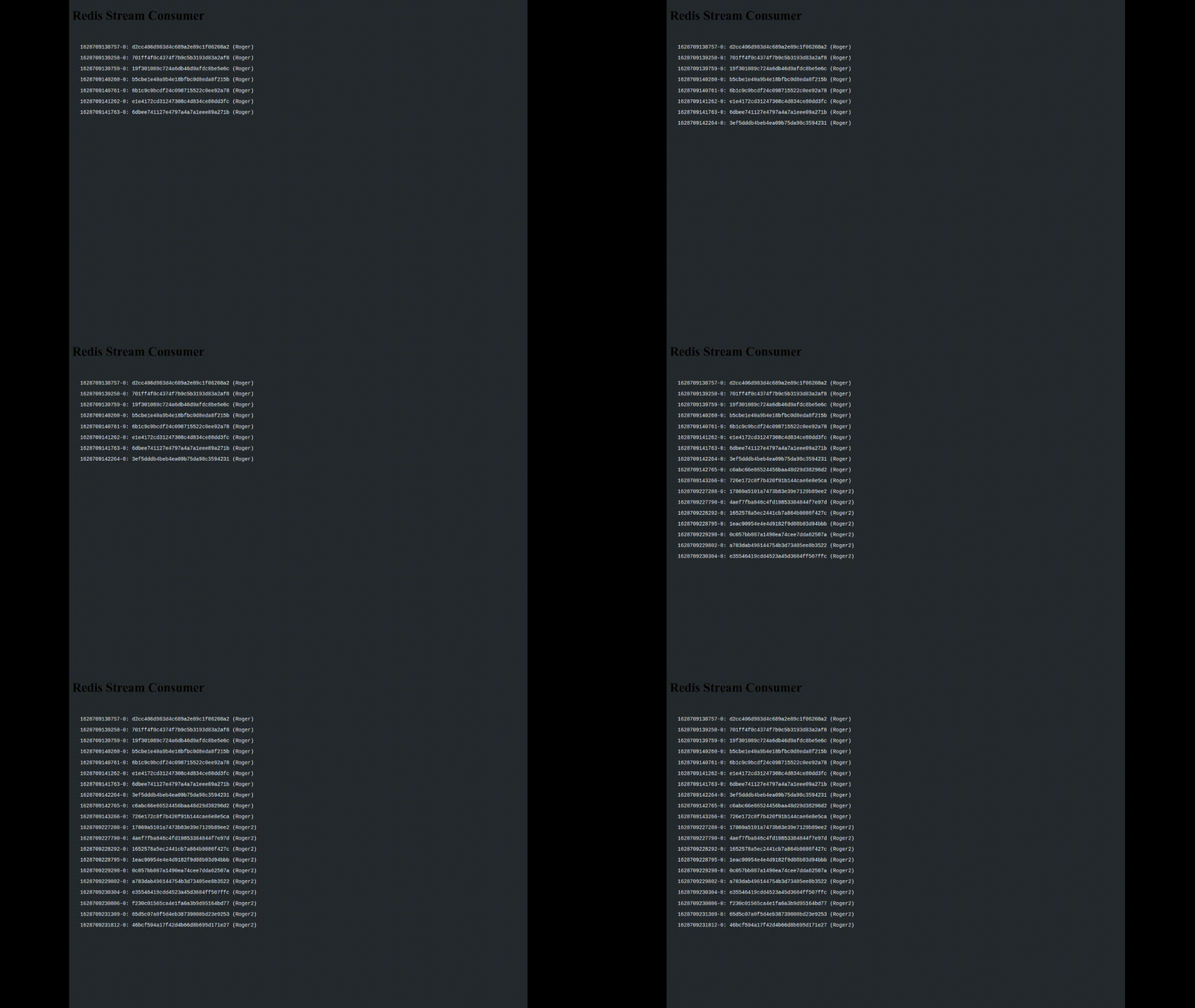
在下面的 repo 中找到完整的源代码
- github.com/huogerac/redis-stream-with-python
链接:
-
redis.io/topics/streams-intro
-
imcsummit.org/2019/us/sites/2019.us/files/s..
-
youtube.com/watch?vu003d7cvyluza00Q
-
youtube.com/watch?vu003d2z0T5djeaKY&tu003d1078s

Redis社区为您提供最前沿的新闻资讯和知识内容
更多推荐
 0
0 0
0- 0



 已为社区贡献422条内容

所有评论(0)