How to remove points from line chart in ReCharts?
·
Answer a question
I want to render just the line without the points. I'm using: http://recharts.org/#/en-US/api/LineChart
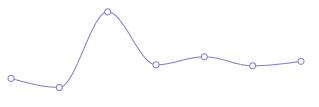
Here is the JSFiddle:
http://jsfiddle.net/gw7v4br8/87/
const {LineChart, Line} = Recharts;
const data = [
      {name: 'Page A', uv: 4000, pv: 2400, amt: 2400},
      {name: 'Page B', uv: 3000, pv: 1398, amt: 2210},
      {name: 'Page C', uv: 2000, pv: 9800, amt: 2290},
      {name: 'Page D', uv: 2780, pv: 3908, amt: 2000},
      {name: 'Page E', uv: 1890, pv: 4800, amt: 2181},
      {name: 'Page F', uv: 2390, pv: 3800, amt: 2500},
      {name: 'Page G', uv: 3490, pv: 4300, amt: 2100},
];
const TinyLineChart = React.createClass({
    render () {
    return (
        <LineChart width={300} height={100} data={data}>
        <Line type='monotone' dataKey='pv' stroke='#8884d8' strokeWidth={1} />
      </LineChart>
    );
  }
})

ReactDOM.render(
  <TinyLineChart />,
  document.getElementById('container')
);
In their API for line chart I don't see a point API, would this even be possible with this library?
http://recharts.org/#/en-US/api/LineChart
Answers
You need to add a prop to the <Line> components you are rendering in order to hide the "dots".
The props to add is the dot prop and you should provide it the value false in order to hide the dots.
So the line where you render the <Line> components should become:
<Line type='monotone' dataKey='pv' stroke='#8884d8' strokeWidth={1} dot={false} />

React社区为您提供最前沿的新闻资讯和知识内容
更多推荐
 0
0 0
0- 0


 已为社区贡献29246条内容

所有评论(0)