
Invalid column count in CSV input on line 1 Error
Answer a question
I'm trying to get a ".csv" file onto an SQL database with phpMyAdmin. However, whenever I import it, I get the error: Invalid column count in CSV input on line 1. I've spent all day playing around with different options to try and get it to work but with no avail. There are exactly 47 columns in my .csv file. I have created 47 columns in my SQL table. The names however aren't exactly the same as the ones in the file. Whenever I import, it keeps giving me that error. Any help would be greatly appreciated! ~Carpetfizz One thing I thought might be causing the problem was that the first column isn't named anything in my excel document. Could this be causing an issue?
EDIT 12:30AM: phpMyAdmin is already the latest version available, via (apt-get install phpmyadmin) (phpmyadmin is already latest version)
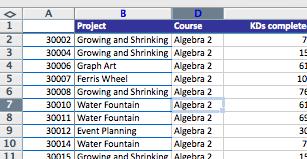
Here is the .csv file, if that helps.
Answers
Fixed! I basically just selected "Import" without even making a table myself. phpMyAdmin created the table for me, with all the right column names, from the original document.

华为、百度、京东云现已入驻,来创建你的专属开发者社区吧!
更多推荐

 0
0 0
0- 0



 已为社区贡献23582条内容

所有评论(0)