kubeflow-2-pipeline的介绍和应用案例
1 概述Kubeflow中默认提供的几个Pipeline都要基于GCP Google的云平台,但是希望在自己的集群部署,所以根据官网,总结了一些构建Pipeline的流程。首先,数据科学家本身就是在提数据,训练,保存模型,部署模型几个重要环节中工作,Pipeline提供了一个很友好的UI来给数据科学家来定义整个过程,而且整个过程是运行在K8S集群上的。这对于一些对资源利用率有要求的公司,统一一层K
1 概述
1.1 pipeline的功能
Kubeflow中默认提供的几个Pipeline都要基于GCP Google的云平台,但是希望在自己的集群部署,所以根据官网,总结了一些构建Pipeline的流程。
首先,数据科学家本身就是在提数据,训练,保存模型,部署模型几个重要环节中工作,Pipeline提供了一个很友好的UI来给数据科学家来定义整个过程,而且整个过程是运行在K8S集群上的。这对于一些对资源利用率有要求的公司,统一一层K8S来服务在线的应用和这些机器学习,还是很不错的。
通过定义这个Pipeline,就可以定义环环相扣的机器学习Workflow,市面是有很多类似的产品的,例如阿里云,腾讯云都有,但是都不全是基于K8S来做的。然后Pipeline也提供了相关的工具来定义这个Pipeline,不过都是Python的,当然这个对于数据科学家来说,不会是什么问题。
最后就是,Pipeline在Kubeflow的生态内,结合Notebook,数据科学家甚至都可以不用跳出去Kubeflow来做其他操作,一站式e2e的就搞定了。
pipelines是一个机器学习工作流的抽象概念,这个工作流可以小到函数的过程、也可以大到机器学习从数据加载、变换、清洗、特征构建、模型训练等多个环节。
在kubeflow中,该组件能以ui界面的方式记录、交互、反馈实验、任务和每一次运行。pipelines各流程组件构建成功后,会依据事先定义好的组件依赖关系构建DAG(有向无环图)。
在pipelines构建各流程组件前,需要将对应流程的业务代码打包成docker镜像文件(kubeflow中运行业务代码均以容器的方式实现)。
1.2 构建pipeline的步骤
如何构建自己的Pipeine并且上传,主要包括几个步骤:
(1)安装专门的SDK
(2)Python定义好Pipeline
(3)SDK构建pipeline的包,最后通过UI上传。
根据已有代码构建pipeline组件。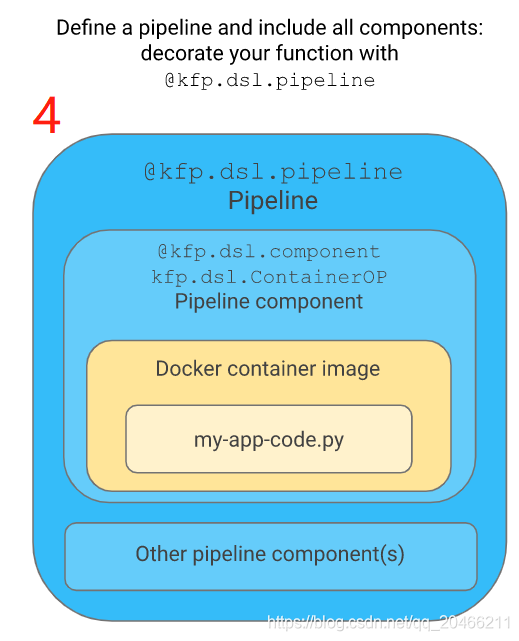
目前提交运行pipelines有2种方法,二者本质都是使用sdk编译pipelines组件。
(1)在notebook中使用sdk提交pipelines至服务中心,直接可以在UI中查看pipelines实验运行进度。
(2)将pipelines组件打成zip包通过ui上传至服务中心,同样可以在UI查看实验运行进度。
kubeflow虽然开源了一段时间,但是一些功能与google云平台耦合依然较重,官方提供的例子在本地k8s集群中使用有诸多坑,也不方便新手理解。以tensorflow经典的手写数字识别算法为例,在本地k8s集群实践pipelines。
2 安装配置环境
网址https://github.com/kubeflow/pipelines中下载相关代码
分析pipelines/samples/core/condition/condition.py
(1)安装python3,并将python指向python3
多版本的python切换
(2)下载https://storage.googleapis.com/ml-pipeline/release/0.1.20/kfp.tar.gz
(3)安装# pip3 install kfp.tar.gz --upgrade
安装前配置一下阿里的加速器。
检查是否安装成功#which dsl-compile
输出显示/usr/local/bin/dsl-compile表明安装成功。
3 pipeline sdk
pipeline sdk是使用python配合kubeflow pipelines功能的工具包。原始文档:
https://www.bookstack.cn/read/kubeflow-1.0-en/dc127d6c8622b832.md
此外,为了简化用户使用kubeflow pipelines功能,对常用api做了使用封装。
3.1 @kfp.dsl.component
component(func)
    Decorator for component functions that returns a ContainerOp.
**********************************************************
例如:
@kfp.dsl.component
def echo_op():
    return kfp.dsl.ContainerOp(
        name='echo',
        image='library/bash:4.4.23',
        command=['sh', '-c'],
        arguments=['echo "hello world"']
    )
**********************************************************
3.2 kfp.dsl.ContainerOp
表示由容器实现镜像的操作
class ContainerOp(BaseOp)
Represents an op implemented by a container image.
参数说明:
常用(1)name: the name of the op.
 It does not have to be unique within a pipeline,
 because the pipeline will generates a unique new name in case of conflicts.
常用(2)image: the container image name, such as 'python:3.5-jessie'
常用(3)command: the command to run in the container.
If None, uses default CMD in defined in container.
常用(4)arguments: the arguments of the command.
The command can include "%s" and supply a PipelineParam as the string replacement.

For example, ('echo %s' % input_param).
At container run time the argument will be 'echo param_value'.
(5)init_containers: the list of `UserContainer` objects
describing the InitContainer to deploy before the `main` container.
(6)sidecars: the list of `Sidecar` objects
describing the sidecar containers to deploy together with the `main` container.
(7)container_kwargs: the dict of additional keyword arguments to pass to the op's `Container` definition.
(8)artifact_argument_paths: Optional. Maps input artifact arguments (values or references) to the local file paths where they'll be placed.

At pipeline run time, the value of the artifact argument is saved to a local file with specified path.

This parameter is only needed when the input file paths are hard-coded in the program.

Otherwise it's better to pass input artifact placement paths by including artifact arguments in the command-line using the InputArgumentPath class instances.
常用(9)file_outputs: Maps output names to container local output file paths.
将输出名称映射到容器本地输出文件路径。

The system will take the data from those files and will make it available for passing to downstream tasks.
系统将从这些文件中获取数据,并将其传递给下游任务。

For each output in the file_outputs map there will be a corresponding output reference available in the task.outputs dictionary.
对于file_outputs map中的每个输出,输出引用对应于task.outputs字典。

These output references can be passed to the other tasks as arguments.
这些输出引用可以作为参数传递给其他任务。

The following output names are handled specially by the frontend and backend: "mlpipeline-ui-metadata" and "mlpipeline-metrics".
(10)output_artifact_paths: Deprecated. Maps output artifact labels to local artifact file paths. Deprecated: Use file_outputs instead. It now supports big data outputs.

 (11)is_exit_handler: Deprecated. This is no longer needed.
 (12)pvolumes: Dictionary for the user to match a path on the op's fs with a
V1Volume or it inherited type.
E.g {"/my/path": vol, "/mnt": other_op.pvolumes["/output"]}.
**********************************************************
例如:
from kfp import dsl|
from kubernetes.client.models import V1EnvVar, V1SecretKeySelector

@dsl.pipeline(
  name='foo',
  description='hello world')
def foo_pipeline(tag: str, pull_image_policy: str):

  # any attributes can be parameterized (both serialized string or actual PipelineParam)
  op = dsl.ContainerOp(name='foo',
	  image='busybox:%s' % tag,
	  # pass in init_container list
	  init_containers=[dsl.UserContainer('print', 'busybox:latest', command='echo "hello"')],
	  # pass in sidecars list
	  sidecars=[dsl.Sidecar('print', 'busybox:latest', command='echo "hello"')],
	  # pass in k8s container kwargs
	  container_kwargs={'env': [V1EnvVar('foo', 'bar')]},
  )
  # set `imagePullPolicy` property for `container` with `PipelineParam`
  op.container.set_image_pull_policy(pull_image_policy)

  # add sidecar with parameterized image tag
  # sidecar follows the argo sidecar swagger spec
  op.add_sidecar(dsl.Sidecar('redis', 'redis:%s' % tag).set_image_pull_policy('Always'))
**********************************************************
3.3 @kfp.dsl.pipeline
pipeline(name:Union[str, NoneType]=None, description:Union[str, NoneType]=None, output_directory:Union[str, NoneType]=None)
Decorator of pipeline functions.修饰pipeline函数
**********************************************************
例如
@pipeline(
  name='my awesome pipeline',
  description='Is it really awesome?'
  output_directory='gs://my-bucket/my-output-path'
)
def my_pipeline(a: PipelineParam, b: PipelineParam):
    ...
**********************************************************
常用(1)name: The pipeline name. Default to a sanitized version of the function name.
常用(2)description: Optionally, a human-readable description of the pipeline.
常用(3)output_directory: The root directory to generate input/output URI under this pipeline.

This is required if input/output URI placeholder is used in this pipeline.
3.4 Compiler.compile
将一个用kfp.dsl.pipeline装饰的工作流方法,编译成一个k8s任务.yaml配置的压缩文件:
class Compiler(object):
  """DSL Compiler.
  It compiles DSL pipeline functions into workflow yaml.
  **********************************************************
  例如:
  首先定义pipeline函数
  @dsl.pipeline(
    name='name',
    description='description'
  )
  def my_pipeline(a: int = 1, b: str = "default value"):
    ...
  然后编译
  Compiler().compile(my_pipeline, 'path/to/workflow.yaml')
 **********************************************************
def compile(self, pipeline_func, package_path, type_check=True, pipeline_conf: dsl.PipelineConf = None):
  """Compile the given pipeline function into workflow yaml.
  Args:
常用(1)pipeline_func: pipeline functions with @dsl.pipeline decorator.
常用(2)package_path: the output workflow tar.gz file path. for example, "~/a.tar.gz"
(3)type_check: whether to enable the type check or not, default: False.
(4)pipeline_conf: PipelineConf instance. Can specify op transforms, image pull secrets and other pipeline-level configuration options. Overrides any configuration that may be set by the pipeline.
  """
3.5 kfp.Client.create_experiment
构建pipeline实验,返回实验编号和名称
create_experiment(self, name, description=None, namespace=None)
Create a new experiment.
参数:
(1)name: The name of the experiment.
(2)description: Description of the experiment.
(3)namespace: Kubernetes namespace where the experiment should be created.
For single user deployment, leave it as None;
For multi user, input a namespace where the user is authorized.
返回:
An Experiment object. Most important field is id.
***************************************************************
例如
client = kfp.Client()
try:
    experiment = client.create_experiment("shiyan")
except Exception:
    experiment = client.get_experiment(experiment_name="shiyan")
print(experiment)
输出
Experiment link here
{'created_at': datetime.datetime(2021, 2, 11, 2, 39, 42, tzinfo=tzlocal()),
 'description': None,
 'id': '9603479a-0e30-4975-b634-eee298c46975',
 'name': 'shiyan',
 'resource_references': None,
 'storage_state': None}
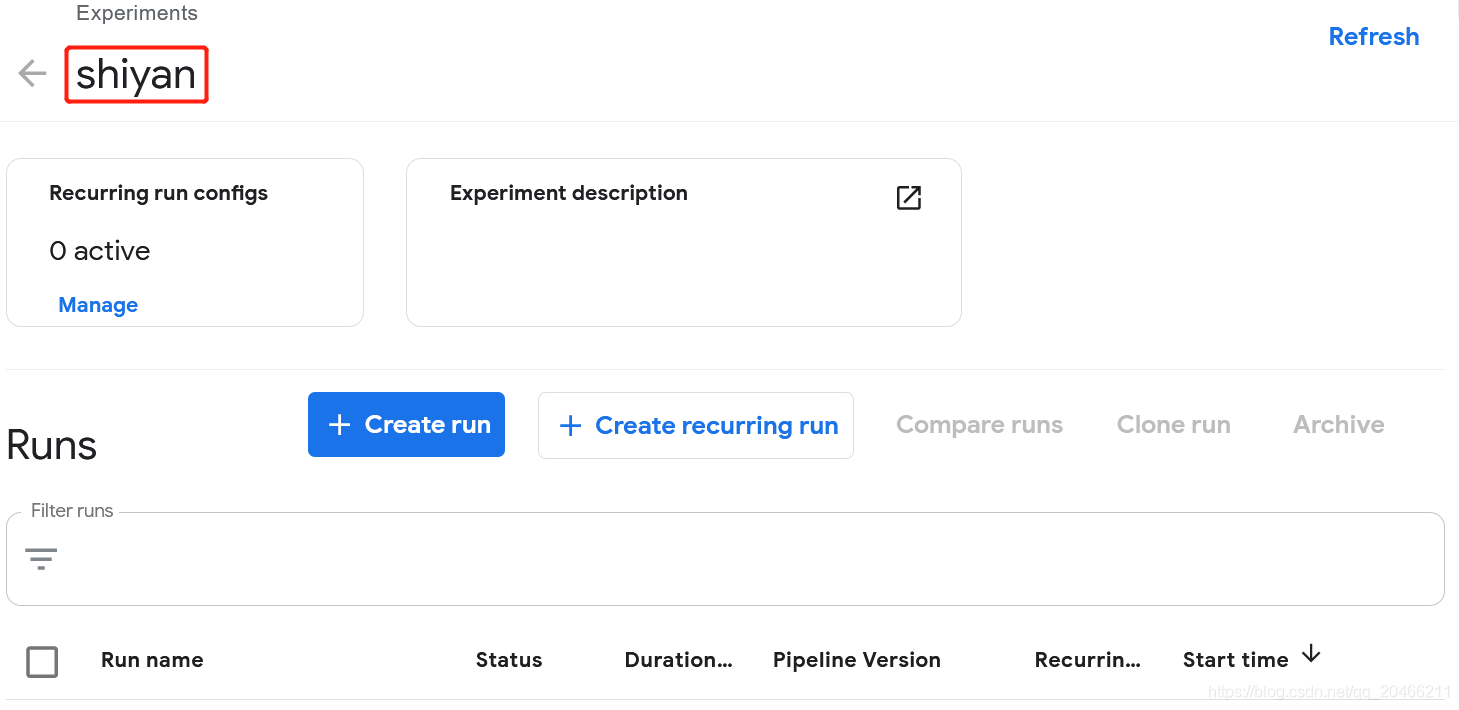
3.6 kfp.Client.run_pipeline
一次实验的运行:
run_pipeline(self, experiment_id, job_name, pipeline_package_path=None, params={}, pipeline_id=None, version_id=None)
Run a specified pipeline.
参数:
(1)experiment_id: The id of an experiment.
(2)job_name: Name of the job.
(3)pipeline_package_path: Local path of the pipeline package(the filename should end with one of the following .tar.gz, .tgz, .zip, .yaml, .yml).
(4)params: A dictionary with key (string) as param name and value (string) as as param value.
(5)pipeline_id: The id of a pipeline.
(6)version_id: The id of a pipeline version.
If both pipeline_id and version_id are specified, version_id will take precendence.
If only pipeline_id is specified, the default version of this pipeline is used to create the run.
返回:
A run object. Most important field is id.
***********************************************************
例如
from kfp.compiler import Compiler
pipeline_func = training_pipeline
pipeline_filename = pipeline_func.__name__ + '.pipeline.yaml'
Compiler().compile(pipeline_func, pipeline_filename)

import kfp
client = kfp.Client()

try:
    experiment = client.create_experiment("Prototyping")
except Exception:
    experiment = client.get_experiment(experiment_name="Prototyping")

arguments = {'pretrained': 'False'}
run_name = pipeline_func.__name__ + ' test_run'
run_result = client.run_pipeline(experiment.id, run_name, pipeline_filename, arguments)
***********************************************************
4 pipeline的使用
pipelines-master\samples\core
| helloworld | A hello world pipeline |
| pipeline_parallelism | The pipeline shows how to set the max number of parallel pods in a pipeline. |
| pipeline_transformers | The pipeline shows how to apply functions to all ops in the pipeline by pipeline transformers |
| resource_ops | A Basic Example on ResourceOp Usage. |
| execution_order | A pipeline to demonstrate execution order management. |
| sequential | A pipeline with two sequential steps. |
| parallel_join | Download two messages in parallel and prints the concatenated result. |
| multiple_outputs | a simple example of how to make a component with multiple outputs using the Pipelines SDK. |
| condition | Shows how to use dsl.Condition(). |
| pipeline_transformers | The pipeline shows how to apply functions to all ops in the pipeline by pipeline transformers |
4.1 helloworld
4.1.1 构建pipeline组件
根据已有代码构建pipeline组件。
(1)写代码my-app-code.py
(2)将my-app-code.py制作成镜像
可以是已经制作好的镜像
#docker pull library/bash:4.4.23
(3)写component函数
import kfp

@kfp.dsl.component
def echo_op():
    return kfp.dsl.ContainerOp(
        name='echo',
        image='library/bash:4.4.23',
        command=['sh', '-c'],
        arguments=['echo "hello world"']
    )
(4)写pipeline函数
@kfp.dsl.pipeline(
    name='My first pipeline',
    description='A hello world pipeline.'
)
def hello_world_pipeline():
    echo_task = echo_op()
(5)编译 pipeline
方式一:直接运行helloworld.py
import kfp

@kfp.dsl.component
def echo_op():
    return kfp.dsl.ContainerOp(
        name='echo',
        image='library/bash:4.4.23',
        command=['sh', '-c'],
        arguments=['echo "hello world"']
    )
@kfp.dsl.pipeline(
    name='My first pipeline',
    description='A hello world pipeline.'
)
def hello_world_pipeline():
    echo_task = echo_op()
if __name__ == '__main__':
    kfp.compiler.Compiler().compile(hello_world_pipeline, __file__ + '.yaml')
#python helloworld.py
运行结束生成一个文件helloworld.py.yaml
可以上传。
方式二:dsl-compile
import kfp

@kfp.dsl.component
def echo_op():
    return kfp.dsl.ContainerOp(
        name='echo',
        image='library/bash:4.4.23',
        command=['sh', '-c'],
        arguments=['echo "hello world"']
    )
@kfp.dsl.pipeline(
    name='My first pipeline',
    description='A hello world pipeline.'
)
def hello_world_pipeline():
    echo_task = echo_op()
#dsl-compile --py helloworld.py --output helloworld.zip
运行结束生成一个文件helloworld.zip
可以上传。
(6)运行pipeline
上传到Kubeflow Pipelines UI。

4.1.2 jupyter notebook中运行
http://192.168.0.165:31380进入kubeflow,再进入notebook server。
import kfp

@kfp.dsl.component
def echo_op():
    return kfp.dsl.ContainerOp(
        name='echo',
        image='library/bash:4.4.23',
        command=['sh', '-c'],
        arguments=['echo "hello kfp"']
    )
@kfp.dsl.pipeline(
    name='My first pipeline',
    description='A hello kfp pipeline.'
)
def hello_world_pipeline():
    echo_task = echo_op()
if __name__ == '__main__':
    pipeline_func = hello_world_pipeline
    pipeline_filename = pipeline_func.__name__ + '.yaml'
    kfp.compiler.Compiler().compile(pipeline_func,pipeline_filename)
    #创建实验
    client = kfp.Client()
    try:
        experiment = client.create_experiment("shiyan")
    except Exception:
        experiment = client.get_experiment(experiment_name="shiyan")
    print(experiment)
    #运行作业
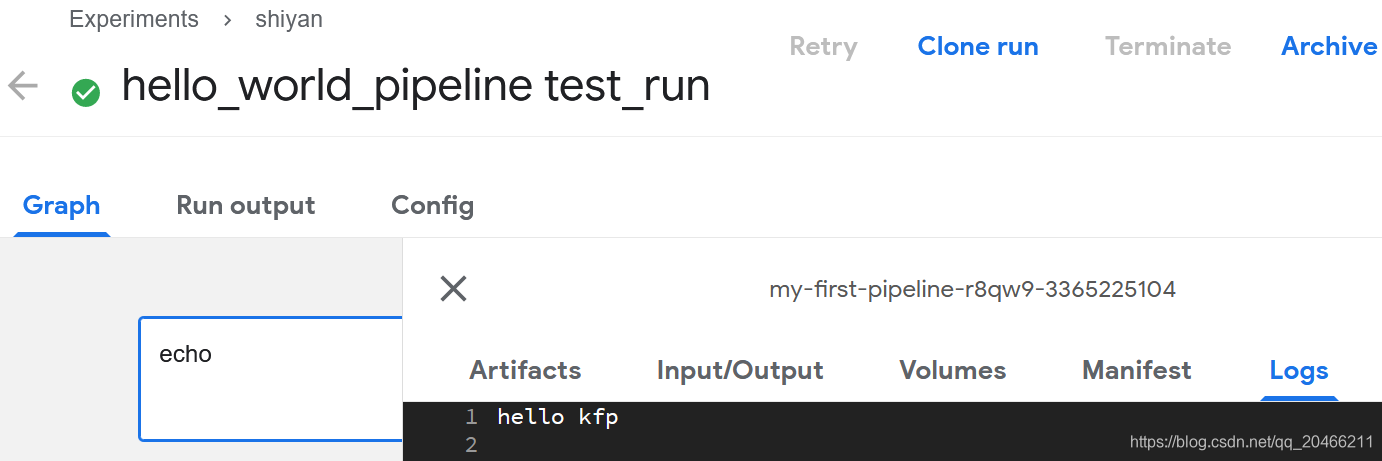
    run_name = pipeline_func.__name__ + ' test_run'
    run_result = client.run_pipeline(experiment.id, run_name, pipeline_filename)
    print(run_result)
输出如下
Experiment link here

{'created_at': datetime.datetime(2021, 2, 11, 2, 39, 42, tzinfo=tzlocal()),
 'description': None,
 'id': '9603479a-0e30-4975-b634-eee298c46975',
 'name': 'shiyan',
 'resource_references': None,
 'storage_state': None}

Run link here

{'created_at': datetime.datetime(2021, 2, 11, 2, 53, 25, tzinfo=tzlocal()),
 'description': None,
 'error': None,
 'finished_at': datetime.datetime(1970, 1, 1, 0, 0, tzinfo=tzlocal()),
 'id': 'be8571d3-a2fe-4168-99be-8be41d9e3adf',
 'metrics': None,
 'name': 'hello_world_pipeline test_run',
 'pipeline_spec': {'parameters': None,
                   'pipeline_id': None,
                   'pipeline_manifest': None,
                   'pipeline_name': None,
                   'workflow_manifest': '{"apiVersion": '
      '"argoproj.io/v1alpha1", "kind": '
      '"Workflow", "metadata": '
      '{"generateName": '
      '"my-first-pipeline-", "annotations": '
      '{"pipelines.kubeflow.org/kfp_sdk_version": '
      '"1.0.0", '
      '"pipelines.kubeflow.org/pipeline_compilation_time": '
      '"2021-02-11T02:53:25.278454", '
      '"pipelines.kubeflow.org/pipeline_spec": '
      '"{\\"description\\": \\"A hello kfp '
      'pipeline.\\", \\"name\\": \\"My first '
      'pipeline\\"}"}, "labels": '
      '{"pipelines.kubeflow.org/kfp_sdk_version": '
      '"1.0.0"}}, "spec": {"entrypoint": '
      '"my-first-pipeline", "templates": '
      '[{"name": "echo", "container": '
      '{"args": ["echo \\"hello kfp\\""], '
      '"command": ["sh", "-c"], "image": '
      '"library/bash:4.4.23"}, "metadata": '
      '{"annotations": '
      '{"pipelines.kubeflow.org/component_spec": '
      '"{\\"name\\": \\"Echo op\\"}"}}}, '
      '{"name": "my-first-pipeline", "dag": '
      '{"tasks": [{"name": "echo", '
      '"template": "echo"}]}}], "arguments": '
      '{"parameters": []}, '
      '"serviceAccountName": '
      '"pipeline-runner"}}'},
 'resource_references': [{'key': {'id': '9603479a-0e30-4975-b634-eee298c46975',
                                  'type': 'EXPERIMENT'},
                          'name': 'shiyan',
                          'relationship': 'OWNER'}],
 'scheduled_at': datetime.datetime(1970, 1, 1, 0, 0, tzinfo=tzlocal()),
 'service_account': None,
 'status': None,
 'storage_state': None}
4.2 execution_order
(1)写代码my-app-code.py
(2)将my-app-code.py制作成镜像
(3)写component函数
(4)写pipeline函数
(5)编译pipeline
(6)运行pipeline
4.2.1 编译运行
#cat execution_order.py
import kfp

@kfp.dsl.component
def echo1_op(text1):
  return kfp.dsl.ContainerOp(
      name='echo1',
      image='library/bash:4.4.23',
      command=['sh', '-c'],
      arguments=['echo "$0"', text1])

@kfp.dsl.component
def echo2_op(text2):
  return kfp.dsl.ContainerOp(
      name='echo2',
      image='library/bash:4.4.23',
      command=['sh', '-c'],
      arguments=['echo "$0"', text2])


@kfp.dsl.pipeline(
    name='Execution order pipeline',
    description='A pipeline to demonstrate execution order management.'
)
def execution_order_pipeline(text1='message 1', text2='message 2'):
  """A two step pipeline with an explicitly defined execution order."""
  step1_task = echo1_op(text1)
  step2_task = echo2_op(text2)
  step2_task.after(step1_task)

if __name__ == '__main__':
  kfp.compiler.Compiler().compile(execution_order_pipeline, __file__ + '.yaml')
#python execution_order.py
或
#dsl-compile --py execution_order.py --output execution_order.zip
上传到UI中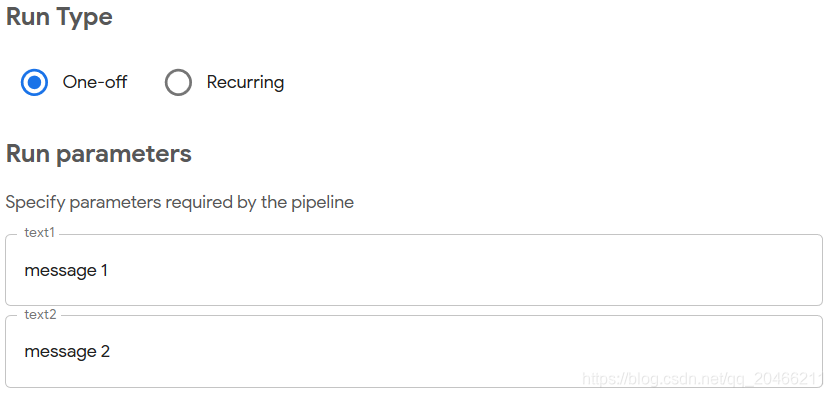 运行
运行
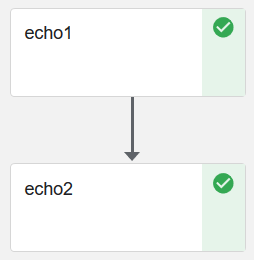
4.2.2 jupyter notebook中运行
3 pipeline_parallelism_limits
(1)写代码my-app-code.py
(2)将my-app-code.py制作镜像
(3)写component函数
(4)写pipeline函数
(5)编译pipeline
(6)运行pipeline
#docker pull alpine:3.6
#vi pipeline_parallelism_limits.py
import kfp
@kfp.dsl.component
def print_op(msg):
  """Print a message."""
  return kfp.dsl.ContainerOp(
      name='Print',
      image='alpine:3.6',
      command=['echo', msg]
  )


@kfp.dsl.pipeline(
    name='Pipeline service account',
    description='The pipeline shows how to set the max number of parallel pods in a pipeline.'
)
def pipeline_parallelism():
  op1 = print_op('hey, what are you up to?')
  op2 = print_op('train my model.')
  kfp.dsl.get_pipeline_conf().set_parallelism(1)

if __name__ == '__main__':
  kfp.compiler.Compiler().compile(pipeline_parallelism, __file__ + '.yaml')
#python pipeline_parallelism_limits.py

4 sequential
(1)写代码my-app-code.py
(2)将my-app-code.py制作镜像
(3)写component函数
(4)写pipeline函数
(5)编译pipeline
(6)运行pipeline
#docker pull google/cloud-sdk:279.0.0
#docker pull library/bash:4.4.23
#vi sequential.py
(1)第一种
不可以出现@kfp.dsl.component
import kfp

def gcs_download_op(url):
    return kfp.dsl.ContainerOp(
        name='GCS - Download',
        image='google/cloud-sdk:279.0.0',
        command=['sh', '-c'],
        arguments=['gsutil cat $0 | tee $1', url, '/tmp/results.txt'],
        file_outputs={
            'data': '/tmp/results.txt',
        }
    )

def echo_op(text):
    return kfp.dsl.ContainerOp(
        name='echo',
        image='library/bash:4.4.23',
        command=['sh', '-c'],
        arguments=['echo "$0"', text]
    )

@kfp.dsl.pipeline(
    name='Sequential pipeline',
    description='A pipeline with two sequential steps.'
)
def sequential_pipeline(url='gs://ml-pipeline/sample-data/shakespeare/shakespeare1.txt'):
    """A pipeline with two sequential steps."""

    download_task = gcs_download_op(url)
    echo_task = echo_op(download_task.output)

if __name__ == '__main__':
    kfp.compiler.Compiler().compile(sequential_pipeline, __file__ + '.yaml')
With which he yoketh your rebellious necks Razeth your cities and subverts your towns And in a moment makes them desolate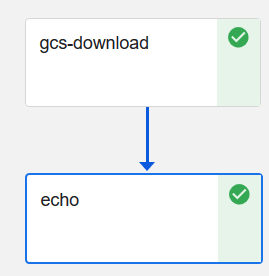
(2)第二种
不可以出现@kfp.dsl.component
import kfp

def write_op(msg):
    return kfp.dsl.ContainerOp(
        name='write',
        image='library/bash:4.4.23',
        command=['sh', '-c'],
        arguments=['echo "$0" >> "$1"', msg, '/tmp/results.txt'],
        file_outputs={'output': '/tmp/results.txt'}
    )

def echo_op(text):
    return kfp.dsl.ContainerOp(
        name='echo',
        image='library/bash:4.4.23',
        command=['sh', '-c'],
        arguments=['echo "$0"', text]
    )

@kfp.dsl.pipeline(
    name='Sequential pipeline',
    description='A pipeline with two sequential steps.'
)
def sequential_pipeline():
    """A pipeline with two sequential steps."""

    write_task = write_op('good evening')
    echo_task = echo_op(write_task.output)

if __name__ == '__main__':
    kfp.compiler.Compiler().compile(sequential_pipeline, __file__ + '.yaml')
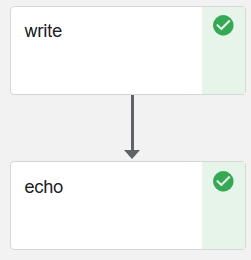
5 parallel_join
(1)写代码my-app-code.py
(2)将my-app-code.py制作镜像
(3)写component函数
(4)写pipeline函数
(5)编译pipeline
(6)运行pipeline
#vi parallel_join.py
import kfp

def gcs_download_op(url):
    return kfp.dsl.ContainerOp(
        name='GCS - Download',
        image='google/cloud-sdk:279.0.0',
        command=['sh', '-c'],
        arguments=['gsutil cat $0 | tee $1', url, '/tmp/results.txt'],
        file_outputs={'data': '/tmp/results.txt',}
    )


def echo2_op(text1, text2):
    return kfp.dsl.ContainerOp(
        name='echo',
        image='library/bash:4.4.23',
        command=['sh', '-c'],
        arguments=['echo "Text 1: $0"; echo "Text 2: $1"', text1, text2]
    )


@kfp.dsl.pipeline(
  name='Parallel pipeline',
  description='Download two messages in parallel and prints the concatenated result.'
)
def download_and_join(
    url1='gs://ml-pipeline/sample-data/shakespeare/shakespeare1.txt',
    url2='gs://ml-pipeline/sample-data/shakespeare/shakespeare2.txt'
):
    """A three-step pipeline with first two running in parallel."""

    download1_task = gcs_download_op(url1)
    download2_task = gcs_download_op(url2)

    echo_task = echo2_op(download1_task.output, download2_task.output)

if __name__ == '__main__':
    kfp.compiler.Compiler().compile(download_and_join, __file__ + '.yaml')
#python parallel_join.py
注意输出到文件的形式:
file_outputs={‘data’: ‘/tmp/results.txt’,}
download1_task.output
download2_task.output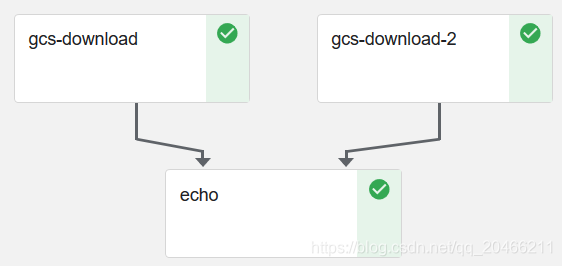
6 pipeline_transformers
(1)写代码my-app-code.py
(2)将my-app-code.py制作镜像
(3)写component函数
(4)写pipeline函数
(5)编译pipeline
(6)运行pipeline
#vi pipeline_transformers.py
import kfp

def print_op(msg):
  """Print a message."""
  return kfp.dsl.ContainerOp(
      name='Print',
      image='alpine:3.6',
      command=['echo', msg],
  )

def add_annotation(op):
  op.add_pod_annotation(name='hobby', value='football')
  return op

@kfp.dsl.pipeline(
    name='Pipeline transformer',
    description='The pipeline shows how to apply functions to all ops in the pipeline by pipeline transformers'
)
def transform_pipeline():
  op1 = print_op('hey, what are you up to?')
  op2 = print_op('train my model.')
  kfp.dsl.get_pipeline_conf().add_op_transformer(add_annotation)

if __name__ == '__main__':
  kfp.compiler.Compiler().compile(transform_pipeline, __file__ + '.yaml')
#python pipeline_transformers.py

7 condition
(1)写代码my-app-code.py
(2)将my-app-code.py制作镜像
(3)写component函数
(4)写pipeline函数
(5)编译pipeline
(6)运行pipeline
#docker pull python:alpine3.6
#docker pull alpine:3.6
#vi condition.py
import kfp

def random_num_op(low, high):
    """Generate a random number between low and high."""
    return kfp.dsl.ContainerOp(
        name='Generate random number',
        image='python:alpine3.6',
        command=['sh', '-c'],
        arguments=['python -c "import random; print(random.randint($0, $1))" | tee $2', str(low), str(high), '/tmp/output'],
        file_outputs={'output': '/tmp/output'}
    )


def flip_coin_op():
    """Flip a coin and output heads or tails randomly."""
    return kfp.dsl.ContainerOp(
        name='Flip coin',
        image='python:alpine3.6',
        command=['sh', '-c'],
        arguments=['python -c "import random; result = \'heads\' if random.randint(0,1) == 0 '
                  'else \'tails\'; print(result)" | tee /tmp/output'],
        file_outputs={'output': '/tmp/output'}
    )


def print_op(msg):
    """Print a message."""
    return kfp.dsl.ContainerOp(
        name='Print',
        image='alpine:3.6',
        command=['echo', msg],
    )


@kfp.dsl.pipeline(
    name='Conditional execution pipeline',
    description='Shows how to use dsl.Condition().'
)
def flipcoin_pipeline():
    flip = flip_coin_op()
    with kfp.dsl.Condition(flip.output == 'heads'):
        random_num_head = random_num_op(0, 9)
        with kfp.dsl.Condition(random_num_head.output > 5):
            print_op('heads and %s > 5!' % random_num_head.output)
        with kfp.dsl.Condition(random_num_head.output <= 5):
            print_op('heads and %s <= 5!' % random_num_head.output)

    with kfp.dsl.Condition(flip.output == 'tails'):
        random_num_tail = random_num_op(10, 19)
        with kfp.dsl.Condition(random_num_tail.output > 15):
            print_op('tails and %s > 15!' % random_num_tail.output)
        with kfp.dsl.Condition(random_num_tail.output <= 15):
            print_op('tails and %s <= 15!' % random_num_tail.output)


if __name__ == '__main__':
    kfp.compiler.Compiler().compile(flipcoin_pipeline, __file__ + '.yaml')
#python condition.py
本质上,构建出来的Pipeline文件是一个基于Argo的一个定义Workflow的YAML文件。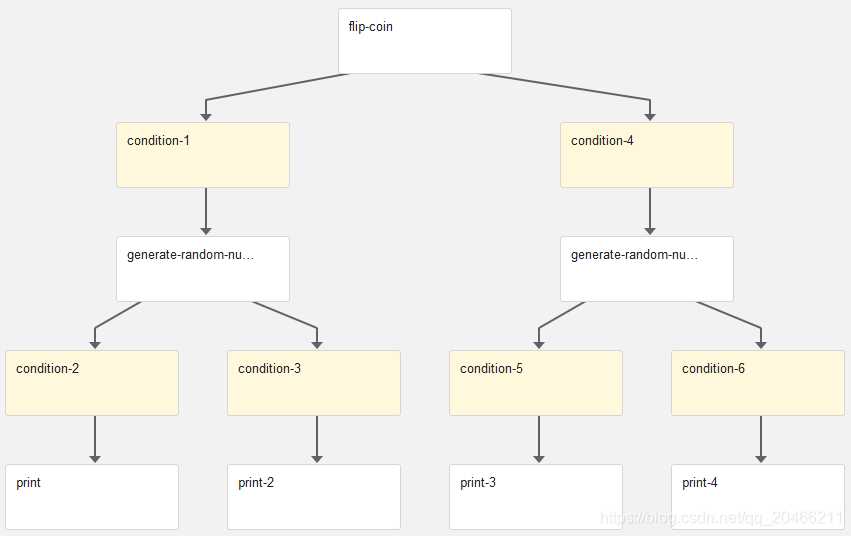 实际
实际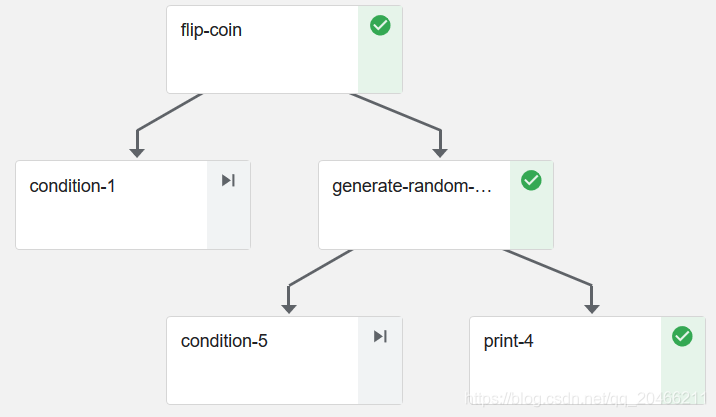

K8S/Kubernetes社区为您提供最前沿的新闻资讯和知识内容
更多推荐


 3
3 0
0- 0


 已为社区贡献5条内容

所有评论(0)