

Recently I had a task at my work to add two Mailchimp embedded subscription sign up forms in a single page, one was a popup and another one in a sidebar.
At first, it went very straight forward, but when I tested them a problem accrued! The second form would redirect me to another page.

That wasn’t acceptable!!!
So the hunting started… To find a solution online xD
The only article that I found was from 2011 and it wasn't even for the exact same problem so I thought this article might help someone in the future :)
So at first, I generated an embedded form in MailChimp -> Create -> Signup form and I implemented my own CSS so I generated an Unstyled Form.
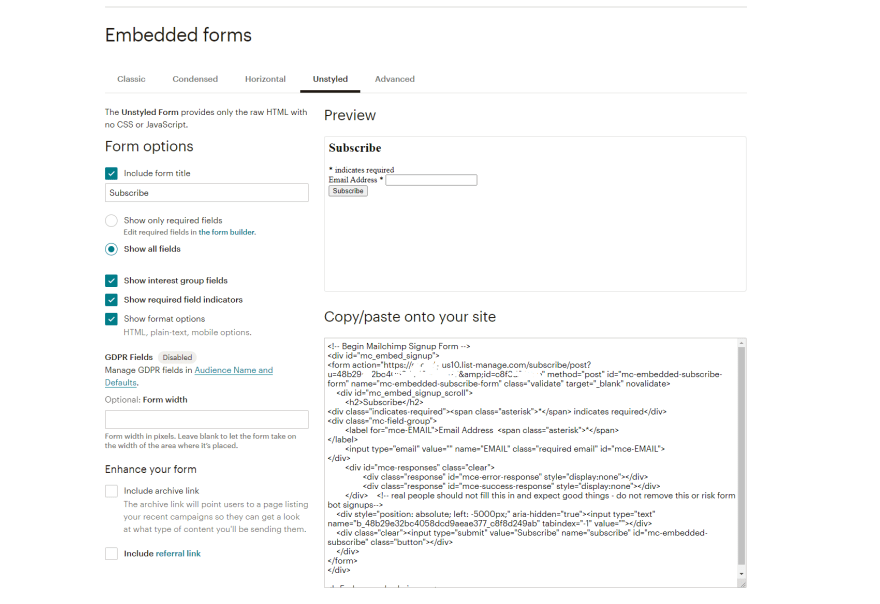
*BONUS TIP*
If you want to have an unstyled form but want to keep the default validation, copy just the script tag from the Classic tab and paste it at the bottom

I pasted this piece of code on my page.
The first one you don't need to do anything else, as it will render the first so no conflict will accur..
But for the second one, I had to come up with another solution to submit the form using AJAX
Here is what I did:
At first, I created a simple HTML form with the action set to the link of the Mailchimp unstyled form code that we got earlier but I removed the User and the ID parameters or (u and id)
So this is the action
<form class="mailchimpform" action="https://YOURLINK.list-manage.com/subscribe/post" method="POST" target="formResult">

    </form>
For the Target, I will explain later, but It has to have a target like that (Spoiler it is an iFrame element)
Now we need to add the 'u' and 'id' parameters
I added them as hidden inputs with the names as u and id and the values from the embedded link that we got earlier
<form action="https://YOTLIST.list-manage.com/subscribe/post?u=YOURUSER&id=YOURID" method="post" id="mc-embedded-subscribe-form" name="mc-embedded-subscribe-form" class="validate" target="_blank" novalidate>
So this is the default one, but now we modified it like this:
<form class="mailchimpform" action="https://YOURLINK.list-manage.com/subscribe/post" method="POST" target="formResult">
                <input type="hidden" name="u" value="YOURUSER">
                <input type="hidden" name="id" value="YOURID">

</form>
Now we need to add the email input field and the submit button we don't need to modify them at all, so simply copy-paste it from the default one
<label for="mce-EMAIL">Email Address  <span class="asterisk">*</span>
</label>
<input type="email" value="" name="EMAIL" class="required email" id="mce-EMAIL">
So now our form should look something like this:
<form class="mailchimpform" action="https://YOURLINK.list-manage.com/subscribe/post" method="POST" target="formResult">
                <input type="hidden" name="u" value="YOURUSER">
                <input type="hidden" name="id" value="YOURID">


<label for="mce-EMAIL">Email Address  <span class="asterisk">*</span>
</label>
<input type="email" value="" name="EMAIL" class="required email" id="mce-EMAIL">


  <!-- real people should not fill this in and expect good things - do not remove this or risk form bot signups-->
    <div style="position: absolute; left: -5000px;" aria-hidden="true"><input type="text" name="b_48b29e32bc4058dcd9aeae377_c8f8d249ab" tabindex="-1" value=""></div>
    <div class="clear"><input type="submit" value="Subscribe" name="subscribe" id="mc-embedded-subscribe" class="button"></div>

</form>
Now we need to create an iFrame so the form after submission won't redirect us anywhere else.
I just added this after the closing form tag
<iframe name="formResult" style="display:none !important;" frameborder="0"></iframe>
Now to the FUN part :D
Please don’t judge me for using jQuery this project was developed using WordPress :)
<script>
    jQuery('.mailchimpform').submit(function (e) {
        var $this = jQuery(this);
        jQuery.ajax({
            type: "GET",
            url: "https://YOUTLINK.list-manage.com/subscribe/post-json?c=?",
            data: $this.serialize(),
            dataType: 'json',
            contentType: "application/json; charset=utf-8",
            error: function (err) {
                alert("Could not connect to the registration server.");
            },
            success: function (data) {
                if (data.result != "success") {
                    jQuery('#thankYouMessage').css("display","block");
                    jQuery('#thankYouMessage').text(data.msg.substr(0, data.msg.indexOf('<')));
                } else {
                    jQuery('.myform').hide();
                    jQuery('#thankYouMessage').css("display","block");
                    jQuery('#thankYouMessage').text(data.msg);

                }
            }
        });
        return false;
    });
</script>
So the thing that is different here is that the link is a bit modified at the end: so this is the link that we got earlier:
https://YOURLINK.list-manage.com/subscribe/post
We changed it to this https://YOUTLINK.list-manage.com/subscribe/post-json?c=?
At the success function we can do whatever we want but I needed to do this quickly and I added some dirty code that I wouldn’t recommend to do it this way, but something more creative :P
So now once again the complete file:
<aside id="secondary" class="sidebar">
     <?php dynamic_sidebar( 'sidebar-1' ); ?>
    <div class="news-updates mt-4 mt-lg-0">
        <h3>News Updates</h3>


        <!-- Begin Mailchimp Signup Form -->

        <div id="mc_embed_signup">
            <form class="mailchimpform" action="https://YOURLINK.list-manage.com/subscribe/post" method="POST" target="formaReturning">
                <input type="hidden" name="u" value="YOURUSER">
                <input type="hidden" name="id" value="YOURID">
                <input type="email" value="" name="EMAIL" class="button border-0 w-100" id="mce-EMAIL" placeholder="email address"
                    required>
                <input style="display:none" type="checkbox" value="1" name="group[16169][1]" id="mce-group[16169]-16169-0" checked>

                <input type="submit" class="button button-primary w-100 border-0" value="Send" name="submit" id="mc-embedded-subscribe">
            </form>
            <div id="thankYouMessage" style="display:none;">
                <p>Thank you for subscribing!</>
            </div>
        </div>

        <iframe name="formaReturning" style="display:none !important;" frameborder="0"></iframe>
        <!--End mc_embed_signup-->

    </div>
</aside><!-- #secondary -->


<script>
    jQuery('.myform').submit(function (e) {
        var $this = jQuery(this);
        jQuery.ajax({
            type: "GET",
            url: "https://YORLINK.list-manage.com/subscribe/post-json?c=?",
            data: $this.serialize(),
            dataType: 'json',
            contentType: "application/json; charset=utf-8",
            error: function (err) {
                alert("Could not connect to the registration server.");
            },
            success: function (data) {
                if (data.result != "success") {
                    jQuery('#thankYouMessage').css("display","block");
                    jQuery('#thankYouMessage').text(data.msg.substr(0, data.msg.indexOf('<')));
                } else {
                    jQuery('.mailchimpform').hide();
                    jQuery('#thankYouMessage').css("display","block");
                    jQuery('#thankYouMessage').text(data.msg);

                }
            }
        });
        return false;
    });
</script>
This would have helped me a lot, so I would be happy if I am helping someone with this article.
I am sure that this isn't the best solution, but it worked for me :)
Btw this is my first post here, sorry about the bad styling... I will get the hang of it :P
Thank you for reading :)


 已为社区贡献3634条内容

所有评论(0)