What does Lock services in Azure Pipelines' task DockerCompose actually do?
Answer a question
I am learning to use Azure Pipelines for CI/CD. I read the official document and found the Docker Compose task has an action called Lock services. I have no idea what this action actually do and what it means by locking the images.
Can anyone explain it to me, or provide me some examples on when and how to use it?
Answers
We have public the source code of this task, so you can check this page to analyze what the exactly action this command do.
For image, there has 2 different identifies: tag and digest. Now, let's assume one scenario:
Most of time, a tagged image in Container Registry is mutable, so with appropriate permissions you or anyone can update/push/delete an image with the same tag to that registry. However, when you deploy a image to production env, you could not sure whether the image with one specific tag does not been overwritten and it is the one you want to deployed.
At this time, digest would be a best choice for you.
Because digest is a SHA256 calculated from the image and identifies it uniquely. Once there has any changes to your image, the corresponding SHA256 value will be changes also.
Explanation of this action:
Check this code line(defined here). It's work logic is read out the image(s) used in the docker-compose.yml file, pull image(s) and generate a digest for them. Next a new docker-compose.yml file is automatically generated, which the image will be specified with digest in this new docker-compose.yml file.
Sample:
The task definition i used:
- task: DockerCompose@0
  displayName: 'Lock services'
  inputs:
    containerregistrytype: 'Container Registry'
    dockerRegistryEndpoint: {service connection name}
    dockerComposeFile: 'Docker/docker-compose.yml'
    action: 'Lock services'
    removeBuildOptions: true
The docker-compose.yml:
version: '3'
services:
  web:
    image: xxxx/testwebapp
    ports:
      - "1983:80"
  newsfeed:
    image: xxx/merlin
  redis:
    image: redis
See the build log of this task:
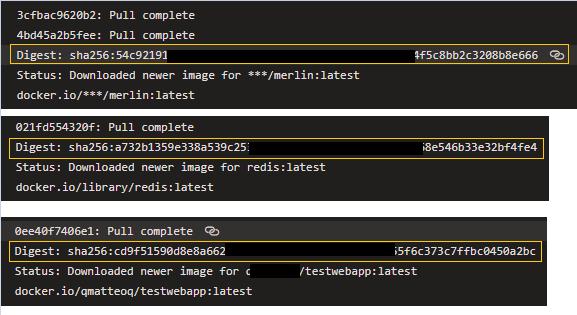
And the contents of new docker-compose.yml which generated.
(List them by using cat xxx command):
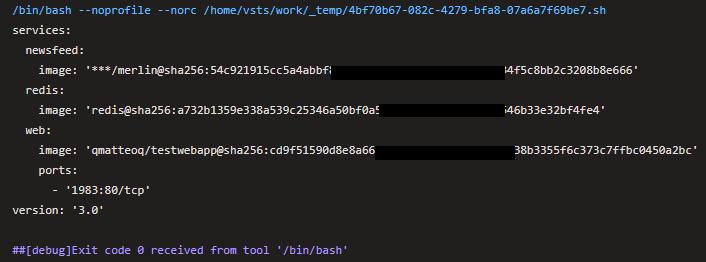
Now, when you deploy the images to production, just use the new docker-compose.yml file the task generated automatically. This can guarantee the deployed image is the version you built at the beginning, even if someone overwrites this image later.

云原生社区为您提供最前沿的新闻资讯和知识内容
更多推荐
 0
0 0
0- 0


 已为社区贡献35528条内容

所有评论(0)