Docker Image Timestamp Issue
Answer a question
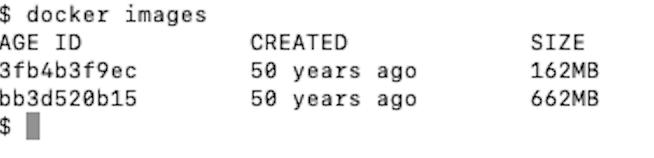
I've created a brand new image but it shows 50 years ago timestamp, please find attached the snippet. Any idea why?
I used the below steps in Dockerfile
FROM openjdk:11

VOLUME /tmp

COPY build/libs /app

ENTRYPOINT ["java", "-Djava.security.egd=file:/dev/./urandom", "-jar", "/app/test-service.jar"]
and my docker version is
Docker version 19.03.5, build 633a0ea
Gradle 6.0.1 build tool, and Google Jib plugin to create image
plugins {
    id 'com.google.cloud.tools.jib' version '1.8.0'
}

jib {
    from {
        image = 'openjdk:11'
    }
    to {
        image = 'test-service'
    }
    container {
        jvmFlags = ['-Xms512m', '-Xdebug']
        mainClass = 'com.sample.Application'
    }
    allowInsecureRegistries=true
}
Answers
That's from Google Jib. For reproducibility they don't set a date, or they explicitly set the date to the zero value, which is the epoch in 1970.
There is a FAQ entry for this: https://github.com/GoogleContainerTools/jib/blob/master/docs/faq.md#why-is-my-image-created-48-years-ago
For reproducibility purposes, Jib sets the creation time of the container images to the Unix epoch (00:00:00, January 1st, 1970 in UTC). If you would like to use a different timestamp, set the
jib.container.creationTime / <container><creationTime>parameter to an ISO 8601 date-time. You may also use the valueUSE_CURRENT_TIMESTAMPto set the creation time to the actual build time, but this sacrifices reproducibility since the timestamp will change with every build.Setting
creationTimeparameterMaven:
<configuration>
  <container>
    <creationTime>2019-07-15T10:15:30+09:00</creationTime>
  </container>
</configuration>
Gradle:
jib.container.creationTime = '2019-07-15T10:15:30+09:00'

云原生社区为您提供最前沿的新闻资讯和知识内容
更多推荐



 0
0 0
0- 0


 已为社区贡献35528条内容

所有评论(0)