将 DynamoDB 的 TTL 精度提高到分钟(或更好)
每个人都知道当事情拖得太久时有多烦人!无论是似乎永远不会结束的细化会议,同事讲的一个没有切入主题的故事,还是您明确告诉您在某个时刻离开但不会离开您的 DynamoDB 表中的项目数据库!根据 AWS 文档,您可以在 dynamoDB 记录上设置生存时间 (TTL),然后 AWS 将在该时间后将其删除。但是,正如它在文档中所述:
因为 TTL 是一个后台进程,用于通过 TTL 过期和删除项目的容量的性质是可变的(但免费)。 TTL 通常会在过期后 48 小时内删除过期项目。
即使在实践中,项目通常会在 15 分钟内被删除,但不能保证它确实会被删除,这对你来说可能是个问题!
在本博客中,我们将讨论一个可扩展的设置,您可以使用该设置以您自己定义的精度使项目过期。
架构
为了更快地摆脱您的物品,我们可以使用下面的架构。计划的 EventBridge 规则用于每分钟触发一次 lambda。 lambda 查询 DynamoDB 哪些项目已过期,并将其删除。
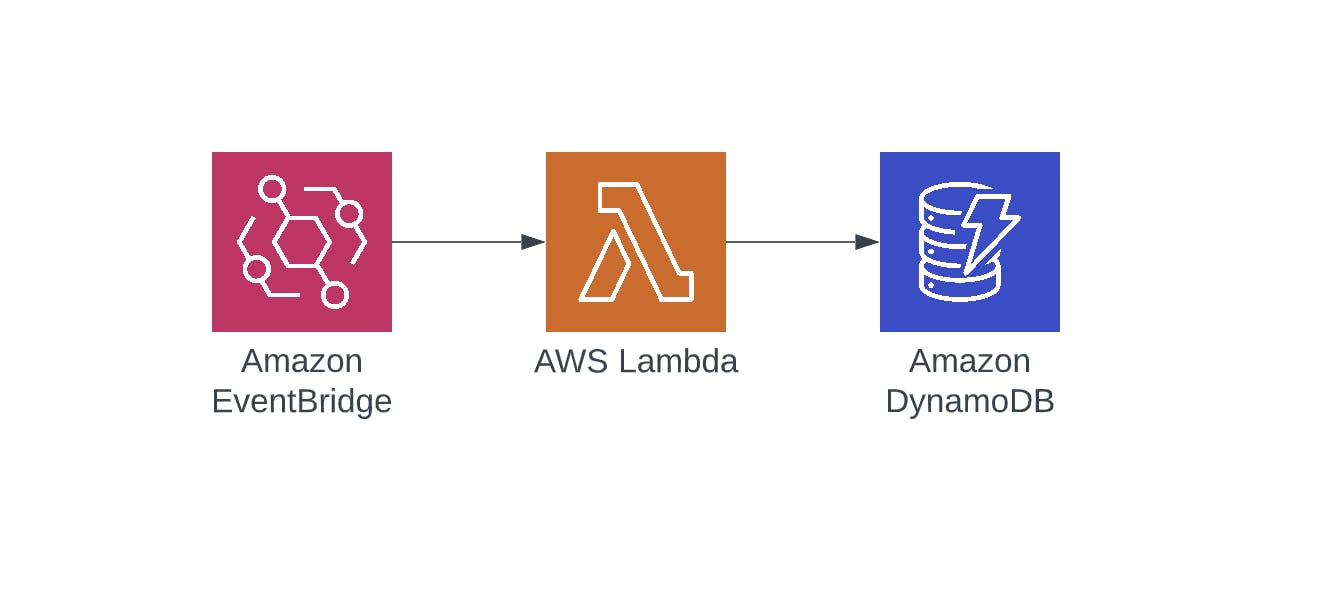
在下面的部分中,我们将提供用于创建此基础结构的代码以及用于查询和删除项目的 lambda 代码。
数据模型
除了在 DynamoDB 中使用 TTL 字段外,我们还必须创建另一个字段,它不包含过期时间,而是包含过期窗口,其粒度您可以自己定义。expirationWindow定义了事件应该在什么时间窗口过期。您可以自由选择此窗口,但唯一的要求是它必须是触发 lambda 的频率的倍数。因此,如果您每 5 分钟触发一次 lambda,则时间窗口应该是 5、10、15 等......分钟长(更多内容见下文)。
为了获得一分钟的准确性,我们还使用了一分钟的expirationWindow粒度。稍后我们将查询此窗口以获取所有应过期的项目。
expirationWindow可以随心所欲地构建,但我选择了开始和结束日期时间的格式,用下划线分隔:StartISOTimestamp_EndISOTimestamp。例如,如果我们选择一分钟的粒度窗口,它可能像2022-07-19T21:27:00.000Z_2022-07-19T21:28:00.000Z。
表中的示例项目现在如下所示:`
itemId(分区键)
ttl
到期窗口
其他属性
0001
1658266025
2022-07-19T21:27:00.000Z_2022-07-19T21:28:00.000Z
...
为了能够查询这个窗口,我们必须在表上创建一个所谓的全局二级索引。它基本上是您的表的副本,但具有不同的分区键和可选的排序键来支持我们需要的查询。
所以索引expirationWindowIndex的结构如下:
expireWindow(分区键)
ttl(排序键)
项目 ID
其他属性
2022-07-19T21:27:00.000Z_2022-07-19T21:28:00.000Z
1658266025
0001
...
这个索引允许我们查询某个expirationWindow内的所有项目(因为它是分区键),甚至可以过滤ttl属性(因为它是排序键)。
注意:在本博客中,我们使用 CloudWatch 事件来触发我们的 lambda 函数,该函数的最小粒度为 1 分钟,因此我们将过期窗口也保持为一分钟的粒度。
基础设施
要部署基础架构以支持此设置,您可以创建如下所示的 CDK 堆栈。它创建一个表(启用ttl并在expirationWindow上创建一个全局二级索引)、一个事件规则和一个 lambda。
import * as cdk from 'aws-cdk-lib';
import * as dynamodb from 'aws-cdk-lib/aws-dynamodb';
import * as events from 'aws-cdk-lib/aws-events';
import * as targets from 'aws-cdk-lib/aws-events-targets';
import * as iam from 'aws-cdk-lib/aws-iam';
import * as lambdaJs from 'aws-cdk-lib/aws-lambda-nodejs';
import { Construct } from 'constructs';

export class DeleteItemsStack extends cdk.Stack {
  public table: dynamodb.Table;

  constructor(scope: Construct, id: string, props: cdk.StackProps) {
    super(scope, id, props);

    /**
     * The table itself
     */

    this.table = new dynamodb.Table(this, 'expirationTable', {
      partitionKey: { name: 'itemId', type: dynamodb.AttributeType.STRING },
      tableName: 'expirationTable',
      billingMode: dynamodb.BillingMode.PAY_PER_REQUEST,
      timeToLiveAttribute: 'ttl',
    });

    /**
     * Deleting expired items: query and delete expired items every minute
     */
    const indexName = 'expirationWindowIndex';
    this.table.addGlobalSecondaryIndex({
      indexName: indexName,
      partitionKey: { name: 'expirationWindow', type: dynamodb.AttributeType.STRING },
      sortKey: { name: 'ttl', type: dynamodb.AttributeType.NUMBER },
    });

    const deleteExpiredItemsFunction = new lambdaJs.NodejsFunction(this, 'deleteExpiredItemsFunction', {
      entry: 'PATH_TO_LAMBDA_HERE',
      timeout: cdk.Duration.minutes(5), // To support a load of api calls if needed :P. And it's still faster than dynanomdb TTL.
      memorySize: 2048,
      environment: {
        TABLE_NAME: this.table.tableName,
        TABLE_INDEX_NAME: indexName,
      },
    });

    // Create an eventrule that goes off every minute, and transform the payload
    const eventRule = new events.Rule(this, 'scheduleRule', {
      schedule: events.Schedule.cron({ minute: '*/1' }),
    });
    eventRule.addTarget(new targets.LambdaFunction(deleteExpiredItemsFunction, {
      event: events.RuleTargetInput.fromObject({
        time: events.EventField.fromPath('$.time'),
      }),
    }));

    //allow it to query and delete items
    deleteExpiredItemsFunction.addToRolePolicy(
      new iam.PolicyStatement({
        actions: ['dynamodb:Query', 'dynamodb:BatchWriteItem'],
        resources: [
          this.table.tableArn,
          `${this.table.tableArn}/index/${indexName}`,
        ],
        effect: iam.Effect.ALLOW,
      }),
    );
  }
}
对于事件规则,请注意使用了自定义映射,因此调用 lambda 的事件有效负载仅包含一个键,该键具有应该创建事件的那一分钟的精确 0 秒时间戳。例如:
{
  time: "2022-07-19T20:55:00.000Z"
}
使用此代码,我们现在拥有删除项目所需的所有基础设施!
拉姆达
用于查询和删除项目的功能包括 3 个步骤:
1.处理EventBridge payload,检查应该查询什么expirationWindow
2.查询expirationWindow获取所有应该删除的项目
- 执行
BatchWriteItem命令删除项目。
-
将项目列表拆分为 25 个项目的块
-
删除块
-
重试以防任何项目处理失败最多 3 次
-
重复直到处理完所有项目和块
可以在下面找到此代码:
/**
 * This lambda polls a table filled with items and checks if any of the items are expired.
 * If so, it deletes those entries from the table.
 */
import * as dynamo from '@aws-sdk/client-dynamodb';
import * as libDynamo from '@aws-sdk/lib-dynamodb';
import { Context } from 'aws-lambda';


const dynamoClient = new dynamo.DynamoDBClient({ region: 'eu-west-1' }); // You can change this to any region of course
const docClient = libDynamo.DynamoDBDocumentClient.from(dynamoClient);

interface ScheduledEvent {
  time: string;
}

/**
 * Construct a start- and end ISO timestamp, representing the partition key of the table's  Global Secondary Index (GSI)
 * @param date The date of the event to construct the expirationWindow for
 * @returns e.g. "2022-06-23T15:50:00.000Z_2022-06-23T15:51:00.000Z"
 */
export const getExpirationWindow = (date: Date, granularityInSeconds = 60) => {
  // a coefficient used to round to the nearest 5 minutes (the number of milliseconds in 5 minutes)
  const numberOfMsInWindow = 1000 * granularityInSeconds;
  // Subtract a second to make sure that floor and ceil give different results for a time falling exactly on a window's edge (12:00:00)
  const expirationDateMinus1 = new Date(date.getTime());
  expirationDateMinus1.setSeconds((expirationDateMinus1.getSeconds() - 1));

  const endWindow = new Date(Math.ceil(date.getTime() / numberOfMsInWindow) * numberOfMsInWindow).toISOString();
  const startWindow = new Date(Math.floor(expirationDateMinus1.getTime() / numberOfMsInWindow) * numberOfMsInWindow).toISOString();
  return startWindow + '_' + endWindow;
};

/**
 * Queries 1 partition of the Global Secondary Index (GSI) of the table,
 * and filters on items that have been expired by using the sort key
 * @param expirationWindow Primary key of the GSI of the table, containing all items expiring in this N minute window
 * @param expirationTime Epoch timestamp on when the items expires
 * @returns A list of item IDs to delete
 */
const queryExpiredItems = async (
  expirationWindow: string,
  expirationTime: number,
  tableName: string,
  tableIndex: string
) => {
  const command = new libDynamo.QueryCommand({
    IndexName: tableIndex,
    TableName: tableName,
    KeyConditionExpression: '#expirationWindow = :expirationWindow AND #expirationTime < :expirationTime',
    ExpressionAttributeNames: {
      '#expirationWindow': 'expirationWindow',
      '#expirationTime': 'ttl',
    },
    ExpressionAttributeValues: {
      ':expirationWindow': expirationWindow,
      ':expirationTime': expirationTime,
    },
  });
  const response = await docClient.send(command);
  return response?.Items?.map(item => (item.itemId));
};

/**
 * Create the parameters for the BatchWrite request to delete a batch of items
 * @param itemIds List of item id's to be deleted
 */
const createDeleteRequestParams = (itemIds: string[], tableName: string) => {
  const deleteRequests: { [key: string]: any }[] = itemIds.map((itemId) => (
    {
      DeleteRequest: {
        Key: {
          itemId,
        },
      },
    }));
  const paramsDelete: libDynamo.BatchWriteCommandInput = {
    RequestItems: {},
  };
  paramsDelete.RequestItems![tableName] = deleteRequests;
  return paramsDelete;
};

/**
 * Deletes a batch (max 25) of items from the table
 * @param itemIds List of item Ids to delete from the table
 * @returns unprocessed items and whether or not errors have occurrred.
 */
const deleteBatch = async (itemIds: string[], tableName: string) => {
  if (itemIds.length > 25) {
    throw new Error(`BatchWrite item supports only up to 25 items. Got ${itemIds.length}`);
  }
  let unprocessedItems: string[] = [];
  const requestParams = createDeleteRequestParams(itemIds, tableName);
  try {
    const data = await docClient.send(new libDynamo.BatchWriteCommand(requestParams));
    // Check if any unprocessed data object is present, and it is populated with at least one item for this table
    if (data.UnprocessedItems && data.UnprocessedItems[tableName]) {
      unprocessedItems = data.UnprocessedItems[tableName].map(
        (request) => (request.DeleteRequest?.Key!).itemId,
      );
    }
    // At least a partial success, maybe with unprocessed items
    return {
      unprocessed: unprocessedItems,
      hasErrors: false,
    };
  } catch (err) {
    // Error in deleting items. Retrying...=
    return {
      unprocessed: itemIds,
      hasErrors: true,
    };
  }
};

/**
 * Delete a set of items from the table.
 * @param items List of itemIds of expired items
 * @param retriesLeft when errors occur, unprocessed items are retried N times.
 */
const deleteExpiredItems = async (items: string[], tableName: string, retriesLeft = 3) => {
  let unprocessedItems: string[] = [];
  if (retriesLeft <= 0) {
    throw new Error(`unable to delete the desired ${items.length} items`);
  }

  // Delete in chunks of 25 items
  const chunkSize = 25;
  for (let i = 0; i < items.length; i += chunkSize) {
    const batchOfItems = items.slice(i, i + chunkSize);
    const response = await deleteBatch(batchOfItems, tableName);
    unprocessedItems = unprocessedItems.concat(response.unprocessed);
  }
  // Retry one more time if unprocessed items happen
  if (unprocessedItems.length > 0) {
    await deleteExpiredItems(unprocessedItems, tableName, retriesLeft - 1);
  }
};

/**
 *
 * @param event A scheduled event from EventBridge with custom payload, providing the exact time of the cron-event.
 * @param _context lambda context object
 * @returns 'done'
 */
// eslint-disable-next-line @typescript-eslint/no-unused-vars
export const lambdaHandler = async (event: ScheduledEvent, _context: Context) => {
  if (!process.env.TABLE_NAME || !process.env.TABLE_INDEX_NAME) {
    throw new Error('TABLE_NAME and TABLE_INDEX_NAME should be defined but are not');
  }
  const tableName = process.env.TABLE_NAME!;
  const tableIndex = process.env.TABLE_INDEX_NAME!;

  // Step 1: read the incoming event payload from eventbridge and process to
  // an expirationWindow and timestamp to query the datatore.
  const eventDatetime = new Date(event.time);
  const expirationWindow = getExpirationWindow(eventDatetime);
  const expirationTimestamp = Math.round(eventDatetime.getTime() / 1000);
  // Step 2: Query the expired items
  const items = await queryExpiredItems(expirationWindow, expirationTimestamp, tableName, tableIndex);
  if (items) {
    // Step 3: Delete the expired items
    await deleteExpiredItems(items, tableName);
  }
};
选择过期窗口
通过上述设置,到期窗口需要是触发 lambda 频率的倍数。要了解原因,让我们考虑以下示例:
每两分钟触发一次,窗口为 5 分钟(不是倍数)。这意味着在第 4 分钟从 0-5 分钟索引中查询项目,仅删除 0-4 分钟。在第 6 分钟的下一次触发时,查询 5-10 分钟索引中的事件,仅删除 5-6 分钟。第 4 分钟到第 5 分钟之间的事件将不予处理!
幸运的是,原生 TTL 功能会在某个时候启动,因此这些项目最终会被删除。您可以自己将逻辑添加到 lambda 以查询以前的索引,但我选择不这样做以使事情更简单。
此设置的成本影响
向表中添加全局二级索引会显着增加写入繁重数据库的成本,因为您不仅要为写入表的记录付费,还要为受写入影响的任何索引付费。这有效地使您的写入成本加倍(假设您没有配置其他 GSI)。
此外,TTL 是免费的,而主动删除项目也算作一次写入,因此会产生额外费用。
进一步提高精度
在所描述的设置中,计划事件用于触发删除功能。由于这些只有分钟粒度,我们也只能每分钟查询一次。为了改进这一点,请编写您自己的调度逻辑以支持例如二级粒度。
结论
使用提供的设置,您可以比 DynamoDb 的原生 TTL 功能更准确地查询和删除项目。 TTL 仍然可以使用,但另外我们可以主动查询和删除那些过期时间过长的项目。

云原生社区为您提供最前沿的新闻资讯和知识内容
更多推荐
 0
0 0
0- 0


 已为社区贡献35528条内容

所有评论(0)