

Table of Content
- Introduction
- Codebase Setup
- Architecture to deploy Micro FE in AWS
- Deployment Guide
- Deployment Pipeline
- Conclusion
Introduction
The Micro Frontend concept is highly inspired by microservices architecture. This will allow us to divide a Monolith Frontend into smaller pieces (micro-frontends) and implement, build, test, and deploy pieces of your frontend app independently of each other.
Among many advantages of using this approach, these few would help us to understand the impact that Micro FE has done.
- A maintainable small code base
- Incremental upgrades
- Independent deployments
- Autonomous teams
Depending on the layer that framework facilitates the Micro FE functionality, there are two main categories of Micro FE approaches.
- Client-side based
- Server-side based
This documentation will guide us to use Singla SPA (Client-side based) library to host our Micro FE application in AWS!
Codebase Setup
To demonstrate the full potential of Micro Frontends, I have created a sample repository on GitHub that contains four different folders with four different applications.
Github URL: https://github.com/nadunindunil/micro-fe-aws-demo
- demo-config (stores configurations and routing information to different micro applications)
- demo-parent-app (contains navigation bar to update browser URL to a specific micro frontend URL)
- micro-fe-one (First Sample Micro FE applications)
- micro-fe-two (Second Sample Micro FE applications)
Please note that all four applications are committed to one Github repository for the sake of simplicity. The best practice is to maintain a separate code repository for different applications.
All four applications mentioned above are created using the create-single-spa CLI tool.
Highlights in application codebase
To keep this article brief and clear, I will take you through a few important areas in the above codebases.
demo-config codebase
This code snippet in index.ej will import required dependencies and Micro Frontend modules to the browser.
This single spa layout will display the navigation bar in the parent application and set up the layout to show Micro applications.
Refer to this link for information about single spa layouts: https://single-spa.js.org/docs/layout-overview
demo-parent-app codebase
This is optional, but I have used react-router to navigate between pages from the parent application.
Architecture to deploy Micro FE in AWS
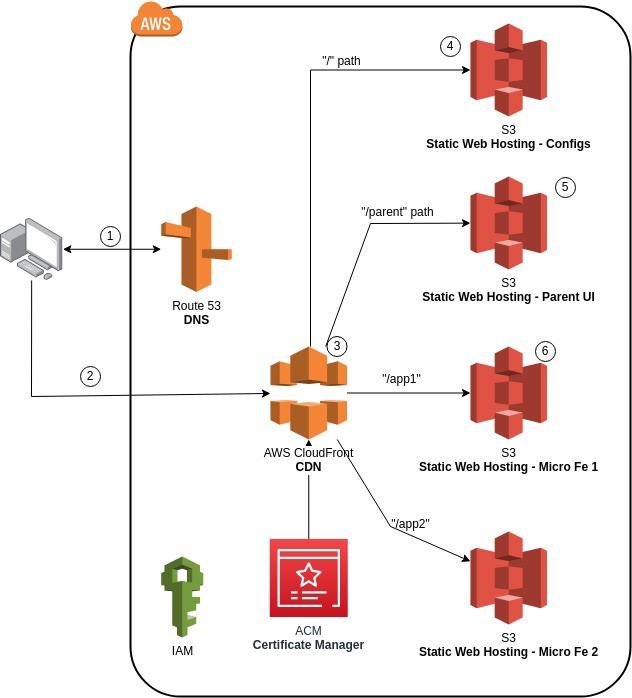
- When users request the website, AWS route 53 provides AWS CloudFront URL
- AWS CloudFront exposes multiple Micro FE using path-based routing
- The browser will first load the Root Config UI (Configs app), then the parent app that contains the navigation bar
- Rest of the Micro FE application loads when Parent UI requests them by path
Deployment Guide
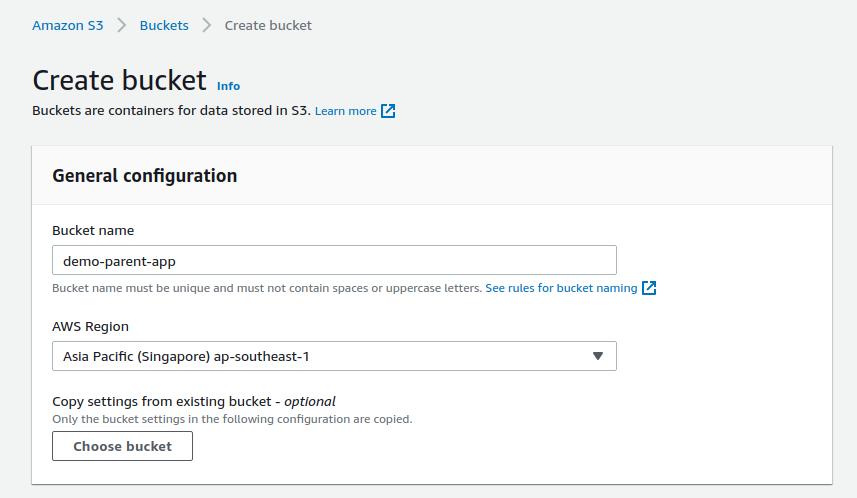
- Create S3 buckets to support static web hosting for all four projects.
Update the bucket name field when creating the bucket. All other configurations should be default values.
Once you have completed all four buckets, it should look like this:
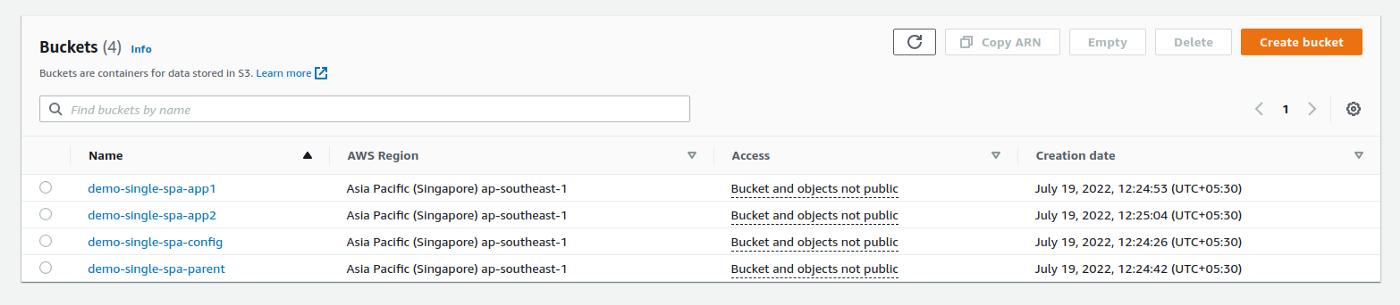
Please note that all the buckets and objects are private. As a best practice, we can keep all the buckets private and expose required items using AWS CloudFront.
2. Create a CloudFront distribution
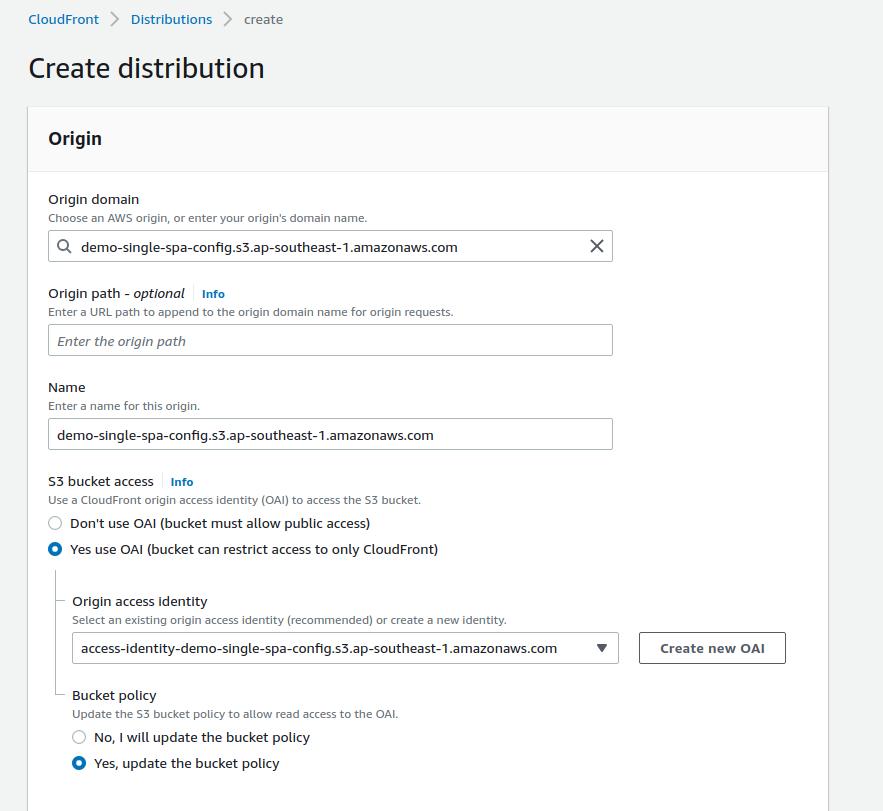
- When creating the distribution, we need to choose the root configuration bucket as the origin domain because that’s where all our application configurations will be stored.
- In order to support the bucket access from CloudFront to s3, we need to choose the
Yes use OAIoption. Choose an origin access identity from the dropdown or, you can create a new OAI(Origin Access Identity). Finally, tickYes, update the bucket policyto update our bucket policy to support this access.
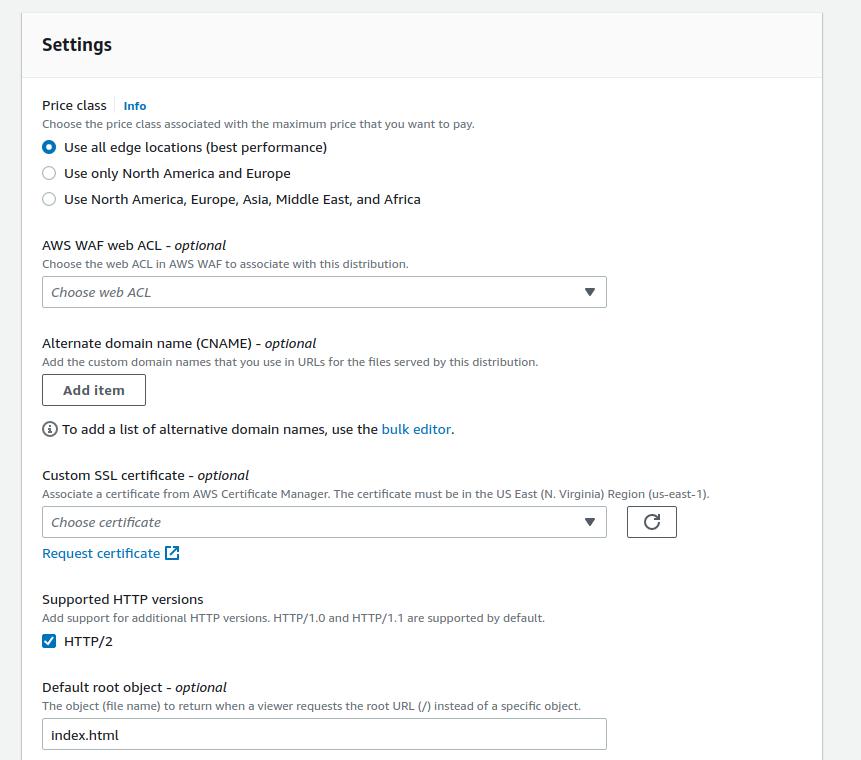
- Put alternate domain names to support your custom domain along with the custom SSL certificate to encrypt data at transit.
- Finally, add
index.htmlas the default root object. This will fetch the HTML document when the root URL is entered in the browser.
3. Create CloudFront Origins to support other micro FE artifacts
- Click on the origins tab in your CloudFront distribution
- Enter parent bucket details and enter OAI details
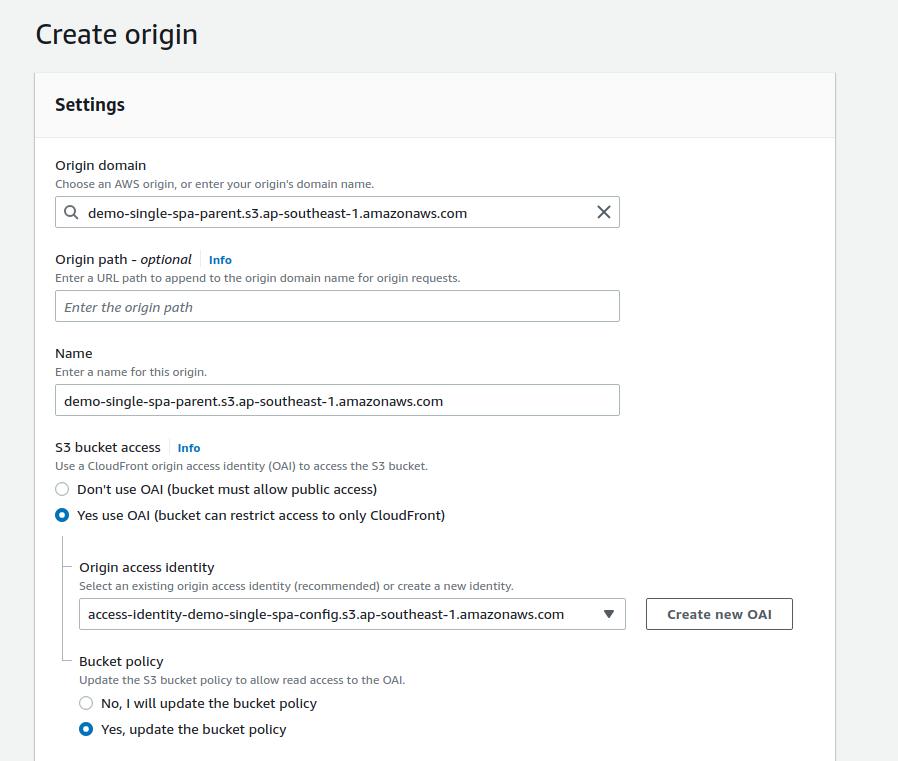
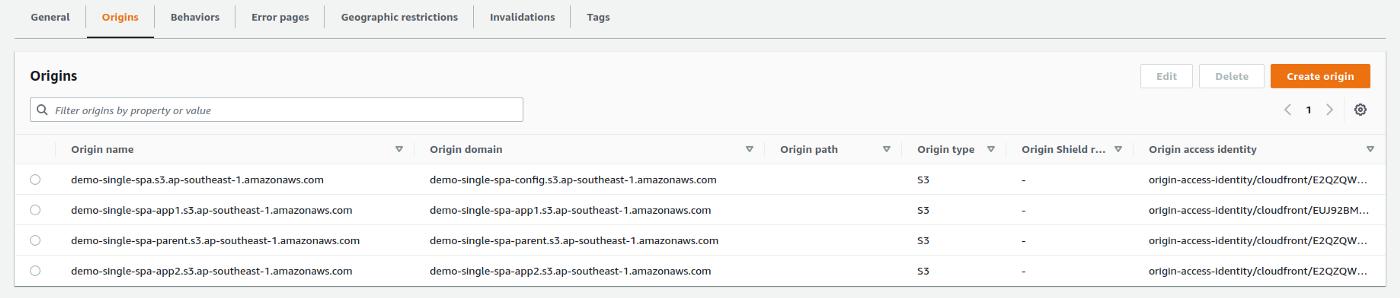
- Repeat this process for all the buckets we created
Once all the buckets are added, the Origins view should be something similar to this:
4. Add new Behaviors to the distribution
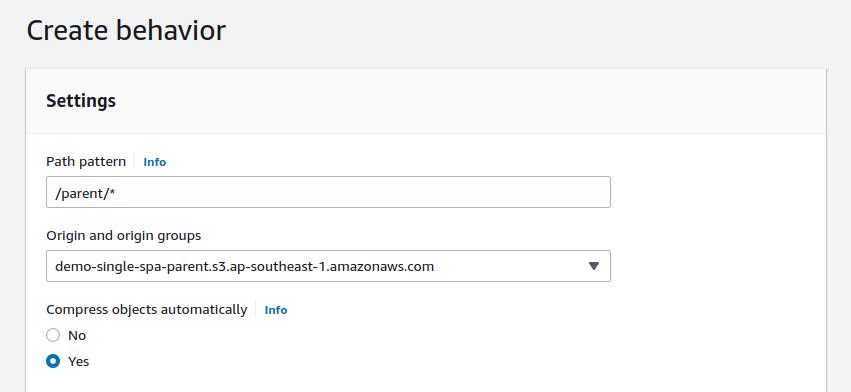
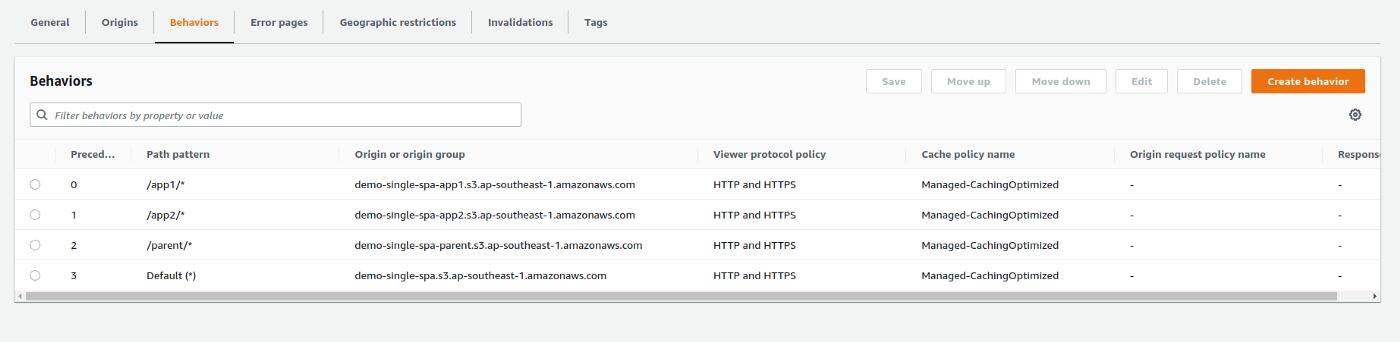
We need to create behaviors to follow a path map as below,
- /parent/* →Parent Bucket
- /app1/* → Micro application one bucket
- /app2/* →Micro application two bucket
This should be the final view of the behaviors list:
5. Add error pages to the distribution

Using this approach we can redirect all the invalid paths into our single spa application, then the developer can decide how to handle an invalid path.
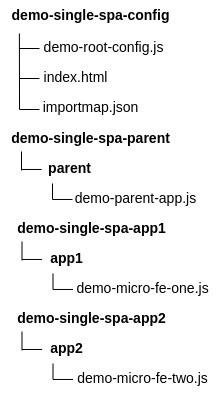
6. Put built artifacts into S3 buckets
- Run
npm run buildinside all four app folders - Minified files will be stored inside a
/distfolder - Place relevant files inside S3 buckets as per the diagram below
7. Include theimportmap.json file inside the config bucket
update-hereplaceholder should be replaced by the Micro FE domain
This will import all the necessary dependencies and Micro FE artifacts when Single-SPA starts the application.
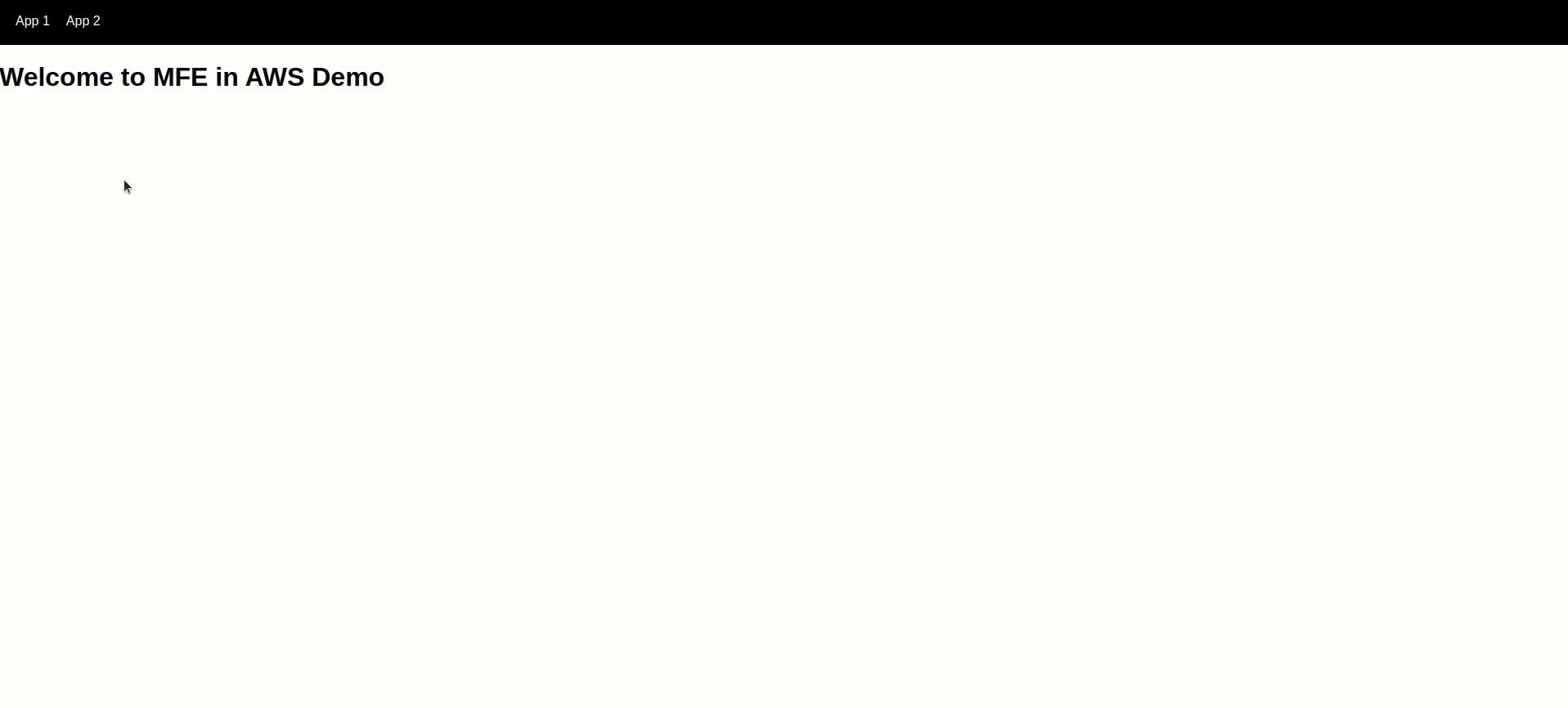
Once all the above steps are completed, visit the URL given by the CloudFront distribution or the domain you assigned.
Deployment Pipeline
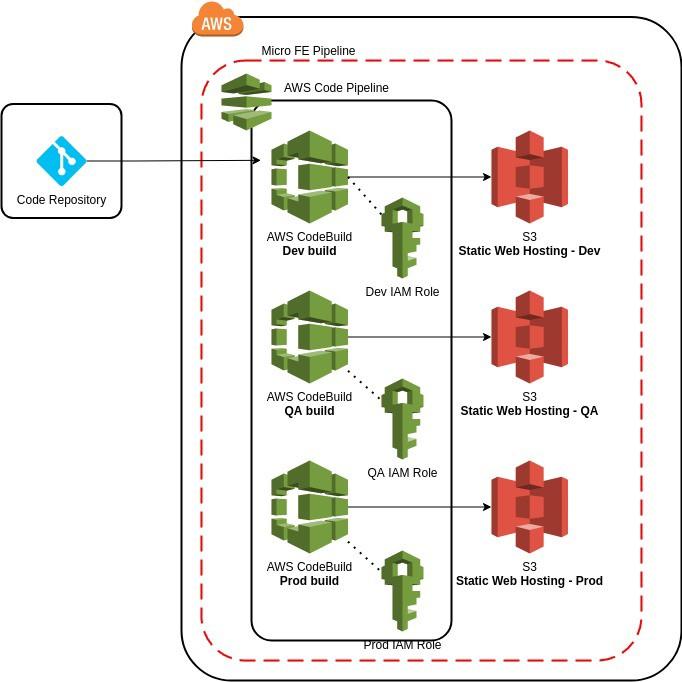
Code pipeline and CodeBuild combination provide a fully serverless solution to our Micro FrontEnd architecture. You can find more information here on how to use the AWS codepipeline to host a static site in AWS S3.
Conclusion
This article just covers the mere surface of both Single SPA usage and Micro FE usage. Yet, there are a few areas that are worth a discussion.
- importmap.json file contains react and react-dom dependencies. This prevents our application from getting bloated by duplicate react copies. single version/dependency will be used across all the applications.
- importmap.json file in production should be manually added into the S3 bucket. This manual task is unavoidable in order to keep the complete independency between micro applications.
- All Micro FE artifacts are stored in a redundant folder in buckets. eg: micro-fe-one.js is inside the app1 directory. This is necessary to map the CloudFront path with S3 bucket paths. We could omit this odd behavior if we used one S3 bucket to hold all the artifacts but that placement is going against having completely separate resources for separate micro applications.
- Single-SPA layouts are a relatively new and powerful approach to address routing between Micro FE applications.
Micro FrontEnd technologies are getting advanced day by day. At the time this article is written, one of the famous libraries is Single-SPA. Regardless, the serverless architecture we discussed above is applicable for almost all kinds of client-side Micro FE approaches.
Finally, It’s important to understand the pros and cons of using Micro FE architecture so that you can apply the approach effectively.
References
- https://dailyjsx.com/micro-frontends/
- https://www.freecodecamp.org/news/developing-and-deploying-micro-frontends-with-single-spa/
- https://dailyjsx.com/static-website-pipeline/
- https://single-spa.js.org


 已为社区贡献35528条内容

所有评论(0)