Possible to disable ESLint/Prettier rule that adds parentheses?
Answer a question
If I write:
const a = 1;
const b = 1;
const c = 1;
const d = 1;

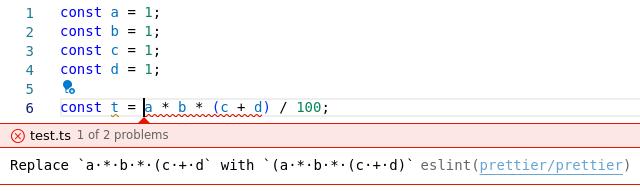
const t = a * b * (c + d) / 100;
then some rule wants to change to:
const t = (a * b * (c + d)) / 100;
//        ^               ^ unwanted parentheses
I don't want the extra parentheses, but I can't figure out if it is ESLint or Prettier that adds them. My .eslintrc added below:
{
  "root": true,
  "parser": "@typescript-eslint/parser",
  "parserOptions": {
    "project": ["./tsconfig.json"]
  },
  "plugins": ["@typescript-eslint", "prettier"],
  "extends": ["eslint:recommended", "plugin:@typescript-eslint/recommended", "prettier"],
  "rules": {
    "no-console": 1,
    "prettier/prettier": 2,
    "no-case-declarations": 0,
    "no-extra-parens": 2,
    "@typescript-eslint/no-extra-parens": 2
  },
  "env": {
    "browser": true,
    "node": true
  }
}
Update
Here is what happens when I hover without the parentheses.
Answers
It is Prettier that adds them and it can't be disabled. See https://github.com/prettier/prettier/issues/12554
Prettier used to print as few parentheses as possible, then it switched to print some extra ones for readability. See the very long #187 for the full story.
In the thread dprint is suggested as an alternative to Prettier. Downgrading Prettier to the 2017 version could also be an option. Or perhaps there is an active fork of Prettier that doesn't add the parentheses.

开发云社区提供前沿行业资讯和优质的学习知识,同时提供优质稳定、价格优惠的云主机、数据库、网络、云储存等云服务产品
更多推荐
 0
0 0
0- 0


 已为社区贡献4439条内容

所有评论(0)