How to set color of cell output of jupyter notebook (.ipynb) in VS Code editor?
Answer a question
Sometimes it is convenient to deal with jupyter notebooks from the VS Code editor (faster load, less latency and easier debugging).
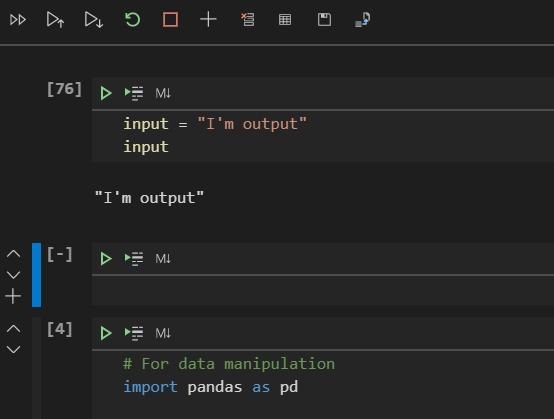
Nonetheless, there is a problem that default theme colors are not contrast enough to distinguish between input and output cells.
I'm having a hard time to figure out which setting I should change, to, let us say, make the output cell background just "dark-grey" (I'm using default VS 2019 Dark theme but other options are also not contrast with .ipynb files). Any help will be welcome.
(I've also come across other similar questions but did not find the turn key solution.)
Example:
Answers
I'm not sure if this helps you, but you can try overriding VSCode's theme by adding this to your settings.json file:
{
  "jupyter.ignoreVscodeTheme": true
}
If you prefer to use VSCode's gui to edit settings, you can go to your Jupyter extension (assuming you have it installed) => Extension settings => and check "Ignore Vscode Theme".
You need to restart or reload VSCode for this to take effect.

开发云社区提供前沿行业资讯和优质的学习知识,同时提供优质稳定、价格优惠的云主机、数据库、网络、云储存等云服务产品
更多推荐
 0
0 0
0- 0


 已为社区贡献4439条内容

所有评论(0)