How to move up and down in quick fix suggestions in visual studio code without using arrow keys?
Answer a question
Whenever there is some missing or needs correction in code, visual studio code shows a yellow bulb to show some quick fixes suggestions.
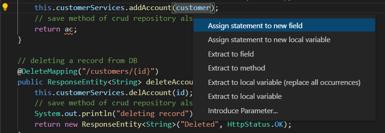
Is there any way or shortcut by which we can navigate up and down suggestion options shown as in screenshot above without using the arrow keys?
Answers
In vscode v1.70 there are two new commands you can use for navigating in the QuickFix menu to go to previous or next source code actions.
focusNextCodeAction
focusPreviousCodeAction
Note: these will be changing in v1.71, see v1.71 release notes: New code action widget. The new commands are:
You can now also customize the keybindings used to navigate through the code action list with
selectNextCodeAction,selectPrevCodeAction, andacceptSelectedCodeAction.
You can see the default keybindings below that have been removed. Note the - before the command name in two of the keybindings, that removes those keybindings.
You can make these keybindings (in your keybindings.json):
  {
    "key": "alt+u",              // whatever you want here
    // "command": "focusPreviousCodeAction",
    "command": "selectPrevCodeAction",  // for v1.71
    "when": "CodeActionMenuVisible"
  },
  {
    "key": "up",                 // default removed
    // "command": "-focusPreviousCodeAction",
    "command": "-selectPrevCodeAction",  // for v1.71
    "when": "CodeActionMenuVisible"
  },
  {
    "key": "alt+d",          // whatever you want here
    // "command": "focusNextCodeAction",
    "command": "selectNextCodeAction",   // for v1.71
    "when": "CodeActionMenuVisible"
  },
  {
    "key": "down",             // default removed
    // "command": "-focusNextCodeAction",
    "command": "-selectNextCodeAction",   // for v1.71
    "when": "CodeActionMenuVisible"
  }
--------
There is an extension presented as a fix: Keyboard QuickFix

开发云社区提供前沿行业资讯和优质的学习知识,同时提供优质稳定、价格优惠的云主机、数据库、网络、云储存等云服务产品
更多推荐
 0
0 0
0- 0


 已为社区贡献4439条内容

所有评论(0)