Audio widget within Jupyter notebook is **not** playing. How can I get the widget to play the audio?
Answer a question
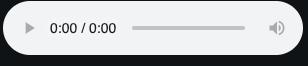
I writing my code within a Jupyter notebook in VS Code. I am hoping to play some of the audio within my data set. However, when I execute the cell, the console reports no errors, produces the widget, but the widget displays 0:00 / 0:00 (see below), indicating there is no sound to play.
Below, I have listed two ways to reproduce the error.
- I have acquired data from the hub data store. Looking specifically at the spoken MNIST data set, I cannot get the data from the
audiotensor to play
import hub
from IPython.display import display, Audio
from ipywidgets import interactive

# Obtain the data using the hub module
ds = hub.load("hub://activeloop/spoken_mnist")

# Create widget
sample = ds.audio[0].numpy()
display(Audio(data=sample, rate = 8000, autoplay=True))
- The second example is a test (copied from another post) that I ran to see if it was something wrong with the data or something wrong with my console, environment, etc.
# Same imports as shown above

# Toy Function to play beats in notebook
def beat_freq(f1=220.0, f2=224.0):
    max_time = 5
    rate = 8000
    times = np.linspace(0,max_time,rate*max_time)
    signal = np.sin(2*np.pi*f1*times) + np.sin(2*np.pi*f2*times)
    display(Audio(data=signal, rate=rate))
    return signal

v = interactive(beat_freq, f1=(200.0,300.0), f2=(200.0,300.0))
display(v)
I believe that if it is something wrong with the data (this is a well-known data set so, I doubt it), then only the second one will play. If it is something to do with the IDE or something else, then neither will work, as is the case now.
Answers
Apologies for the late reply! In the future, please tag the questions with activeloop so it's easier to sort through (or hit us up directly in community slack -> slack.activeloop.ai).
Regarding the Free Spoken Digit Dataset, I managed to track the error with your usage of activeloop hub and audio display.
adding [:,0] to 9th line will help fixing display on Colab as Audio expects one-dimensional data
%matplotlib inline
import hub
from IPython.display import display, Audio
from ipywidgets import interactive

# Obtain the data using the hub module
ds = hub.load("hub://activeloop/spoken_mnist")

# Create widget
sample = ds.audio[0].numpy()[:,0]
display(Audio(data=sample, rate = 8000, autoplay=True))
(When we uploaded the dataset, we decided to upload the audio as (N,C) where C is the number of channels, which happens to be 1 for the particular dataset. The added dimension wasn't added automatically)
Regarding the VScode... the audio, unfortunately, would still not work (not because of us, but VScode), but you can still try visualizing Free Spoken Digit Dataset (you can play the music there, too). Hopefully this addresses your needs!
Let us know if you have further questions.
Mikayel from Activeloop

开发云社区提供前沿行业资讯和优质的学习知识,同时提供优质稳定、价格优惠的云主机、数据库、网络、云储存等云服务产品
更多推荐
 0
0 0
0- 0


 已为社区贡献4439条内容

所有评论(0)