Unable to Convert Markdown to PDF in VS Code
Answer a question
I have installed the markdown extension in VS code however, when I attempt to convert it via Pressing F1 and selecting the below:

I am using Windows
I receive the following errors:
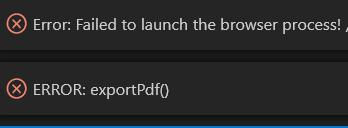
Full Error:
Error: Failed to launch the browser process! /home/myname/.vscode-server/extensions/yzane.markdown-pdf-1.4.4/node_modules/puppeteer-core/.local-chromium/linux-722234/chrome-linux/chrome: error while loading shared libraries: libXcursor.so.1: cannot open shared object file: No such file or directory TROUBLESHOOTING: https://github.com/puppeteer/puppeteer/blob/master/docs/troubleshooting.md
Any ideas?
I am able to see it has created the _tmp.html file, but it stops there and doesn't finalise the conversion pdf
The Markdown Extension I have installed in VS code is: Markdown PDF by yzane
Cheers, Michael
Answers
I am guessing that you are using VSCode with [WSL: Ubuntu]. Unfortunately you are in the same boat as me. I have been informed that WSL and windows have a missmatch sometimes, and Chromium for windows is the victim in this case. I have scoured the net and the only way to fix it makes you vulnerable to outside forces.
You can use grip or pandoc instead.

开发云社区提供前沿行业资讯和优质的学习知识,同时提供优质稳定、价格优惠的云主机、数据库、网络、云储存等云服务产品
更多推荐
 0
0 0
0- 0


 已为社区贡献4439条内容

所有评论(0)