Visual Studio code beautify format issues
Answer a question
I'm using VS Code + js-beautify + Beautify css/sass/scss/less, and I'm facing couple of annoying issues when I format my code (don't know how to solve them):
-
This is NOT how I want my background color to look.
From:background-color: rgba(0, 0, 0, .0);
To:
    background-color: rgba(0,
    0,
    0,
    .0);
I want it to be format as one line (like "from").
-
The "cursor" property is in different color
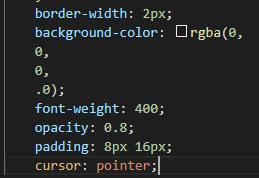
-
When I format my html code, there are line spaces in the body and the html.
From:<!DOCTYPE html> <html lang="en"> <head> <title>React App</title> </head> <body> <div id="root"></div> </body> </html>
To:
 <!DOCTYPE html>
   <html lang="en">
    <head>
     <title>React App</title>
    </head>
    <body>
    <div id="root"></div>
   </body>
  </html>
I want it to be formatted without any empty spaces (like "from").
Answers
While this is an old question, I was encountering the same issue and found the solution. In your VS Code settings.json, add the following to it:
"html.format.extraLiners": "",
By default nothing is there so it will default to html, body, /html. By setting it to nothing, it will give you the behavior you want.

开发云社区提供前沿行业资讯和优质的学习知识,同时提供优质稳定、价格优惠的云主机、数据库、网络、云储存等云服务产品
更多推荐
 0
0 0
0- 0


 已为社区贡献4439条内容

所有评论(0)