How do I set my workspace folder in Visual Studio Code?
·
Answer a question
How do I set my workspace folder in Visual Studio Code?
This appears to be necessary for debugging, and I suspect it's why my breakpoints aren't getting hit.
Further reading:
- This question about adding workspaces doesn't have an accepted answer.
- What is a 'workspace' in VS Code?, while providing a wealth of information, does not explain how to set a workspace for debugging.
- User and Workspace Settings. The documentation also does not mention how to set a workspace for debugging.
Answers
How do I set my workspace folder in Visual Studio Code?
- Open Visual Studio Code. You should be on the Welcome page.
- Add workspace folder...
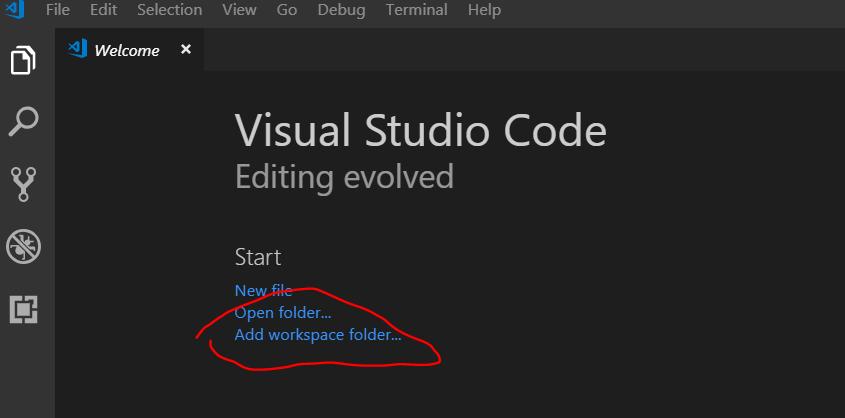
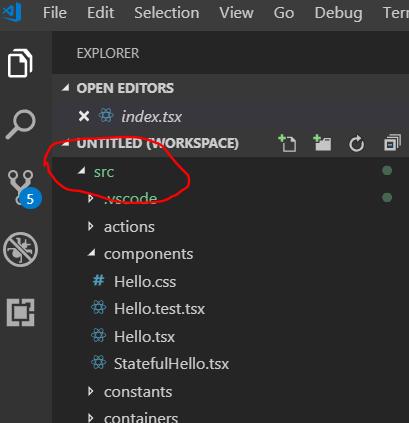
- File explorer opens. Select the folder you want for your workspace. Add.
Now your workspace folder is shown in the left pane :-)

开发云社区提供前沿行业资讯和优质的学习知识,同时提供优质稳定、价格优惠的云主机、数据库、网络、云储存等云服务产品
更多推荐
 0
0 0
0- 0


 已为社区贡献4439条内容

所有评论(0)