What's the command that Ctrl-Q triggers on VSCode (Windows)
Answer a question
On Windows VSCode ctrl+q shows a menu with the items on the activity bar.
What is that command?
I switch to Linux and want to add a key binding to that command (not map by default as on Linux ctrl+q quits the program) but cannot find it and don't have a Windows machine at hand to look on the key bindings and doesn't seem to be listed here.
Answers
When we do not have access to VSC on given platform
It should be possible to sift through the sources.
In this case we are looking for Ctrl that should be CtrlCmd and Q KeyQ in KEYBINDING of some module class, so something like:
    static readonly ID = 'workbench.action.quickOpenView';
    static readonly KEYBINDING = {
        primary: KeyMod.CtrlCmd | KeyCode.KeyQ,
        mac: { primary: KeyMod.WinCtrl | KeyCode.KeyQ },
        linux: { primary: 0 }
    };
(Yes, that's exactly it and I've started from here backwards.)
Slightly convoluted GitHub search query *
KEYBINDING KeyMod CtrlCmd KeyCode KeyQ repo:microsoft/vscode extension:ts
should bring us there so we now have the command ID: workbench.action.quickOpenView.
When we have VSC on platform at hand
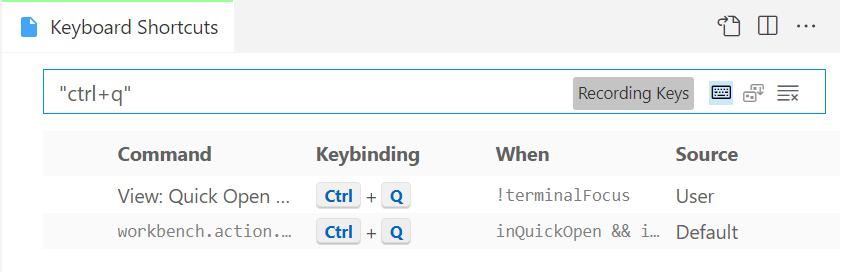
It is easy as using the 'Record keys' feature in the Keyboard Shortcuts settings pane to find this information (either clicking the "Keyboard" icon or using Alt+K) where we should find that Ctrl+Q is by default bound to View: Quick Open View:
-
GitHub code search sadly ignores all non-alphanumerics
. , : ; / \ ` ' " = * ! ? # $ & + ^ | ~ < > ( ) { } [ ] @

开发云社区提供前沿行业资讯和优质的学习知识,同时提供优质稳定、价格优惠的云主机、数据库、网络、云储存等云服务产品
更多推荐
 0
0 0
0- 0


 已为社区贡献4439条内容

所有评论(0)