How to enable `Github Copilot` typing `Tab` to auto completes in markdown files?
·
Answer a question
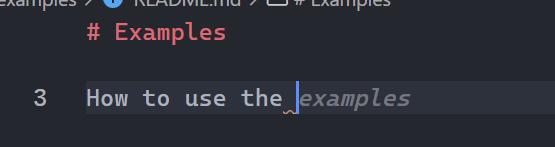
I can get some suggestions by copilot in .md files, But when I keydowned Tab, it only added a space, not autocompletes the suggestion, What should I do can autocomplete the suggestion?
Answers
To enable suggestions for GitHub Copilot with a Tab key, follow the steps below.
-
Open the file
keybindings.jsonin Visual Studio Code. This can be done by pressing Ctrl + Shift + P, and typing Open Keyboard Shortcuts (JSON). -
In
keybindings.json, add the following.[ { "key": "tab", "command": "editor.action.inlineSuggest.commit", "when": "textInputFocus && inlineSuggestionHasIndentationLessThanTabSize && inlineSuggestionVisible && !editorTabMovesFocus" } ]
This should now enable you to accept suggestions in Markdown using the Tab key!

开发云社区提供前沿行业资讯和优质的学习知识,同时提供优质稳定、价格优惠的云主机、数据库、网络、云储存等云服务产品
更多推荐
 0
0 0
0- 0


 已为社区贡献4439条内容

所有评论(0)